> ## Documentation Index
> Fetch the complete documentation index at: https://docs.together.ai/llms.txt
> Use this file to discover all available pages before exploring further.
# Conditional workflow
> Adapt to different tasks by conditionally navigating to various LLMs and tools.
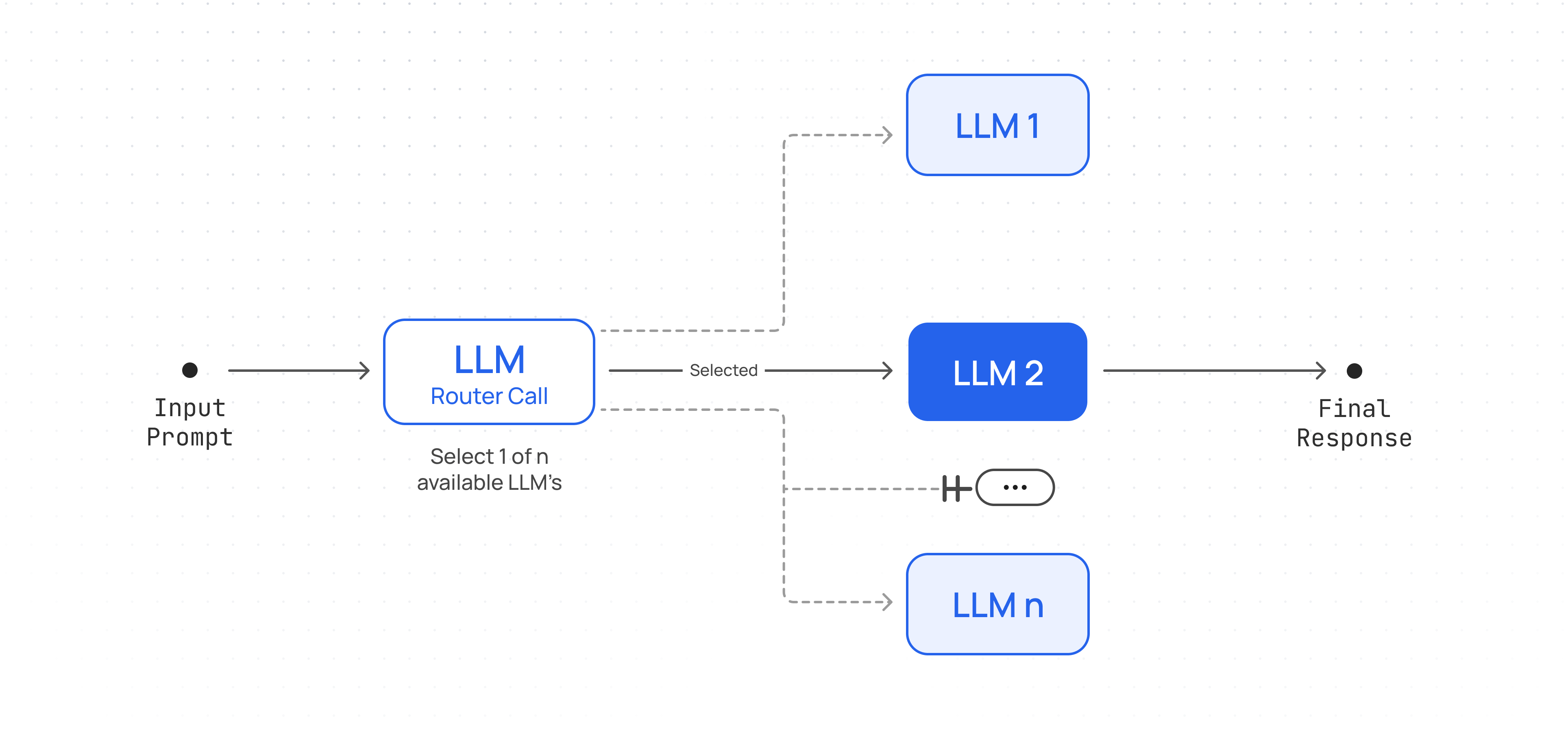
A workflow where user input is classified and directed to a specific task (can be a specific LLM, specific custom prompt, different tool calls etc.). This allows you to handle many different inputs with the appropriate set of calls.
## Workflow Architecture
Create an agent that conditionally routes tasks to specialized models.
 ## Set up client and helper functions
```py Python theme={null}
import json
from pydantic import ValidationError
from together import Together
client = Together()
def run_llm(user_prompt: str, model: str, system_prompt: str = None):
messages = []
if system_prompt:
messages.append({"role": "system", "content": system_prompt})
messages.append({"role": "user", "content": user_prompt})
response = client.chat.completions.create(
model=model,
messages=messages,
temperature=0.7,
max_tokens=4000,
)
return response.choices[0].message.content
def JSON_llm(user_prompt: str, schema, system_prompt: str = None):
try:
messages = []
if system_prompt:
messages.append({"role": "system", "content": system_prompt})
messages.append({"role": "user", "content": user_prompt})
extract = client.chat.completions.create(
messages=messages,
model="meta-llama/Llama-3.3-70B-Instruct-Turbo",
response_format={
"type": "json_schema",
"json_schema": {
"name": "route_selection",
"schema": schema.model_json_schema(),
},
},
)
return json.loads(extract.choices[0].message.content)
except ValidationError as e:
error_message = f"Failed to parse JSON: {e}"
print(error_message)
```
## Implement Workflow
```py Python theme={null}
from pydantic import BaseModel, Field
from typing import Literal, Dict
def router_workflow(input_query: str, routes: Dict[str, str]) -> str:
"""Given a `input_query` and a dictionary of `routes` containing options and details for each.
Selects the best model for the task and return the response from the model.
"""
ROUTER_PROMPT = """Given a user prompt/query: {user_query}, select the best option out of the following routes:
{routes}. Answer only in JSON format."""
# Create a schema from the routes dictionary
class Schema(BaseModel):
route: Literal[tuple(routes.keys())]
reason: str = Field(
description="Short one-liner explanation why this route was selected for the task in the prompt/query."
)
# Call LLM to select route
selected_route = JSON_llm(
ROUTER_PROMPT.format(user_query=input_query, routes=routes), Schema
)
print(
f"Selected route:{selected_route['route']}\nReason: {selected_route['reason']}\n"
)
# Use LLM on selected route.
# Could also have different prompts that need to be used for each route.
response = run_llm(user_prompt=input_query, model=selected_route["route"])
print(f"Response: {response}\n")
return response
```
```ts TypeScript theme={null}
import dedent from "dedent";
import assert from "node:assert";
import Together from "together-ai";
import { z } from "zod";
const client = new Together();
const prompts = [
"Produce python snippet to check to see if a number is prime or not.",
"Plan and provide a short itinerary for a 2 week vacation in Europe.",
"Write a short story about a dragon and a knight.",
];
const modelRoutes = {
"moonshotai/Kimi-K2.7-Code":
"Best model choice for code generation tasks.",
"meta-llama/Llama-3.3-70B-Instruct-Turbo":
"Best model choice for story-telling, role-playing and fantasy tasks.",
"moonshotai/Kimi-K2.6":
"Best model for reasoning, planning and multi-step tasks",
};
const schema = z.object({
route: z.enum(Object.keys(modelRoutes) as [keyof typeof modelRoutes]),
reason: z.string(),
});
const jsonSchema = z.toJSONSchema(schema);
async function routerWorkflow(
inputQuery: string,
routes: { [key: string]: string },
) {
const routerPrompt = dedent`
Given a user prompt/query: ${inputQuery}, select the best option out of the following routes:
${Object.keys(routes)
.map((key) => `${key}: ${routes[key]}`)
.join("\n")}
Answer only in JSON format.`;
// Call LLM to select route
const routeResponse = await client.chat.completions.create({
messages: [
{ role: "system", content: routerPrompt },
{ role: "user", content: inputQuery },
],
model: "meta-llama/Llama-3.3-70B-Instruct-Turbo",
response_format: {
type: "json_schema",
json_schema: {
name: "route_selection",
schema: jsonSchema,
},
},
});
const content = routeResponse.choices[0].message?.content;
assert(typeof content === "string");
const selectedRoute = schema.parse(JSON.parse(content));
// Use LLM on selected route.
// Could also have different prompts that need to be used for each route.
const response = await client.chat.completions.create({
messages: [{ role: "user", content: inputQuery }],
model: selectedRoute.route,
});
const responseContent = response.choices[0].message?.content;
console.log(`${responseContent}\n`);
}
async function main() {
for (const prompt of prompts) {
console.log(`Task ${prompts.indexOf(prompt) + 1}: ${prompt}`);
console.log("====================");
await routerWorkflow(prompt, modelRoutes);
}
}
main();
```
## Example Usage
```py Python theme={null}
prompt_list = [
"Produce python snippet to check to see if a number is prime or not.",
"Plan and provide a short itinerary for a 2 week vacation in Europe.",
"Write a short story about a dragon and a knight.",
]
model_routes = {
"moonshotai/Kimi-K2.7-Code": "Best model choice for code generation tasks.",
"meta-llama/Llama-3.3-70B-Instruct-Turbo": "Best model choice for story-telling, role-playing and fantasy tasks.",
"moonshotai/Kimi-K2.6": "Best model for reasoning, planning and multi-step tasks",
}
for i, prompt in enumerate(prompt_list):
print(f"Task {i+1}: {prompt}\n")
print(20 * "==")
router_workflow(prompt, model_routes)
```
## Use cases
* Routing easy/common questions to smaller models like Llama 3.1 8B and hard/unusual questions to more capable models like Deepseek v3 and Llama 3.3 70B to optimize cost and speed.
* Directing different types of customer service queries (general questions, refund requests, technical support) into different downstream processes, prompts, and tools.
* Different LLMs or model configurations excel at different tasks (e.g., writing summaries vs. generating code). Using a router, you can automatically detect the user's intent and send the input to the best-fit model.
* Evaluating whether a request meets certain guidelines or triggers specific filters (e.g., checking if content is disallowed). Based on the classification, forward it to the appropriate next LLM call or step.
* If one model's output doesn't meet a certain confidence threshold or fails for some reason, route automatically to a fallback model.
### Conditional Workflow Cookbook
For a more detailed walk-through refer to the [notebook here](https://togetherai.link/agent-recipes-deep-dive-routing).
## Set up client and helper functions
```py Python theme={null}
import json
from pydantic import ValidationError
from together import Together
client = Together()
def run_llm(user_prompt: str, model: str, system_prompt: str = None):
messages = []
if system_prompt:
messages.append({"role": "system", "content": system_prompt})
messages.append({"role": "user", "content": user_prompt})
response = client.chat.completions.create(
model=model,
messages=messages,
temperature=0.7,
max_tokens=4000,
)
return response.choices[0].message.content
def JSON_llm(user_prompt: str, schema, system_prompt: str = None):
try:
messages = []
if system_prompt:
messages.append({"role": "system", "content": system_prompt})
messages.append({"role": "user", "content": user_prompt})
extract = client.chat.completions.create(
messages=messages,
model="meta-llama/Llama-3.3-70B-Instruct-Turbo",
response_format={
"type": "json_schema",
"json_schema": {
"name": "route_selection",
"schema": schema.model_json_schema(),
},
},
)
return json.loads(extract.choices[0].message.content)
except ValidationError as e:
error_message = f"Failed to parse JSON: {e}"
print(error_message)
```
## Implement Workflow
```py Python theme={null}
from pydantic import BaseModel, Field
from typing import Literal, Dict
def router_workflow(input_query: str, routes: Dict[str, str]) -> str:
"""Given a `input_query` and a dictionary of `routes` containing options and details for each.
Selects the best model for the task and return the response from the model.
"""
ROUTER_PROMPT = """Given a user prompt/query: {user_query}, select the best option out of the following routes:
{routes}. Answer only in JSON format."""
# Create a schema from the routes dictionary
class Schema(BaseModel):
route: Literal[tuple(routes.keys())]
reason: str = Field(
description="Short one-liner explanation why this route was selected for the task in the prompt/query."
)
# Call LLM to select route
selected_route = JSON_llm(
ROUTER_PROMPT.format(user_query=input_query, routes=routes), Schema
)
print(
f"Selected route:{selected_route['route']}\nReason: {selected_route['reason']}\n"
)
# Use LLM on selected route.
# Could also have different prompts that need to be used for each route.
response = run_llm(user_prompt=input_query, model=selected_route["route"])
print(f"Response: {response}\n")
return response
```
```ts TypeScript theme={null}
import dedent from "dedent";
import assert from "node:assert";
import Together from "together-ai";
import { z } from "zod";
const client = new Together();
const prompts = [
"Produce python snippet to check to see if a number is prime or not.",
"Plan and provide a short itinerary for a 2 week vacation in Europe.",
"Write a short story about a dragon and a knight.",
];
const modelRoutes = {
"moonshotai/Kimi-K2.7-Code":
"Best model choice for code generation tasks.",
"meta-llama/Llama-3.3-70B-Instruct-Turbo":
"Best model choice for story-telling, role-playing and fantasy tasks.",
"moonshotai/Kimi-K2.6":
"Best model for reasoning, planning and multi-step tasks",
};
const schema = z.object({
route: z.enum(Object.keys(modelRoutes) as [keyof typeof modelRoutes]),
reason: z.string(),
});
const jsonSchema = z.toJSONSchema(schema);
async function routerWorkflow(
inputQuery: string,
routes: { [key: string]: string },
) {
const routerPrompt = dedent`
Given a user prompt/query: ${inputQuery}, select the best option out of the following routes:
${Object.keys(routes)
.map((key) => `${key}: ${routes[key]}`)
.join("\n")}
Answer only in JSON format.`;
// Call LLM to select route
const routeResponse = await client.chat.completions.create({
messages: [
{ role: "system", content: routerPrompt },
{ role: "user", content: inputQuery },
],
model: "meta-llama/Llama-3.3-70B-Instruct-Turbo",
response_format: {
type: "json_schema",
json_schema: {
name: "route_selection",
schema: jsonSchema,
},
},
});
const content = routeResponse.choices[0].message?.content;
assert(typeof content === "string");
const selectedRoute = schema.parse(JSON.parse(content));
// Use LLM on selected route.
// Could also have different prompts that need to be used for each route.
const response = await client.chat.completions.create({
messages: [{ role: "user", content: inputQuery }],
model: selectedRoute.route,
});
const responseContent = response.choices[0].message?.content;
console.log(`${responseContent}\n`);
}
async function main() {
for (const prompt of prompts) {
console.log(`Task ${prompts.indexOf(prompt) + 1}: ${prompt}`);
console.log("====================");
await routerWorkflow(prompt, modelRoutes);
}
}
main();
```
## Example Usage
```py Python theme={null}
prompt_list = [
"Produce python snippet to check to see if a number is prime or not.",
"Plan and provide a short itinerary for a 2 week vacation in Europe.",
"Write a short story about a dragon and a knight.",
]
model_routes = {
"moonshotai/Kimi-K2.7-Code": "Best model choice for code generation tasks.",
"meta-llama/Llama-3.3-70B-Instruct-Turbo": "Best model choice for story-telling, role-playing and fantasy tasks.",
"moonshotai/Kimi-K2.6": "Best model for reasoning, planning and multi-step tasks",
}
for i, prompt in enumerate(prompt_list):
print(f"Task {i+1}: {prompt}\n")
print(20 * "==")
router_workflow(prompt, model_routes)
```
## Use cases
* Routing easy/common questions to smaller models like Llama 3.1 8B and hard/unusual questions to more capable models like Deepseek v3 and Llama 3.3 70B to optimize cost and speed.
* Directing different types of customer service queries (general questions, refund requests, technical support) into different downstream processes, prompts, and tools.
* Different LLMs or model configurations excel at different tasks (e.g., writing summaries vs. generating code). Using a router, you can automatically detect the user's intent and send the input to the best-fit model.
* Evaluating whether a request meets certain guidelines or triggers specific filters (e.g., checking if content is disallowed). Based on the classification, forward it to the appropriate next LLM call or step.
* If one model's output doesn't meet a certain confidence threshold or fails for some reason, route automatically to a fallback model.
### Conditional Workflow Cookbook
For a more detailed walk-through refer to the [notebook here](https://togetherai.link/agent-recipes-deep-dive-routing).