> ## Documentation Index
> Fetch the complete documentation index at: https://docs.together.ai/llms.txt
> Use this file to discover all available pages before exploring further.
# Build a CSV data analysis app with the code interpreter
> Build a full-stack Next.js app that answers questions about CSV data with AI-generated Python code.
[CSVToChat](https://csvtochat.com) is an open-source app that turns static CSV files into a conversation. You upload a CSV, ask questions in natural language, and get back answers and charts produced by Python code that a Together AI model writes and the [code interpreter](/docs/together-code-interpreter) executes.
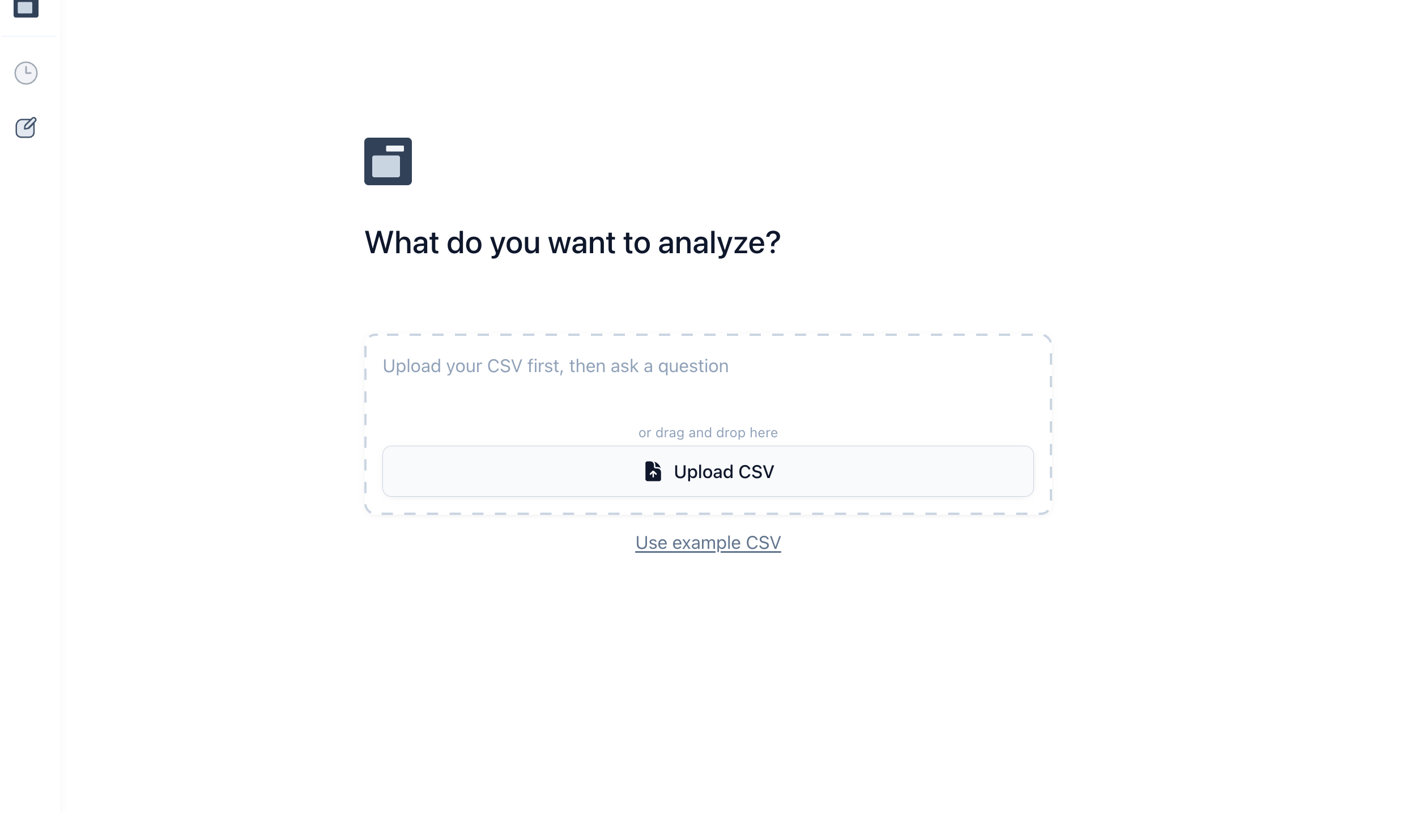 This guide walks through the AI core of CSVToChat as it exists in the [open-source repository](https://github.com/nutlope/csvtochat): how the app describes the CSV to the model without flooding its context, how it generates analysis code, and how it runs that code in a sandbox. Each section names the source file it covers and links to it on GitHub, so you can read the guide alongside the real code.
The TypeScript examples use [Vercel's AI SDK](/docs/using-together-with-vercels-ai-sdk) v6 and the `together-ai` Node SDK. They are adapted from the CSVToChat source and updated to current SDK and model versions, so they can differ in small ways from the linked files.
## Provide CSV context without flooding the model
Sending an entire CSV file to the model doesn't scale, as large files will overflow the context window, and even mid-sized ones can crowd out the conversation. Instead, the app's system prompt gives the model a compact description of the data:
1. **S3 URL:** The generated code downloads the full dataset at execution time, so the model never needs the raw rows in context.
2. **Column names:** The model needs the schema to write correct code.
3. **Sample rows:** A few representative rows guide the analysis.
4. **Instructions:** Constraints on code structure and output format.
This guide walks through the AI core of CSVToChat as it exists in the [open-source repository](https://github.com/nutlope/csvtochat): how the app describes the CSV to the model without flooding its context, how it generates analysis code, and how it runs that code in a sandbox. Each section names the source file it covers and links to it on GitHub, so you can read the guide alongside the real code.
The TypeScript examples use [Vercel's AI SDK](/docs/using-together-with-vercels-ai-sdk) v6 and the `together-ai` Node SDK. They are adapted from the CSVToChat source and updated to current SDK and model versions, so they can differ in small ways from the linked files.
## Provide CSV context without flooding the model
Sending an entire CSV file to the model doesn't scale, as large files will overflow the context window, and even mid-sized ones can crowd out the conversation. Instead, the app's system prompt gives the model a compact description of the data:
1. **S3 URL:** The generated code downloads the full dataset at execution time, so the model never needs the raw rows in context.
2. **Column names:** The model needs the schema to write correct code.
3. **Sample rows:** A few representative rows guide the analysis.
4. **Instructions:** Constraints on code structure and output format.
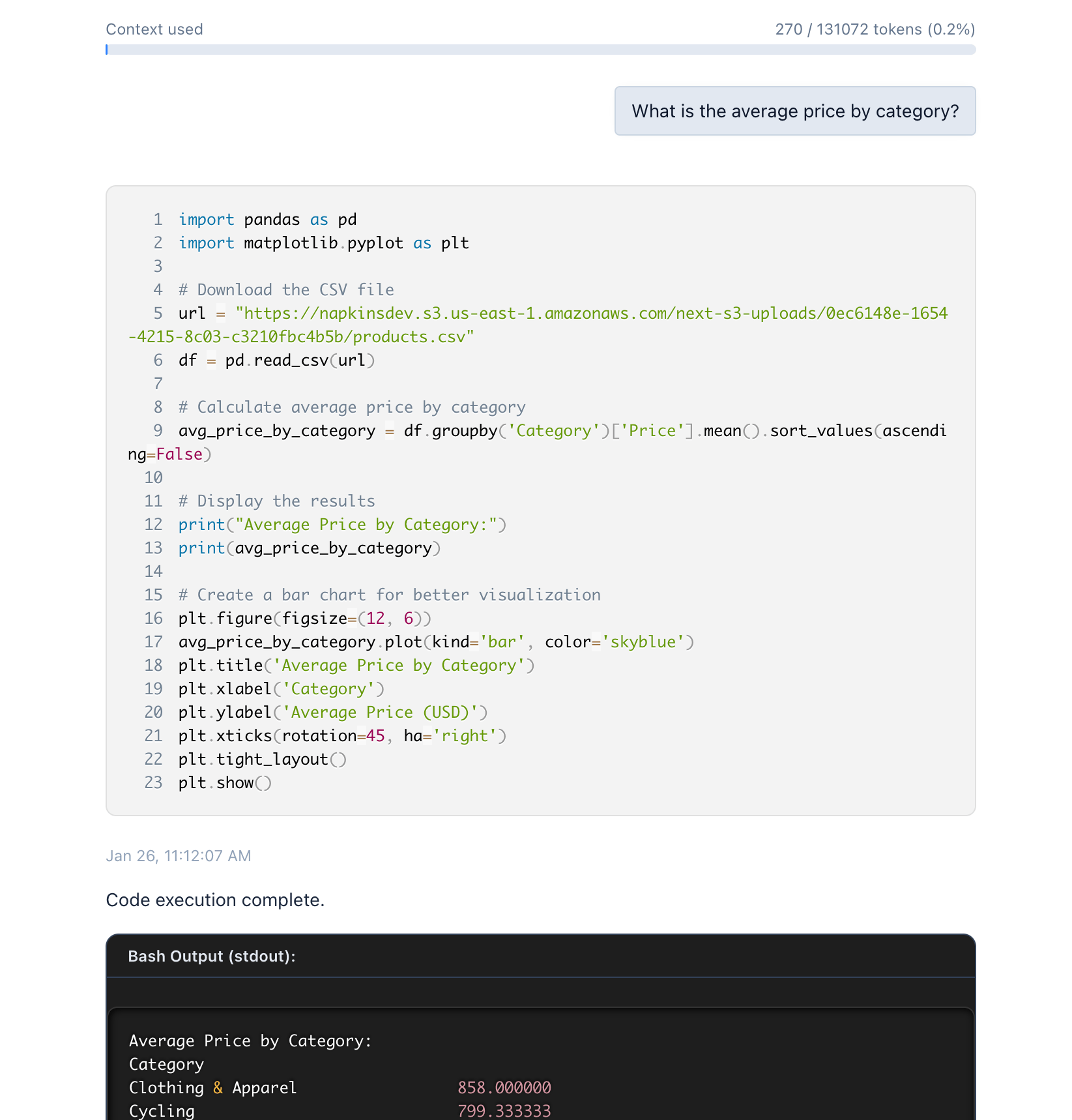 The `generateCodePrompt` function in [`src/lib/prompts.ts`](https://github.com/nutlope/csvtochat/blob/main/src/lib/prompts.ts) assembles these pieces into a system prompt that the model will use to generate the analysis code:
```typescript theme={null}
const generateCodePrompt = ({
csvFileUrl,
csvHeaders,
csvRows,
}: {
csvFileUrl?: string;
csvHeaders?: string[];
csvRows?: { [key: string]: string }[];
}) => {
// Prepare sample rows as a markdown table if available
let sampleRowsSection = "";
if (csvRows && csvRows.length > 0 && csvHeaders && csvHeaders.length > 0) {
const sampleRows = csvRows.slice(0, 3);
const headerRow = `| ${csvHeaders.join(" | ")} |`;
const separatorRow = `|${csvHeaders.map(() => "---").join("|")}|`;
const dataRows = sampleRows
.map((row) => `| ${csvHeaders.map((h) => row[h] ?? "").join(" | ")} |`)
.join("\n");
sampleRowsSection = `\n\nHere are a few sample rows from the dataset:\n\n${headerRow}\n${separatorRow}\n${dataRows}`;
}
return `
You are an expert data scientist assistant that writes python code to answer questions about a dataset.
You are given a dataset and a question.
The dataset is available at the following S3 URL: ${
csvFileUrl || "[NO FILE URL PROVIDED]"
}
The dataset has the following columns: ${
csvHeaders?.join(", ") || "[NO HEADERS PROVIDED]"
}
${sampleRowsSection}
You must always write python code that:
- Downloads the CSV from the provided S3 URL (using requests or pandas.read_csv).
- Uses the provided columns for analysis.
- Never outputs more than one graph per code response.
- Limits graph complexity to maintain readability.
- Never generates HTML output. Only use Python print statements or graphs/plots for output.
Always return the python code in a single unique code block.
Python sessions come pre-installed with pandas, matplotlib, seaborn, numpy, and other essential data science libraries.
`;
};
```
## Generate analysis code
When a user asks a question, the model receives their query, the CSV metadata via the system prompt, and the conversation history. It responds with Python code that:
* Downloads the CSV from the provided S3 URL using `pandas.read_csv()`.
* Performs the requested analysis using data science libraries.
* Produces either text results or a single visualization.
The chat route handler in [`src/app/api/chat/route.ts`](https://github.com/nutlope/csvtochat/blob/main/src/app/api/chat/route.ts) calls `streamText` and streams the response to the client so the user sees the code as the model writes it:
```typescript theme={null}
import { streamText } from "ai";
import { createTogetherAI } from "@ai-sdk/togetherai";
const togetherai = createTogetherAI({
apiKey: process.env.TOGETHER_API_KEY ?? "",
});
export const generateAnalysisCode = (
userQuestion: string,
csvFileUrl: string,
csvHeaders: string[],
csvRows: { [key: string]: string }[],
model: string = "moonshotai/Kimi-K2.7-Code",
) => {
const result = streamText({
model: togetherai(model),
system: generateCodePrompt({ csvFileUrl, csvHeaders, csvRows }),
messages: [{ role: "user", content: userQuestion }],
});
// Stream the response to the client as UI messages
return result.toUIMessageStreamResponse({ sendReasoning: true });
};
```
## Execute code in the sandbox
Model-generated code can contain mistakes, and in an app that accepts arbitrary user data you have to assume it might include malicious content. CSVToChat never runs generated code on its own servers. Instead, the `runPython` helper in [`src/lib/coding.ts`](https://github.com/nutlope/csvtochat/blob/main/src/lib/coding.ts) sends the code to the Together [code interpreter](/docs/together-code-interpreter), which executes it in an isolated sandbox and returns the outputs:
```typescript theme={null}
import Together from "together-ai";
const together = new Together({
apiKey: process.env.TOGETHER_API_KEY,
});
/**
* Executes Python code with the Together code interpreter.
*/
export async function runPython(code: string, sessionId?: string) {
const response = await together.codeInterpreter.execute({
code,
language: "python",
...(sessionId ? { session_id: sessionId } : {}),
});
if (response.errors) {
return { status: "error" as const, errors: response.errors };
}
return {
status: "success" as const,
// Pass this back as sessionId on the next call to reuse the same
// sandbox, so variables and installed packages persist across questions
sessionId: response.data.session_id,
// stdout/stderr text plus rich outputs such as image/png for charts
outputs: response.data.outputs,
};
}
```
The `outputs` array contains `stdout` and `stderr` text entries along with rich display outputs. When the generated code renders a chart, the sandbox returns it as a base64-encoded `image/png` entry that the frontend displays inline.
## End-to-end flow
A full interaction runs through these steps:
1. **Upload:** The app parses the column names and sample rows, then uploads the file to S3.
2. **Question:** The user asks a question, and the app builds the system prompt from the CSV context.
3. **Generation:** The model writes Python code, which streams to the frontend in real time.
4. **Execution:** The app extracts the code block from the finished response and runs it in the sandbox.
5. **Display:** The frontend renders the printed results or chart.
In the app, the client extracts the code block from the streamed message with `extractCodeFromText` in [`src/lib/utils.ts`](https://github.com/nutlope/csvtochat/blob/main/src/lib/utils.ts), then posts it to the execution route in [`src/app/api/coding/route.ts`](https://github.com/nutlope/csvtochat/blob/main/src/app/api/coding/route.ts). The same flow condensed into one server-side function looks like this:
````typescript theme={null}
const extractPythonCode = (text: string) => {
const match = text.match(/```python\s*([\s\S]*?)```/);
return match ? match[1].trim() : null;
};
export const analyzeCsv = async (
question: string,
csvFileUrl: string,
csvHeaders: string[],
csvRows: { [key: string]: string }[],
) => {
// 1. Generate analysis code
const result = streamText({
model: togetherai("moonshotai/Kimi-K2.7-Code"),
system: generateCodePrompt({ csvFileUrl, csvHeaders, csvRows }),
messages: [{ role: "user", content: question }],
});
// 2. Wait for the full response and pull out the code block
const code = extractPythonCode(await result.text);
if (!code) return null;
// 3. Run the code in the sandbox
return runPython(code);
};
````
## Choose a model
CSVToChat lets users pick from several Together AI models depending on the complexity of the analysis:
* [**Kimi K2.7 Code**](https://api.together.ai/models/moonshotai/Kimi-K2.7-Code) (default): Fast, reliable code generation.
* [**DeepSeek-V4-Pro**](https://api.together.ai/models/deepseek-ai/DeepSeek-V4-Pro): Complex analysis tasks that benefit from more reasoning.
* [**GPT-OSS 120B**](https://api.together.ai/models/openai/gpt-oss-120b): Low-cost code generation for shorter questions.
* [**Llama 3.3 70B Instruct Turbo**](https://api.together.ai/models/meta-llama/Llama-3.3-70B-Instruct-Turbo): Balanced performance and cost.
See [recommended models](/docs/inference/recommended-models) for current picks, and the [serverless model catalog](/docs/serverless/models) for the full list.
## Explore the full app
The production app adds chat history persistence, per-question execution timeouts, and rate limiting on top of the core flow covered here. CSVToChat is open source, so you can read the complete implementation on [GitHub](https://github.com/nutlope/csvtochat) or try it at [csvtochat.com](https://csvtochat.com).
The `generateCodePrompt` function in [`src/lib/prompts.ts`](https://github.com/nutlope/csvtochat/blob/main/src/lib/prompts.ts) assembles these pieces into a system prompt that the model will use to generate the analysis code:
```typescript theme={null}
const generateCodePrompt = ({
csvFileUrl,
csvHeaders,
csvRows,
}: {
csvFileUrl?: string;
csvHeaders?: string[];
csvRows?: { [key: string]: string }[];
}) => {
// Prepare sample rows as a markdown table if available
let sampleRowsSection = "";
if (csvRows && csvRows.length > 0 && csvHeaders && csvHeaders.length > 0) {
const sampleRows = csvRows.slice(0, 3);
const headerRow = `| ${csvHeaders.join(" | ")} |`;
const separatorRow = `|${csvHeaders.map(() => "---").join("|")}|`;
const dataRows = sampleRows
.map((row) => `| ${csvHeaders.map((h) => row[h] ?? "").join(" | ")} |`)
.join("\n");
sampleRowsSection = `\n\nHere are a few sample rows from the dataset:\n\n${headerRow}\n${separatorRow}\n${dataRows}`;
}
return `
You are an expert data scientist assistant that writes python code to answer questions about a dataset.
You are given a dataset and a question.
The dataset is available at the following S3 URL: ${
csvFileUrl || "[NO FILE URL PROVIDED]"
}
The dataset has the following columns: ${
csvHeaders?.join(", ") || "[NO HEADERS PROVIDED]"
}
${sampleRowsSection}
You must always write python code that:
- Downloads the CSV from the provided S3 URL (using requests or pandas.read_csv).
- Uses the provided columns for analysis.
- Never outputs more than one graph per code response.
- Limits graph complexity to maintain readability.
- Never generates HTML output. Only use Python print statements or graphs/plots for output.
Always return the python code in a single unique code block.
Python sessions come pre-installed with pandas, matplotlib, seaborn, numpy, and other essential data science libraries.
`;
};
```
## Generate analysis code
When a user asks a question, the model receives their query, the CSV metadata via the system prompt, and the conversation history. It responds with Python code that:
* Downloads the CSV from the provided S3 URL using `pandas.read_csv()`.
* Performs the requested analysis using data science libraries.
* Produces either text results or a single visualization.
The chat route handler in [`src/app/api/chat/route.ts`](https://github.com/nutlope/csvtochat/blob/main/src/app/api/chat/route.ts) calls `streamText` and streams the response to the client so the user sees the code as the model writes it:
```typescript theme={null}
import { streamText } from "ai";
import { createTogetherAI } from "@ai-sdk/togetherai";
const togetherai = createTogetherAI({
apiKey: process.env.TOGETHER_API_KEY ?? "",
});
export const generateAnalysisCode = (
userQuestion: string,
csvFileUrl: string,
csvHeaders: string[],
csvRows: { [key: string]: string }[],
model: string = "moonshotai/Kimi-K2.7-Code",
) => {
const result = streamText({
model: togetherai(model),
system: generateCodePrompt({ csvFileUrl, csvHeaders, csvRows }),
messages: [{ role: "user", content: userQuestion }],
});
// Stream the response to the client as UI messages
return result.toUIMessageStreamResponse({ sendReasoning: true });
};
```
## Execute code in the sandbox
Model-generated code can contain mistakes, and in an app that accepts arbitrary user data you have to assume it might include malicious content. CSVToChat never runs generated code on its own servers. Instead, the `runPython` helper in [`src/lib/coding.ts`](https://github.com/nutlope/csvtochat/blob/main/src/lib/coding.ts) sends the code to the Together [code interpreter](/docs/together-code-interpreter), which executes it in an isolated sandbox and returns the outputs:
```typescript theme={null}
import Together from "together-ai";
const together = new Together({
apiKey: process.env.TOGETHER_API_KEY,
});
/**
* Executes Python code with the Together code interpreter.
*/
export async function runPython(code: string, sessionId?: string) {
const response = await together.codeInterpreter.execute({
code,
language: "python",
...(sessionId ? { session_id: sessionId } : {}),
});
if (response.errors) {
return { status: "error" as const, errors: response.errors };
}
return {
status: "success" as const,
// Pass this back as sessionId on the next call to reuse the same
// sandbox, so variables and installed packages persist across questions
sessionId: response.data.session_id,
// stdout/stderr text plus rich outputs such as image/png for charts
outputs: response.data.outputs,
};
}
```
The `outputs` array contains `stdout` and `stderr` text entries along with rich display outputs. When the generated code renders a chart, the sandbox returns it as a base64-encoded `image/png` entry that the frontend displays inline.
## End-to-end flow
A full interaction runs through these steps:
1. **Upload:** The app parses the column names and sample rows, then uploads the file to S3.
2. **Question:** The user asks a question, and the app builds the system prompt from the CSV context.
3. **Generation:** The model writes Python code, which streams to the frontend in real time.
4. **Execution:** The app extracts the code block from the finished response and runs it in the sandbox.
5. **Display:** The frontend renders the printed results or chart.
In the app, the client extracts the code block from the streamed message with `extractCodeFromText` in [`src/lib/utils.ts`](https://github.com/nutlope/csvtochat/blob/main/src/lib/utils.ts), then posts it to the execution route in [`src/app/api/coding/route.ts`](https://github.com/nutlope/csvtochat/blob/main/src/app/api/coding/route.ts). The same flow condensed into one server-side function looks like this:
````typescript theme={null}
const extractPythonCode = (text: string) => {
const match = text.match(/```python\s*([\s\S]*?)```/);
return match ? match[1].trim() : null;
};
export const analyzeCsv = async (
question: string,
csvFileUrl: string,
csvHeaders: string[],
csvRows: { [key: string]: string }[],
) => {
// 1. Generate analysis code
const result = streamText({
model: togetherai("moonshotai/Kimi-K2.7-Code"),
system: generateCodePrompt({ csvFileUrl, csvHeaders, csvRows }),
messages: [{ role: "user", content: question }],
});
// 2. Wait for the full response and pull out the code block
const code = extractPythonCode(await result.text);
if (!code) return null;
// 3. Run the code in the sandbox
return runPython(code);
};
````
## Choose a model
CSVToChat lets users pick from several Together AI models depending on the complexity of the analysis:
* [**Kimi K2.7 Code**](https://api.together.ai/models/moonshotai/Kimi-K2.7-Code) (default): Fast, reliable code generation.
* [**DeepSeek-V4-Pro**](https://api.together.ai/models/deepseek-ai/DeepSeek-V4-Pro): Complex analysis tasks that benefit from more reasoning.
* [**GPT-OSS 120B**](https://api.together.ai/models/openai/gpt-oss-120b): Low-cost code generation for shorter questions.
* [**Llama 3.3 70B Instruct Turbo**](https://api.together.ai/models/meta-llama/Llama-3.3-70B-Instruct-Turbo): Balanced performance and cost.
See [recommended models](/docs/inference/recommended-models) for current picks, and the [serverless model catalog](/docs/serverless/models) for the full list.
## Explore the full app
The production app adds chat history persistence, per-question execution timeouts, and rate limiting on top of the core flow covered here. CSVToChat is open source, so you can read the complete implementation on [GitHub](https://github.com/nutlope/csvtochat) or try it at [csvtochat.com](https://csvtochat.com).