> ## Documentation Index
> Fetch the complete documentation index at: https://docs.together.ai/llms.txt
> Use this file to discover all available pages before exploring further.
# Run an A/B test
> Compare a candidate deployment against a baseline on live traffic.
Use A/B tests to split live traffic between a baseline deployment (the **control**) and one or more candidates (the **variants**) under a single endpoint, so you can compare them on real requests.
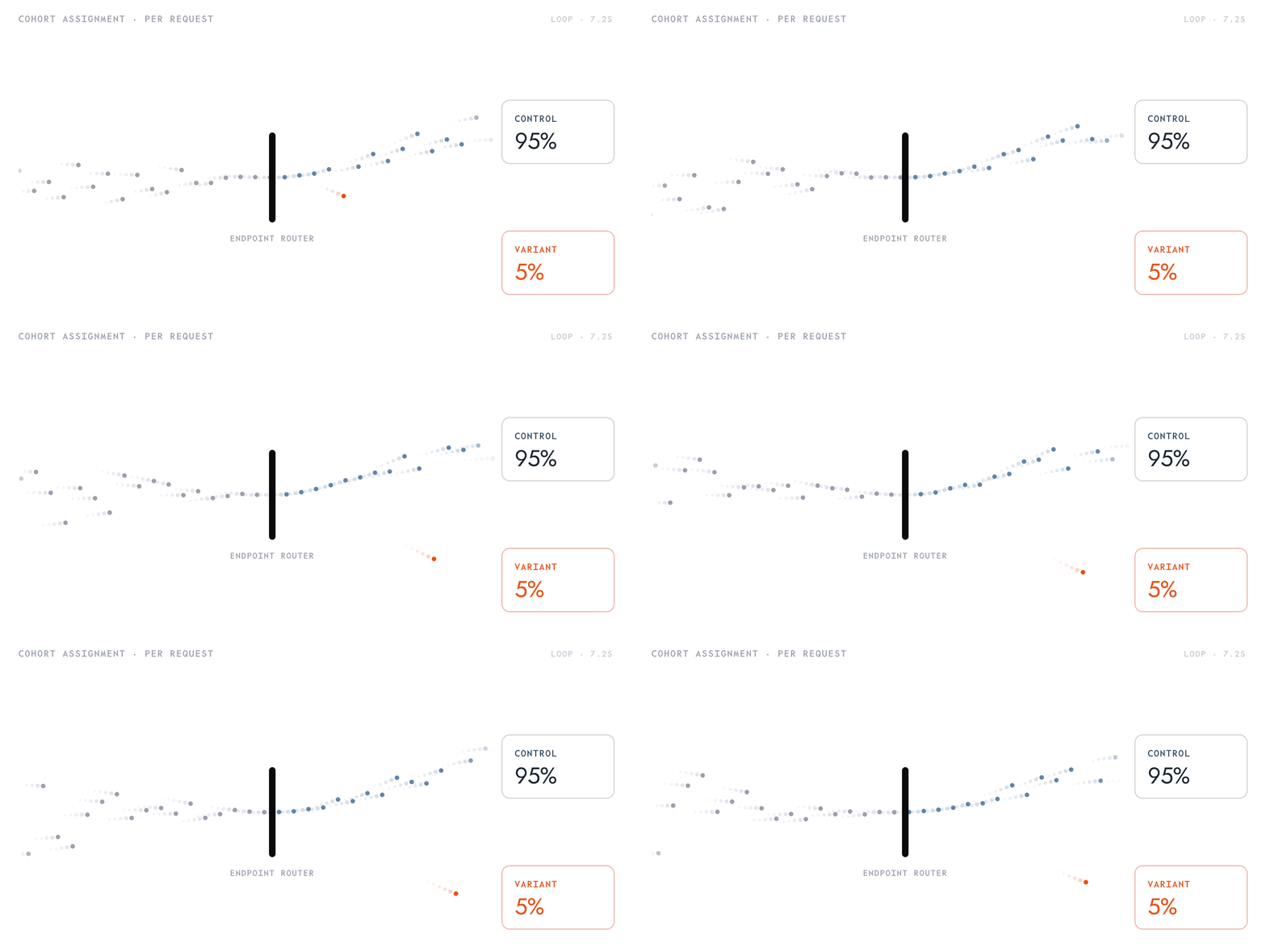 An A/B test doesn't shift the endpoint fully onto the new deployment. It maintains a fixed split, allowing you to measure how a new deployment performs before you promote it.
## How it works
A/B tests compare two or more deployments on live traffic.
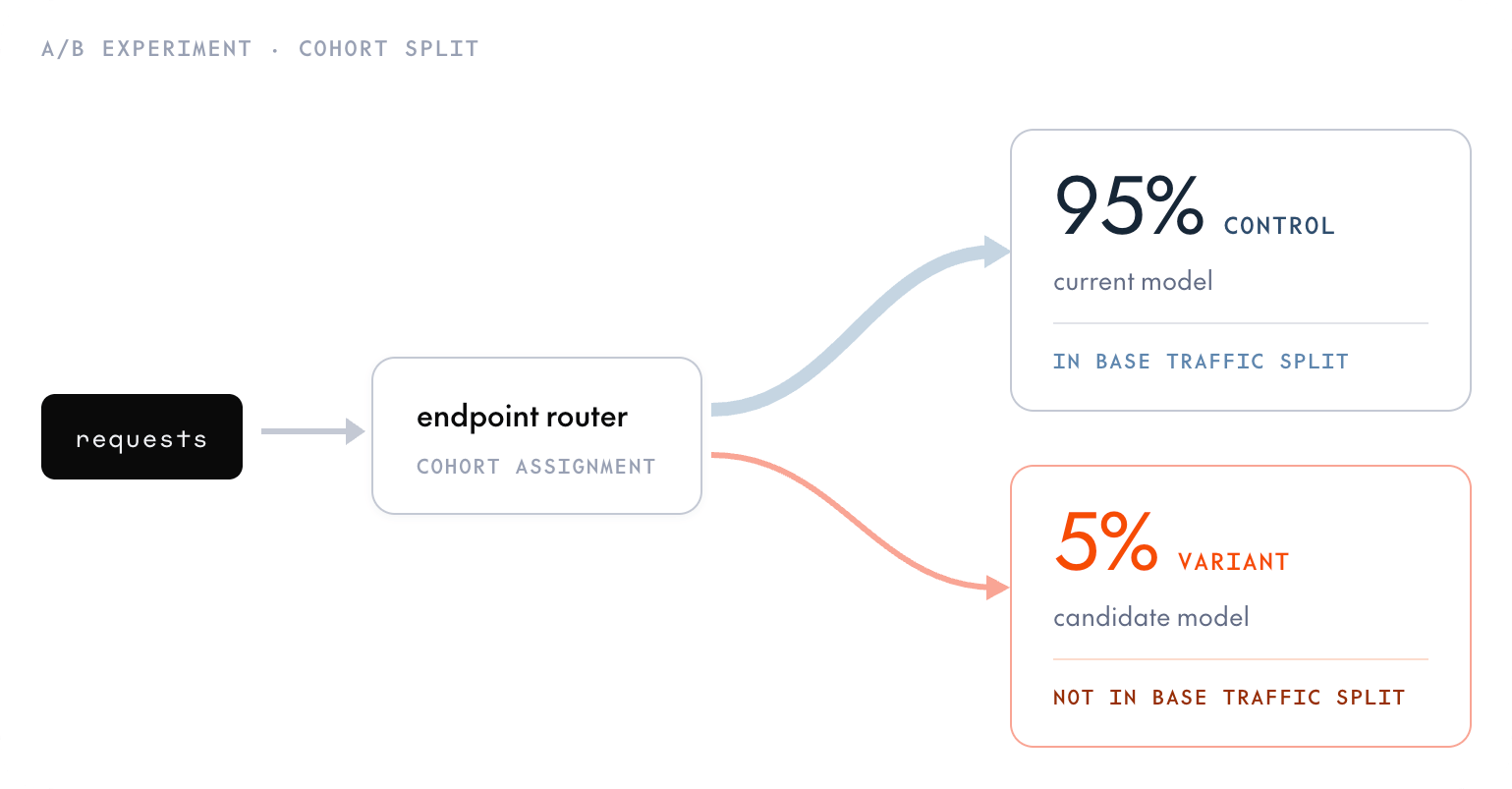
While the A/B test is active, it subdivides the control's share of traffic among the control and its variants. Requests that would route to the control are re-sampled across the test members by the percentages you set; the rest of the endpoint's [traffic split](/docs/dedicated-endpoints/route-traffic) is unaffected.
Test variants must be excluded from the endpoint's traffic split (weight `0` or unset); only the control belongs in the split. A variant that has a non-zero traffic-split weight causes the test to fail to start.
An A/B test needs exactly one control and at least one variant, up to 19 variants (20 members total). Each member, including the control, is assigned a percentage of the control's traffic, and the percentages must sum to 100. Because the test only subdivides traffic destined for the control, a control with `weight: 0` (or one that's absent from the traffic split) means the test receives no traffic at all.
An A/B test doesn't shift the endpoint fully onto the new deployment. It maintains a fixed split, allowing you to measure how a new deployment performs before you promote it.
## How it works
A/B tests compare two or more deployments on live traffic.
While the A/B test is active, it subdivides the control's share of traffic among the control and its variants. Requests that would route to the control are re-sampled across the test members by the percentages you set; the rest of the endpoint's [traffic split](/docs/dedicated-endpoints/route-traffic) is unaffected.
Test variants must be excluded from the endpoint's traffic split (weight `0` or unset); only the control belongs in the split. A variant that has a non-zero traffic-split weight causes the test to fail to start.
An A/B test needs exactly one control and at least one variant, up to 19 variants (20 members total). Each member, including the control, is assigned a percentage of the control's traffic, and the percentages must sum to 100. Because the test only subdivides traffic destined for the control, a control with `weight: 0` (or one that's absent from the traffic split) means the test receives no traffic at all.
 Deleting an A/B test ends the variant/control split immediately, returning all traffic to the control.
## Requirements
You need a `READY` control deployment that is [receiving traffic](/docs/dedicated-endpoints/route-traffic), plus a model to test as the variant. The CLI's `ab` command creates the variant deployment for you. See [Create a deployment](/docs/dedicated-endpoints/manage#create-a-deployment) if you don't have a control yet.
The examples below use these example IDs, which you should replace with your own:
* Endpoint: `ep_abc123`.
* Control deployment: `dep_control123`.
* Variant model: `ml_CbJNwQC2ZqCU2iFT3mrCh`.
* Second variant model: `ml_Zk7pR2mQ9sT4vU6yB1nD3`.
## Create an A/B test
Attach the control (and only the control) to the endpoint's traffic split. Pass the control's deployment ID—the CLI resolves its parent endpoint and preserves the other deployments' weights. For a single deployment, any non-zero weight routes all traffic to it:
```bash CLI theme={null}
tg beta endpoints update dep_control123 --traffic-weight 1
```
The CLI's `ab` command creates the variant deployment for the model you pass and starts the experiment, assigning `--percent` to the variant and the remainder to the control. Start the variant small, for example 5% (the CLI assigns the remaining 95% to the control). Percents must be integers in `[1, 100]`.
```bash CLI theme={null}
tg beta endpoints ab ml_CbJNwQC2ZqCU2iFT3mrCh \
--control dep_control123 \
--percent 5 \
--name sampling-tweak-v1
```
Note the experiment ID (`abx_...`) and the variant's deployment ID (`dep_...`) from the response. You use the experiment ID to adjust or delete the test, and the variant's deployment ID to ramp or promote it.
[Send requests](/docs/dedicated-endpoints/requests) to the endpoint, using the endpoint string as the `model` field.
## Ramp the variant
To change an existing member's share, update the experiment's members from the SDK or API. The CLI's `ab` command can start an experiment and add variants to it, but it can't change a member's percentage, so ramping is an SDK or API operation. Updating `members` replaces the whole set and re-validates the shape, so resend every member each time.
Deleting an A/B test ends the variant/control split immediately, returning all traffic to the control.
## Requirements
You need a `READY` control deployment that is [receiving traffic](/docs/dedicated-endpoints/route-traffic), plus a model to test as the variant. The CLI's `ab` command creates the variant deployment for you. See [Create a deployment](/docs/dedicated-endpoints/manage#create-a-deployment) if you don't have a control yet.
The examples below use these example IDs, which you should replace with your own:
* Endpoint: `ep_abc123`.
* Control deployment: `dep_control123`.
* Variant model: `ml_CbJNwQC2ZqCU2iFT3mrCh`.
* Second variant model: `ml_Zk7pR2mQ9sT4vU6yB1nD3`.
## Create an A/B test
Attach the control (and only the control) to the endpoint's traffic split. Pass the control's deployment ID—the CLI resolves its parent endpoint and preserves the other deployments' weights. For a single deployment, any non-zero weight routes all traffic to it:
```bash CLI theme={null}
tg beta endpoints update dep_control123 --traffic-weight 1
```
The CLI's `ab` command creates the variant deployment for the model you pass and starts the experiment, assigning `--percent` to the variant and the remainder to the control. Start the variant small, for example 5% (the CLI assigns the remaining 95% to the control). Percents must be integers in `[1, 100]`.
```bash CLI theme={null}
tg beta endpoints ab ml_CbJNwQC2ZqCU2iFT3mrCh \
--control dep_control123 \
--percent 5 \
--name sampling-tweak-v1
```
Note the experiment ID (`abx_...`) and the variant's deployment ID (`dep_...`) from the response. You use the experiment ID to adjust or delete the test, and the variant's deployment ID to ramp or promote it.
[Send requests](/docs/dedicated-endpoints/requests) to the endpoint, using the endpoint string as the `model` field.
## Ramp the variant
To change an existing member's share, update the experiment's members from the SDK or API. The CLI's `ab` command can start an experiment and add variants to it, but it can't change a member's percentage, so ramping is an SDK or API operation. Updating `members` replaces the whole set and re-validates the shape, so resend every member each time.
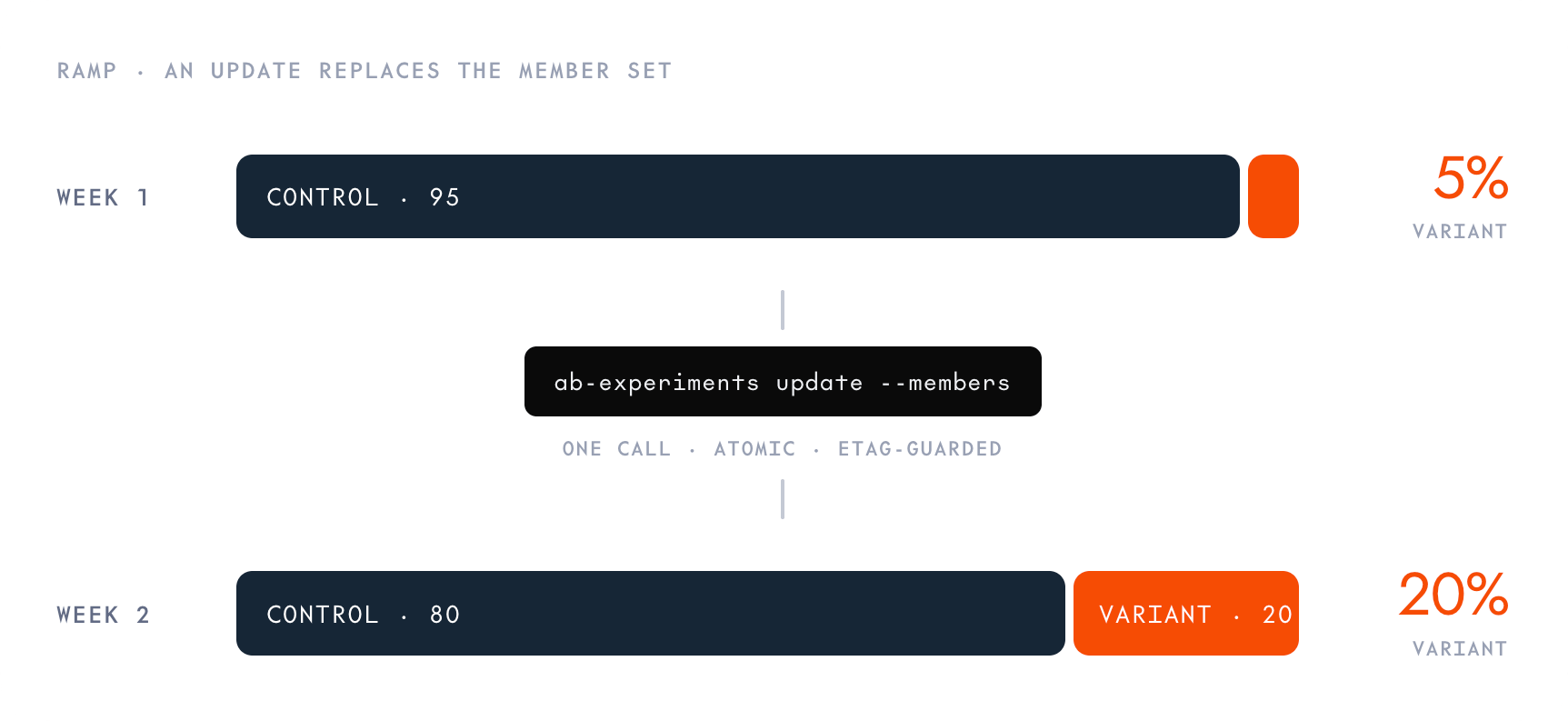 To move to a 90% control / 10% variant split:
```python Python theme={null}
from together import Together
client = Together()
project_id = client.whoami().project_id
client.beta.endpoints.ab_experiments.update(
"abx_abc123",
endpoint_id="ep_abc123",
project_id=project_id,
members=[
{
"deployment_id": "dep_control123",
"role": "AB_EXPERIMENT_MEMBER_ROLE_CONTROL",
"percent": 90,
},
{
"deployment_id": "dep_variant456",
"role": "AB_EXPERIMENT_MEMBER_ROLE_VARIANT",
"percent": 10,
},
],
)
```
## Add more variants
You can compare more than one candidate at once. Run `ab` again with the same control and a different variant model. The CLI creates the new variant deployment, finds the existing experiment for that control, and adds the deployment to it as another variant.
To move to a 90% control / 10% variant split:
```python Python theme={null}
from together import Together
client = Together()
project_id = client.whoami().project_id
client.beta.endpoints.ab_experiments.update(
"abx_abc123",
endpoint_id="ep_abc123",
project_id=project_id,
members=[
{
"deployment_id": "dep_control123",
"role": "AB_EXPERIMENT_MEMBER_ROLE_CONTROL",
"percent": 90,
},
{
"deployment_id": "dep_variant456",
"role": "AB_EXPERIMENT_MEMBER_ROLE_VARIANT",
"percent": 10,
},
],
)
```
## Add more variants
You can compare more than one candidate at once. Run `ab` again with the same control and a different variant model. The CLI creates the new variant deployment, finds the existing experiment for that control, and adds the deployment to it as another variant.
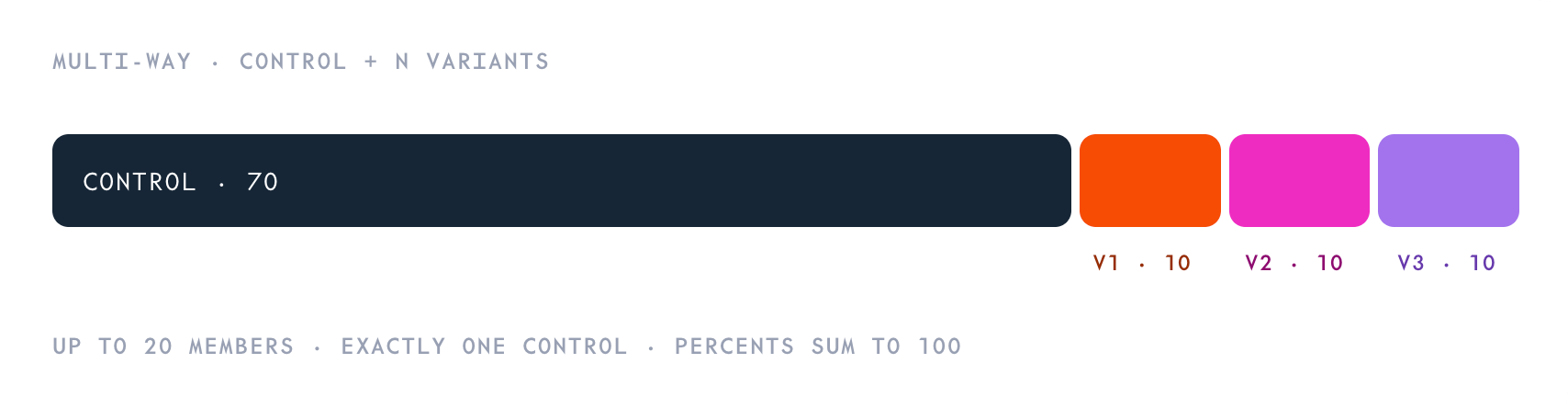 Each `ab` call carves the new variant's percentage out of the control's share and leaves the existing variants untouched. Continuing from the 90% / 10% split above, adding a second variant at 10% gives 80% control / 10% / 10%:
```bash CLI theme={null}
tg beta endpoints ab ml_Zk7pR2mQ9sT4vU6yB1nD3 \
--control dep_control123 \
--percent 10
```
An experiment allows up to 20 members with exactly one control, and the control's share can't drop below 1%.
## Promote a variant
When you've picked a winner, promote it by [updating the endpoint's traffic split](/docs/dedicated-endpoints/route-traffic) so the winning deployment serves all traffic. Set the winner's weight to a non-zero value and set the other deployments to `0` (or delete them):
```bash CLI theme={null}
tg beta endpoints update dep_control123 --traffic-weight 0
tg beta endpoints update dep_variant456 --traffic-weight 1
```
Then [delete the test](#delete-the-test) to end the managed control/variant split.
## Delete the test
Deleting an A/B test ends the variant/control split immediately. All traffic returns to the endpoint's regular traffic split, either the control, or the variant you [promoted](#promote-a-variant).
The CLI's smart-delete `rm` accepts the experiment ID:
```bash CLI theme={null}
tg beta endpoints rm abx_abc123
```
To clean up the member deployments, follow the teardown order in [Manage deployments](/docs/dedicated-endpoints/manage#delete-resources) for each deployment.
## Next steps
Create control and variant deployments for an A/B test.
Promote a winning variant by updating the endpoint's traffic split.
Compare control and variant deployments with per-deployment metrics.
Understand how traffic is routed across deployments under an endpoint.
Each `ab` call carves the new variant's percentage out of the control's share and leaves the existing variants untouched. Continuing from the 90% / 10% split above, adding a second variant at 10% gives 80% control / 10% / 10%:
```bash CLI theme={null}
tg beta endpoints ab ml_Zk7pR2mQ9sT4vU6yB1nD3 \
--control dep_control123 \
--percent 10
```
An experiment allows up to 20 members with exactly one control, and the control's share can't drop below 1%.
## Promote a variant
When you've picked a winner, promote it by [updating the endpoint's traffic split](/docs/dedicated-endpoints/route-traffic) so the winning deployment serves all traffic. Set the winner's weight to a non-zero value and set the other deployments to `0` (or delete them):
```bash CLI theme={null}
tg beta endpoints update dep_control123 --traffic-weight 0
tg beta endpoints update dep_variant456 --traffic-weight 1
```
Then [delete the test](#delete-the-test) to end the managed control/variant split.
## Delete the test
Deleting an A/B test ends the variant/control split immediately. All traffic returns to the endpoint's regular traffic split, either the control, or the variant you [promoted](#promote-a-variant).
The CLI's smart-delete `rm` accepts the experiment ID:
```bash CLI theme={null}
tg beta endpoints rm abx_abc123
```
To clean up the member deployments, follow the teardown order in [Manage deployments](/docs/dedicated-endpoints/manage#delete-resources) for each deployment.
## Next steps
Create control and variant deployments for an A/B test.
Promote a winning variant by updating the endpoint's traffic split.
Compare control and variant deployments with per-deployment metrics.
Understand how traffic is routed across deployments under an endpoint.