> ## Documentation Index
> Fetch the complete documentation index at: https://docs.together.ai/llms.txt
> Use this file to discover all available pages before exploring further.
# Run a shadow experiment
> Mirror a sampled fraction of endpoint traffic to a target deployment without affecting the client response.
A shadow experiment copies a fraction of live traffic on an endpoint to one or more target deployments for observation, without changing what your application gets back.
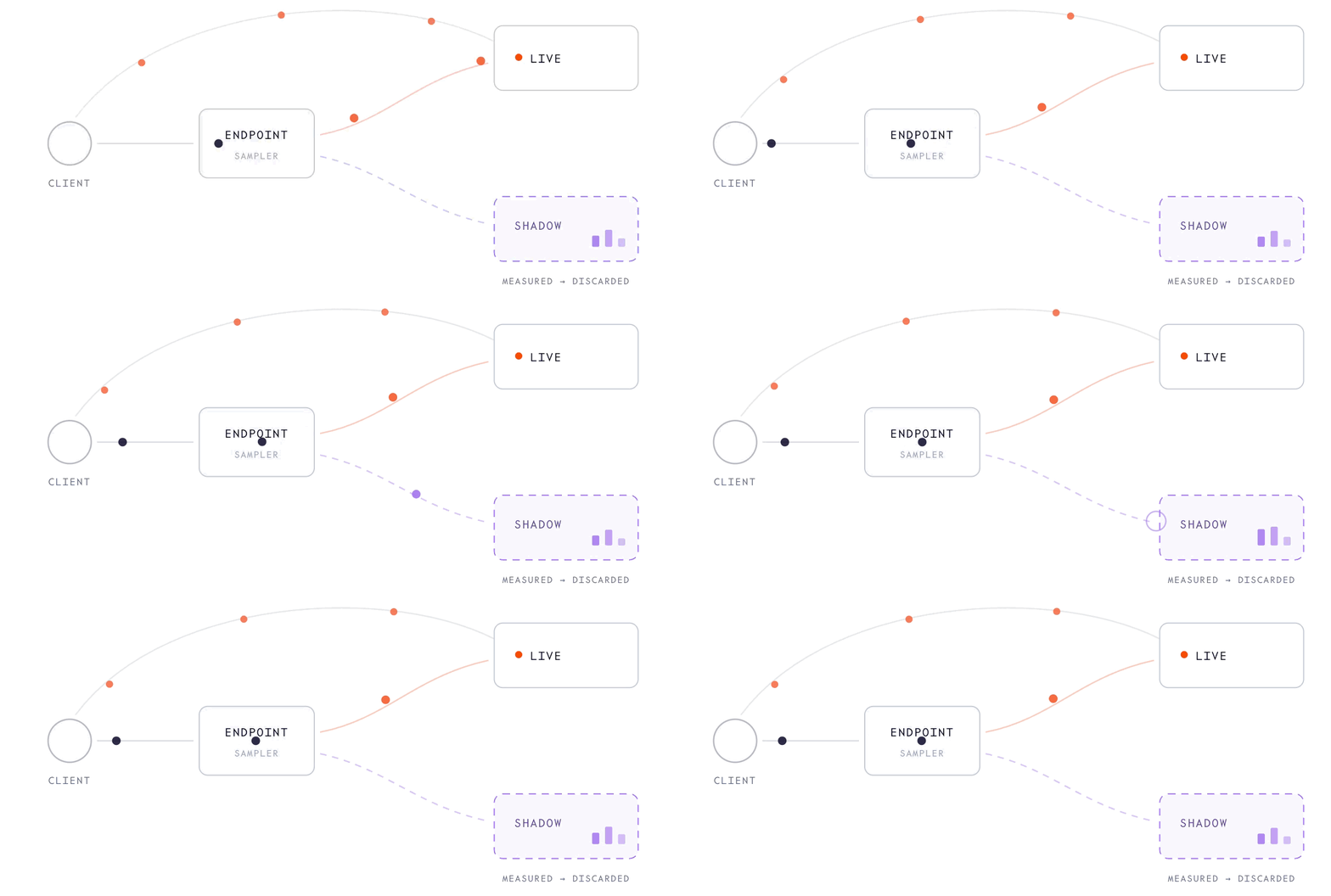 Use a shadow experiment to warm up a new deployment under real load, stress-test configuration changes, or gather latency data for a candidate before routing live requests to it. Unlike an [A/B test](/docs/dedicated-endpoints/ab-tests), a shadow experiment never affects the client-visible response.
## How it works
A shadow experiment has two parts:
* **Source:** The endpoint where mirrored traffic comes from and how much of it gets sampled. The source samples traffic at the API gateway using one of four [sampling strategies](#sampling-strategies).
* **Targets:** The deployments that receive the mirrored traffic. Each target names a deployment under the same endpoint that's excluded from the endpoint's traffic split (weight `0` or unset), so it serves only mirrored traffic. Size it for the mirrored volume you expect.
When a request is sampled, a copy is sent to every target in the experiment. In an experiment with two targets that sample at 10% each, each target receives 10% of endpoint traffic. Adding a target multiplies the mirrored volume rather than dividing it.
For a single target, copies are spread across its replicas through normal load balancing.
All mirroring stops when you delete the experiment.
### Hosting multiple experiments on an endpoint
An endpoint can host several experiments at once. Each experiment samples the endpoint's traffic independently, with its own [sampling strategy](#sampling-strategies) and rate, so a single request can be mirrored by more than one experiment. Mirrored volumes add up across experiments, so watch the total load on your targets.
Use the structure that matches your use case:
* **More targets in one experiment:** Compare how candidates perform for the same sampled requests. Each sampling decision applies to every target, so each target receives the same traffic. Use this for apples-to-apples comparisons, such as comparing fp8, fp4, and baseline builds on the same prompts.
* **Multiple experiments on the endpoint:** Compare how candidates perform under different rules. Use this method when candidates require different sampling rates (a large candidate can absorb 50% vs. a small one that can only take 10%), different strategies (sticky key-based sampling vs. random uniform), or different owners and lifetimes (a long-lived 1% safety net vs. a short-lived high-rate test).
### Sampling strategies
The source can be configured with one of four sampling strategies:
Use a shadow experiment to warm up a new deployment under real load, stress-test configuration changes, or gather latency data for a candidate before routing live requests to it. Unlike an [A/B test](/docs/dedicated-endpoints/ab-tests), a shadow experiment never affects the client-visible response.
## How it works
A shadow experiment has two parts:
* **Source:** The endpoint where mirrored traffic comes from and how much of it gets sampled. The source samples traffic at the API gateway using one of four [sampling strategies](#sampling-strategies).
* **Targets:** The deployments that receive the mirrored traffic. Each target names a deployment under the same endpoint that's excluded from the endpoint's traffic split (weight `0` or unset), so it serves only mirrored traffic. Size it for the mirrored volume you expect.
When a request is sampled, a copy is sent to every target in the experiment. In an experiment with two targets that sample at 10% each, each target receives 10% of endpoint traffic. Adding a target multiplies the mirrored volume rather than dividing it.
For a single target, copies are spread across its replicas through normal load balancing.
All mirroring stops when you delete the experiment.
### Hosting multiple experiments on an endpoint
An endpoint can host several experiments at once. Each experiment samples the endpoint's traffic independently, with its own [sampling strategy](#sampling-strategies) and rate, so a single request can be mirrored by more than one experiment. Mirrored volumes add up across experiments, so watch the total load on your targets.
Use the structure that matches your use case:
* **More targets in one experiment:** Compare how candidates perform for the same sampled requests. Each sampling decision applies to every target, so each target receives the same traffic. Use this for apples-to-apples comparisons, such as comparing fp8, fp4, and baseline builds on the same prompts.
* **Multiple experiments on the endpoint:** Compare how candidates perform under different rules. Use this method when candidates require different sampling rates (a large candidate can absorb 50% vs. a small one that can only take 10%), different strategies (sticky key-based sampling vs. random uniform), or different owners and lifetimes (a long-lived 1% safety net vs. a short-lived high-rate test).
### Sampling strategies
The source can be configured with one of four sampling strategies:
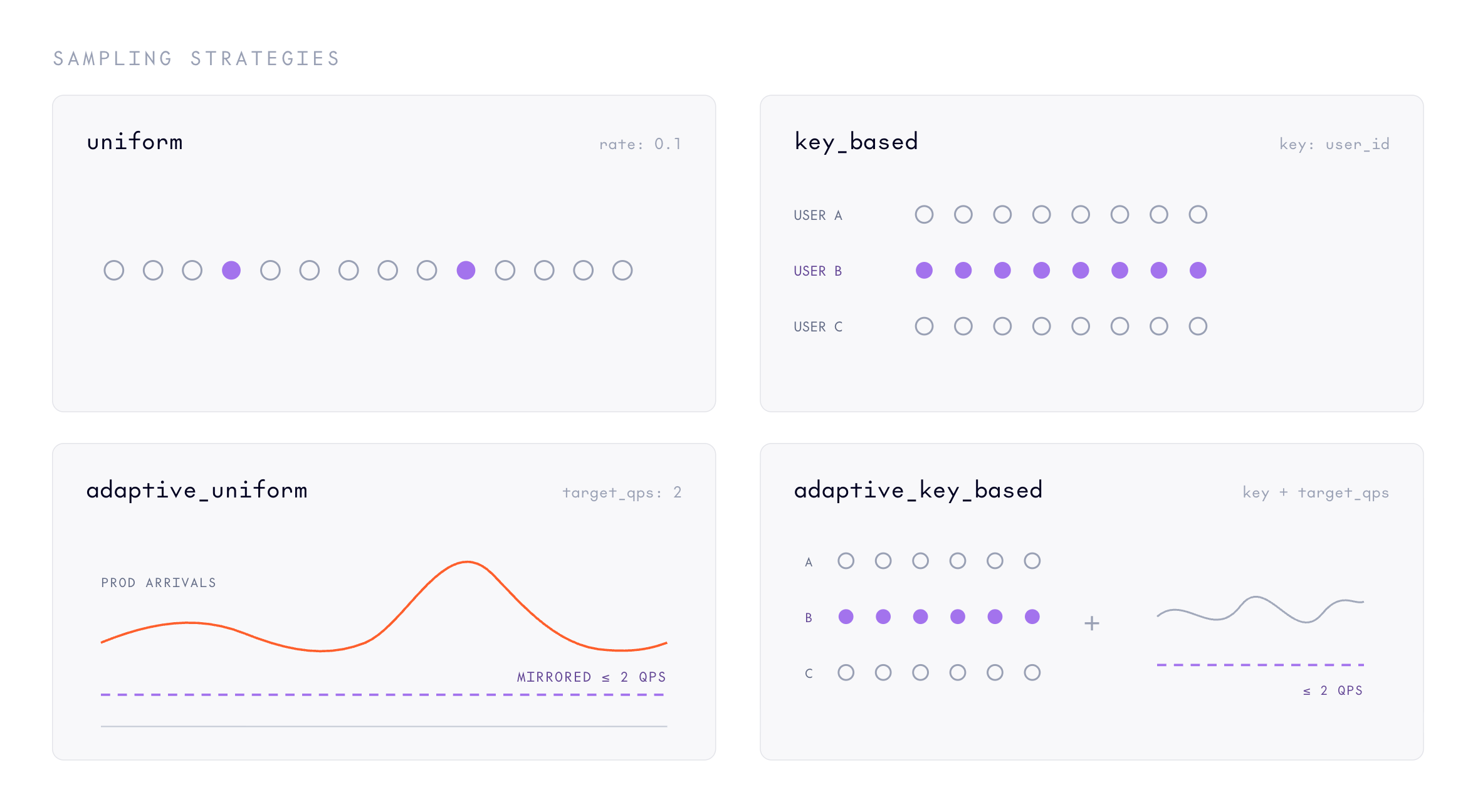 | Strategy | Description |
| -------------------- | ----------------------------------------------------------------------------------------------------------------------------------------------------------------------------------------------- |
| `uniform` | Samples a fixed fraction of all requests at random. Set the `--rate` flag to a value between `0.0` and `1.0` to use this strategy. |
| `key_based` | Samples a fixed fraction of distinct key values. The same key always gets the same decision (sticky). Set the `--rate` and `--key` flags to use this strategy. |
| `adaptive_uniform` | Auto-adjusts the uniform rate to approach a target request rate (QPS). Set the `--target-qps` flag, and optionally `--window` (the sliding window for QPS observation, defaults to 60 seconds). |
| `adaptive_key_based` | Auto-adjusts a per-key rate to approach a target request rate (QPS). Set the `--target-qps` and `--key` flags, and optionally `--window`. |
The `key` for key-based strategies names a top-level field in the request body (for example `body.user` or `body.prompt_cache_key`), not a nested path. Requests with no value in that field are sampled at random.
Setting `--rate` to `0` mirrors nothing, which is a way to [pause an experiment](#pause-retune-or-stop-an-experiment) without deleting it.
For the adaptive strategies, `target_qps` is an approximate throttle, not a precise cap on total mirrored volume. The volume your targets actually receive may run higher than the value you set, and it grows as your endpoint scales up under load. Treat `target_qps` as a way to keep mirroring loosely bounded rather than pinned to an exact rate. Set it conservatively, [check the volume your targets actually receive](#observe-results), and adjust. If you need a predictable, exact fraction of traffic, use a `uniform` strategy instead.
## Requirements
Before you start a shadow experiment, you need a running endpoint under load and a candidate deployment to shadow to. The candidate must be excluded from the endpoint's traffic split (weight `0` or unset) so it receives only mirrored traffic, never live requests.
The CLI's `shadow` command provisions a new shadow deployment from a model ID and wires up the experiment in one command, so you only need the endpoint and a model. The SDK mirrors to a deployment you've already created.
The examples below use these example IDs, which you should replace with your own:
* Endpoint: `ep_abc123`.
* Model to shadow-deploy: `ml_CbJNwQC2ZqCU2iFT3mrCh`.
* Target deployment (already created, for the SDK path): `dep_target456`.
## Create a shadow experiment
Create an experiment that samples 10% of gateway traffic uniformly and mirrors it to one target. The CLI's `shadow` command creates a new shadow deployment from a model, then starts mirroring sampled traffic to it. The SDK mirrors to an existing target deployment, with the sampling strategy in the `source.endpoint` block:
```bash theme={null}
tg beta endpoints shadow \
--endpoint ep_abc123 \
--model ml_CbJNwQC2ZqCU2iFT3mrCh \
--rate 0.1 \
--name candidate-v2
```
Note the experiment ID (`exp_...`) from the response. You use it to inspect, update, or delete the experiment.
`name` is immutable after creation and must be unique within the endpoint. `description` can't be set on create. Set it by [updating the experiment](#update-an-experiment).
After creating the experiment, [send requests](/docs/dedicated-endpoints/requests) to the endpoint as you normally would, using the endpoint string as the `model` field. The request path doesn't change, but a sampled fraction of requests is mirrored to each target in the background.
### Sampling strategy examples
Use `key_based` sampling to make mirroring decisions sticky on a request field (for example `body.user`), so all requests from the same user are either always mirrored or never:
```bash theme={null}
tg beta endpoints shadow \
--endpoint ep_abc123 \
--model ml_CbJNwQC2ZqCU2iFT3mrCh \
--rate 0.05 \
--key body.user \
--name candidate-v2
```
Use `adaptive_uniform` to throttle mirroring toward a target request rate (QPS) rather than a fixed fraction. The sampler adjusts the rate automatically:
```bash theme={null}
tg beta endpoints shadow \
--endpoint ep_abc123 \
--model ml_CbJNwQC2ZqCU2iFT3mrCh \
--target-qps 5.0 \
--name candidate-v2
```
### Response fields
| Field | Description |
| ------------- | ------------------------------------------------------------------------------------------------------------------------------------------------------------------------------------------------------------------- |
| `id` | Unique experiment identifier. |
| `project_id` | The project the experiment belongs to. |
| `endpoint_id` | The endpoint whose traffic is sampled. |
| `name` | Human-readable name, unique within the endpoint. |
| `source` | Sampling configuration for the endpoint's traffic. |
| `targets` | Target deployments, populated inline on Get. |
| `created_by` | Identifier of the principal that created the experiment. |
| `created_at` | Timestamp when the experiment was created. |
| `updated_at` | Timestamp when the experiment was last updated. |
| `etag` | Opaque version tag for optimistic concurrency. Pass it back in update and delete requests. A stale value is rejected. |
| `state` | Output only. Derived serving state: `ACTIVE` when the experiment has at least one target, `INACTIVE` when it has none. Recomputed on every read; not stored and not settable (rejected if listed in `update_mask`). |
## Observe results
Once the experiment is `ACTIVE`, keep calling the endpoint as you normally would. A sampled fraction of your requests is mirrored to each target in the background, and the response you get back is always the baseline's.
A new or updated experiment takes effect within about 30 to 60 seconds. Deleting an experiment stops mirroring within roughly the same window.
Because targets never return their responses to your caller, evaluate them the same way you would evaluate any deployment:
* Compare each target's own latency, throughput, and error rate against the baseline.
* If you log outputs, compare each target's outputs against the baseline's for the mirrored requests.
* Confirm each target is receiving the expected mirrored volume. As a rough check, target volume should equal the sampled requests times the number of targets: about (endpoint traffic times `rate`) for a uniform strategy, or roughly tracking your configured `target_qps` (which can run higher and rises as the endpoint scales) for an adaptive one.
## Pause, retune, or stop an experiment
* **Pause without deleting:** [Update](#update-an-experiment) the experiment's `source` to set the sampling `rate` to `0`. The experiment stays `ACTIVE` but samples nothing.
* **Retune sampling:** Update the experiment's `source`, for example to raise `uniform.rate` or switch strategy. Fetch the experiment first to get its current `etag` and pass it back on the update; a stale value returns `409 ABORTED`.
* **Fan out to more targets:** [Add a target](#add-a-target) to the experiment. One sampling decision fans out to every target, so adding a target roughly multiplies mirrored volume.
* **Stop mirroring:** [Delete the experiment](#delete-an-experiment) (which cascade-deletes its targets), or remove all its targets so the experiment goes `INACTIVE`.
Mirrored requests are never sampled and mirrored again; the system prevents shadow loops automatically.
Before deleting a deployment that an experiment targets, remove it from the experiment first (or delete the experiment). That keeps the experiment's configuration consistent and avoids leaving a target that points at a deployment that no longer exists.
### Delete an experiment
Deletion cascade-deletes all targets, and mirroring stops shortly after. The CLI's smart-delete `rm` accepts the experiment ID:
```bash theme={null}
tg beta endpoints rm exp_abc123
```
## Troubleshooting
* **A target receives no mirrored traffic:** The experiment may be `INACTIVE` (no targets), the sampling `rate` may be `0`, or the change may not have propagated yet. Confirm the experiment is `ACTIVE` with at least one target and a non-zero rate, then re-check after the 30-to-60-second propagation window. Mirroring also needs live traffic on the endpoint: a sampled fraction of zero requests is zero.
* **A target's shadow metrics show dropped copies (`build_error` or `5xx`):** Mirroring is fire-and-forget. If a target is still provisioning, scaled to zero, or unhealthy, copies are still sent and then silently dropped, and the failures show up only in that target's shadow metrics. Your callers are never affected, and mirroring recovers on its own once the target is serving again.
* **Mirrored volume is lower than expected:** With `key_based` sampling, whole keys are sampled sticky, so a few high-volume keys can pull the effective rate away from the nominal `rate`. With an adaptive strategy, the sampler throttles toward `target_qps` rather than a fixed fraction, and the actual volume can drift as the endpoint scales. Switch to `uniform` if you need a predictable fraction.
* **An update or delete returns `409 ABORTED`:** The `etag` you passed is stale. Re-read the experiment (or target) to get the current `etag`, then retry.
* **Create returns `400`:** The request shape is invalid. Check for a missing required field, a `rate` outside `[0.0, 1.0]`, more than 100 inline targets, or a `name` longer than 256 characters.
* **Create or add target returns `400` with `the deployment is serving live traffic on this endpoint and cannot also be a shadow target; remove it from the traffic split first`:** The target deployment has a non-zero weight in the endpoint's [traffic split](/docs/dedicated-endpoints/route-traffic). Remove it from the split (set its weight to `0` or omit it) before adding it as a shadow target.
* **Create or a lookup returns `404`:** The experiment, target, or parent endpoint doesn't exist in the project named in the path. The API returns the same `404` for a missing ID, a wrong-endpoint ID, and an ID that belongs to a different project, so you can't use it to probe for cross-tenant resources.
## Limits
* Up to 100 inline targets when creating an experiment. Add more with the target methods after creation.
* `name` (on both experiments and targets) is at most 256 characters.
* `limit` on list calls defaults to 50, up to a maximum of 500.
## Next steps
Split live traffic and compare user-visible responses across deployments.
Route live traffic to a deployment by weight once you've validated it.
Monitor per-deployment metrics during experimentation.
Create and manage the deployments used in shadow experiments.
| Strategy | Description |
| -------------------- | ----------------------------------------------------------------------------------------------------------------------------------------------------------------------------------------------- |
| `uniform` | Samples a fixed fraction of all requests at random. Set the `--rate` flag to a value between `0.0` and `1.0` to use this strategy. |
| `key_based` | Samples a fixed fraction of distinct key values. The same key always gets the same decision (sticky). Set the `--rate` and `--key` flags to use this strategy. |
| `adaptive_uniform` | Auto-adjusts the uniform rate to approach a target request rate (QPS). Set the `--target-qps` flag, and optionally `--window` (the sliding window for QPS observation, defaults to 60 seconds). |
| `adaptive_key_based` | Auto-adjusts a per-key rate to approach a target request rate (QPS). Set the `--target-qps` and `--key` flags, and optionally `--window`. |
The `key` for key-based strategies names a top-level field in the request body (for example `body.user` or `body.prompt_cache_key`), not a nested path. Requests with no value in that field are sampled at random.
Setting `--rate` to `0` mirrors nothing, which is a way to [pause an experiment](#pause-retune-or-stop-an-experiment) without deleting it.
For the adaptive strategies, `target_qps` is an approximate throttle, not a precise cap on total mirrored volume. The volume your targets actually receive may run higher than the value you set, and it grows as your endpoint scales up under load. Treat `target_qps` as a way to keep mirroring loosely bounded rather than pinned to an exact rate. Set it conservatively, [check the volume your targets actually receive](#observe-results), and adjust. If you need a predictable, exact fraction of traffic, use a `uniform` strategy instead.
## Requirements
Before you start a shadow experiment, you need a running endpoint under load and a candidate deployment to shadow to. The candidate must be excluded from the endpoint's traffic split (weight `0` or unset) so it receives only mirrored traffic, never live requests.
The CLI's `shadow` command provisions a new shadow deployment from a model ID and wires up the experiment in one command, so you only need the endpoint and a model. The SDK mirrors to a deployment you've already created.
The examples below use these example IDs, which you should replace with your own:
* Endpoint: `ep_abc123`.
* Model to shadow-deploy: `ml_CbJNwQC2ZqCU2iFT3mrCh`.
* Target deployment (already created, for the SDK path): `dep_target456`.
## Create a shadow experiment
Create an experiment that samples 10% of gateway traffic uniformly and mirrors it to one target. The CLI's `shadow` command creates a new shadow deployment from a model, then starts mirroring sampled traffic to it. The SDK mirrors to an existing target deployment, with the sampling strategy in the `source.endpoint` block:
```bash theme={null}
tg beta endpoints shadow \
--endpoint ep_abc123 \
--model ml_CbJNwQC2ZqCU2iFT3mrCh \
--rate 0.1 \
--name candidate-v2
```
Note the experiment ID (`exp_...`) from the response. You use it to inspect, update, or delete the experiment.
`name` is immutable after creation and must be unique within the endpoint. `description` can't be set on create. Set it by [updating the experiment](#update-an-experiment).
After creating the experiment, [send requests](/docs/dedicated-endpoints/requests) to the endpoint as you normally would, using the endpoint string as the `model` field. The request path doesn't change, but a sampled fraction of requests is mirrored to each target in the background.
### Sampling strategy examples
Use `key_based` sampling to make mirroring decisions sticky on a request field (for example `body.user`), so all requests from the same user are either always mirrored or never:
```bash theme={null}
tg beta endpoints shadow \
--endpoint ep_abc123 \
--model ml_CbJNwQC2ZqCU2iFT3mrCh \
--rate 0.05 \
--key body.user \
--name candidate-v2
```
Use `adaptive_uniform` to throttle mirroring toward a target request rate (QPS) rather than a fixed fraction. The sampler adjusts the rate automatically:
```bash theme={null}
tg beta endpoints shadow \
--endpoint ep_abc123 \
--model ml_CbJNwQC2ZqCU2iFT3mrCh \
--target-qps 5.0 \
--name candidate-v2
```
### Response fields
| Field | Description |
| ------------- | ------------------------------------------------------------------------------------------------------------------------------------------------------------------------------------------------------------------- |
| `id` | Unique experiment identifier. |
| `project_id` | The project the experiment belongs to. |
| `endpoint_id` | The endpoint whose traffic is sampled. |
| `name` | Human-readable name, unique within the endpoint. |
| `source` | Sampling configuration for the endpoint's traffic. |
| `targets` | Target deployments, populated inline on Get. |
| `created_by` | Identifier of the principal that created the experiment. |
| `created_at` | Timestamp when the experiment was created. |
| `updated_at` | Timestamp when the experiment was last updated. |
| `etag` | Opaque version tag for optimistic concurrency. Pass it back in update and delete requests. A stale value is rejected. |
| `state` | Output only. Derived serving state: `ACTIVE` when the experiment has at least one target, `INACTIVE` when it has none. Recomputed on every read; not stored and not settable (rejected if listed in `update_mask`). |
## Observe results
Once the experiment is `ACTIVE`, keep calling the endpoint as you normally would. A sampled fraction of your requests is mirrored to each target in the background, and the response you get back is always the baseline's.
A new or updated experiment takes effect within about 30 to 60 seconds. Deleting an experiment stops mirroring within roughly the same window.
Because targets never return their responses to your caller, evaluate them the same way you would evaluate any deployment:
* Compare each target's own latency, throughput, and error rate against the baseline.
* If you log outputs, compare each target's outputs against the baseline's for the mirrored requests.
* Confirm each target is receiving the expected mirrored volume. As a rough check, target volume should equal the sampled requests times the number of targets: about (endpoint traffic times `rate`) for a uniform strategy, or roughly tracking your configured `target_qps` (which can run higher and rises as the endpoint scales) for an adaptive one.
## Pause, retune, or stop an experiment
* **Pause without deleting:** [Update](#update-an-experiment) the experiment's `source` to set the sampling `rate` to `0`. The experiment stays `ACTIVE` but samples nothing.
* **Retune sampling:** Update the experiment's `source`, for example to raise `uniform.rate` or switch strategy. Fetch the experiment first to get its current `etag` and pass it back on the update; a stale value returns `409 ABORTED`.
* **Fan out to more targets:** [Add a target](#add-a-target) to the experiment. One sampling decision fans out to every target, so adding a target roughly multiplies mirrored volume.
* **Stop mirroring:** [Delete the experiment](#delete-an-experiment) (which cascade-deletes its targets), or remove all its targets so the experiment goes `INACTIVE`.
Mirrored requests are never sampled and mirrored again; the system prevents shadow loops automatically.
Before deleting a deployment that an experiment targets, remove it from the experiment first (or delete the experiment). That keeps the experiment's configuration consistent and avoids leaving a target that points at a deployment that no longer exists.
### Delete an experiment
Deletion cascade-deletes all targets, and mirroring stops shortly after. The CLI's smart-delete `rm` accepts the experiment ID:
```bash theme={null}
tg beta endpoints rm exp_abc123
```
## Troubleshooting
* **A target receives no mirrored traffic:** The experiment may be `INACTIVE` (no targets), the sampling `rate` may be `0`, or the change may not have propagated yet. Confirm the experiment is `ACTIVE` with at least one target and a non-zero rate, then re-check after the 30-to-60-second propagation window. Mirroring also needs live traffic on the endpoint: a sampled fraction of zero requests is zero.
* **A target's shadow metrics show dropped copies (`build_error` or `5xx`):** Mirroring is fire-and-forget. If a target is still provisioning, scaled to zero, or unhealthy, copies are still sent and then silently dropped, and the failures show up only in that target's shadow metrics. Your callers are never affected, and mirroring recovers on its own once the target is serving again.
* **Mirrored volume is lower than expected:** With `key_based` sampling, whole keys are sampled sticky, so a few high-volume keys can pull the effective rate away from the nominal `rate`. With an adaptive strategy, the sampler throttles toward `target_qps` rather than a fixed fraction, and the actual volume can drift as the endpoint scales. Switch to `uniform` if you need a predictable fraction.
* **An update or delete returns `409 ABORTED`:** The `etag` you passed is stale. Re-read the experiment (or target) to get the current `etag`, then retry.
* **Create returns `400`:** The request shape is invalid. Check for a missing required field, a `rate` outside `[0.0, 1.0]`, more than 100 inline targets, or a `name` longer than 256 characters.
* **Create or add target returns `400` with `the deployment is serving live traffic on this endpoint and cannot also be a shadow target; remove it from the traffic split first`:** The target deployment has a non-zero weight in the endpoint's [traffic split](/docs/dedicated-endpoints/route-traffic). Remove it from the split (set its weight to `0` or omit it) before adding it as a shadow target.
* **Create or a lookup returns `404`:** The experiment, target, or parent endpoint doesn't exist in the project named in the path. The API returns the same `404` for a missing ID, a wrong-endpoint ID, and an ID that belongs to a different project, so you can't use it to probe for cross-tenant resources.
## Limits
* Up to 100 inline targets when creating an experiment. Add more with the target methods after creation.
* `name` (on both experiments and targets) is at most 256 characters.
* `limit` on list calls defaults to 50, up to a maximum of 500.
## Next steps
Split live traffic and compare user-visible responses across deployments.
Route live traffic to a deployment by weight once you've validated it.
Monitor per-deployment metrics during experimentation.
Create and manage the deployments used in shadow experiments.