> ## Documentation Index
> Fetch the complete documentation index at: https://docs.together.ai/llms.txt
> Use this file to discover all available pages before exploring further.
# Overview
> High-performance GPU clusters for training, fine-tuning, and large-scale AI workloads
Using a coding agent? Install the [together-gpu-clusters](https://github.com/togethercomputer/skills/tree/main/skills/together-gpu-clusters) skill to let your agent write correct GPU cluster code automatically. [Learn more](/docs/agent-skills).
## What are GPU Clusters?
Together GPU Clusters provide on-demand access to high-performance GPU infrastructure for training, fine-tuning, and running large-scale AI workloads. Create clusters in minutes with features like real-time scaling, persistent storage, and support for both Kubernetes and Slurm workload managers.
## Concepts
### Kubernetes Cluster Architecture
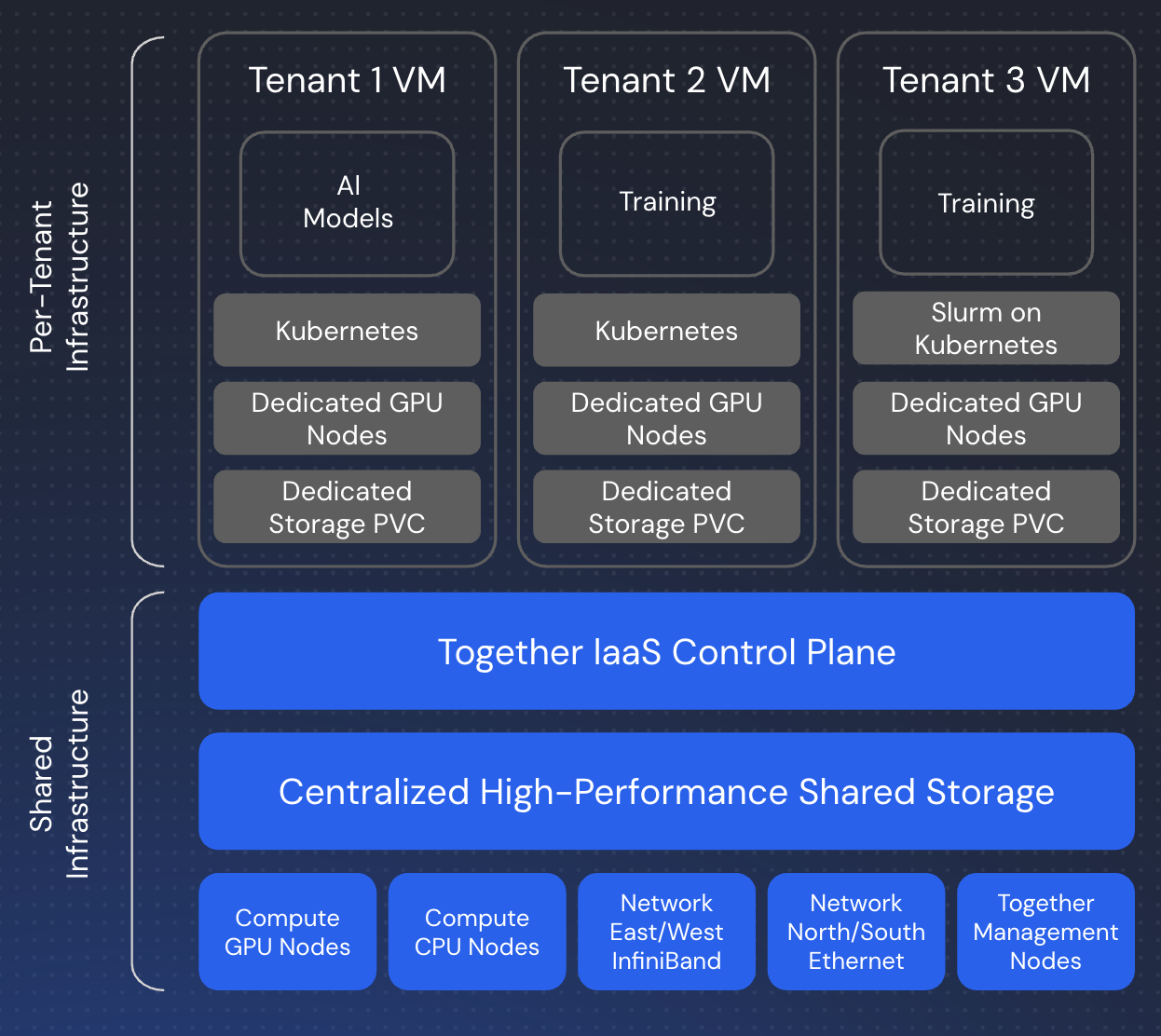 Each GPU cluster is built on Kubernetes, providing a robust container orchestration platform. The architecture includes:
* **Control Plane** – Manages cluster state, scheduling, and API access
* **Worker Nodes** – GPU-equipped nodes that run your workloads
* **Networking** – High-speed InfiniBand for multi-node communication
* **Storage Layer** – Persistent volumes, local NVMe, and shared storage
You interact with the cluster using standard Kubernetes tools like `kubectl`, or through higher-level abstractions like Slurm.
### Slurm on Kubernetes via Slinky
For users preferring HPC-style workflows, Together runs Slurm on top of Kubernetes using **Slinky**, an integration layer that bridges traditional HPC scheduling with cloud-native infrastructure:
* **Slurm Controller** – Runs as Kubernetes pods, managing job queues and scheduling
* **Login Nodes** – SSH-accessible entry points for job submission
* **Compute Nodes** – GPU workers registered with both Kubernetes and Slurm
This architecture gives you the simplicity of `sbatch` and `srun` commands while leveraging Kubernetes' reliability, scalability, and ecosystem.
## Key Features
* **Fast provisioning** – Clusters ready in minutes, not hours or days
* **Flexible scaling** – Scale up or down in real time to match workload demands
* **Persistent storage** – Long-lived, resizable shared storage with high throughput
* **Multiple workload managers** – Choose between Kubernetes or Slurm-on-Kubernetes
* **Full API access** – Manage clusters via REST API or CLI
* **Enterprise integration** – Works with SkyPilot and other orchestration tools
## Available Hardware
Choose from the latest NVIDIA GPU configurations:
* **NVIDIA HGX B200** – Latest generation for maximum performance
* **NVIDIA HGX H200** – Enhanced memory for large models
* **NVIDIA HGX H100 SXM** – High-bandwidth training and inference
All nodes feature high-speed InfiniBand networking for multi-node training (except inference-optimized variants).
## Capacity Options
GPU Clusters offer two billing modes to match different workload patterns and budget requirements. You can choose **Reserved** capacity for predictable, sustained workloads with cost savings, or **On-demand** capacity for flexible, pay-as-you-go usage.
### Reserved Capacity
Reserve GPU capacity upfront for a commitment period of 1-90 days at discounted rates.
**How It Works:**
* **Upfront payment** – Credits are charged or deducted when the cluster is provisioned
* **Fixed duration** – Reserve capacity for 1 to 90 days
* **Discounted pricing** – Lower rates compared to on-demand
* **Automatic decommission** – Clusters are decommissioned when the reservation expires
* **Extend as needed** User can extend their reservations from the cloud console cluster details page by clicking the "Extend Duration" button
**When to Use Reserved:**
* Predictable workloads where you know the duration
* Multi-day training runs or experiments
* Cost optimization with discounted rates
* Planned workloads with specific commitments
Note: The lifecycle of the shared volumes attached to a reserved cluster is decoupled from the clusters; i.e. storage volumes are not decommissioned when the cluster is decommissioned at the reservation expiration. Shared volumes automatically move to on-demand pricing and continue to persist, and can be attached to other clusters or deleted post data extraction.
### On-demand Capacity
Pay only for what you use with hourly billing and no upfront commitment.
**How It Works:**
* **Hourly billing** – Pay per hour of cluster runtime
* **No commitment** – Terminate anytime without penalty
* **Flexible** – Scale up and down as needed
* **Standard pricing** – Higher per-hour rates than reserved capacity
**When to Use On-demand:**
* Variable or unpredictable resource needs
* Short-term experiments or development work
* Exploratory testing before committing to longer runs
* Temporary capacity needs beyond reserved baseline
### Mixing Capacity Types
You can combine reserved and on-demand capacity in the same cluster for optimal cost and flexibility:
1. **Start with reserved capacity** for your baseline workload (e.g., reserve 8xH100 for 30 days)
2. **Add on-demand capacity** during peak periods (e.g., scale to 16xH100 temporarily)
3. **Scale back down** when burst period ends – on-demand capacity is removed, reserved capacity remains
Any usage beyond your reserved capacity is automatically billed at on-demand rates.
### Choosing the Right Type
**Choose Reserved if:**
* ✓ You know the duration of your workload
* ✓ You're running multi-day training or experiments
* ✓ Cost optimization is important
* ✓ You can commit to a specific period
**Choose On-demand if:**
* ✓ Your resource needs are unpredictable
* ✓ You're running short experiments
* ✓ You need maximum flexibility
* ✓ You're in development/testing phase
**Mix Both if:**
* ✓ You have a predictable baseline with occasional bursts
* ✓ You want cost savings on steady-state workload
* ✓ You need flexibility for peak periods
## Storage
Clusters include multiple storage tiers:
* **Shared volumes** – **Persistent.** High-throughput file-system that survives pod restarts, node reboots, and cluster deletion.
* **Local NVMe** – **Ephemeral.** Fast local disks on each node. Data can be lost during reboots/migrations/recreations or cluster operations.
* **`/home` directory** – **Persistent on Slurm** (NFS-backed). **Ephemeral on Kubernetes** (local to each node).
Local NVMe and node-local storage are ephemeral. Always use shared volumes for data you need to keep.
Storage can be dynamically resized as your data grows.
[Learn more about storage →](/docs/cluster-storage)
## Workload Management
### Kubernetes
Use standard Kubernetes workflows with `kubectl` to:
* Deploy pods and jobs
* Manage persistent volumes
* Access the Kubernetes Dashboard
* Integrate with existing K8s tooling
### Slurm
For HPC-style workflows, use Slurm with:
* Direct SSH access to login nodes
* Familiar commands (`sbatch`, `srun`, `squeue`)
* Job arrays for distributed processing
* Traditional batch scheduling
[Learn more about Slurm →](/docs/slurm)
## Getting Started
Ready to create your first cluster?
1. [Follow the Quickstart guide](/docs/gpu-clusters-quickstart) for step-by-step instructions
2. Review the Capacity Options above to choose the right billing mode
3. Check [Pricing](https://www.together.ai/instant-gpu-clusters) for current rates
## Support
* **Capacity unavailable?** Use the "Notify Me" option to get alerts when capacity comes online
* **Questions or custom requirements?** Contact [support@together.ai](mailto:support@together.ai)
Each GPU cluster is built on Kubernetes, providing a robust container orchestration platform. The architecture includes:
* **Control Plane** – Manages cluster state, scheduling, and API access
* **Worker Nodes** – GPU-equipped nodes that run your workloads
* **Networking** – High-speed InfiniBand for multi-node communication
* **Storage Layer** – Persistent volumes, local NVMe, and shared storage
You interact with the cluster using standard Kubernetes tools like `kubectl`, or through higher-level abstractions like Slurm.
### Slurm on Kubernetes via Slinky
For users preferring HPC-style workflows, Together runs Slurm on top of Kubernetes using **Slinky**, an integration layer that bridges traditional HPC scheduling with cloud-native infrastructure:
* **Slurm Controller** – Runs as Kubernetes pods, managing job queues and scheduling
* **Login Nodes** – SSH-accessible entry points for job submission
* **Compute Nodes** – GPU workers registered with both Kubernetes and Slurm
This architecture gives you the simplicity of `sbatch` and `srun` commands while leveraging Kubernetes' reliability, scalability, and ecosystem.
## Key Features
* **Fast provisioning** – Clusters ready in minutes, not hours or days
* **Flexible scaling** – Scale up or down in real time to match workload demands
* **Persistent storage** – Long-lived, resizable shared storage with high throughput
* **Multiple workload managers** – Choose between Kubernetes or Slurm-on-Kubernetes
* **Full API access** – Manage clusters via REST API or CLI
* **Enterprise integration** – Works with SkyPilot and other orchestration tools
## Available Hardware
Choose from the latest NVIDIA GPU configurations:
* **NVIDIA HGX B200** – Latest generation for maximum performance
* **NVIDIA HGX H200** – Enhanced memory for large models
* **NVIDIA HGX H100 SXM** – High-bandwidth training and inference
All nodes feature high-speed InfiniBand networking for multi-node training (except inference-optimized variants).
## Capacity Options
GPU Clusters offer two billing modes to match different workload patterns and budget requirements. You can choose **Reserved** capacity for predictable, sustained workloads with cost savings, or **On-demand** capacity for flexible, pay-as-you-go usage.
### Reserved Capacity
Reserve GPU capacity upfront for a commitment period of 1-90 days at discounted rates.
**How It Works:**
* **Upfront payment** – Credits are charged or deducted when the cluster is provisioned
* **Fixed duration** – Reserve capacity for 1 to 90 days
* **Discounted pricing** – Lower rates compared to on-demand
* **Automatic decommission** – Clusters are decommissioned when the reservation expires
* **Extend as needed** User can extend their reservations from the cloud console cluster details page by clicking the "Extend Duration" button
**When to Use Reserved:**
* Predictable workloads where you know the duration
* Multi-day training runs or experiments
* Cost optimization with discounted rates
* Planned workloads with specific commitments
Note: The lifecycle of the shared volumes attached to a reserved cluster is decoupled from the clusters; i.e. storage volumes are not decommissioned when the cluster is decommissioned at the reservation expiration. Shared volumes automatically move to on-demand pricing and continue to persist, and can be attached to other clusters or deleted post data extraction.
### On-demand Capacity
Pay only for what you use with hourly billing and no upfront commitment.
**How It Works:**
* **Hourly billing** – Pay per hour of cluster runtime
* **No commitment** – Terminate anytime without penalty
* **Flexible** – Scale up and down as needed
* **Standard pricing** – Higher per-hour rates than reserved capacity
**When to Use On-demand:**
* Variable or unpredictable resource needs
* Short-term experiments or development work
* Exploratory testing before committing to longer runs
* Temporary capacity needs beyond reserved baseline
### Mixing Capacity Types
You can combine reserved and on-demand capacity in the same cluster for optimal cost and flexibility:
1. **Start with reserved capacity** for your baseline workload (e.g., reserve 8xH100 for 30 days)
2. **Add on-demand capacity** during peak periods (e.g., scale to 16xH100 temporarily)
3. **Scale back down** when burst period ends – on-demand capacity is removed, reserved capacity remains
Any usage beyond your reserved capacity is automatically billed at on-demand rates.
### Choosing the Right Type
**Choose Reserved if:**
* ✓ You know the duration of your workload
* ✓ You're running multi-day training or experiments
* ✓ Cost optimization is important
* ✓ You can commit to a specific period
**Choose On-demand if:**
* ✓ Your resource needs are unpredictable
* ✓ You're running short experiments
* ✓ You need maximum flexibility
* ✓ You're in development/testing phase
**Mix Both if:**
* ✓ You have a predictable baseline with occasional bursts
* ✓ You want cost savings on steady-state workload
* ✓ You need flexibility for peak periods
## Storage
Clusters include multiple storage tiers:
* **Shared volumes** – **Persistent.** High-throughput file-system that survives pod restarts, node reboots, and cluster deletion.
* **Local NVMe** – **Ephemeral.** Fast local disks on each node. Data can be lost during reboots/migrations/recreations or cluster operations.
* **`/home` directory** – **Persistent on Slurm** (NFS-backed). **Ephemeral on Kubernetes** (local to each node).
Local NVMe and node-local storage are ephemeral. Always use shared volumes for data you need to keep.
Storage can be dynamically resized as your data grows.
[Learn more about storage →](/docs/cluster-storage)
## Workload Management
### Kubernetes
Use standard Kubernetes workflows with `kubectl` to:
* Deploy pods and jobs
* Manage persistent volumes
* Access the Kubernetes Dashboard
* Integrate with existing K8s tooling
### Slurm
For HPC-style workflows, use Slurm with:
* Direct SSH access to login nodes
* Familiar commands (`sbatch`, `srun`, `squeue`)
* Job arrays for distributed processing
* Traditional batch scheduling
[Learn more about Slurm →](/docs/slurm)
## Getting Started
Ready to create your first cluster?
1. [Follow the Quickstart guide](/docs/gpu-clusters-quickstart) for step-by-step instructions
2. Review the Capacity Options above to choose the right billing mode
3. Check [Pricing](https://www.together.ai/instant-gpu-clusters) for current rates
## Support
* **Capacity unavailable?** Use the "Notify Me" option to get alerts when capacity comes online
* **Questions or custom requirements?** Contact [support@together.ai](mailto:support@together.ai)