> ## Documentation Index
> Fetch the complete documentation index at: https://docs.together.ai/llms.txt
> Use this file to discover all available pages before exploring further.
# OpenClaw
> Pair OpenClaw, an autonomous agent, with frontier OSS models on Together AI like Kimi K2.5 and GLM 4.7.
## What is OpenClaw?
OpenClaw is the first Jarvis-like agent that actually gets things done — writing and executing scripts, browsing the web, using apps, and managing tasks from Telegram, WhatsApp, or any chat interface. By pairing it with [Together AI](https://together.ai), you unlock access to leading open-source models like GLM 4.7, Kimi K2.5, and DeepSeek V3 through a single OpenAI-compatible API — at a fraction of the cost of closed-source alternatives.
## Get started in 2 minutes
### Prerequisites
1. An OpenClaw installation ([install guide](https://docs.openclaw.ai/install))
2. A Together AI API key — grab one at [api.together.ai](https://api.together.ai)
### Step 1: Onboard with Together AI
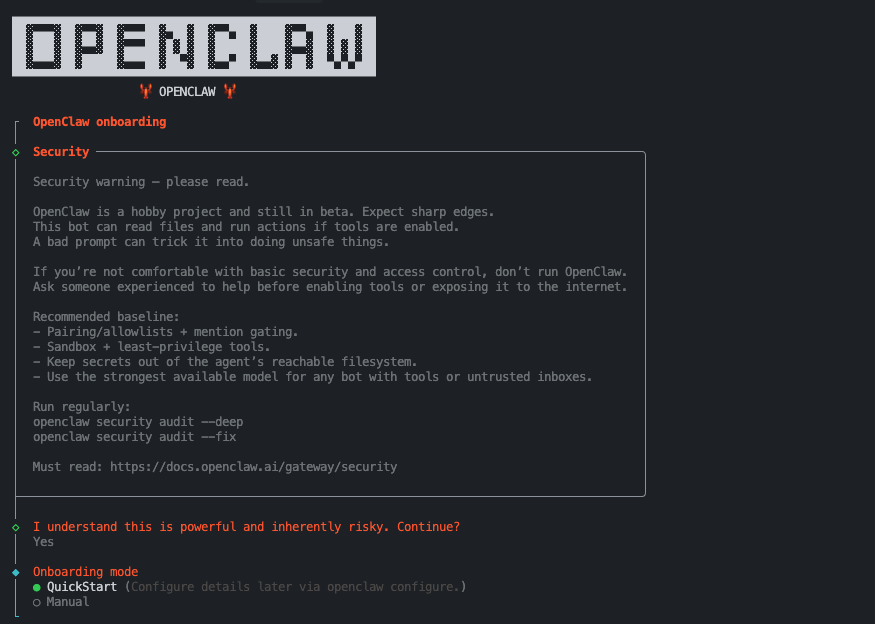 Run the interactive onboarding and select Together AI as your provider:
```bash theme={null}
openclaw onboard --auth-choice together-api-key
```
This will prompt you for your `TOGETHER_API_KEY` and store it securely for the Gateway.
Run the interactive onboarding and select Together AI as your provider:
```bash theme={null}
openclaw onboard --auth-choice together-api-key
```
This will prompt you for your `TOGETHER_API_KEY` and store it securely for the Gateway.
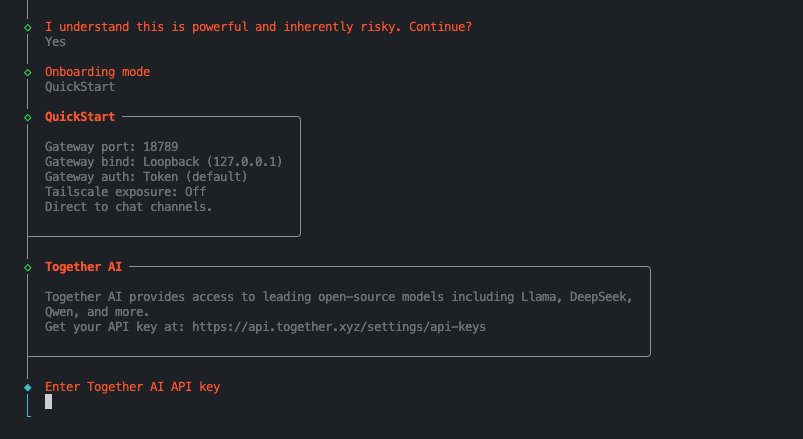 ### Step 2: Set your default model
Using the onboard command and "QuickStart" mode you will get the default model selected by default as Kimi K2.5.
Otherwise you can also change this within your OpenClaw config, setting your default model. Remember to prefix the model name with "together/":
```json5 theme={null}
{
agents: {
defaults: {
model: { primary: "together/moonshotai/Kimi-K2.5" },
},
},
}
```
### Step 3: Launch and chat
Start the Gateway and begin chatting — via the web UI, CLI, Telegram, or WhatsApp:
```bash theme={null}
openclaw gateway run
```
That's it. OpenClaw is now powered by open-source models on Together AI.
## Environment note
If the Gateway runs as a daemon (launchd / systemd), make sure `TOGETHER_API_KEY` is available to that process — for example, in `~/.openclaw/.env` or via `env.shellEnv`.
## Why Together AI + OpenClaw?
Together AI gives you access to the best open-source models with high throughput and low latency. For token-hungry agentic workflows like OpenClaw, this translates to massive savings without sacrificing quality:
* **Kimi K2.5** — 256K context, state-of-the-art reasoning model
* **DeepSeek V3.1 / R1** — top-tier coding and reasoning model
* **GLM 4.7** — strong & fast all-rounder model
All models are OpenAI API compatible, so OpenClaw works with them out of the box.
## Use cases
OpenClaw can help with both personal and work tasks — from automating daily workflows to powering complex business processes. Check out the [OpenClaw Showcase](https://openclaw.ai/showcase) for real-world examples and inspiration on how others are using OpenClaw for personal productivity and professional work.
## The bottom line
You don't have to choose between performance, quality, and cost. Together AI gives you access to the smartest open-source models, and OpenClaw turns them into a full-featured agent that lives on your machine. Pair them together and you get frontier-level capability at open-source prices.
### Step 2: Set your default model
Using the onboard command and "QuickStart" mode you will get the default model selected by default as Kimi K2.5.
Otherwise you can also change this within your OpenClaw config, setting your default model. Remember to prefix the model name with "together/":
```json5 theme={null}
{
agents: {
defaults: {
model: { primary: "together/moonshotai/Kimi-K2.5" },
},
},
}
```
### Step 3: Launch and chat
Start the Gateway and begin chatting — via the web UI, CLI, Telegram, or WhatsApp:
```bash theme={null}
openclaw gateway run
```
That's it. OpenClaw is now powered by open-source models on Together AI.
## Environment note
If the Gateway runs as a daemon (launchd / systemd), make sure `TOGETHER_API_KEY` is available to that process — for example, in `~/.openclaw/.env` or via `env.shellEnv`.
## Why Together AI + OpenClaw?
Together AI gives you access to the best open-source models with high throughput and low latency. For token-hungry agentic workflows like OpenClaw, this translates to massive savings without sacrificing quality:
* **Kimi K2.5** — 256K context, state-of-the-art reasoning model
* **DeepSeek V3.1 / R1** — top-tier coding and reasoning model
* **GLM 4.7** — strong & fast all-rounder model
All models are OpenAI API compatible, so OpenClaw works with them out of the box.
## Use cases
OpenClaw can help with both personal and work tasks — from automating daily workflows to powering complex business processes. Check out the [OpenClaw Showcase](https://openclaw.ai/showcase) for real-world examples and inspiration on how others are using OpenClaw for personal productivity and professional work.
## The bottom line
You don't have to choose between performance, quality, and cost. Together AI gives you access to the smartest open-source models, and OpenClaw turns them into a full-featured agent that lives on your machine. Pair them together and you get frontier-level capability at open-source prices.