> ## Documentation Index
> Fetch the complete documentation index at: https://docs.together.ai/llms.txt
> Use this file to discover all available pages before exploring further.
# Image generation parameters
> Parameter reference for the images API: dimensions, quality control, base64 responses, safety checker, and troubleshooting.
A high-level overview of image generation parameters and when to use them. For parameters tied to reference images, keyframes, or LoRAs, see [Capability-specific parameters](#capability-specific-parameters) below.
For the complete schema, including every supported field along with its types and ranges, see the [image generation API reference](/reference/post-images-generations).
**Available parameters vary by model.** FLUX Schnell and the Kontext family (Pro, Max, Dev) use `aspect_ratio` to set the output size, while FLUX.1 Pro, FLUX 1.1 Pro, and FLUX.1 Dev use `width` and `height`. The Kling video model requires `frame_images` instead of `prompt`.
## Quick reference
Match the problem you're solving to the parameter most likely to help.
* **Image doesn't match the prompt:** Make the prompt more specific, add a `negative_prompt` for what to exclude, or raise `guidance_scale` toward `8`-`10`.
* **Poor image quality:** Raise `steps` to `30`-`40`, add quality modifiers to the prompt ("highly detailed", "8k", "professional"), or use a `negative_prompt` like "blurry, low quality, distorted".
* **Generation is too slow:** Lower `steps` (FLUX Schnell looks good at `4`) or generate fewer images per call by lowering `n`.
* **Need the same image every run (evals, regression tests):** Set `seed` to a fixed integer.
* **Need multiple variations of one prompt:** Increase `n` to up to `4`, or sweep different `seed` values.
* **Wrong dimensions or aspect ratio:** Set `width` and `height` explicitly. Keep dimensions to multiples of `8`.
* **Want the image bytes inline (no URL fetch):** Set `response_format` to `"base64"`.
* **Editing or composing existing images:** Pass `image_url` or `reference_images`. See [Reference images](/docs/inference/images/reference-images).
## Prompting
### prompt
A description of the image to generate. Required for every model except Kling. Maximum length varies by model.
Be specific about subject, setting, lighting, composition, and style. Vague prompts produce generic results. For higher fidelity, add style references such as "National Geographic style" or "studio photograph".
Typical default: required.
### negative\_prompt
A description of what to avoid in the generated image. Useful for excluding common artifacts.
Set it when the model keeps producing unwanted elements (extra fingers, watermarks, oversaturation). A reasonable starting point for quality issues: `"blurry, low quality, distorted, pixelated"`.
Typical default: unset.
## Output dimensions
### width and height
The size of the generated image in pixels. Available combinations differ by model. Both values should be multiples of `8`.
Common ratios:
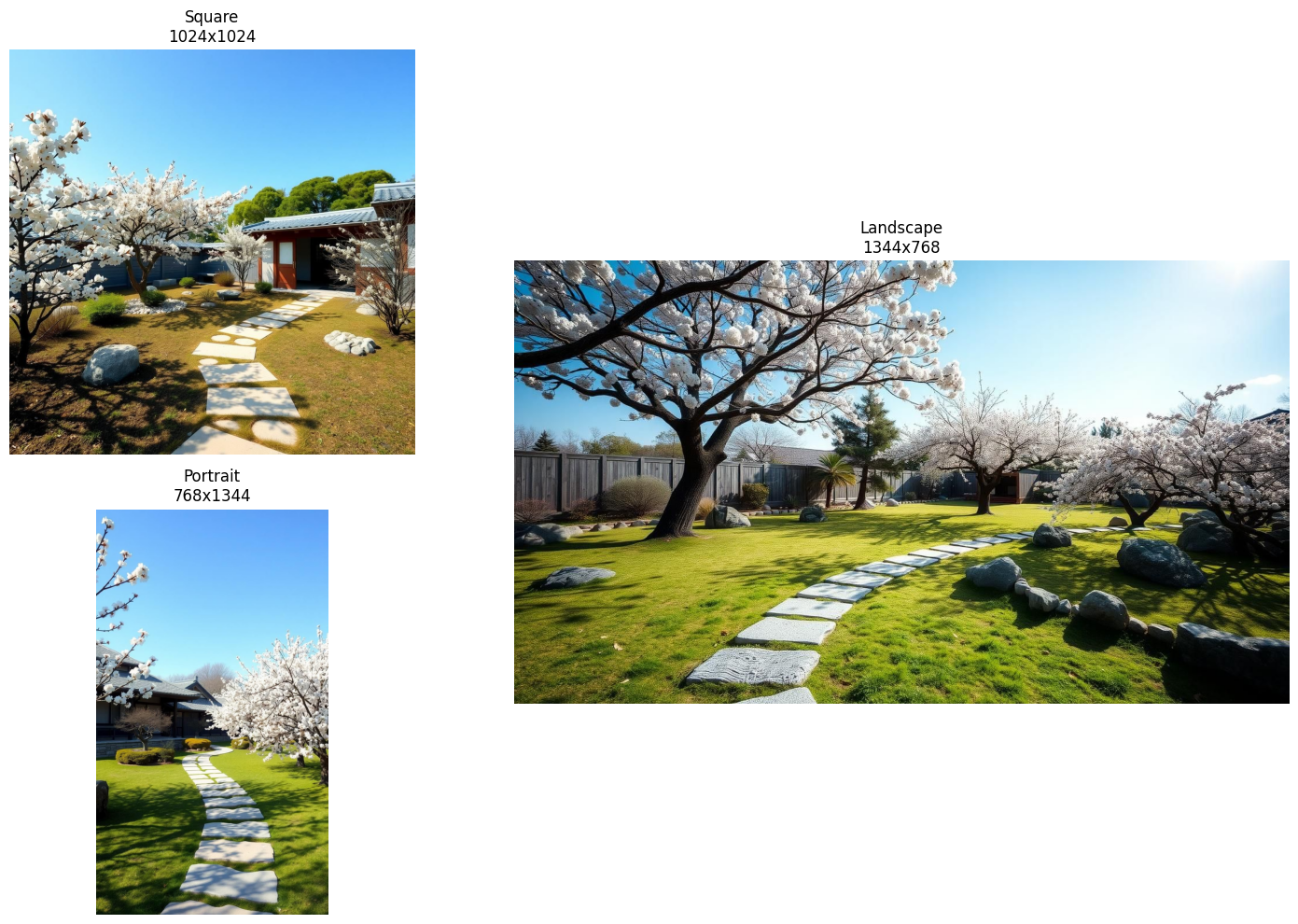
* Square (`1024` x `1024`): social media posts, profile pictures.
* Landscape (`1344` x `768`): banners, desktop wallpapers.
* Portrait (`768` x `1344`): mobile wallpapers, posters.
Typical default: `1024` x `1024`.
```python Python theme={null}
from together import Together
client = Together()
# Square: social media posts, profile pictures
response_square = client.images.generate(
prompt="A peaceful zen garden with a stone path",
model="black-forest-labs/FLUX.1-schnell",
width=1024,
height=1024,
steps=4,
)
# Landscape: banners, desktop wallpapers
response_landscape = client.images.generate(
prompt="A peaceful zen garden with a stone path",
model="black-forest-labs/FLUX.1-schnell",
width=1344,
height=768,
steps=4,
)
# Portrait: mobile wallpapers, posters
response_portrait = client.images.generate(
prompt="A peaceful zen garden with a stone path",
model="black-forest-labs/FLUX.1-schnell",
width=768,
height=1344,
steps=4,
)
```
```typescript TypeScript theme={null}
// Square: social media posts, profile pictures
const response_square = await together.images.generate({
prompt: "A peaceful zen garden with a stone path",
model: "black-forest-labs/FLUX.1-schnell",
width: 1024,
height: 1024,
steps: 4,
});
// Landscape: banners, desktop wallpapers
const response_landscape = await together.images.generate({
prompt: "A peaceful zen garden with a stone path",
model: "black-forest-labs/FLUX.1-schnell",
width: 1344,
height: 768,
steps: 4,
});
// Portrait: mobile wallpapers, posters
const response_portrait = await together.images.generate({
prompt: "A peaceful zen garden with a stone path",
model: "black-forest-labs/FLUX.1-schnell",
width: 768,
height: 1344,
steps: 4,
});
```
```bash cURL theme={null}
# Square: social media posts, profile pictures
curl -X POST "https://api.together.ai/v1/images/generations" \
-H "Authorization: Bearer $TOGETHER_API_KEY" \
-H "Content-Type: application/json" \
-d '{
"model": "black-forest-labs/FLUX.1-schnell",
"prompt": "A peaceful zen garden with a stone path",
"width": 1024,
"height": 1024,
"steps": 4
}'
# Landscape: banners, desktop wallpapers
curl -X POST "https://api.together.ai/v1/images/generations" \
-H "Authorization: Bearer $TOGETHER_API_KEY" \
-H "Content-Type: application/json" \
-d '{
"model": "black-forest-labs/FLUX.1-schnell",
"prompt": "A peaceful zen garden with a stone path",
"width": 1344,
"height": 768,
"steps": 4
}'
# Portrait: mobile wallpapers, posters
curl -X POST "https://api.together.ai/v1/images/generations" \
-H "Authorization: Bearer $TOGETHER_API_KEY" \
-H "Content-Type: application/json" \
-d '{
"model": "black-forest-labs/FLUX.1-schnell",
"prompt": "A peaceful zen garden with a stone path",
"width": 768,
"height": 1344,
"steps": 4
}'
```
 ## Quality and speed
### steps
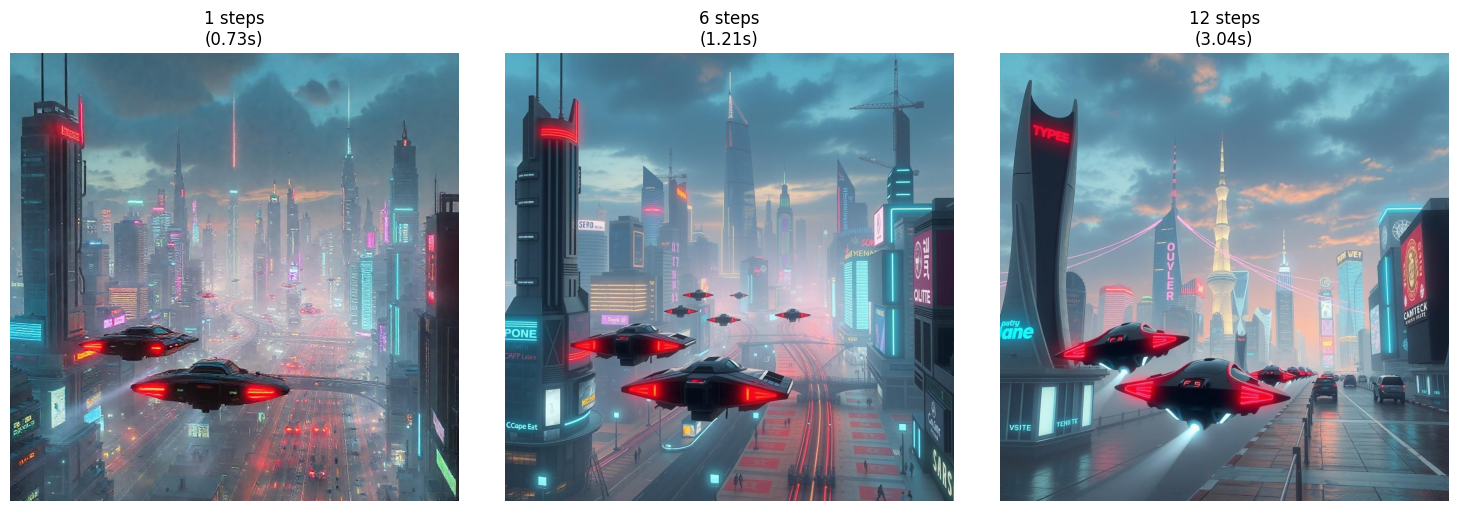
The number of diffusion steps. More steps generally improve quality at a near-linear cost in latency. Past a model-specific point, additional steps stop helping.
Lower it (`1`-`4`) for fast iteration on FLUX Schnell. Raise it (`30`-`40`) for production-quality output on Pro and Dev models.
Typical default: model-specific (often `20`).
```python Python theme={null}
import time
from together import Together
client = Together()
prompt = "A majestic mountain landscape"
step_counts = [1, 6, 12]
for steps in step_counts:
start = time.time()
response = client.images.generate(
prompt=prompt,
model="black-forest-labs/FLUX.1-schnell",
steps=steps,
seed=42,
)
elapsed = time.time() - start
print(f"Steps: {steps} - Generated in {elapsed:.2f}s")
```
```typescript TypeScript theme={null}
import Together from "together-ai";
const together = new Together();
const prompt = "A majestic mountain landscape";
const stepCounts = [1, 6, 12];
for (const steps of stepCounts) {
const start = Date.now();
const response = await together.images.generate({
prompt,
model: "black-forest-labs/FLUX.1-schnell",
steps,
seed: 42,
});
const elapsed = (Date.now() - start) / 1000;
console.log(`Steps: ${steps} - Generated in ${elapsed.toFixed(2)}s`);
}
```
```bash cURL theme={null}
curl -X POST "https://api.together.ai/v1/images/generations" \
-H "Authorization: Bearer $TOGETHER_API_KEY" \
-H "Content-Type: application/json" \
-d '{
"model": "black-forest-labs/FLUX.1-schnell",
"prompt": "A majestic mountain landscape",
"steps": 6,
"seed": 42
}'
```
## Quality and speed
### steps
The number of diffusion steps. More steps generally improve quality at a near-linear cost in latency. Past a model-specific point, additional steps stop helping.
Lower it (`1`-`4`) for fast iteration on FLUX Schnell. Raise it (`30`-`40`) for production-quality output on Pro and Dev models.
Typical default: model-specific (often `20`).
```python Python theme={null}
import time
from together import Together
client = Together()
prompt = "A majestic mountain landscape"
step_counts = [1, 6, 12]
for steps in step_counts:
start = time.time()
response = client.images.generate(
prompt=prompt,
model="black-forest-labs/FLUX.1-schnell",
steps=steps,
seed=42,
)
elapsed = time.time() - start
print(f"Steps: {steps} - Generated in {elapsed:.2f}s")
```
```typescript TypeScript theme={null}
import Together from "together-ai";
const together = new Together();
const prompt = "A majestic mountain landscape";
const stepCounts = [1, 6, 12];
for (const steps of stepCounts) {
const start = Date.now();
const response = await together.images.generate({
prompt,
model: "black-forest-labs/FLUX.1-schnell",
steps,
seed: 42,
});
const elapsed = (Date.now() - start) / 1000;
console.log(`Steps: ${steps} - Generated in ${elapsed.toFixed(2)}s`);
}
```
```bash cURL theme={null}
curl -X POST "https://api.together.ai/v1/images/generations" \
-H "Authorization: Bearer $TOGETHER_API_KEY" \
-H "Content-Type: application/json" \
-d '{
"model": "black-forest-labs/FLUX.1-schnell",
"prompt": "A majestic mountain landscape",
"steps": 6,
"seed": 42
}'
```
 ### guidance\_scale
Controls how closely the image follows the prompt. Higher values make the output more faithful to the prompt but can introduce artifacts and oversaturation. Lower values give the model more creative freedom.
Raise it (`8`-`10`) when the model ignores parts of the prompt. Lower it (`1`-`5`) when output looks oversaturated, posterized, or "burned".
Typical default: `3.5`.
## Reproducibility and variations
### seed
An integer that fixes the random initialization. With the same `seed`, prompt, model, and parameters, the model returns the same image. Useful for reproducibility, regression tests, and fair comparisons when tuning other parameters.
Typical default: unset (each call returns a new image).
### n
The number of images to generate per request. Each image appears as a separate entry in `data`. Higher values cost more (you pay for every image generated).
Use it to compare variations of the same prompt in one call. Range: `1` to `4`.
Typical default: `1`.
## Output format
### response\_format
Controls how the image is returned. `"url"` (default) returns a hosted URL you can fetch later. `"base64"` embeds the image bytes directly in the response under `b64_json`, so you don't need a second HTTP request.
Use `"base64"` when you're saving the image to a file, piping it elsewhere, or want to avoid an extra round trip. See [Save to disk](/docs/inference/images/overview#save-to-disk) on the overview page for a complete example.
Typical default: `"url"`.
```python Python theme={null}
import base64
from together import Together
client = Together()
response = client.images.generate(
model="black-forest-labs/FLUX.1-schnell",
prompt="a cat in outer space",
steps=4,
response_format="base64",
)
image_data = base64.b64decode(response.data[0].b64_json)
with open("output.png", "wb") as f:
f.write(image_data)
print("Saved to output.png")
```
```typescript TypeScript theme={null}
import { writeFileSync } from "fs";
import Together from "together-ai";
const client = new Together();
const response = await client.images.generate({
model: "black-forest-labs/FLUX.1-schnell",
prompt: "A cat in outer space",
steps: 4,
response_format: "base64",
});
const imageData = Buffer.from(response.data[0].b64_json!, "base64");
writeFileSync("output.png", imageData);
console.log("Saved to output.png");
```
```bash cURL theme={null}
curl -X POST "https://api.together.ai/v1/images/generations" \
-H "Authorization: Bearer $TOGETHER_API_KEY" \
-H "Content-Type: application/json" \
-d '{
"model": "black-forest-labs/FLUX.1-schnell",
"prompt": "A cat in outer space",
"steps": 4,
"response_format": "base64"
}'
```
When `response_format` is `"base64"`, the response includes a `b64_json` field with the image encoded as a base64 string:
```json theme={null}
{
"id": "oNM6X9q-2kFHot-9aa9c4c93aa269a2-PDX",
"data": [
{
"b64_json": "/9j/4AAQSkZJRgABAQA",
"index": 0,
"type": null,
"timings": {
"inference": 0.7992482790723443
}
}
],
"model": "black-forest-labs/FLUX.1-schnell",
"object": "list"
}
```
### output\_format
The encoded image format: `"jpeg"` or `"png"`. PNG preserves transparency and crisp edges but produces larger files. JPEG is smaller but lossy.
Typical default: `"jpeg"`.
## Safety
### disable\_safety\_checker
Disables the built-in NSFW safety checker. By default, requests that trigger the checker return `422 Unprocessable Entity`. The checker runs on every model except FLUX Schnell Free and FLUX Pro.
Typical default: `false`.
```python Python theme={null}
from together import Together
client = Together()
response = client.images.generate(
prompt="a flying cat",
model="black-forest-labs/FLUX.1-schnell",
steps=4,
disable_safety_checker=True,
)
print(response.data[0].url)
```
```typescript TypeScript theme={null}
import Together from "together-ai";
const together = new Together();
async function main() {
const response = await together.images.generate({
prompt: "a flying cat",
model: "black-forest-labs/FLUX.1-schnell",
steps: 4,
disable_safety_checker: true,
});
console.log(response.data[0].url);
}
main();
```
```bash cURL theme={null}
curl -X POST "https://api.together.ai/v1/images/generations" \
-H "Authorization: Bearer $TOGETHER_API_KEY" \
-H "Content-Type: application/json" \
-d '{
"model": "black-forest-labs/FLUX.1-schnell",
"prompt": "a flying cat",
"steps": 4,
"disable_safety_checker": true
}'
```
## Model compatibility
Parameter support varies by model family. Use this table to confirm which parameters apply before coding.
| Parameter | FLUX.1 Schnell | FLUX.1.1 Pro | FLUX.2 Pro | FLUX.2 Dev | FLUX.2 Flex | Kontext Pro/Max |
| ------------------------ | :------------: | :----------: | :--------: | :--------: | :---------: | :-------------: |
| `prompt` | Required | Required | Required | Required | Required | Required |
| `width` / `height` | ✓ | ✓ | ✓ | ✓ | ✓ | — |
| `aspect_ratio` | — | — | — | — | — | ✓ |
| `steps` | ✓ (default 4) | — | — | ✓ | ✓ | ✓ (default 28) |
| `guidance_scale` | — | — | — | ✓ | ✓ | — |
| `n` | ✓ | ✓ | ✓ | ✓ | ✓ | ✓ |
| `seed` | ✓ | ✓ | ✓ | ✓ | ✓ | ✓ |
| `negative_prompt` | ✓ | ✓ | — | — | — | — |
| `prompt_upsampling` | — | — | ✓ | — | — | — |
| `response_format` | ✓ | ✓ | ✓ | ✓ | ✓ | ✓ |
| `output_format` | ✓ | ✓ | ✓ | ✓ | ✓ | ✓ |
| `disable_safety_checker` | ✓ | ✓ | ✓ | ✓ | ✓ | ✓ |
For Google Imagen and Gemini models, see the [API reference](/reference/post-images-generations) for supported parameters.
## Capability-specific parameters
These parameters belong to features with their own dedicated pages or schemas. Each link below covers supported models and end-to-end examples.
* **`image_url` and `reference_images`:** Edit or compose an existing image. Used by the Kontext family, FLUX.2, and Google models. See [Reference images](/docs/inference/images/reference-images).
* **`frame_images`:** Required keyframes for video generation with the Kling model.
* **`image_loras`:** Apply LoRA adapters to influence style. See the [API reference](/reference/post-images-generations) for the full object schema.
## See also
* [Image generation overview](/docs/inference/images/overview): generate images from text prompts.
* [Reference images](/docs/inference/images/reference-images): edit or transform an existing image.
### guidance\_scale
Controls how closely the image follows the prompt. Higher values make the output more faithful to the prompt but can introduce artifacts and oversaturation. Lower values give the model more creative freedom.
Raise it (`8`-`10`) when the model ignores parts of the prompt. Lower it (`1`-`5`) when output looks oversaturated, posterized, or "burned".
Typical default: `3.5`.
## Reproducibility and variations
### seed
An integer that fixes the random initialization. With the same `seed`, prompt, model, and parameters, the model returns the same image. Useful for reproducibility, regression tests, and fair comparisons when tuning other parameters.
Typical default: unset (each call returns a new image).
### n
The number of images to generate per request. Each image appears as a separate entry in `data`. Higher values cost more (you pay for every image generated).
Use it to compare variations of the same prompt in one call. Range: `1` to `4`.
Typical default: `1`.
## Output format
### response\_format
Controls how the image is returned. `"url"` (default) returns a hosted URL you can fetch later. `"base64"` embeds the image bytes directly in the response under `b64_json`, so you don't need a second HTTP request.
Use `"base64"` when you're saving the image to a file, piping it elsewhere, or want to avoid an extra round trip. See [Save to disk](/docs/inference/images/overview#save-to-disk) on the overview page for a complete example.
Typical default: `"url"`.
```python Python theme={null}
import base64
from together import Together
client = Together()
response = client.images.generate(
model="black-forest-labs/FLUX.1-schnell",
prompt="a cat in outer space",
steps=4,
response_format="base64",
)
image_data = base64.b64decode(response.data[0].b64_json)
with open("output.png", "wb") as f:
f.write(image_data)
print("Saved to output.png")
```
```typescript TypeScript theme={null}
import { writeFileSync } from "fs";
import Together from "together-ai";
const client = new Together();
const response = await client.images.generate({
model: "black-forest-labs/FLUX.1-schnell",
prompt: "A cat in outer space",
steps: 4,
response_format: "base64",
});
const imageData = Buffer.from(response.data[0].b64_json!, "base64");
writeFileSync("output.png", imageData);
console.log("Saved to output.png");
```
```bash cURL theme={null}
curl -X POST "https://api.together.ai/v1/images/generations" \
-H "Authorization: Bearer $TOGETHER_API_KEY" \
-H "Content-Type: application/json" \
-d '{
"model": "black-forest-labs/FLUX.1-schnell",
"prompt": "A cat in outer space",
"steps": 4,
"response_format": "base64"
}'
```
When `response_format` is `"base64"`, the response includes a `b64_json` field with the image encoded as a base64 string:
```json theme={null}
{
"id": "oNM6X9q-2kFHot-9aa9c4c93aa269a2-PDX",
"data": [
{
"b64_json": "/9j/4AAQSkZJRgABAQA",
"index": 0,
"type": null,
"timings": {
"inference": 0.7992482790723443
}
}
],
"model": "black-forest-labs/FLUX.1-schnell",
"object": "list"
}
```
### output\_format
The encoded image format: `"jpeg"` or `"png"`. PNG preserves transparency and crisp edges but produces larger files. JPEG is smaller but lossy.
Typical default: `"jpeg"`.
## Safety
### disable\_safety\_checker
Disables the built-in NSFW safety checker. By default, requests that trigger the checker return `422 Unprocessable Entity`. The checker runs on every model except FLUX Schnell Free and FLUX Pro.
Typical default: `false`.
```python Python theme={null}
from together import Together
client = Together()
response = client.images.generate(
prompt="a flying cat",
model="black-forest-labs/FLUX.1-schnell",
steps=4,
disable_safety_checker=True,
)
print(response.data[0].url)
```
```typescript TypeScript theme={null}
import Together from "together-ai";
const together = new Together();
async function main() {
const response = await together.images.generate({
prompt: "a flying cat",
model: "black-forest-labs/FLUX.1-schnell",
steps: 4,
disable_safety_checker: true,
});
console.log(response.data[0].url);
}
main();
```
```bash cURL theme={null}
curl -X POST "https://api.together.ai/v1/images/generations" \
-H "Authorization: Bearer $TOGETHER_API_KEY" \
-H "Content-Type: application/json" \
-d '{
"model": "black-forest-labs/FLUX.1-schnell",
"prompt": "a flying cat",
"steps": 4,
"disable_safety_checker": true
}'
```
## Model compatibility
Parameter support varies by model family. Use this table to confirm which parameters apply before coding.
| Parameter | FLUX.1 Schnell | FLUX.1.1 Pro | FLUX.2 Pro | FLUX.2 Dev | FLUX.2 Flex | Kontext Pro/Max |
| ------------------------ | :------------: | :----------: | :--------: | :--------: | :---------: | :-------------: |
| `prompt` | Required | Required | Required | Required | Required | Required |
| `width` / `height` | ✓ | ✓ | ✓ | ✓ | ✓ | — |
| `aspect_ratio` | — | — | — | — | — | ✓ |
| `steps` | ✓ (default 4) | — | — | ✓ | ✓ | ✓ (default 28) |
| `guidance_scale` | — | — | — | ✓ | ✓ | — |
| `n` | ✓ | ✓ | ✓ | ✓ | ✓ | ✓ |
| `seed` | ✓ | ✓ | ✓ | ✓ | ✓ | ✓ |
| `negative_prompt` | ✓ | ✓ | — | — | — | — |
| `prompt_upsampling` | — | — | ✓ | — | — | — |
| `response_format` | ✓ | ✓ | ✓ | ✓ | ✓ | ✓ |
| `output_format` | ✓ | ✓ | ✓ | ✓ | ✓ | ✓ |
| `disable_safety_checker` | ✓ | ✓ | ✓ | ✓ | ✓ | ✓ |
For Google Imagen and Gemini models, see the [API reference](/reference/post-images-generations) for supported parameters.
## Capability-specific parameters
These parameters belong to features with their own dedicated pages or schemas. Each link below covers supported models and end-to-end examples.
* **`image_url` and `reference_images`:** Edit or compose an existing image. Used by the Kontext family, FLUX.2, and Google models. See [Reference images](/docs/inference/images/reference-images).
* **`frame_images`:** Required keyframes for video generation with the Kling model.
* **`image_loras`:** Apply LoRA adapters to influence style. See the [API reference](/reference/post-images-generations) for the full object schema.
## See also
* [Image generation overview](/docs/inference/images/overview): generate images from text prompts.
* [Reference images](/docs/inference/images/reference-images): edit or transform an existing image.