> ## Documentation Index
> Fetch the complete documentation index at: https://docs.together.ai/llms.txt
> Use this file to discover all available pages before exploring further.
# Image-to-image generation
> Edit or transform an existing image by passing image_url (Kontext) or reference_images (FLUX.2 and Google models).
Some image models support editing or transforming an existing image. The parameter you use depends on the model:
| Parameter | Type | Models | Description |
| ------------------ | ---------- | ---------------------------------------------------------- | ------------------------------------------ |
| `image_url` | `string` | FLUX.1 Kontext (pro/max), FLUX.2 (pro/flex) | A single image URL to edit or transform |
| `reference_images` | `string[]` | FLUX.2 (pro/dev/flex), Gemini 3 Pro Image, Flash Image 2.5 | An array of image URLs to guide generation |
`reference_images` is recommended for FLUX.2 and Google models because it supports multiple input images. FLUX.2 \[pro] and \[flex] also accept `image_url` for single-image edits, but FLUX.2 \[dev], Gemini 3 Pro Image, and Flash Image 2.5 only support `reference_images`.
## Use `image_url` (Kontext models)
```python Python theme={null}
from together import Together
client = Together()
response = client.images.generate(
model="black-forest-labs/FLUX.1-kontext-pro",
width=1024,
height=768,
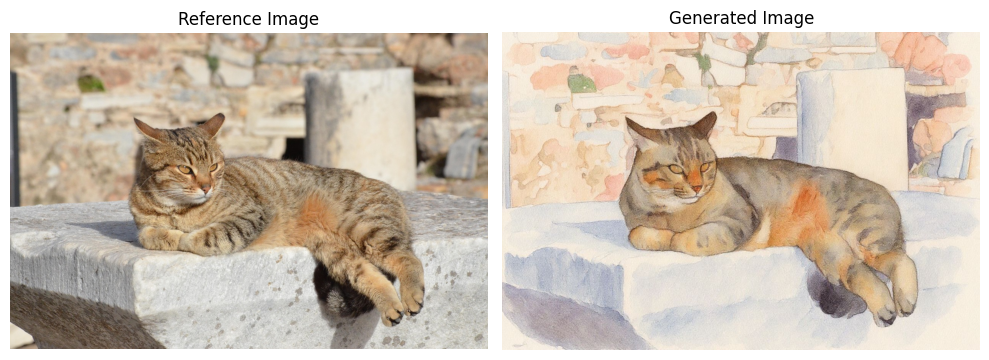
prompt="Transform this into a watercolor painting",
image_url="https://cdn.pixabay.com/photo/2020/05/20/08/27/cat-5195431_1280.jpg",
)
```
```typescript TypeScript theme={null}
import Together from "together-ai";
const together = new Together();
const response = await together.images.generate({
model: "black-forest-labs/FLUX.1-kontext-pro",
width: 1024,
height: 768,
prompt: "Transform this into a watercolor painting",
image_url:
"https://cdn.pixabay.com/photo/2020/05/20/08/27/cat-5195431_1280.jpg",
});
```
```bash cURL theme={null}
curl -X POST "https://api.together.ai/v1/images/generations" \
-H "Authorization: Bearer $TOGETHER_API_KEY" \
-H "Content-Type: application/json" \
-d '{
"model": "black-forest-labs/FLUX.1-kontext-pro",
"width": 1024,
"height": 768,
"prompt": "Transform this into a watercolor painting",
"image_url": "https://cdn.pixabay.com/photo/2020/05/20/08/27/cat-5195431_1280.jpg"
}'
```
Example output:
 ## Use `reference_images` (FLUX.2 and Google models)
```python Python theme={null}
from together import Together
client = Together()
response = client.images.generate(
model="black-forest-labs/FLUX.2-pro",
width=1024,
height=768,
prompt="Replace the color of the car to blue",
reference_images=[
"https://images.pexels.com/photos/3729464/pexels-photo-3729464.jpeg"
],
)
```
```typescript TypeScript theme={null}
import Together from "together-ai";
const together = new Together();
const response = await together.images.generate({
model: "black-forest-labs/FLUX.2-pro",
width: 1024,
height: 768,
prompt: "Replace the color of the car to blue",
reference_images: [
"https://images.pexels.com/photos/3729464/pexels-photo-3729464.jpeg",
],
});
```
```bash cURL theme={null}
curl -X POST "https://api.together.ai/v1/images/generations" \
-H "Authorization: Bearer $TOGETHER_API_KEY" \
-H "Content-Type: application/json" \
-d '{
"model": "black-forest-labs/FLUX.2-pro",
"width": 1024,
"height": 768,
"prompt": "Replace the color of the car to blue",
"reference_images": ["https://images.pexels.com/photos/3729464/pexels-photo-3729464.jpeg"]
}'
```
For more details on multi-image editing, image indexing, and color control with FLUX.2, see the [FLUX.2 Quickstart](/docs/quickstart-flux#image-to-image-with-reference-images).
## Use `reference_images` (FLUX.2 and Google models)
```python Python theme={null}
from together import Together
client = Together()
response = client.images.generate(
model="black-forest-labs/FLUX.2-pro",
width=1024,
height=768,
prompt="Replace the color of the car to blue",
reference_images=[
"https://images.pexels.com/photos/3729464/pexels-photo-3729464.jpeg"
],
)
```
```typescript TypeScript theme={null}
import Together from "together-ai";
const together = new Together();
const response = await together.images.generate({
model: "black-forest-labs/FLUX.2-pro",
width: 1024,
height: 768,
prompt: "Replace the color of the car to blue",
reference_images: [
"https://images.pexels.com/photos/3729464/pexels-photo-3729464.jpeg",
],
});
```
```bash cURL theme={null}
curl -X POST "https://api.together.ai/v1/images/generations" \
-H "Authorization: Bearer $TOGETHER_API_KEY" \
-H "Content-Type: application/json" \
-d '{
"model": "black-forest-labs/FLUX.2-pro",
"width": 1024,
"height": 768,
"prompt": "Replace the color of the car to blue",
"reference_images": ["https://images.pexels.com/photos/3729464/pexels-photo-3729464.jpeg"]
}'
```
For more details on multi-image editing, image indexing, and color control with FLUX.2, see the [FLUX.2 Quickstart](/docs/quickstart-flux#image-to-image-with-reference-images).