> ## Documentation Index
> Fetch the complete documentation index at: https://docs.together.ai/llms.txt
> Use this file to discover all available pages before exploring further.
# Manage checkpoints
> Save inference and training checkpoints, download trained weights, resume or fork a run, and find a session's checkpoints after it ends.
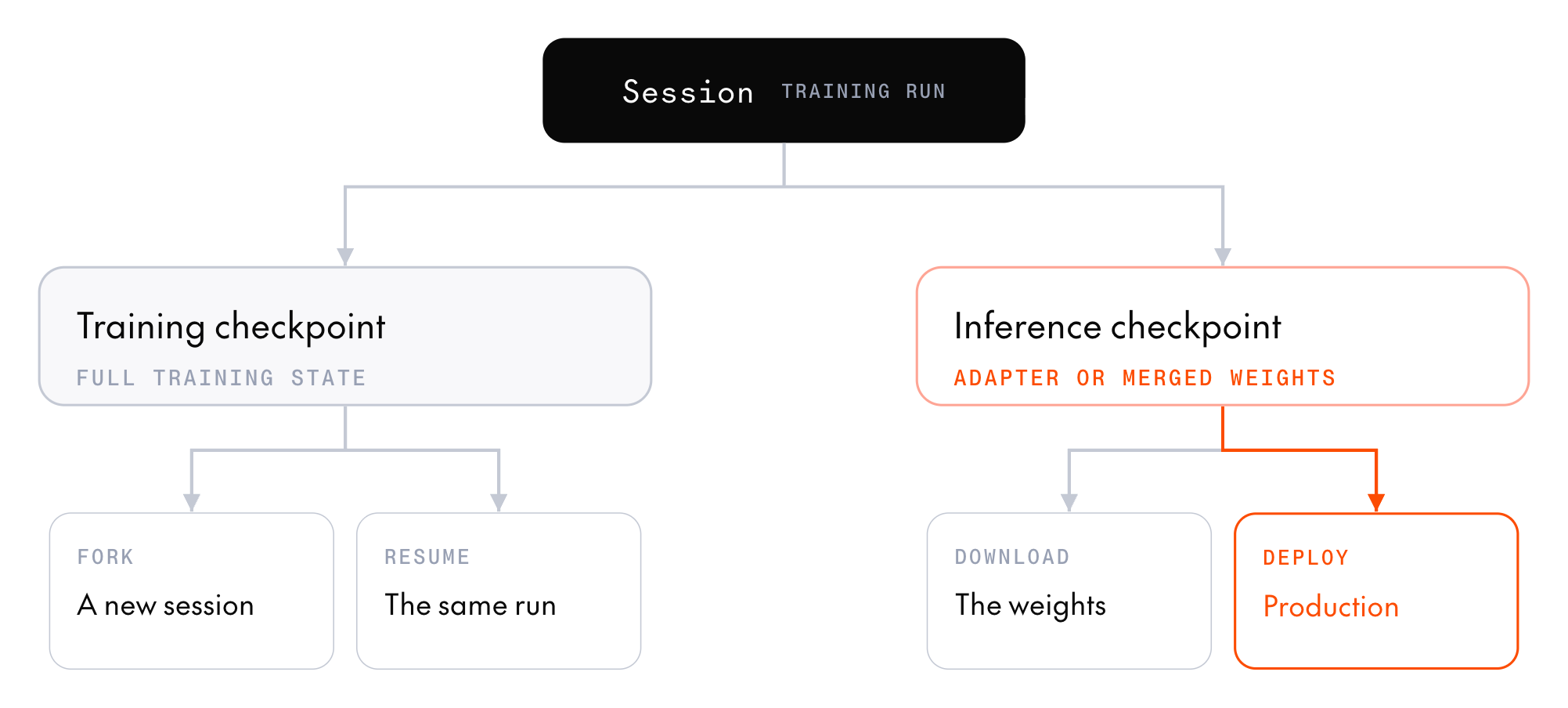 A training session produces two kinds of checkpoints:
* An **inference checkpoint** snapshots the model weights and registers them in the model registry, ready to download or [deploy](/docs/post-training/deployment).
* A **training checkpoint** saves the full training state so a later session can resume the run.
## Inference checkpoints
Cookbook recipes save an inference checkpoint at the final step, and every `inference_checkpoint_interval` steps if you set it. To save one from the SDK, call `create_inference_checkpoint`:
```python theme={null}
checkpoint = session.create_inference_checkpoint()
print(checkpoint.id, checkpoint.step)
```
The call returns the new `InferenceCheckpoint`, which the session also lists in `inference_checkpoints`. It has an `id`, the `step` it was taken at, and a `registration` that holds the model registry IDs you deploy with.
A checkpoint from a low-rank adapter (LoRA) session registers the adapter (`registration.adapter`). A checkpoint from a full-weight session, or from a LoRA session on custom base weights, registers a merged full model (`registration.model`) instead. Each has a model registry `id` (`ml_...`) and `revision_id` (`rv_...`). `registration` is absent when the checkpoint wasn't uploaded to the model registry, which is always the case for MiniMax-M3: download its checkpoints instead.
To read the IDs and deploy them, see [Deploy a checkpoint](/docs/post-training/deployment).
### Download the weights
To download an inference checkpoint's files to a local directory, call `download_checkpoint` with the checkpoint's `id`. The `variant` argument controls which files you get:
* `CHECKPOINT_VARIANT_MERGED` (the default): The base model with the adapter merged in, ready for any inference framework. Available for full-weight sessions and for LoRA sessions on Qwen models.
* `CHECKPOINT_VARIANT_ADAPTER`: The adapter weights alone. Much smaller, but you need the base model alongside it for inference. GLM, Kimi-K3, and MiniMax-M3 inference checkpoints are adapter-only, so pass this variant for them.
The adapter files use SGLang's multi-LoRA layout, not the PEFT layout, so PEFT and Hugging Face Transformers can't load them. To run a trained model in another inference framework, download `CHECKPOINT_VARIANT_MERGED`. To serve a trained model on Together AI instead, [deploy its inference checkpoint](/docs/post-training/deployment).
```python theme={null}
from pathlib import Path
from together import Together
from together.post_training import download_checkpoint
client = Together()
paths = download_checkpoint(
client,
"",
variant="CHECKPOINT_VARIANT_MERGED",
output_dir=Path("./trained_model"),
)
for path in paths:
print(f" {path.name} ({path.stat().st_size:,} bytes)")
```
You should see the standard Hugging Face layout:
```text theme={null}
chat_template.jinja (8,952 bytes)
config.json (3,636 bytes)
...
model-00001-of-00018.safetensors (3,966,730,520 bytes)
model-00002-of-00018.safetensors (3,043,080,296 bytes)
...
tokenizer.json (12,809,320 bytes)
...
```
Only inference checkpoints can be downloaded. Training checkpoints can only be resumed.
## Training checkpoints
A training checkpoint saves the trained weights (the adapter, for a LoRA session), the optimizer moments, and the step counter.
To have a cookbook recipe save training checkpoints, set `training_checkpoint_interval` on its config. The cookbook writes a checkpoint only when the interval fires, so to get one at the end of the run, set the interval equal to the step count. The cookbook records the checkpoint IDs in `runs//checkpoints.jsonl`.
To save a training checkpoint from the SDK, call `create_training_checkpoint`:
```python theme={null}
checkpoint = session.create_training_checkpoint()
print(checkpoint.id, checkpoint.step)
```
### Resume or fork a run
To start a session from a training checkpoint, pass its ID as `resume_from_checkpoint_id` to `resources.create_session` or `SessionClient.create`. Both methods also take `load_optimizer`, which decides whether the new session continues the original run or starts a new one. The cookbook exposes both fields on every config.
* **Continue the same run:** Omit `load_optimizer` or pass `True`. The new session restores the adapter, the optimizer state, and the step counter, and training continues where it left off.
* **Start a new run from the weights:** Pass `load_optimizer=False`. The new session loads only the adapter weights, with a fresh optimizer and a step counter at zero. Use this to hand off from [SFT to GRPO](/docs/post-training/sft#chain-sft-and-grpo), or to fork from a known-good state and try different hyperparameters.
`load_optimizer` applies only when you pass a checkpoint ID to `resume_from_checkpoint_id`.
In both cases, pass the same `lora_config` (rank and alpha) the original session used. The session doesn't inherit these values from the checkpoint: if you omit `rank`, `alpha`, or `dropout`, the server applies its defaults. `train_unembed` is the exception. An omitted value keeps the checkpoint's setting, and the server rejects a value that differs from it. The model resource must also use the same base weights as the one that saved the checkpoint. Catalog entries that share weights are interchangeable, so a checkpoint saved on `Qwen/Qwen3.8-27B-single-session` resumes on `Qwen/Qwen3.8-27B`. LoRA sessions resume from training checkpoints only.
This example starts a new run from a checkpoint's weights:
```python theme={null}
from together.post_training import LoraConfig, ModelResourcesClient
with ModelResourcesClient.create(
base_model="Qwen/Qwen3.8-27B",
compute_config={"gpu_type": "B200-SXM"},
) as resources:
with resources.create_session(
resume_from_checkpoint_id="",
load_optimizer=False,
lora_config=LoraConfig(rank=16, alpha=16),
) as session:
... # continue training
```
### Continue a cookbook run
To continue a cookbook GRPO run, rerun its recipe with the original settings, plus the training checkpoint ID and the original run's directory:
```python theme={null}
from post_training_cookbook.grpo.config import GRPOConfig
from post_training_cookbook.grpo.train import train_single_turn
config = GRPOConfig(
model="Qwen/Qwen3.6-35B-A3B",
dataset="gsm8k",
# ...every other setting from the original run...
num_steps=200,
resume_from_checkpoint_id="",
resume_run_dir="runs/",
)
train_single_turn(config)
```
The new session restores the adapter and optimizer from the checkpoint. The cookbook then picks up the learning-rate schedule, validation cadence, and next batch of data where the original run stopped, using the checkpoint's record in the run directory's `checkpoints.jsonl`. That record holds the step the checkpoint was saved at and its position in the dataset. The server's step counter can't replace the record, because a step that collects no usable groups advances the schedule without an optimizer update.
* **Set `num_steps` to the total, not the remainder:** Resuming from a checkpoint saved at step 40 with `num_steps=200` trains 160 more steps. If the checkpoint is at or past `num_steps`, the run trains nothing and provisions nothing.
* **Keep the data and batch shape the same:** The dataset contents and order, `batch_size`, and single-turn or multi-turn mode must match the original run. The cookbook checks them against the record and fails before provisioning if they differ.
* **Keep the learning-rate and checkpoint settings the same:** If they differ from the original run, the schedule won't match.
* **Keep the run directory:** Continuing requires the checkpoint's record. If the record is missing, or the checkpoint was saved before the cookbook started recording data positions, start a new run from the weights with `load_optimizer=False` instead.
* **Use JSON-serializable training inputs:** Any run that saves training checkpoints fingerprints its training data, so multi-turn task targets and metadata must be JSON-serializable.
An async multi-turn run uses the resumed model to regenerate any rollouts that were queued or in flight when the checkpoint was saved. It doesn't reproduce their original sampled tokens.
SFT and DPO configs have no `resume_run_dir`. They restore the adapter and optimizer from the checkpoint, but their learning-rate schedules and data order restart from step zero. DPO also recomputes its reference log-probabilities from the restored weights, so a resumed DPO run uses the checkpoint as its reference, not the original model.
## Find a checkpoint
To look up checkpoints after a session ends, call `client.post_training.checkpoints.list`. It returns the training and inference checkpoints in your project, newest first, and filters by `session_id`, `base_model`, or `type`. Use it to recover a training checkpoint ID when you no longer have the run directory's `checkpoints.jsonl`:
```python theme={null}
from together import Together
client = Together()
page = client.post_training.checkpoints.list(
session_id="",
type="CHECKPOINT_TYPE_TRAINING",
)
for checkpoint in page.data:
print(checkpoint.id, checkpoint.step)
```
Omit `type` to get both kinds, or pass `CHECKPOINT_TYPE_INFERENCE` to get only inference checkpoints.
Each call returns one page of up to `limit` checkpoints, from 1 to 100. When `page.meta.has_more` is true, pass `page.meta.next_cursor` as `after` to get the next page.
For an inference checkpoint, the listed checkpoint holds the model registry IDs in `inference_registration` (`inference_registration.adapter` or `inference_registration.model`). For a training checkpoint, they're in `training_registration`, which holds the training state and can't be deployed. To resume, pass the checkpoint's `id`, not these IDs.
To get one checkpoint's details, call `client.post_training.checkpoints.retrieve("")`. Its `lora_rank` is the rank to pass in `lora_config` when you [resume or fork a run](#resume-or-fork-a-run) from it. `lora_rank` is absent for full-weight sessions.
## Sample a saved checkpoint
A generator samples only from its own session's current weights, so you can't sample a saved checkpoint directly. Use one of these routes instead:
* **Training checkpoint:** Start a session from it with `resume_from_checkpoint_id`, on a resource with at least one generator replica. The service loads the checkpoint's weights onto the generator when the session starts, so `session.generator.sample` returns completions from the saved model before you run any training step.
* **Inference checkpoint:** [Deploy it](/docs/post-training/deployment) to dedicated model inference and send requests to the deployment.
* **Base model:** Call [serverless inference](/docs/serverless/models) if it hosts the model, as in [Check a baseline before training](/docs/post-training/reward-functions#check-a-baseline-before-training).
## Next steps
Serve a trained model on dedicated model inference.
Hand an SFT training checkpoint off to a GRPO run.
Learn the timers and stops that a training checkpoint protects against.
Every field a session takes when it resumes from a checkpoint.
This documentation is built and hosted on [Mintlify](https://mintlify.com), a developer documentation platform.
A training session produces two kinds of checkpoints:
* An **inference checkpoint** snapshots the model weights and registers them in the model registry, ready to download or [deploy](/docs/post-training/deployment).
* A **training checkpoint** saves the full training state so a later session can resume the run.
## Inference checkpoints
Cookbook recipes save an inference checkpoint at the final step, and every `inference_checkpoint_interval` steps if you set it. To save one from the SDK, call `create_inference_checkpoint`:
```python theme={null}
checkpoint = session.create_inference_checkpoint()
print(checkpoint.id, checkpoint.step)
```
The call returns the new `InferenceCheckpoint`, which the session also lists in `inference_checkpoints`. It has an `id`, the `step` it was taken at, and a `registration` that holds the model registry IDs you deploy with.
A checkpoint from a low-rank adapter (LoRA) session registers the adapter (`registration.adapter`). A checkpoint from a full-weight session, or from a LoRA session on custom base weights, registers a merged full model (`registration.model`) instead. Each has a model registry `id` (`ml_...`) and `revision_id` (`rv_...`). `registration` is absent when the checkpoint wasn't uploaded to the model registry, which is always the case for MiniMax-M3: download its checkpoints instead.
To read the IDs and deploy them, see [Deploy a checkpoint](/docs/post-training/deployment).
### Download the weights
To download an inference checkpoint's files to a local directory, call `download_checkpoint` with the checkpoint's `id`. The `variant` argument controls which files you get:
* `CHECKPOINT_VARIANT_MERGED` (the default): The base model with the adapter merged in, ready for any inference framework. Available for full-weight sessions and for LoRA sessions on Qwen models.
* `CHECKPOINT_VARIANT_ADAPTER`: The adapter weights alone. Much smaller, but you need the base model alongside it for inference. GLM, Kimi-K3, and MiniMax-M3 inference checkpoints are adapter-only, so pass this variant for them.
The adapter files use SGLang's multi-LoRA layout, not the PEFT layout, so PEFT and Hugging Face Transformers can't load them. To run a trained model in another inference framework, download `CHECKPOINT_VARIANT_MERGED`. To serve a trained model on Together AI instead, [deploy its inference checkpoint](/docs/post-training/deployment).
```python theme={null}
from pathlib import Path
from together import Together
from together.post_training import download_checkpoint
client = Together()
paths = download_checkpoint(
client,
"",
variant="CHECKPOINT_VARIANT_MERGED",
output_dir=Path("./trained_model"),
)
for path in paths:
print(f" {path.name} ({path.stat().st_size:,} bytes)")
```
You should see the standard Hugging Face layout:
```text theme={null}
chat_template.jinja (8,952 bytes)
config.json (3,636 bytes)
...
model-00001-of-00018.safetensors (3,966,730,520 bytes)
model-00002-of-00018.safetensors (3,043,080,296 bytes)
...
tokenizer.json (12,809,320 bytes)
...
```
Only inference checkpoints can be downloaded. Training checkpoints can only be resumed.
## Training checkpoints
A training checkpoint saves the trained weights (the adapter, for a LoRA session), the optimizer moments, and the step counter.
To have a cookbook recipe save training checkpoints, set `training_checkpoint_interval` on its config. The cookbook writes a checkpoint only when the interval fires, so to get one at the end of the run, set the interval equal to the step count. The cookbook records the checkpoint IDs in `runs//checkpoints.jsonl`.
To save a training checkpoint from the SDK, call `create_training_checkpoint`:
```python theme={null}
checkpoint = session.create_training_checkpoint()
print(checkpoint.id, checkpoint.step)
```
### Resume or fork a run
To start a session from a training checkpoint, pass its ID as `resume_from_checkpoint_id` to `resources.create_session` or `SessionClient.create`. Both methods also take `load_optimizer`, which decides whether the new session continues the original run or starts a new one. The cookbook exposes both fields on every config.
* **Continue the same run:** Omit `load_optimizer` or pass `True`. The new session restores the adapter, the optimizer state, and the step counter, and training continues where it left off.
* **Start a new run from the weights:** Pass `load_optimizer=False`. The new session loads only the adapter weights, with a fresh optimizer and a step counter at zero. Use this to hand off from [SFT to GRPO](/docs/post-training/sft#chain-sft-and-grpo), or to fork from a known-good state and try different hyperparameters.
`load_optimizer` applies only when you pass a checkpoint ID to `resume_from_checkpoint_id`.
In both cases, pass the same `lora_config` (rank and alpha) the original session used. The session doesn't inherit these values from the checkpoint: if you omit `rank`, `alpha`, or `dropout`, the server applies its defaults. `train_unembed` is the exception. An omitted value keeps the checkpoint's setting, and the server rejects a value that differs from it. The model resource must also use the same base weights as the one that saved the checkpoint. Catalog entries that share weights are interchangeable, so a checkpoint saved on `Qwen/Qwen3.8-27B-single-session` resumes on `Qwen/Qwen3.8-27B`. LoRA sessions resume from training checkpoints only.
This example starts a new run from a checkpoint's weights:
```python theme={null}
from together.post_training import LoraConfig, ModelResourcesClient
with ModelResourcesClient.create(
base_model="Qwen/Qwen3.8-27B",
compute_config={"gpu_type": "B200-SXM"},
) as resources:
with resources.create_session(
resume_from_checkpoint_id="",
load_optimizer=False,
lora_config=LoraConfig(rank=16, alpha=16),
) as session:
... # continue training
```
### Continue a cookbook run
To continue a cookbook GRPO run, rerun its recipe with the original settings, plus the training checkpoint ID and the original run's directory:
```python theme={null}
from post_training_cookbook.grpo.config import GRPOConfig
from post_training_cookbook.grpo.train import train_single_turn
config = GRPOConfig(
model="Qwen/Qwen3.6-35B-A3B",
dataset="gsm8k",
# ...every other setting from the original run...
num_steps=200,
resume_from_checkpoint_id="",
resume_run_dir="runs/",
)
train_single_turn(config)
```
The new session restores the adapter and optimizer from the checkpoint. The cookbook then picks up the learning-rate schedule, validation cadence, and next batch of data where the original run stopped, using the checkpoint's record in the run directory's `checkpoints.jsonl`. That record holds the step the checkpoint was saved at and its position in the dataset. The server's step counter can't replace the record, because a step that collects no usable groups advances the schedule without an optimizer update.
* **Set `num_steps` to the total, not the remainder:** Resuming from a checkpoint saved at step 40 with `num_steps=200` trains 160 more steps. If the checkpoint is at or past `num_steps`, the run trains nothing and provisions nothing.
* **Keep the data and batch shape the same:** The dataset contents and order, `batch_size`, and single-turn or multi-turn mode must match the original run. The cookbook checks them against the record and fails before provisioning if they differ.
* **Keep the learning-rate and checkpoint settings the same:** If they differ from the original run, the schedule won't match.
* **Keep the run directory:** Continuing requires the checkpoint's record. If the record is missing, or the checkpoint was saved before the cookbook started recording data positions, start a new run from the weights with `load_optimizer=False` instead.
* **Use JSON-serializable training inputs:** Any run that saves training checkpoints fingerprints its training data, so multi-turn task targets and metadata must be JSON-serializable.
An async multi-turn run uses the resumed model to regenerate any rollouts that were queued or in flight when the checkpoint was saved. It doesn't reproduce their original sampled tokens.
SFT and DPO configs have no `resume_run_dir`. They restore the adapter and optimizer from the checkpoint, but their learning-rate schedules and data order restart from step zero. DPO also recomputes its reference log-probabilities from the restored weights, so a resumed DPO run uses the checkpoint as its reference, not the original model.
## Find a checkpoint
To look up checkpoints after a session ends, call `client.post_training.checkpoints.list`. It returns the training and inference checkpoints in your project, newest first, and filters by `session_id`, `base_model`, or `type`. Use it to recover a training checkpoint ID when you no longer have the run directory's `checkpoints.jsonl`:
```python theme={null}
from together import Together
client = Together()
page = client.post_training.checkpoints.list(
session_id="",
type="CHECKPOINT_TYPE_TRAINING",
)
for checkpoint in page.data:
print(checkpoint.id, checkpoint.step)
```
Omit `type` to get both kinds, or pass `CHECKPOINT_TYPE_INFERENCE` to get only inference checkpoints.
Each call returns one page of up to `limit` checkpoints, from 1 to 100. When `page.meta.has_more` is true, pass `page.meta.next_cursor` as `after` to get the next page.
For an inference checkpoint, the listed checkpoint holds the model registry IDs in `inference_registration` (`inference_registration.adapter` or `inference_registration.model`). For a training checkpoint, they're in `training_registration`, which holds the training state and can't be deployed. To resume, pass the checkpoint's `id`, not these IDs.
To get one checkpoint's details, call `client.post_training.checkpoints.retrieve("")`. Its `lora_rank` is the rank to pass in `lora_config` when you [resume or fork a run](#resume-or-fork-a-run) from it. `lora_rank` is absent for full-weight sessions.
## Sample a saved checkpoint
A generator samples only from its own session's current weights, so you can't sample a saved checkpoint directly. Use one of these routes instead:
* **Training checkpoint:** Start a session from it with `resume_from_checkpoint_id`, on a resource with at least one generator replica. The service loads the checkpoint's weights onto the generator when the session starts, so `session.generator.sample` returns completions from the saved model before you run any training step.
* **Inference checkpoint:** [Deploy it](/docs/post-training/deployment) to dedicated model inference and send requests to the deployment.
* **Base model:** Call [serverless inference](/docs/serverless/models) if it hosts the model, as in [Check a baseline before training](/docs/post-training/reward-functions#check-a-baseline-before-training).
## Next steps
Serve a trained model on dedicated model inference.
Hand an SFT training checkpoint off to a GRPO run.
Learn the timers and stops that a training checkpoint protects against.
Every field a session takes when it resumes from a checkpoint.
This documentation is built and hosted on [Mintlify](https://mintlify.com), a developer documentation platform.