> ## Documentation Index
> Fetch the complete documentation index at: https://docs.together.ai/llms.txt
> Use this file to discover all available pages before exploring further.
# Reinforcement learning with GRPO
> Train a model against a reward function with group relative policy optimization.
Group relative policy optimization (GRPO) trains a model from a reward signal instead of example responses. For each prompt, the model generates a group of completions and a reward function you write scores each one. The update then raises the probability of completions that scored above their group's average and lowers the probability of the rest. Use it when you can measure how good an output is but can't write the ideal output yourself, or when you want to push accuracy on a task past what your demonstrations reach.
The [RL quickstart](/docs/post-training/quickstart-rl) runs a GRPO recipe end to end. This page covers the mechanics behind it, the settings that change its behavior, how to write your own loop, async training, and what to do when a run misbehaves.
## Requirements
* A model with generator support. GRPO samples completions as it trains, so the model resource needs `num_generator_replicas` of 1 or more. Models marked trainer-only on [Supported models](/docs/post-training/supported-models) can't run GRPO.
* A dataset and a reward function. The cookbook ships [four datasets with rewards](/docs/post-training/reward-functions#built-in-datasets). To bring your own, see [Reward functions](/docs/post-training/reward-functions).
* Weights & Biases set up, if you train with the cookbook. `GRPOConfig` logs to W\&B by default, so export `WANDB_API_KEY` or turn logging off, as [Monitoring](/docs/post-training/monitoring) describes. Otherwise the run fails after the model resource is provisioned.
## How post-training runs GRPO
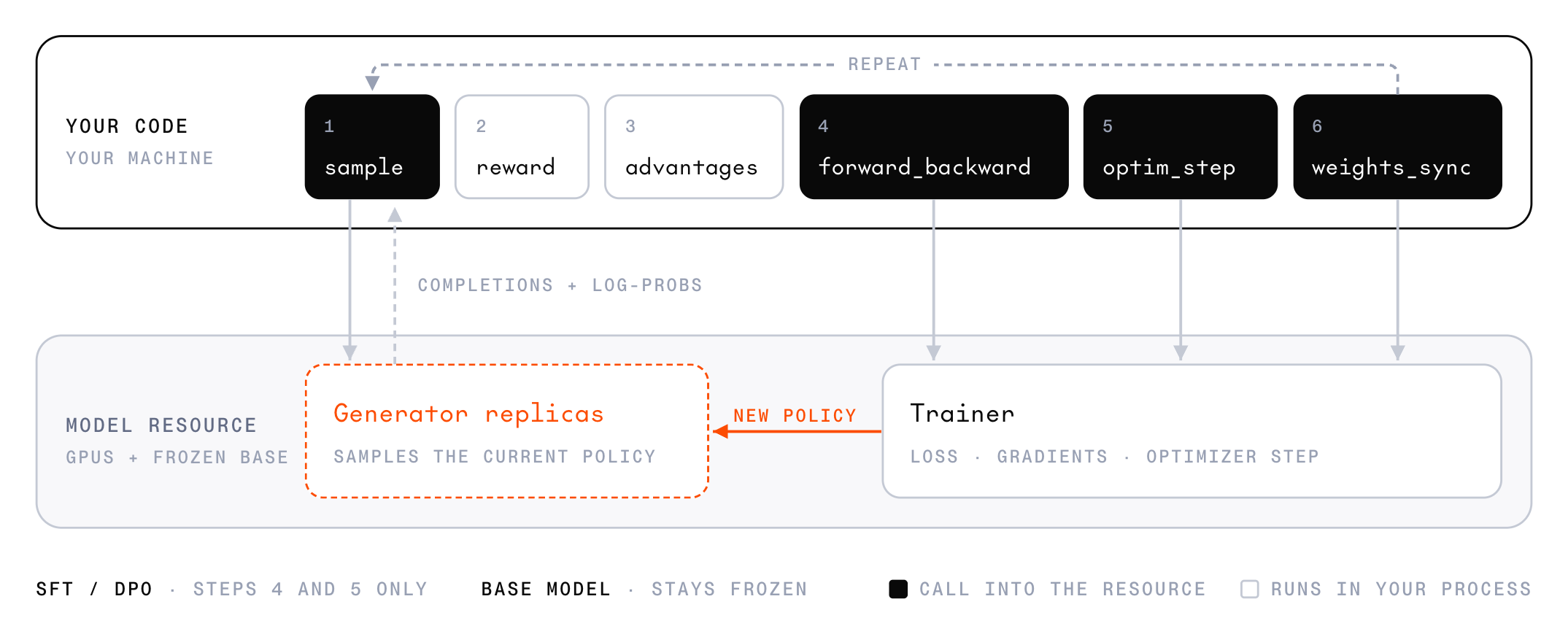 The generator replicas produce completions, and the trainer updates the weights. Each step runs this sequence:
1. **`sample`:** The generator replicas produce `group_size` completions for each prompt in the batch, along with the log-probability of each generated token.
2. **Reward:** Your reward function scores each completion.
3. **Advantages:** Your code subtracts each group's mean reward from each completion's reward. [Rewards and advantages](#rewards-and-advantages) covers how the cookbook computes and filters them.
4. **`forward_backward`:** With `LOSS_TYPE_GRPO`, the trainer computes the clipped policy-gradient loss over samples that carry each completion's tokens, advantage, and generator log-probabilities, and accumulates gradients.
5. **`optim_step`:** The optimizer applies the accumulated gradients. Its `adam_params` carry the learning rate, gradient clipping, and the other [per-step optimizer settings](/reference/post-training/operations-optim-step-create).
6. **`weights_sync`:** The trainer publishes its new weights to the generator replicas, so the next `sample` comes from the updated policy. [Async training](#async-training) covers the sync modes that return before the publish finishes.
Steps 2 and 3 run in your process, so the reward function can be any code you write. The other four steps run on the model resource.
## Run a GRPO recipe
Every GRPO hyperparameter lives on `GRPOConfig`. To run the loop, pass the config to `train_single_turn`. This config sets only what the sections below discuss, and the [RL quickstart](/docs/post-training/quickstart-rl) walks through the full GSM8K recipe:
```python theme={null}
from post_training_cookbook.grpo.config import GRPOConfig
from post_training_cookbook.grpo.train import train_single_turn
config = GRPOConfig(
model="Qwen/Qwen3.6-35B-A3B",
dataset="gsm8k",
enable_thinking=False,
max_sampling_attempts=3,
num_steps=200,
max_model_length=1536,
max_sample_tokens=768,
)
train_single_turn(config)
```
`train_single_turn` provisions a model resource for `model` with `num_generator_replicas` generator replicas (one by default), attaches one session to it, and stops both when it returns. To train on a model resource that's already running, set `model_resources_id` instead of `model`. See [Manage model resources](/docs/post-training/model-resources).
`learning_rate` defaults to `1e-5`. Try `5e-6` for slower, steadier training or `2e-5` for faster convergence, and to compare several rates at once, [train multiple adapters on one base model](/docs/post-training/multi-lora). Change one setting at a time, in small increments, so you can see how each one affects the run.
Every `GRPOConfig` field is listed in the [cookbook reference](/docs/post-training/cookbook#grpoconfig). The sections below cover the settings that most change a run's behavior.
## Rewards and advantages
The generator replicas produce completions, and the trainer updates the weights. Each step runs this sequence:
1. **`sample`:** The generator replicas produce `group_size` completions for each prompt in the batch, along with the log-probability of each generated token.
2. **Reward:** Your reward function scores each completion.
3. **Advantages:** Your code subtracts each group's mean reward from each completion's reward. [Rewards and advantages](#rewards-and-advantages) covers how the cookbook computes and filters them.
4. **`forward_backward`:** With `LOSS_TYPE_GRPO`, the trainer computes the clipped policy-gradient loss over samples that carry each completion's tokens, advantage, and generator log-probabilities, and accumulates gradients.
5. **`optim_step`:** The optimizer applies the accumulated gradients. Its `adam_params` carry the learning rate, gradient clipping, and the other [per-step optimizer settings](/reference/post-training/operations-optim-step-create).
6. **`weights_sync`:** The trainer publishes its new weights to the generator replicas, so the next `sample` comes from the updated policy. [Async training](#async-training) covers the sync modes that return before the publish finishes.
Steps 2 and 3 run in your process, so the reward function can be any code you write. The other four steps run on the model resource.
## Run a GRPO recipe
Every GRPO hyperparameter lives on `GRPOConfig`. To run the loop, pass the config to `train_single_turn`. This config sets only what the sections below discuss, and the [RL quickstart](/docs/post-training/quickstart-rl) walks through the full GSM8K recipe:
```python theme={null}
from post_training_cookbook.grpo.config import GRPOConfig
from post_training_cookbook.grpo.train import train_single_turn
config = GRPOConfig(
model="Qwen/Qwen3.6-35B-A3B",
dataset="gsm8k",
enable_thinking=False,
max_sampling_attempts=3,
num_steps=200,
max_model_length=1536,
max_sample_tokens=768,
)
train_single_turn(config)
```
`train_single_turn` provisions a model resource for `model` with `num_generator_replicas` generator replicas (one by default), attaches one session to it, and stops both when it returns. To train on a model resource that's already running, set `model_resources_id` instead of `model`. See [Manage model resources](/docs/post-training/model-resources).
`learning_rate` defaults to `1e-5`. Try `5e-6` for slower, steadier training or `2e-5` for faster convergence, and to compare several rates at once, [train multiple adapters on one base model](/docs/post-training/multi-lora). Change one setting at a time, in small increments, so you can see how each one affects the run.
Every `GRPOConfig` field is listed in the [cookbook reference](/docs/post-training/cookbook#grpoconfig). The sections below cover the settings that most change a run's behavior.
## Rewards and advantages
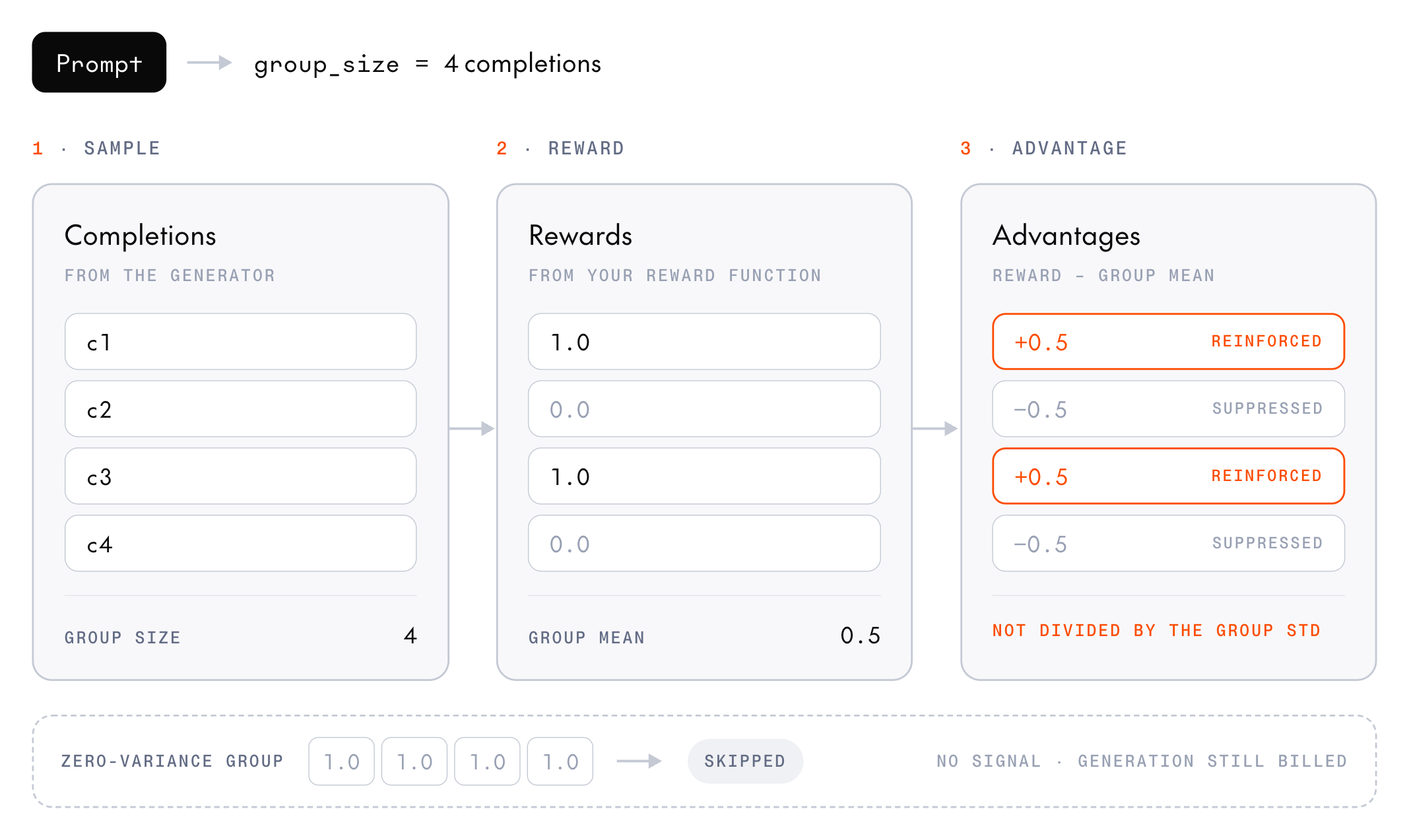 For each prompt, the generator produces `group_size` completions and the reward function scores each one. A completion's advantage is its reward minus the group's mean reward, so completions above the mean are reinforced and completions below it are suppressed.
The cookbook departs from the GRPO paper in two ways. It doesn't divide advantages by the group's standard deviation, so they stay on the reward's scale. It also skips any group where every completion scores the same, because that group carries no signal. No samples are built from a skipped group, but you still pay to generate its completions. The step log reports the fraction of skipped groups as `zero_variance_skip_ratio`.
**Group size:** `group_size` defaults to 8. Larger groups, such as 16, give steadier advantage estimates and fewer zero-variance groups, at the cost of proportionally more sampling per step.
**Temperature:** The group-mean baseline is only informative when the completions within a group differ. The default, `temperature=0.7`, balances exploration and exploitation. Raise it toward `1.0` when groups collapse to identical answers, or lower it toward `0.5` to exploit the current policy.
## Write your own GRPO loop
When none of the cookbook recipes fit your use case, you can write your own training loop. This loop trains on an in-memory list of math problems whose prompts ask for the final answer after `####`, and its reward function checks that answer:
```python theme={null}
from post_training_cookbook.codecs import get_codec
from post_training_cookbook.grpo.samples import (
build_policy_sample,
compute_group_advantages,
)
from post_training_cookbook.samples import make_prompt
from together.post_training import (
AdamParams,
ComputeConfig,
GrpoLossParams,
LoraConfig,
LossConfig,
ModelResourcesClient,
SamplingParams,
)
MODEL = "Qwen/Qwen3.8-27B"
BATCH_SIZE = 16 # prompts per step
GROUP_SIZE = 8 # completions per prompt
problems = load_problems() # a list of (messages, answer) pairs
def reward_fn(completion: str, answer: str) -> float:
# 1.0 when the text after the last "####" is the answer, else 0.0
return 1.0 if completion.split("####")[-1].strip() == answer else 0.0
# Load the model's chat template, with thinking off to keep completions short
codec = get_codec(MODEL, enable_thinking=False)
# Cap completion length, and use the cookbook's default temperature
sampling_params = SamplingParams(max_tokens=768, temperature=0.7)
# The GRPO loss, with the cookbook's default clip band from DAPO
loss = LossConfig(
type="LOSS_TYPE_GRPO",
grpo_params=GrpoLossParams(
clip_low_threshold=0.8, clip_high_threshold=1.28
),
)
# Provision a model resource with one generator replica to sample from
with ModelResourcesClient.create(
base_model=MODEL,
compute_config=ComputeConfig(
gpu_type="B200-SXM", num_generator_replicas=1
),
) as resources:
# Start a training session that trains a LoRA adapter
with resources.create_session(
lora_config=LoraConfig(rank=16, alpha=16)
) as session:
# Each step trains on the next BATCH_SIZE problems
for step, start in enumerate(range(0, len(problems), BATCH_SIZE)):
batch = problems[start : start + BATCH_SIZE]
# Render each prompt with the chat template, ready for a reply
prompts = [
codec.encode_messages(messages, add_generation_prompt=True)
for messages, _ in batch
]
# 1. Sample GROUP_SIZE completions per prompt from the generator
results = session.generator.sample_batch(
[make_prompt(prompt) for prompt in prompts],
num_samples=GROUP_SIZE,
sampling_params=sampling_params,
)
samples, rewards = [], []
for prompt, (_, answer), result in zip(prompts, batch, results):
# Token IDs can come back as strings, so convert them
group = [
([int(t) for t in seq.tokens], list(seq.logprobs))
for seq in result.sequences
]
# 2. Score each completion with the reward function
group_rewards = [
reward_fn(codec.decode(tokens), answer)
for tokens, _ in group
]
rewards.extend(group_rewards)
# 3. Subtract the group's mean reward to get each advantage.
# A group where every completion scored the same has no
# signal, so skip it.
advantages = compute_group_advantages(group_rewards).values
if advantages is None:
continue
# Build one sample per completion. Zeros over the prompt keep
# it out of the loss, and the generator's logprobs let the
# trainer compute the clipping ratio.
prompt_zeros = [0.0] * len(prompt)
for (tokens, logprobs), advantage in zip(group, advantages):
samples.append(
build_policy_sample(
tokens=prompt + tokens,
logprobs=prompt_zeros + logprobs,
loss_mask=prompt_zeros + [1.0] * len(tokens),
advantage=advantage,
)
)
# The mean reward should rise as the policy improves
print(f"[step {step}] reward={sum(rewards) / len(rewards):.3f}")
# Skip the update when every group in the step was skipped
if not samples:
continue
# 4. Compute the clipped policy-gradient loss and its gradients
session.trainer.forward_backward(samples=samples, loss=loss)
# 5. Update the adapter's weights
session.trainer.optim_step(
adam_params=AdamParams(learning_rate=1e-5, weight_decay=0.01),
)
# 6. Send the new weights to the generator, so the next step
# samples from the updated policy
session.trainer.weights_sync()
# Save the adapter as an inference checkpoint you can deploy
checkpoint = session.create_inference_checkpoint()
print(checkpoint.id)
```
The reward runs in your process, so `reward_fn` can be any scoring code you write. [Write a reward function](/docs/post-training/reward-functions#write-a-reward-function) covers what makes a good one.
`compute_group_advantages` computes advantages as [Rewards and advantages](#rewards-and-advantages) describes. For a group where every completion scored the same, its `values` is `None`, and the loop skips the group. `build_policy_sample` shifts the tokens into input and target positions and puts the advantage on every trained position.
The loop keeps the generators busy by sending every prompt in a step in one `sample_batch` call and by getting each group from one request with `num_samples`. To overlap more, run independent calls concurrently with the `_async` variants. Sampling runs alongside other sampling and alongside the trainer's `forward_backward` and `optim_step`, but a synchronous `weights_sync` waits for in-flight sampling to finish.
`sample_batch` applies one `SamplingParams` to every prompt in the call. Its fields and defaults are in the [API reference](/reference/post-training/operations-sample-create). Two of them need care:
* **`stop`:** Not every model supports stop strings. A model that can't match them rejects the request as invalid input, so omit `stop` and truncate completions in your code.
* **`seed`:** Not supported yet, so leave it unset. When the generator runs more than one inference engine, the service rejects `seed` and the `sample` operation fails with an internal error.
To score fixed text without generating, call `session.generator.compute_logprobs(prompt)`, or `compute_logprobs_batch(prompts)` for several prompts. They score with the weights the generator last received, so call `weights_sync` first if the trainer has stepped since. Entry `0` of the result is always `0`, because the first token has no tokens before it. The same placeholder appears in `prompt_logprobs` when you pass `prompt_logprobs=True` to `sample`.
The cookbook's `train_single_turn` adds the rest of the recipe on top of this loop: a cosine learning-rate schedule, [dynamic sampling](#dynamic-sampling), the [overlong penalty](#overlong-responses), [length budgets](#length-budgets), validation, and periodic checkpoints.
## Dynamic sampling
When too many groups collapse to identical rewards, a step can be left with little to train on. Dynamic sampling, from the DAPO paper, keeps drawing fresh batches and discarding zero-variance groups until the step has `batch_size` usable groups or reaches the attempt cap. To turn it on, set `max_sampling_attempts` above `1`. The default is `1`, so dynamic sampling is off unless you set it. The GSM8K recipe in the quickstart sets `3`.
Each attempt samples a full batch, so a step that uses all its attempts costs `max_sampling_attempts` batches of generation. If no attempt produces a group with varied rewards, the step has nothing to train on. The cookbook skips it. Single-turn runs log `skipped: 0/ groups had non-zero reward variance`, and multi-turn runs log `samples=0`.
Dynamic sampling doesn't address why groups collapse. If `zero_variance_skip_ratio` stays high, also look at task difficulty and temperature.
## Clipping
GRPO uses clipped importance sampling to keep any single step from moving the policy too far. For every token, the service computes the ratio between the trainer's probability of that token and the generator's probability when it sampled the token, then clamps the ratio to a band. A positive-advantage token whose ratio exceeds `clip_high_threshold` gets no gradient, because the model already favors it enough. A negative-advantage token whose ratio falls below `clip_low_threshold` gets no gradient, because the model already disfavors it enough.
The thresholds are absolute bounds on the ratio, not offsets from `1.0`, so a DAPO epsilon pair (ε\_low, ε\_high) maps to `(1 - ε_low, 1 + ε_high)`. Move either bound toward `1.0` to clip harder.
The cookbook defaults to `0.8` and `1.28`, the asymmetric "Clip-Higher" band from DAPO. Its ceiling sits further from `1.0` than its floor, which leaves more room to raise the probability of tokens the policy currently underweights. If your own loop leaves the thresholds unset, the service uses `0.8` and `1.2` instead.
`forward_backward` returns the clip rates in its `metrics`, and the cookbook logs them as `fb/loss/clip/high_fraction` and `fb/loss/clip/low_fraction`. [Service-emitted metrics](/docs/post-training/monitoring#service-emitted-metrics) explains how to read them.
## Overlong responses
Two independent settings handle completions that run into the token budget, and both can be on at once:
* **Overlong penalty (on by default):** A soft penalty from DAPO, added to the reward, that ramps up linearly over the last `overlong_buffer_len` tokens of the completion's token budget. `overlong_buffer_len` defaults to `max_sample_tokens // 8`. `overlong_penalty_factor` scales the penalty, and setting it to `0` turns the penalty off.
* **Overlong masking (off by default):** With `overlong_masking=True`, a truncated completion produces no training sample at all, but its reward still counts toward the group's baseline. In single-turn training, if masking leaves a step with fewer than `group_size` samples, the cookbook skips that step.
Turning masking on doesn't turn the penalty off. To mask without penalizing, set both `overlong_masking=True` and `overlong_penalty_factor=0`.
## Length budgets
Two settings bound sequence length, and both default to values derived from `max_model_length` (default `2048`):
* **`max_sample_tokens`:** The cap on tokens generated per completion. It defaults to `max_model_length`.
* **`max_prompt_length`:** The hard filter on single-turn prompt length. It defaults to `max_model_length - max_sample_tokens`, and prompts over the limit are dropped before training.
For single-turn training, always set `max_sample_tokens` or `max_prompt_length` yourself. If you leave both at their defaults, `max_prompt_length` works out to `0` and every prompt is dropped. With `num_steps` set, the run then fails after the model resource has already started billing. Without it, the run exits before provisioning and reports that no training is needed.
Setting `max_sample_tokens` well below `max_model_length` also keeps a single completion from filling the whole context. Watch `truncated_ratio`: a value above about 30% means the budget is too tight or the model is producing runaway-length output.
GLM-5.3 needs a larger budget. It always thinks, and its chat template sets reasoning effort to maximum by default. Completions truncate mid-reasoning unless you set a generous `max_sample_tokens` or lower the effort with `thinking_effort="high"` or `"low"`. The cookbook rejects `enable_thinking=False` for GLM-5.3.
## Variants
The cookbook's GRPO loop samples groups and computes advantages the same way whatever loss function it trains with. These `GRPOConfig` settings select related algorithms:
* **Policy loss function:** `loss` picks the built-in loss function that trains on the group advantages. The default is `"grpo"`, and the others are `"ppo"`, `"cispo"`, `"dppo"`, `"dro"`, and `"importance_sampling"`, described in [Built-in loss functions](#built-in-loss-functions). Unlike GRPO, they sum their per-token losses instead of averaging them, so their `loss` grows with the number of trained tokens in the batch, and settings tuned for `"grpo"`, such as the learning rate, may need retuning.
* **Clip band:** `clip_low_threshold` and `clip_high_threshold` apply to `"grpo"`, `"ppo"`, and `"cispo"`. The cookbook sends its own defaults of `0.8` and `1.28` with all three, not the service defaults, which are `[0.8, 1.2]` for PPO and `[0, 4]` for CISPO. To get a service default, set the thresholds to it.
* **Metrics:** The `fb/loss/clip/*` and `fb/loss/ratio/mean` metrics in [Clipping](#clipping) come from `"grpo"` and `"ppo"`. The other loss functions log their own keys under `fb/`, such as `fb/ratio_mean`, and `"cispo"` logs `fb/clip_fraction`. `"cispo"` uses the band to scale each token's gradient rather than to zero it.
* **DRO penalty:** `"dro"` requires `dro_beta`, the coefficient on its quadratic log-ratio penalty.
* **Loss aggregation:** `loss_agg_type` sets how the per-token losses reduce to one number. `GRPO_LOSS_AGGREGATION_TYPE_FIXED_HORIZON` (the default) divides the masked sum by every token in the batch, padding included. `TOKEN_MEAN` divides by the trained tokens only. `SEQUENCE_MEAN` averages within each sequence, then across sequences, so every sequence gets equal weight whatever its length. The denominator changes the effective learning rate, so keep it fixed when you compare runs.
* **GSPO:** To compute the importance ratio per sequence instead of per token, set `ratio_type="GRPO_LOSS_RATIO_TYPE_SEQUENCE"`. The clip band then applies to a whole completion at once.
`loss_agg_type` and `ratio_type` apply only to `"grpo"`, and the config raises if you change them, the clip band, or `dro_beta` for a loss function that doesn't use them.
The cookbook has no setting for a KL penalty against a reference policy. In [your own loop](#write-your-own-grpo-loop), set `beta` above `0` on `GrpoLossParams`, and give every sample a `reference_logprobs` row. For an objective none of the built-in loss functions cover, [write a custom loss function](/docs/post-training/custom-loss-functions).
### Built-in loss functions
In your own loop, `forward_backward` takes a `LossConfig`. Its `type` selects the loss function, and the matching `*_params` field configures it. Setting a params field that belongs to a different loss function fails client-side. Each loss function reads its own rows from every sample's `loss_fn_inputs`. The [API reference](/reference/post-training/operations-forward-backward-create) lists each params field and its defaults.
| `type` | Params | Sample rows required | Use |
| - | - | - | - |
| `LOSS_TYPE_CROSS_ENTROPY` | `cross_entropy_params` | `target_tokens`, `weights` | [SFT](/docs/post-training/sft). Weighted next-token cross-entropy. `weights` may be fractional. |
| `LOSS_TYPE_GRPO` | `grpo_params` | `target_tokens`, `advantages`, `logprobs`, plus `reference_logprobs` when `beta > 0` | GRPO, and GSPO with `ratio_type="GRPO_LOSS_RATIO_TYPE_SEQUENCE"`. |
| `LOSS_TYPE_PPO` | `ppo_params` | `target_tokens`, `advantages`, `logprobs` | Clipped surrogate with a token-level ratio and no KL term. The default clip range is `[0.8, 1.2]`. |
| `LOSS_TYPE_CISPO` | `cispo_params` | `target_tokens`, `advantages`, `logprobs` | Clipped ratio applied as a detached coefficient, so no token's gradient is zeroed. The default clip range is `[0, 4]`. |
| `LOSS_TYPE_DRO` | `dro_params` | `target_tokens`, `advantages`, `logprobs` | Policy gradient plus a quadratic log-ratio penalty. `beta` is required. |
| `LOSS_TYPE_IMPORTANCE_SAMPLING` | None | `target_tokens`, `advantages`, `logprobs` | Unclipped `-(ratio * advantage)`. |
| `LOSS_TYPE_DPPO` | `dppo_params` | `target_tokens`, `advantages`, `logprobs` | Drops tokens whose probability moved past `delta_low` or `delta_high` in probability space, and trains the rest with the plain importance-sampling gradient. Both thresholds default to `0.15`. |
Every built-in loss function except cross-entropy is advantage-based, and these loss functions also read an optional `weights` row as a mask of `0` or `1`. If you omit it, every position trains, including the prompt. To train on the completion only, pass `1` on completion tokens and `0` everywhere else. Only cross-entropy accepts fractional weights.
## Async training
For each prompt, the generator produces `group_size` completions and the reward function scores each one. A completion's advantage is its reward minus the group's mean reward, so completions above the mean are reinforced and completions below it are suppressed.
The cookbook departs from the GRPO paper in two ways. It doesn't divide advantages by the group's standard deviation, so they stay on the reward's scale. It also skips any group where every completion scores the same, because that group carries no signal. No samples are built from a skipped group, but you still pay to generate its completions. The step log reports the fraction of skipped groups as `zero_variance_skip_ratio`.
**Group size:** `group_size` defaults to 8. Larger groups, such as 16, give steadier advantage estimates and fewer zero-variance groups, at the cost of proportionally more sampling per step.
**Temperature:** The group-mean baseline is only informative when the completions within a group differ. The default, `temperature=0.7`, balances exploration and exploitation. Raise it toward `1.0` when groups collapse to identical answers, or lower it toward `0.5` to exploit the current policy.
## Write your own GRPO loop
When none of the cookbook recipes fit your use case, you can write your own training loop. This loop trains on an in-memory list of math problems whose prompts ask for the final answer after `####`, and its reward function checks that answer:
```python theme={null}
from post_training_cookbook.codecs import get_codec
from post_training_cookbook.grpo.samples import (
build_policy_sample,
compute_group_advantages,
)
from post_training_cookbook.samples import make_prompt
from together.post_training import (
AdamParams,
ComputeConfig,
GrpoLossParams,
LoraConfig,
LossConfig,
ModelResourcesClient,
SamplingParams,
)
MODEL = "Qwen/Qwen3.8-27B"
BATCH_SIZE = 16 # prompts per step
GROUP_SIZE = 8 # completions per prompt
problems = load_problems() # a list of (messages, answer) pairs
def reward_fn(completion: str, answer: str) -> float:
# 1.0 when the text after the last "####" is the answer, else 0.0
return 1.0 if completion.split("####")[-1].strip() == answer else 0.0
# Load the model's chat template, with thinking off to keep completions short
codec = get_codec(MODEL, enable_thinking=False)
# Cap completion length, and use the cookbook's default temperature
sampling_params = SamplingParams(max_tokens=768, temperature=0.7)
# The GRPO loss, with the cookbook's default clip band from DAPO
loss = LossConfig(
type="LOSS_TYPE_GRPO",
grpo_params=GrpoLossParams(
clip_low_threshold=0.8, clip_high_threshold=1.28
),
)
# Provision a model resource with one generator replica to sample from
with ModelResourcesClient.create(
base_model=MODEL,
compute_config=ComputeConfig(
gpu_type="B200-SXM", num_generator_replicas=1
),
) as resources:
# Start a training session that trains a LoRA adapter
with resources.create_session(
lora_config=LoraConfig(rank=16, alpha=16)
) as session:
# Each step trains on the next BATCH_SIZE problems
for step, start in enumerate(range(0, len(problems), BATCH_SIZE)):
batch = problems[start : start + BATCH_SIZE]
# Render each prompt with the chat template, ready for a reply
prompts = [
codec.encode_messages(messages, add_generation_prompt=True)
for messages, _ in batch
]
# 1. Sample GROUP_SIZE completions per prompt from the generator
results = session.generator.sample_batch(
[make_prompt(prompt) for prompt in prompts],
num_samples=GROUP_SIZE,
sampling_params=sampling_params,
)
samples, rewards = [], []
for prompt, (_, answer), result in zip(prompts, batch, results):
# Token IDs can come back as strings, so convert them
group = [
([int(t) for t in seq.tokens], list(seq.logprobs))
for seq in result.sequences
]
# 2. Score each completion with the reward function
group_rewards = [
reward_fn(codec.decode(tokens), answer)
for tokens, _ in group
]
rewards.extend(group_rewards)
# 3. Subtract the group's mean reward to get each advantage.
# A group where every completion scored the same has no
# signal, so skip it.
advantages = compute_group_advantages(group_rewards).values
if advantages is None:
continue
# Build one sample per completion. Zeros over the prompt keep
# it out of the loss, and the generator's logprobs let the
# trainer compute the clipping ratio.
prompt_zeros = [0.0] * len(prompt)
for (tokens, logprobs), advantage in zip(group, advantages):
samples.append(
build_policy_sample(
tokens=prompt + tokens,
logprobs=prompt_zeros + logprobs,
loss_mask=prompt_zeros + [1.0] * len(tokens),
advantage=advantage,
)
)
# The mean reward should rise as the policy improves
print(f"[step {step}] reward={sum(rewards) / len(rewards):.3f}")
# Skip the update when every group in the step was skipped
if not samples:
continue
# 4. Compute the clipped policy-gradient loss and its gradients
session.trainer.forward_backward(samples=samples, loss=loss)
# 5. Update the adapter's weights
session.trainer.optim_step(
adam_params=AdamParams(learning_rate=1e-5, weight_decay=0.01),
)
# 6. Send the new weights to the generator, so the next step
# samples from the updated policy
session.trainer.weights_sync()
# Save the adapter as an inference checkpoint you can deploy
checkpoint = session.create_inference_checkpoint()
print(checkpoint.id)
```
The reward runs in your process, so `reward_fn` can be any scoring code you write. [Write a reward function](/docs/post-training/reward-functions#write-a-reward-function) covers what makes a good one.
`compute_group_advantages` computes advantages as [Rewards and advantages](#rewards-and-advantages) describes. For a group where every completion scored the same, its `values` is `None`, and the loop skips the group. `build_policy_sample` shifts the tokens into input and target positions and puts the advantage on every trained position.
The loop keeps the generators busy by sending every prompt in a step in one `sample_batch` call and by getting each group from one request with `num_samples`. To overlap more, run independent calls concurrently with the `_async` variants. Sampling runs alongside other sampling and alongside the trainer's `forward_backward` and `optim_step`, but a synchronous `weights_sync` waits for in-flight sampling to finish.
`sample_batch` applies one `SamplingParams` to every prompt in the call. Its fields and defaults are in the [API reference](/reference/post-training/operations-sample-create). Two of them need care:
* **`stop`:** Not every model supports stop strings. A model that can't match them rejects the request as invalid input, so omit `stop` and truncate completions in your code.
* **`seed`:** Not supported yet, so leave it unset. When the generator runs more than one inference engine, the service rejects `seed` and the `sample` operation fails with an internal error.
To score fixed text without generating, call `session.generator.compute_logprobs(prompt)`, or `compute_logprobs_batch(prompts)` for several prompts. They score with the weights the generator last received, so call `weights_sync` first if the trainer has stepped since. Entry `0` of the result is always `0`, because the first token has no tokens before it. The same placeholder appears in `prompt_logprobs` when you pass `prompt_logprobs=True` to `sample`.
The cookbook's `train_single_turn` adds the rest of the recipe on top of this loop: a cosine learning-rate schedule, [dynamic sampling](#dynamic-sampling), the [overlong penalty](#overlong-responses), [length budgets](#length-budgets), validation, and periodic checkpoints.
## Dynamic sampling
When too many groups collapse to identical rewards, a step can be left with little to train on. Dynamic sampling, from the DAPO paper, keeps drawing fresh batches and discarding zero-variance groups until the step has `batch_size` usable groups or reaches the attempt cap. To turn it on, set `max_sampling_attempts` above `1`. The default is `1`, so dynamic sampling is off unless you set it. The GSM8K recipe in the quickstart sets `3`.
Each attempt samples a full batch, so a step that uses all its attempts costs `max_sampling_attempts` batches of generation. If no attempt produces a group with varied rewards, the step has nothing to train on. The cookbook skips it. Single-turn runs log `skipped: 0/ groups had non-zero reward variance`, and multi-turn runs log `samples=0`.
Dynamic sampling doesn't address why groups collapse. If `zero_variance_skip_ratio` stays high, also look at task difficulty and temperature.
## Clipping
GRPO uses clipped importance sampling to keep any single step from moving the policy too far. For every token, the service computes the ratio between the trainer's probability of that token and the generator's probability when it sampled the token, then clamps the ratio to a band. A positive-advantage token whose ratio exceeds `clip_high_threshold` gets no gradient, because the model already favors it enough. A negative-advantage token whose ratio falls below `clip_low_threshold` gets no gradient, because the model already disfavors it enough.
The thresholds are absolute bounds on the ratio, not offsets from `1.0`, so a DAPO epsilon pair (ε\_low, ε\_high) maps to `(1 - ε_low, 1 + ε_high)`. Move either bound toward `1.0` to clip harder.
The cookbook defaults to `0.8` and `1.28`, the asymmetric "Clip-Higher" band from DAPO. Its ceiling sits further from `1.0` than its floor, which leaves more room to raise the probability of tokens the policy currently underweights. If your own loop leaves the thresholds unset, the service uses `0.8` and `1.2` instead.
`forward_backward` returns the clip rates in its `metrics`, and the cookbook logs them as `fb/loss/clip/high_fraction` and `fb/loss/clip/low_fraction`. [Service-emitted metrics](/docs/post-training/monitoring#service-emitted-metrics) explains how to read them.
## Overlong responses
Two independent settings handle completions that run into the token budget, and both can be on at once:
* **Overlong penalty (on by default):** A soft penalty from DAPO, added to the reward, that ramps up linearly over the last `overlong_buffer_len` tokens of the completion's token budget. `overlong_buffer_len` defaults to `max_sample_tokens // 8`. `overlong_penalty_factor` scales the penalty, and setting it to `0` turns the penalty off.
* **Overlong masking (off by default):** With `overlong_masking=True`, a truncated completion produces no training sample at all, but its reward still counts toward the group's baseline. In single-turn training, if masking leaves a step with fewer than `group_size` samples, the cookbook skips that step.
Turning masking on doesn't turn the penalty off. To mask without penalizing, set both `overlong_masking=True` and `overlong_penalty_factor=0`.
## Length budgets
Two settings bound sequence length, and both default to values derived from `max_model_length` (default `2048`):
* **`max_sample_tokens`:** The cap on tokens generated per completion. It defaults to `max_model_length`.
* **`max_prompt_length`:** The hard filter on single-turn prompt length. It defaults to `max_model_length - max_sample_tokens`, and prompts over the limit are dropped before training.
For single-turn training, always set `max_sample_tokens` or `max_prompt_length` yourself. If you leave both at their defaults, `max_prompt_length` works out to `0` and every prompt is dropped. With `num_steps` set, the run then fails after the model resource has already started billing. Without it, the run exits before provisioning and reports that no training is needed.
Setting `max_sample_tokens` well below `max_model_length` also keeps a single completion from filling the whole context. Watch `truncated_ratio`: a value above about 30% means the budget is too tight or the model is producing runaway-length output.
GLM-5.3 needs a larger budget. It always thinks, and its chat template sets reasoning effort to maximum by default. Completions truncate mid-reasoning unless you set a generous `max_sample_tokens` or lower the effort with `thinking_effort="high"` or `"low"`. The cookbook rejects `enable_thinking=False` for GLM-5.3.
## Variants
The cookbook's GRPO loop samples groups and computes advantages the same way whatever loss function it trains with. These `GRPOConfig` settings select related algorithms:
* **Policy loss function:** `loss` picks the built-in loss function that trains on the group advantages. The default is `"grpo"`, and the others are `"ppo"`, `"cispo"`, `"dppo"`, `"dro"`, and `"importance_sampling"`, described in [Built-in loss functions](#built-in-loss-functions). Unlike GRPO, they sum their per-token losses instead of averaging them, so their `loss` grows with the number of trained tokens in the batch, and settings tuned for `"grpo"`, such as the learning rate, may need retuning.
* **Clip band:** `clip_low_threshold` and `clip_high_threshold` apply to `"grpo"`, `"ppo"`, and `"cispo"`. The cookbook sends its own defaults of `0.8` and `1.28` with all three, not the service defaults, which are `[0.8, 1.2]` for PPO and `[0, 4]` for CISPO. To get a service default, set the thresholds to it.
* **Metrics:** The `fb/loss/clip/*` and `fb/loss/ratio/mean` metrics in [Clipping](#clipping) come from `"grpo"` and `"ppo"`. The other loss functions log their own keys under `fb/`, such as `fb/ratio_mean`, and `"cispo"` logs `fb/clip_fraction`. `"cispo"` uses the band to scale each token's gradient rather than to zero it.
* **DRO penalty:** `"dro"` requires `dro_beta`, the coefficient on its quadratic log-ratio penalty.
* **Loss aggregation:** `loss_agg_type` sets how the per-token losses reduce to one number. `GRPO_LOSS_AGGREGATION_TYPE_FIXED_HORIZON` (the default) divides the masked sum by every token in the batch, padding included. `TOKEN_MEAN` divides by the trained tokens only. `SEQUENCE_MEAN` averages within each sequence, then across sequences, so every sequence gets equal weight whatever its length. The denominator changes the effective learning rate, so keep it fixed when you compare runs.
* **GSPO:** To compute the importance ratio per sequence instead of per token, set `ratio_type="GRPO_LOSS_RATIO_TYPE_SEQUENCE"`. The clip band then applies to a whole completion at once.
`loss_agg_type` and `ratio_type` apply only to `"grpo"`, and the config raises if you change them, the clip band, or `dro_beta` for a loss function that doesn't use them.
The cookbook has no setting for a KL penalty against a reference policy. In [your own loop](#write-your-own-grpo-loop), set `beta` above `0` on `GrpoLossParams`, and give every sample a `reference_logprobs` row. For an objective none of the built-in loss functions cover, [write a custom loss function](/docs/post-training/custom-loss-functions).
### Built-in loss functions
In your own loop, `forward_backward` takes a `LossConfig`. Its `type` selects the loss function, and the matching `*_params` field configures it. Setting a params field that belongs to a different loss function fails client-side. Each loss function reads its own rows from every sample's `loss_fn_inputs`. The [API reference](/reference/post-training/operations-forward-backward-create) lists each params field and its defaults.
| `type` | Params | Sample rows required | Use |
| - | - | - | - |
| `LOSS_TYPE_CROSS_ENTROPY` | `cross_entropy_params` | `target_tokens`, `weights` | [SFT](/docs/post-training/sft). Weighted next-token cross-entropy. `weights` may be fractional. |
| `LOSS_TYPE_GRPO` | `grpo_params` | `target_tokens`, `advantages`, `logprobs`, plus `reference_logprobs` when `beta > 0` | GRPO, and GSPO with `ratio_type="GRPO_LOSS_RATIO_TYPE_SEQUENCE"`. |
| `LOSS_TYPE_PPO` | `ppo_params` | `target_tokens`, `advantages`, `logprobs` | Clipped surrogate with a token-level ratio and no KL term. The default clip range is `[0.8, 1.2]`. |
| `LOSS_TYPE_CISPO` | `cispo_params` | `target_tokens`, `advantages`, `logprobs` | Clipped ratio applied as a detached coefficient, so no token's gradient is zeroed. The default clip range is `[0, 4]`. |
| `LOSS_TYPE_DRO` | `dro_params` | `target_tokens`, `advantages`, `logprobs` | Policy gradient plus a quadratic log-ratio penalty. `beta` is required. |
| `LOSS_TYPE_IMPORTANCE_SAMPLING` | None | `target_tokens`, `advantages`, `logprobs` | Unclipped `-(ratio * advantage)`. |
| `LOSS_TYPE_DPPO` | `dppo_params` | `target_tokens`, `advantages`, `logprobs` | Drops tokens whose probability moved past `delta_low` or `delta_high` in probability space, and trains the rest with the plain importance-sampling gradient. Both thresholds default to `0.15`. |
Every built-in loss function except cross-entropy is advantage-based, and these loss functions also read an optional `weights` row as a mask of `0` or `1`. If you omit it, every position trains, including the prompt. To train on the completion only, pass `1` on completion tokens and `0` everywhere else. Only cross-entropy accepts fractional weights.
## Async training
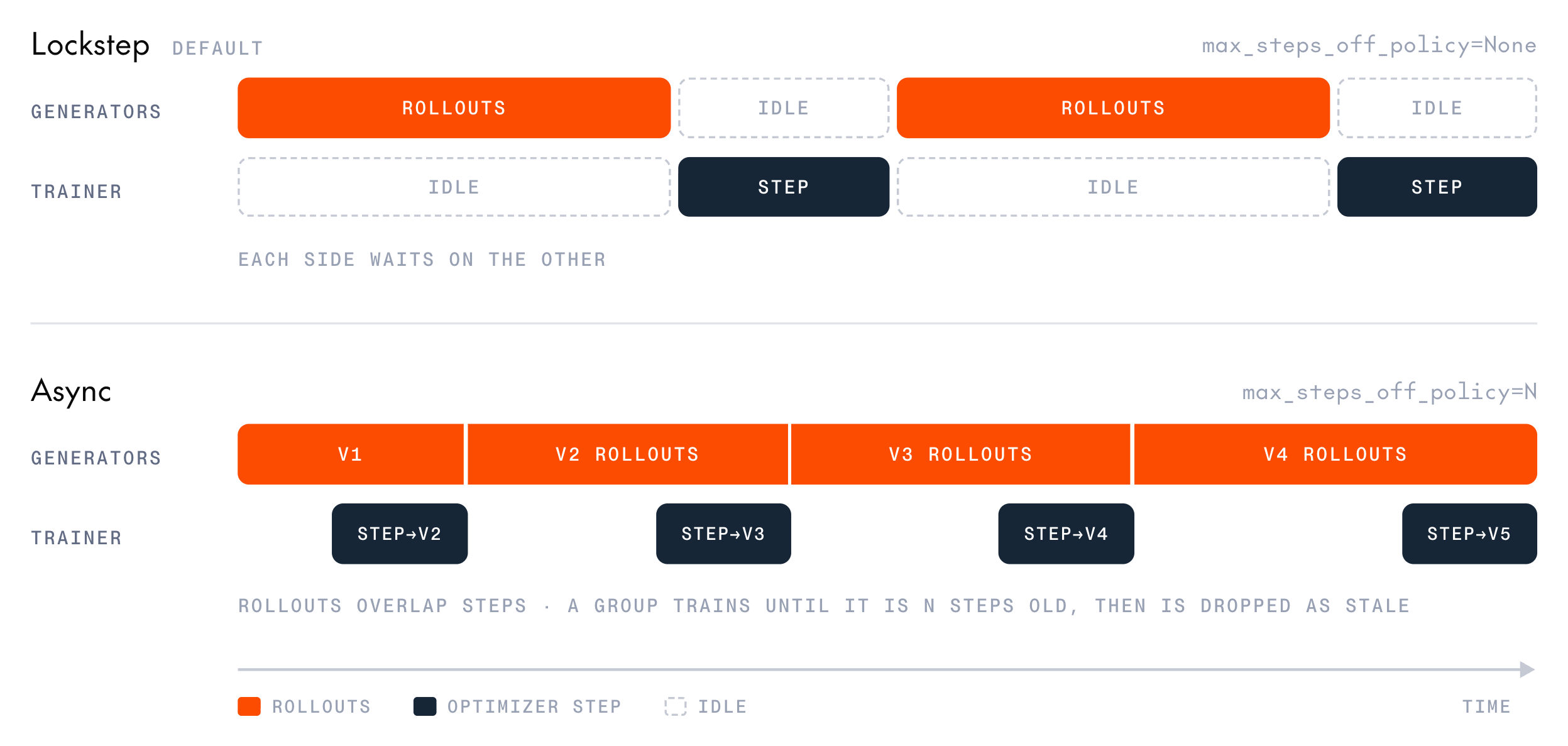 Collection and training run in lockstep by default. Every rollout in a step finishes before the optimizer runs, so the generators sit idle during the forward and backward pass, and the trainer sits idle during sampling. Async training overlaps the two.
The cookbook supports async training for multi-turn GRPO (`train_multi_turn`), where long, variable-length episodes make the idle gaps worst. `train_single_turn` rejects `max_steps_off_policy`.
Three settings control async training:
* **`max_steps_off_policy`:** Turns on async collection. `None` (the default) means lockstep. An integer starts a pool of rollout workers that keep collecting through the optimizer step, and sets how many optimizer steps old a group may be and still train. `0` is allowed and means async collection that trains only on groups started under the current policy.
* **`groups_in_flight`:** The number of rollout groups the workers collect at once. It defaults to `batch_size`.
* **`weight_sync_type`:** How new weights reach the generators after each step. `WEIGHT_SYNC_TYPE_SYNCHRONOUS` (the default) publishes inline. `WEIGHT_SYNC_TYPE_BACKGROUND_PUBLISH` hands the publish to a server-side worker and returns immediately. `WEIGHT_SYNC_TYPE_PIPELINE` also defers the publish and lets a generation already in flight finish under the new weights.
Async collection works with any weight-sync mode. The two deferred modes require `max_steps_off_policy`, so the drift they allow is bounded and measured.
`WEIGHT_SYNC_TYPE_PIPELINE` requires full-weight training (`use_lora=False`). The server rejects it on a low-rank adapter (LoRA) session, and the cookbook fails before provisioning when the two are combined.
To run async training, pass a configuration like this one to `train_multi_turn`, along with tasks and an environment factory as in [Multi-turn environments](/docs/post-training/multi-turn-environments#run-multi-turn-training):
```python theme={null}
from post_training_cookbook.grpo.config import GRPOConfig
config = GRPOConfig(
model="Qwen/Qwen3.6-35B-A3B",
max_turns=6,
batch_size=4,
episodes_per_task=8,
max_steps_off_policy=1,
groups_in_flight=8,
num_generator_replicas=2,
)
```
Start with `max_steps_off_policy=1`. At `0`, a worker's next group is often one version behind by the time it arrives, so it gets dropped.
To tell whether the overlap is paying off, watch the [async collection metrics](/docs/post-training/monitoring#async-collection-metrics), starting with `async/train_wait_s` and `async/dropped_stale_groups`. Stale groups are counted separately from zero-variance groups, so they don't inflate `zero_variance_skip_ratio`. For a runnable example, see `recipes/grpo/tool_use_game_async.py`.
## Troubleshooting
* **`zero_variance_skip_ratio` stays above 50%:** Most groups score identically. To tell "all right" from "all wrong", check `identical_nonzero_reward_skip_ratio`, which only single-turn runs log. If the task is too easy, use a harder dataset or raise `temperature`. If it's too hard, use an easier dataset or a stronger base model. You can also raise `group_size` to 16, or set `max_sampling_attempts` above `1` to recover the step at the cost of extra sampling.
* **The run fails at the end with `You need to complete at least one training step before you can create an inference checkpoint`:** Every step was skipped, so nothing trained, but you're still billed for the sampling. Before you rerun, check the step log for `skipped:` lines (single-turn) or `samples=0` (multi-turn) to find the cause. If no group had varied rewards, adjust the task difficulty as the `zero_variance_skip_ratio` entry describes. If [overlong masking](#overlong-responses) left too few samples, adjust the [length budget](#length-budgets).
* **Accuracy stays at zero:** The reward function probably can't parse the model's output. Run it by hand on a sampled completion, raise `temperature`, and confirm the few-shot examples match the format the reward expects.
* **`fb/loss/ratio/mean` drifts away from `1.0`:** Lower `learning_rate` and check that `weights_sync` runs after every step. [Service-emitted metrics](/docs/post-training/monitoring#service-emitted-metrics) covers the system-side causes to rule out. With a loss function other than `"grpo"` or `"ppo"`, watch `fb/ratio_mean` instead.
* **`fb/loss/ratio/mean` is far from `1.0` on the first step:** Before the first update, the trainer and generator hold the same weights, so the ratio should be close to `1.0`. In a loop that builds samples by hand, a ratio far from `1.0` this early usually means `logprobs` doesn't line up with `target_tokens`. Check that you dropped the first value of every per-token array, as described in [Build samples by hand](/docs/post-training/concepts#build-samples-by-hand). A misaligned `advantages` array doesn't change this metric.
* **Out of memory or timeouts:** Reduce `batch_size`, `max_model_length`, or `group_size`, or raise `timeout` on the config.
* **An operation fails because the session isn't active:** The session expired after an hour without an operation, was stopped, or hit an error. See [Troubleshooting](/docs/post-training/model-resources#troubleshooting) in Manage model resources.
## Next steps
Bring your own dataset and reward to the loop.
Train tool-use agents over whole episodes.
Every metric the loop logs and how to act on it.
Every `GRPOConfig` field and its default.
This documentation is built and hosted on [Mintlify](https://mintlify.com), a developer documentation platform.
Collection and training run in lockstep by default. Every rollout in a step finishes before the optimizer runs, so the generators sit idle during the forward and backward pass, and the trainer sits idle during sampling. Async training overlaps the two.
The cookbook supports async training for multi-turn GRPO (`train_multi_turn`), where long, variable-length episodes make the idle gaps worst. `train_single_turn` rejects `max_steps_off_policy`.
Three settings control async training:
* **`max_steps_off_policy`:** Turns on async collection. `None` (the default) means lockstep. An integer starts a pool of rollout workers that keep collecting through the optimizer step, and sets how many optimizer steps old a group may be and still train. `0` is allowed and means async collection that trains only on groups started under the current policy.
* **`groups_in_flight`:** The number of rollout groups the workers collect at once. It defaults to `batch_size`.
* **`weight_sync_type`:** How new weights reach the generators after each step. `WEIGHT_SYNC_TYPE_SYNCHRONOUS` (the default) publishes inline. `WEIGHT_SYNC_TYPE_BACKGROUND_PUBLISH` hands the publish to a server-side worker and returns immediately. `WEIGHT_SYNC_TYPE_PIPELINE` also defers the publish and lets a generation already in flight finish under the new weights.
Async collection works with any weight-sync mode. The two deferred modes require `max_steps_off_policy`, so the drift they allow is bounded and measured.
`WEIGHT_SYNC_TYPE_PIPELINE` requires full-weight training (`use_lora=False`). The server rejects it on a low-rank adapter (LoRA) session, and the cookbook fails before provisioning when the two are combined.
To run async training, pass a configuration like this one to `train_multi_turn`, along with tasks and an environment factory as in [Multi-turn environments](/docs/post-training/multi-turn-environments#run-multi-turn-training):
```python theme={null}
from post_training_cookbook.grpo.config import GRPOConfig
config = GRPOConfig(
model="Qwen/Qwen3.6-35B-A3B",
max_turns=6,
batch_size=4,
episodes_per_task=8,
max_steps_off_policy=1,
groups_in_flight=8,
num_generator_replicas=2,
)
```
Start with `max_steps_off_policy=1`. At `0`, a worker's next group is often one version behind by the time it arrives, so it gets dropped.
To tell whether the overlap is paying off, watch the [async collection metrics](/docs/post-training/monitoring#async-collection-metrics), starting with `async/train_wait_s` and `async/dropped_stale_groups`. Stale groups are counted separately from zero-variance groups, so they don't inflate `zero_variance_skip_ratio`. For a runnable example, see `recipes/grpo/tool_use_game_async.py`.
## Troubleshooting
* **`zero_variance_skip_ratio` stays above 50%:** Most groups score identically. To tell "all right" from "all wrong", check `identical_nonzero_reward_skip_ratio`, which only single-turn runs log. If the task is too easy, use a harder dataset or raise `temperature`. If it's too hard, use an easier dataset or a stronger base model. You can also raise `group_size` to 16, or set `max_sampling_attempts` above `1` to recover the step at the cost of extra sampling.
* **The run fails at the end with `You need to complete at least one training step before you can create an inference checkpoint`:** Every step was skipped, so nothing trained, but you're still billed for the sampling. Before you rerun, check the step log for `skipped:` lines (single-turn) or `samples=0` (multi-turn) to find the cause. If no group had varied rewards, adjust the task difficulty as the `zero_variance_skip_ratio` entry describes. If [overlong masking](#overlong-responses) left too few samples, adjust the [length budget](#length-budgets).
* **Accuracy stays at zero:** The reward function probably can't parse the model's output. Run it by hand on a sampled completion, raise `temperature`, and confirm the few-shot examples match the format the reward expects.
* **`fb/loss/ratio/mean` drifts away from `1.0`:** Lower `learning_rate` and check that `weights_sync` runs after every step. [Service-emitted metrics](/docs/post-training/monitoring#service-emitted-metrics) covers the system-side causes to rule out. With a loss function other than `"grpo"` or `"ppo"`, watch `fb/ratio_mean` instead.
* **`fb/loss/ratio/mean` is far from `1.0` on the first step:** Before the first update, the trainer and generator hold the same weights, so the ratio should be close to `1.0`. In a loop that builds samples by hand, a ratio far from `1.0` this early usually means `logprobs` doesn't line up with `target_tokens`. Check that you dropped the first value of every per-token array, as described in [Build samples by hand](/docs/post-training/concepts#build-samples-by-hand). A misaligned `advantages` array doesn't change this metric.
* **Out of memory or timeouts:** Reduce `batch_size`, `max_model_length`, or `group_size`, or raise `timeout` on the config.
* **An operation fails because the session isn't active:** The session expired after an hour without an operation, was stopped, or hit an error. See [Troubleshooting](/docs/post-training/model-resources#troubleshooting) in Manage model resources.
## Next steps
Bring your own dataset and reward to the loop.
Train tool-use agents over whole episodes.
Every metric the loop logs and how to act on it.
Every `GRPOConfig` field and its default.
This documentation is built and hosted on [Mintlify](https://mintlify.com), a developer documentation platform.