> ## Documentation Index
> Fetch the complete documentation index at: https://docs.together.ai/llms.txt
> Use this file to discover all available pages before exploring further.
# Train multiple adapters on one base model
> Share one provisioned model resource across several adapter sessions to run hyperparameter sweeps at the cost of a single base model.
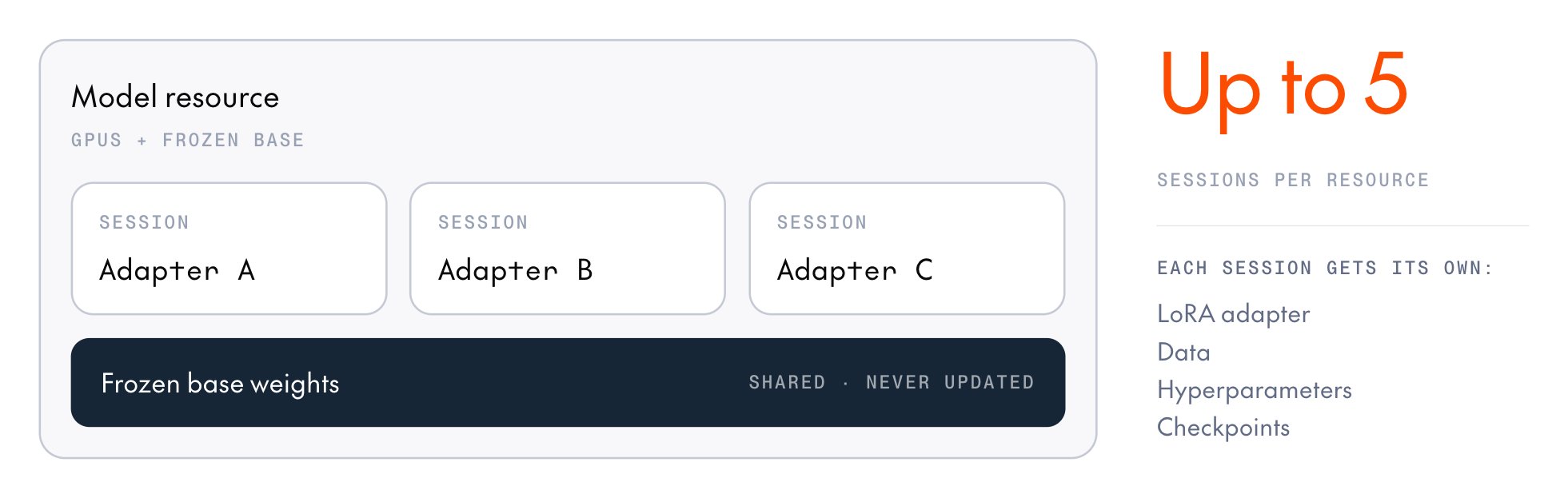 Most of what post-training bills for is the model resource, i.e. the set of GPUs with the base model loaded onto them. Training sessions add nothing to the bill, as each LoRA session trains its own adapter over the same frozen base weights, with its own data, hyperparameters, and checkpoints, and a resource can host several at once. Attach a [sweep of sessions](#run-a-sweep) to one resource and you train a sweep of adapters for the price of one base model.
The sessions on a resource don't need to share a training method. A resource has no method of its own, and each session chooses its loss function per training step, so SFT, DPO, and GRPO sessions can run side by side.
This page covers training several adapters on one model resource. To serve the trained adapters from one inference deployment and compare them, see [Multi-LoRA deployment](/docs/post-training/multi-lora-deployment).
## How many sessions a resource takes
A resource created with `lora_enabled=True` accepts up to five concurrent sessions by default, and fewer for some models. A full-weight resource (`lora_enabled=False`) accepts one. Before you plan a sweep, check the model's row on [Supported models](/docs/post-training/supported-models). Creating a session beyond the cap fails with HTTP `429` and an "at capacity" message. The SDK retries the request a few times, then raises `RateLimitError`.
Sessions on a resource share its base model, GPU type, generator replicas, and optimizer, so a sweep can vary only what each session sets for itself: its LoRA config, its data, its loss function and sampling settings, its learning rate and other per-step optimizer parameters, and its checkpoints.
## Attach to a running resource
A training run names exactly one model source:
* **`model`** provisions a fresh resource that the run owns. When the run exits, it stops both its session and the resource.
* **`model_resources_id`** attaches a session to an existing resource as a tenant. When the run exits, it stops only its own session and leaves the resource running.
Attach to train on a resource that a teammate provisioned, or one you keep running across several experiments. To find a resource's ID, [list the ready resources](/docs/post-training/model-resources#inspect-and-list-resources) or open the **Model resources** tab under [Post-training](https://api.together.ai/custom-training/resources) in the console. Then set `model_resources_id` and leave `model` unset:
```python theme={null}
import os
from post_training_cookbook.grpo.config import GRPOConfig
from post_training_cookbook.grpo.train import train_single_turn
config = GRPOConfig(
model_resources_id=os.environ["MODEL_RESOURCES_ID"],
dataset="gsm8k",
max_model_length=1536,
max_prompt_length=768,
max_sample_tokens=768,
)
train_single_turn(config) # leaves the resource running
```
When a run attaches, the cookbook checks the resource first, so a mismatch fails before training instead of mid-run. The resource must:
* Be `READY`.
* Be LoRA-enabled when `use_lora=True`.
* Have a generator when the run samples.
For a complete tenant-side example, see the cookbook's `recipes/grpo/deepmath_shared.py`.
## Run a sweep
A *hyperparameter sweep* is a set of training runs that are identical except for one or two settings, such as the learning rate or LoRA rank. You compare the resulting adapters to find the values that work best. On a shared resource, a three-run sweep costs the GPU time of one base model instead of three.
Provision once, train every run in the sweep concurrently as its own session, and tear down once. The cookbook's DeepMath sweep (`recipes/grpo/deepmath_sweep.py`) is the worked example. It trains four arms, each a session with its own learning rate:
```python theme={null}
from concurrent.futures import ThreadPoolExecutor
from post_training_cookbook.grpo.config import GRPOConfig
from post_training_cookbook.grpo.train import train_single_turn
from together.post_training import ModelResourcesClient
MODEL = "Qwen/Qwen3.6-35B-A3B"
LEARNING_RATES = (5e-5, 1e-4, 2e-4, 4e-4)
def build_config(model_resources_id: str, lr: float) -> GRPOConfig:
return GRPOConfig(
model_resources_id=model_resources_id,
learning_rate=lr,
wandb_run_name=f"lr{lr:.0e}",
dataset="deepmath",
num_examples=2000,
num_val_examples=128,
batch_size=16,
group_size=8,
num_steps=20,
max_model_length=16384,
max_prompt_length=1024,
max_sample_tokens=15360,
max_sampling_attempts=4,
validation_interval=5,
wandb_project="grpo-deepmath",
wandb_group="deepmath-sweep",
)
if __name__ == "__main__":
# Provision the base model once; every arm attaches its own session.
with ModelResourcesClient.create(
base_model=MODEL,
lora_enabled=True,
compute_config={"gpu_type": "B200-SXM", "num_generator_replicas": 1},
) as resource:
configs = [
build_config(resource.model_resources_id, lr)
for lr in LEARNING_RATES
]
with ThreadPoolExecutor(max_workers=len(configs)) as pool:
arms = {
cfg.wandb_run_name: pool.submit(train_single_turn, cfg)
for cfg in configs
}
failed = {
name: exc
for name, future in arms.items()
if (exc := future.exception()) is not None
}
for name, exc in failed.items():
print(f"[{name}] arm failed: {exc!r}")
```
How the pieces fit:
* **Concurrency:** `train_single_turn` blocks, so each arm runs in its own thread. The SDK tracks each session's work separately, so one arm's teardown doesn't cancel another arm's work.
* **Isolation:** An arm that raises doesn't stop the others. Collect failures with `future.exception()` after the pool drains.
* **Model selection:** Put the arms in one `wandb_group` and compare their `val/accuracy` curves side by side. Each arm already runs validation, so picking the best adapter takes no extra evaluation code.
* **Teardown:** The `ModelResourcesClient` context manager stops the resource once on exit, even if an arm raised. If you don't use the context manager, call `resource.stop()` yourself.
Run the sweep with `uv run python recipes/grpo/deepmath_sweep.py`. Each arm logs to Weights & Biases, so set up W\&B or turn it off, as [Monitoring](/docs/post-training/monitoring) describes, before you run it.
## Keep a resource alive
A resource stops on its own after an hour without an operation from any of its sessions. An attached session that sends no operations doesn't keep it alive: at the one-hour mark, every session on the resource is marked `EXPIRED` and the resource stops. To keep a shared resource alive between runs, start the next run within the hour.
A ready resource bills whether or not anything is training on it, so when your team is done, [stop it](/docs/post-training/model-resources#stop-a-resource) with `force=True`, which also stops any tenant sessions still attached.
## Next steps
Compare the trained adapters on one endpoint and pick the winner.
Per-model session caps and GPU types.
Create, inspect, and stop the resource your sessions share.
What a shared resource costs and when it stops.
This documentation is built and hosted on [Mintlify](https://mintlify.com), a developer documentation platform.
Most of what post-training bills for is the model resource, i.e. the set of GPUs with the base model loaded onto them. Training sessions add nothing to the bill, as each LoRA session trains its own adapter over the same frozen base weights, with its own data, hyperparameters, and checkpoints, and a resource can host several at once. Attach a [sweep of sessions](#run-a-sweep) to one resource and you train a sweep of adapters for the price of one base model.
The sessions on a resource don't need to share a training method. A resource has no method of its own, and each session chooses its loss function per training step, so SFT, DPO, and GRPO sessions can run side by side.
This page covers training several adapters on one model resource. To serve the trained adapters from one inference deployment and compare them, see [Multi-LoRA deployment](/docs/post-training/multi-lora-deployment).
## How many sessions a resource takes
A resource created with `lora_enabled=True` accepts up to five concurrent sessions by default, and fewer for some models. A full-weight resource (`lora_enabled=False`) accepts one. Before you plan a sweep, check the model's row on [Supported models](/docs/post-training/supported-models). Creating a session beyond the cap fails with HTTP `429` and an "at capacity" message. The SDK retries the request a few times, then raises `RateLimitError`.
Sessions on a resource share its base model, GPU type, generator replicas, and optimizer, so a sweep can vary only what each session sets for itself: its LoRA config, its data, its loss function and sampling settings, its learning rate and other per-step optimizer parameters, and its checkpoints.
## Attach to a running resource
A training run names exactly one model source:
* **`model`** provisions a fresh resource that the run owns. When the run exits, it stops both its session and the resource.
* **`model_resources_id`** attaches a session to an existing resource as a tenant. When the run exits, it stops only its own session and leaves the resource running.
Attach to train on a resource that a teammate provisioned, or one you keep running across several experiments. To find a resource's ID, [list the ready resources](/docs/post-training/model-resources#inspect-and-list-resources) or open the **Model resources** tab under [Post-training](https://api.together.ai/custom-training/resources) in the console. Then set `model_resources_id` and leave `model` unset:
```python theme={null}
import os
from post_training_cookbook.grpo.config import GRPOConfig
from post_training_cookbook.grpo.train import train_single_turn
config = GRPOConfig(
model_resources_id=os.environ["MODEL_RESOURCES_ID"],
dataset="gsm8k",
max_model_length=1536,
max_prompt_length=768,
max_sample_tokens=768,
)
train_single_turn(config) # leaves the resource running
```
When a run attaches, the cookbook checks the resource first, so a mismatch fails before training instead of mid-run. The resource must:
* Be `READY`.
* Be LoRA-enabled when `use_lora=True`.
* Have a generator when the run samples.
For a complete tenant-side example, see the cookbook's `recipes/grpo/deepmath_shared.py`.
## Run a sweep
A *hyperparameter sweep* is a set of training runs that are identical except for one or two settings, such as the learning rate or LoRA rank. You compare the resulting adapters to find the values that work best. On a shared resource, a three-run sweep costs the GPU time of one base model instead of three.
Provision once, train every run in the sweep concurrently as its own session, and tear down once. The cookbook's DeepMath sweep (`recipes/grpo/deepmath_sweep.py`) is the worked example. It trains four arms, each a session with its own learning rate:
```python theme={null}
from concurrent.futures import ThreadPoolExecutor
from post_training_cookbook.grpo.config import GRPOConfig
from post_training_cookbook.grpo.train import train_single_turn
from together.post_training import ModelResourcesClient
MODEL = "Qwen/Qwen3.6-35B-A3B"
LEARNING_RATES = (5e-5, 1e-4, 2e-4, 4e-4)
def build_config(model_resources_id: str, lr: float) -> GRPOConfig:
return GRPOConfig(
model_resources_id=model_resources_id,
learning_rate=lr,
wandb_run_name=f"lr{lr:.0e}",
dataset="deepmath",
num_examples=2000,
num_val_examples=128,
batch_size=16,
group_size=8,
num_steps=20,
max_model_length=16384,
max_prompt_length=1024,
max_sample_tokens=15360,
max_sampling_attempts=4,
validation_interval=5,
wandb_project="grpo-deepmath",
wandb_group="deepmath-sweep",
)
if __name__ == "__main__":
# Provision the base model once; every arm attaches its own session.
with ModelResourcesClient.create(
base_model=MODEL,
lora_enabled=True,
compute_config={"gpu_type": "B200-SXM", "num_generator_replicas": 1},
) as resource:
configs = [
build_config(resource.model_resources_id, lr)
for lr in LEARNING_RATES
]
with ThreadPoolExecutor(max_workers=len(configs)) as pool:
arms = {
cfg.wandb_run_name: pool.submit(train_single_turn, cfg)
for cfg in configs
}
failed = {
name: exc
for name, future in arms.items()
if (exc := future.exception()) is not None
}
for name, exc in failed.items():
print(f"[{name}] arm failed: {exc!r}")
```
How the pieces fit:
* **Concurrency:** `train_single_turn` blocks, so each arm runs in its own thread. The SDK tracks each session's work separately, so one arm's teardown doesn't cancel another arm's work.
* **Isolation:** An arm that raises doesn't stop the others. Collect failures with `future.exception()` after the pool drains.
* **Model selection:** Put the arms in one `wandb_group` and compare their `val/accuracy` curves side by side. Each arm already runs validation, so picking the best adapter takes no extra evaluation code.
* **Teardown:** The `ModelResourcesClient` context manager stops the resource once on exit, even if an arm raised. If you don't use the context manager, call `resource.stop()` yourself.
Run the sweep with `uv run python recipes/grpo/deepmath_sweep.py`. Each arm logs to Weights & Biases, so set up W\&B or turn it off, as [Monitoring](/docs/post-training/monitoring) describes, before you run it.
## Keep a resource alive
A resource stops on its own after an hour without an operation from any of its sessions. An attached session that sends no operations doesn't keep it alive: at the one-hour mark, every session on the resource is marked `EXPIRED` and the resource stops. To keep a shared resource alive between runs, start the next run within the hour.
A ready resource bills whether or not anything is training on it, so when your team is done, [stop it](/docs/post-training/model-resources#stop-a-resource) with `force=True`, which also stops any tenant sessions still attached.
## Next steps
Compare the trained adapters on one endpoint and pick the winner.
Per-model session caps and GPU types.
Create, inspect, and stop the resource your sessions share.
What a shared resource costs and when it stops.
This documentation is built and hosted on [Mintlify](https://mintlify.com), a developer documentation platform.