> ## Documentation Index
> Fetch the complete documentation index at: https://docs.together.ai/llms.txt
> Use this file to discover all available pages before exploring further.
# Train in multi-turn environments
> Train tool-use agents with GRPO over whole episodes, where the model acts, an environment responds, and a reward scores the outcome.
Single-turn group relative policy optimization (GRPO) scores one model response per prompt. Multi-turn GRPO runs and scores whole episodes. In each episode, the model takes an action (an assistant message that may carry tool calls), the environment responds, and the loop repeats until the environment ends the episode or a turn limit stops it. The reward comes from the environment when the episode ends, and every assistant turn in the episode trains on it.
Use multi-turn GRPO for tool-use agents, multi-step reasoning against an external system, and any task where the model has to act more than once to earn a reward.
## Requirements
* The same requirements as [single-turn GRPO](/docs/post-training/grpo#requirements): a model with generator support, and a model resource with `num_generator_replicas` of 1 or more.
* A cookbook checkout, which provides the environment abstractions in `post_training_cookbook.envs`.
## How an episode runs
Each episode starts from a `Task`, which carries the prompt, the target the reward checks against, and any metadata the environment needs. The loop then alternates between the model and the environment:
1. The environment's `reset(task)` returns the opening messages, typically a system prompt and the user prompt.
2. The loop renders the messages and the environment's tool specs through the model's codec, samples an assistant message, and parses it back into a structured message with any tool calls.
3. The environment's `step(message)` consumes the assistant message, executes any tool calls, appends the results, and returns a `StepResult` with the updated history, a reward, and whether the episode is over.
4. Steps 2 and 3 repeat until the environment terminates the episode, the loop truncates it, or `max_turns` assistant turns have run.
`episodes_per_task` is the multi-turn counterpart of `group_size` in single-turn training. Each task runs that many episodes, and advantages are computed across them.
## Write an environment
Subclass `Env` and implement its four members: `reset`, `step`, `tool_specs`, and `messages`. The environment owns the conversation history, tool dispatch, and the rule for when an episode ends. The loop owns tokenization and sampling.
```python theme={null}
import json
from post_training_cookbook.envs import (
Env,
StepResult,
Task,
Tool,
ToolResult,
tool_to_spec,
)
from post_training_cookbook.types import Message, ToolSpec
SYSTEM_PROMPT = (
"Use the calculator tool, then reply with only the final number."
)
class CalculatorTool:
name = "calculator"
description = "Evaluate an arithmetic expression."
parameters_schema = {
"type": "object",
"properties": {"expression": {"type": "string"}},
"required": ["expression"],
}
async def execute(self, arguments: str) -> ToolResult:
expression = json.loads(arguments)["expression"]
# safe_eval is your own arithmetic evaluator. Define it before you
# train. Until you do, every call returns a tool_error, because the
# step's except catches the NameError. Never eval() model output.
return ToolResult(content=str(safe_eval(expression)))
class MathEnv(Env):
def __init__(self) -> None:
self._messages: list[Message] = []
self._task: Task | None = None
self._tools: dict[str, Tool] = {"calculator": CalculatorTool()}
async def reset(self, task: Task) -> list[Message]:
self._task = task
self._messages = [
Message(role="system", content=SYSTEM_PROMPT),
Message(role="user", content=task.prompt),
]
return list(self._messages)
async def step(self, message: Message) -> StepResult:
self._messages.append(message)
tool_calls = message.get("tool_calls", [])
if not tool_calls:
# No tool calls: treat the message as the final answer.
correct = message.get("content", "").strip() == str(
self._task.target
)
return StepResult(
terminated=True,
truncated=False,
messages=list(self._messages),
reward=1.0 if correct else 0.0,
)
for call in tool_calls:
name = call["function"]["name"]
try:
tool = self._tools[name]
result = await tool.execute(call["function"]["arguments"])
content = result.content
except Exception as exc:
# Report a bad tool call to the model. An uncaught
# exception here stops the whole training run.
content = f"tool_error: {exc!r}"
self._messages.append(
Message(
role="tool",
content=content,
tool_call_id=call["id"],
name=name,
)
)
return StepResult(
terminated=False,
truncated=False,
messages=list(self._messages),
reward=0.0,
)
@property
def tool_specs(self) -> list[ToolSpec]:
return [tool_to_spec(tool) for tool in self._tools.values()]
@property
def messages(self) -> list[Message]:
return list(self._messages)
```
Beyond those four members, an environment works with these pieces:
* **`Task`:** The spec for one episode, with `prompt`, `target`, and `metadata` fields.
* **`Tool`:** Anything with `name`, `description`, `parameters_schema`, and an `async execute(arguments) -> ToolResult` method. `tool_to_spec` converts a tool into the schema the codec renders into the prompt.
* **`ToolResult`:** The return value of `execute`. Set `should_stop=True` to ask the environment to end the episode. Your `step` decides how to honor the request. The cookbook's reference environment returns `terminated=True`.
* **`StepResult`:** The return value of `step`. `terminated` means task logic ended the episode, for example on a final answer. `truncated` means an external policy ended it. `reward` is the episode's reward when it ends. The loop reads `reward` and `metrics` only from the step that ends the episode, so intermediate steps usually return `0.0` and diagnostics belong in the final step's `metrics`.
* **`close()`:** Override it when `reset` starts background work, such as a subprocess or a connection. It runs even when the loop truncates the episode and the environment never sees a terminal `step`.
To build your own environment, start from a copy of the cookbook's reference implementation, `ToolUseGameEnv` in `post_training_cookbook/envs/tool_use_game/`. It provides `list_fact_keys`, `lookup`, and `calculator` tools and a bundled task list.
## Run multi-turn training
Call `train_multi_turn` with your tasks, a factory that builds a fresh environment for each episode, and a config that sets `max_turns`:
```python theme={null}
from post_training_cookbook.envs.tool_use_game import (
TOOL_USE_GAME_TASKS,
ToolUseGameEnv,
)
from post_training_cookbook.grpo.config import GRPOConfig
from post_training_cookbook.grpo.train import train_multi_turn
tasks = list(TOOL_USE_GAME_TASKS)
config = GRPOConfig(
model="Qwen/Qwen3.8-27B",
batch_size=4,
episodes_per_task=8,
num_steps=200,
validation_interval=10,
max_turns=6,
max_model_length=2048,
learning_rate=2e-5,
wandb_project="grpo-tool-use-game",
sequential_validation=True,
max_sampling_attempts=2,
)
train_multi_turn(
config,
tasks=tasks,
env_factory=lambda task: ToolUseGameEnv(),
val_tasks=tasks,
)
```
This example is the cookbook's `recipes/grpo/tool_use_game.py` recipe. These settings are specific to multi-turn training:
| Setting | Default | Description |
| - | - | - |
| `max_turns` | `None` | Maximum assistant turns per episode. Required by `train_multi_turn`. |
| `episodes_per_task` | `1` | Episodes per task per step, the multi-turn analogue of `group_size`. Set it to 2 or more: a single episode has no group to compare against, so it never trains. |
| `failed_parse_reward` | `-0.1` | Reward assigned when the sampled output can't be parsed into a valid message or tool call. |
| `val_max_turns` | `None` | Turn limit during validation. `None` reuses `max_turns`. |
| `sequential_validation` | `False` | Run validation episodes one at a time instead of in parallel. |
| `max_steps_off_policy`, `groups_in_flight` | `None`, `None` (resolves to `batch_size`) | Async collection. See [Async training](/docs/post-training/grpo#async-training). |
## How episodes become training samples
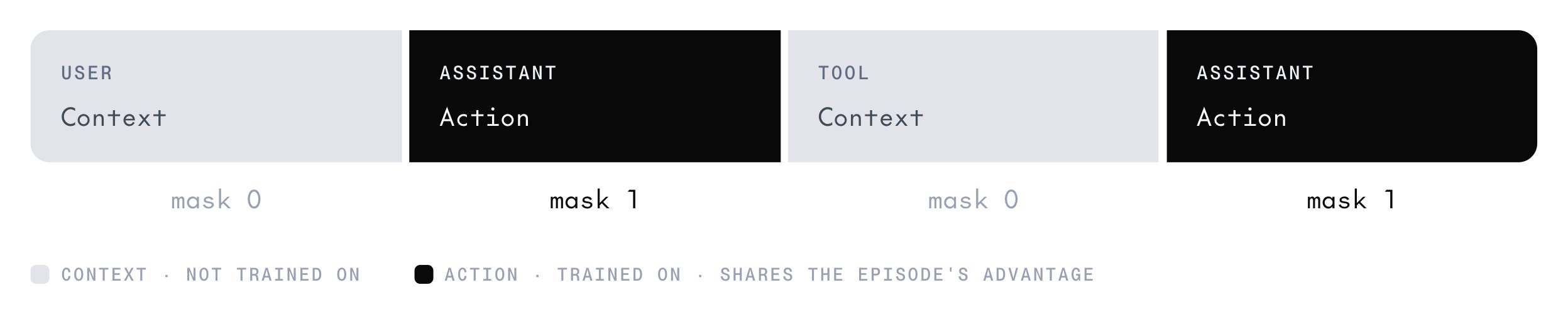 An episode is a sequence of alternating turns, but the trainer sees flat token sequences. The collector flattens each episode into context segments and action segments.
Context segments get loss mask `0`, so the model isn't trained to predict the prompt or the tool results. Action segments get loss mask `1`, and every action in the episode carries the episode's advantage.
When the chat template strips earlier content from history, such as a reasoning model's `` blocks, the collector starts a new sample at that point, so the tokens stay aligned with the log-probabilities the generator recorded. [Thinking settings](/docs/post-training/cookbook#thinking) covers the options that control this.
## Truncation
An episode that doesn't reach a terminal `step` is truncated. The cause determines whether the [soft overlong penalty](/docs/post-training/grpo#overlong-responses) is added to the episode's reward. Only the two length-budget causes add it:
| Cause | What happened | Overlong penalty applies |
| - | - | - |
| `CONTEXT_OVERFLOW` | The conversation exceeded the context budget before the episode ended. | Yes. |
| `MAX_TURNS` | The episode hit `max_turns` without terminating. | Yes. |
| `ENV` | The environment's `step` returned `truncated=True`. | No. |
| `PARSE_FAILURE` | The sampled message couldn't be parsed. The episode ends with `failed_parse_reward`. | No. |
With `overlong_masking=True`, truncated episodes of any cause are dropped before samples are built, but their rewards still count toward the group baseline.
To track how episodes end, watch the [multi-turn metrics](/docs/post-training/monitoring#multi-turn-metrics) in the step log: `terminated_ratio`, `truncated_ratio`, `context_overflow_ratio`, and `parse_failure_ratio`.
## Score a hosted model first
Before you spend GPU time, use the cookbook's `post_training_cookbook.serverless_eval` package to get a baseline score for your environment. Its `run_and_report` function runs any `Env` against a hosted chat model without a training session. For a worked example, see `recipes/serverless_eval/tool_use_game.py`. [Check a baseline before training](/docs/post-training/reward-functions#check-a-baseline-before-training) explains how to read the score.
## Next steps
Clipping, dynamic sampling, overlong handling, and async training.
Design guidance that applies to episode rewards too.
The multi-turn and async metrics.
Every GRPO config field, including the multi-turn ones.
This documentation is built and hosted on [Mintlify](https://mintlify.com), a developer documentation platform.
An episode is a sequence of alternating turns, but the trainer sees flat token sequences. The collector flattens each episode into context segments and action segments.
Context segments get loss mask `0`, so the model isn't trained to predict the prompt or the tool results. Action segments get loss mask `1`, and every action in the episode carries the episode's advantage.
When the chat template strips earlier content from history, such as a reasoning model's `` blocks, the collector starts a new sample at that point, so the tokens stay aligned with the log-probabilities the generator recorded. [Thinking settings](/docs/post-training/cookbook#thinking) covers the options that control this.
## Truncation
An episode that doesn't reach a terminal `step` is truncated. The cause determines whether the [soft overlong penalty](/docs/post-training/grpo#overlong-responses) is added to the episode's reward. Only the two length-budget causes add it:
| Cause | What happened | Overlong penalty applies |
| - | - | - |
| `CONTEXT_OVERFLOW` | The conversation exceeded the context budget before the episode ended. | Yes. |
| `MAX_TURNS` | The episode hit `max_turns` without terminating. | Yes. |
| `ENV` | The environment's `step` returned `truncated=True`. | No. |
| `PARSE_FAILURE` | The sampled message couldn't be parsed. The episode ends with `failed_parse_reward`. | No. |
With `overlong_masking=True`, truncated episodes of any cause are dropped before samples are built, but their rewards still count toward the group baseline.
To track how episodes end, watch the [multi-turn metrics](/docs/post-training/monitoring#multi-turn-metrics) in the step log: `terminated_ratio`, `truncated_ratio`, `context_overflow_ratio`, and `parse_failure_ratio`.
## Score a hosted model first
Before you spend GPU time, use the cookbook's `post_training_cookbook.serverless_eval` package to get a baseline score for your environment. Its `run_and_report` function runs any `Env` against a hosted chat model without a training session. For a worked example, see `recipes/serverless_eval/tool_use_game.py`. [Check a baseline before training](/docs/post-training/reward-functions#check-a-baseline-before-training) explains how to read the score.
## Next steps
Clipping, dynamic sampling, overlong handling, and async training.
Design guidance that applies to episode rewards too.
The multi-turn and async metrics.
Every GRPO config field, including the multi-turn ones.
This documentation is built and hosted on [Mintlify](https://mintlify.com), a developer documentation platform.