> ## Documentation Index
> Fetch the complete documentation index at: https://docs.together.ai/llms.txt
> Use this file to discover all available pages before exploring further.
> Execute LLM-generated code seamlessly with a simple API call.
# Code interpreter
Using a coding agent? Install the [together-sandboxes](https://github.com/togethercomputer/skills/tree/main/skills/together-sandboxes) skill to let your agent write correct sandbox code automatically. [Learn more](/docs/agent-skills).
Together Code Interpreter (TCI) enables you to execute Python code in a sandboxed environment.
The Code Interpreter currently only supports Python. We plan to expand the language options in the future.
> ℹ️ MCP Server
>
> TCI is also available as an MCP server through [Smithery](https://smithery.ai/server/@togethercomputer/mcp-server-tci). This makes it easier to add code interpreting abilities to any MCP client like Cursor, Windsurf, or your own chat app.
## Run your first query using the TCI
```python Python theme={null}
from together import Together
client = Together()
## Run a simple print statement in the code interpreter
response = client.code_interpreter.run(
code='print("Welcome to Together Code Interpreter!")',
language="python",
)
print(f"Status: {response.data.status}")
for output in response.data.outputs:
print(f"{output.type}: {output.data}")
```
```python Python(v2) theme={null}
from together import Together
client = Together()
## Run a simple print statement in the code interpreter
response = client.code_interpreter.execute(
code='print("Welcome to Together Code Interpreter!")',
language="python",
)
print(f"Status: {response.data.status}")
for output in response.data.outputs:
print(f"{output.type}: {output.data}")
```
```typescript TypeScript theme={null}
import Together from 'together-ai';
const client = new Together();
const response = await client.codeInterpreter.execute({
code: 'print("Welcome to Together Code Interpreter!")',
language: 'python',
});
if (response.errors) {
console.log(`Errors: ${response.errors}`);
} else {
for (const output of response.data.outputs) {
console.log(`${output.type}: ${output.data}`);
}
}
```
```powershell Powershell theme={null}
curl -X POST "https://api.together.ai/tci/execute" \
-H "Authorization: Bearer $TOGETHER_API_KEY" \
-H "Content-Type: application/json" \
-d '{
"language": "python",
"code": "print(\"Welcome to Together Code Interpreter!\")"
}'
```
Output
```text Text theme={null}
Status: completed
stdout: Welcome to Together Code Interpreter!
```
> ℹ️ Pricing information
>
> TCI usage is billed at **\$0.03/session**. As detailed below, sessions have a lifespan of 60 minutes and can be used multiple times.
## Example Use Cases
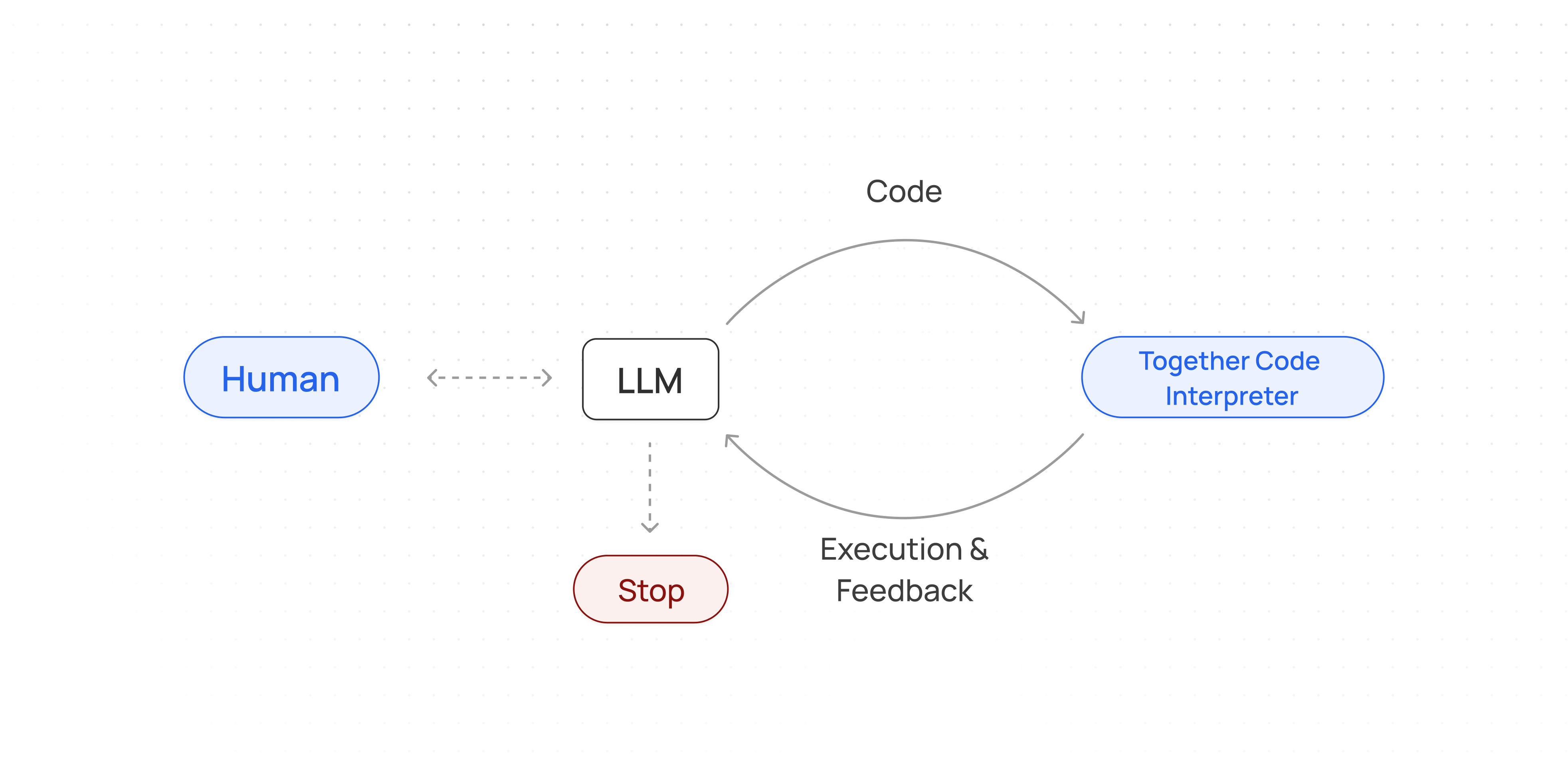
* **Reinforcement learning (RL) training**: TCI transforms code execution into an interactive RL environment where generated code is run and evaluated in real time, providing reward signals from successes or failures, integrating automated pass/fail tests, and scaling easily across parallel workers—thus creating a powerful feedback loop that refines coding models over many trials.
* **Developing agentic workflows**: TCI allows AI agents to seamlessly write and execute Python code, enabling robust, iterative, and secure computations within a closed-loop system.
## Response Format
The API returns:
* `session_id`: Identifier for the current session
* `outputs`: Array of execution outputs, which can include:
* Execution output (the return value of your snippet)
* Standard output (`stdout`)
* Standard error (`stderr`)
* Error messages
* Rich display data (images, HTML, etc.)
Example
```json JSON theme={null}
{
"data": {
"outputs": [
{
"data": "Hello, world!\n",
"type": "stdout"
},
{
"data": {
"image/png": "iVBORw0KGgoAAAANSUhEUgAAA...",
"text/plain": ""
},
"type": "display_data"
}
],
"session_id": "ses_CM42NfvvzCab123"
},
"errors": null
}
```
## Usage overview
Together AI has created sessions to measure TCI usage.
A session is an active code execution environment that can be called to execute code, they can be used multiple times and have a lifespan of 60 minutes.
Typical TCI usage follows this workflow:
1. Start a session (create a TCI instance).
2. Call that session to execute code; TCI outputs `stdout` and `stderr`.
3. Optionally reuse an existing session by calling its `session_id`.
## Reusing sessions and maintaining state between runs
The `session_id` can be used to access a previously initialized session. All packages, variables, and memory will be retained.
```python Python theme={null}
from together import Together
client = Together()
## set a variable x to 42
response1 = client.code_interpreter.run(code="x = 42", language="python")
session_id = response1.data.session_id
## print the value of x
response2 = client.code_interpreter.run(
code='print(f"The value of x is {x}")',
language="python",
session_id=session_id,
)
for output in response2.data.outputs:
print(f"{output.type}: {output.data}")
```
```python Python(v2) theme={null}
from together import Together
client = Together()
## set a variable x to 42
response1 = client.code_interpreter.execute(code="x = 42", language="python")
session_id = response1.data.session_id
## print the value of x
response2 = client.code_interpreter.execute(
code='print(f"The value of x is {x}")',
language="python",
session_id=session_id,
)
for output in response2.data.outputs:
print(f"{output.type}: {output.data}")
```
```typescript TypeScript theme={null}
import Together from 'together-ai';
const client = new Together();
async function main() {
// Run the first session
const response1 = await client.codeInterpreter.execute({
code: 'x = 42',
language: 'python',
});
if (response1.errors) {
console.log(`Response 1 errors: ${response1.errors}`);
return;
}
// Save the session_id
const sessionId = response1.data.session_id;
// Reuse the first session
const response2 = await client.codeInterpreter.execute({
code: 'print(f"The value of x is {x}")',
language: 'python',
session_id: sessionId,
});
if (response2.errors) {
console.log(`Response 2 errors: ${response2.errors}`);
return;
}
for (const output of response2.data.outputs) {
console.log(`${output.type}: ${output.data}`);
}
}
main();
```
```curl cURL theme={null}
curl -X POST "https://api.together.ai/tci/execute" \
-H "Authorization: Bearer $TOGETHER_API_KEY" \
-H "Content-Type: application/json" \
-d '{
"language": "python",
"code": "x = 42"
}'
curl -X POST "https://api.together.ai/tci/execute" \
-H "Authorization: Bearer $TOGETHER_API_KEY" \
-H "Content-Type: application/json" \
-d '{
"language": "python",
"code": "print(f\"The value of x is {x}\")",
"session_id": "YOUR_SESSION_ID_FROM_FIRST_RESPONSE"
}'
```
Output
```text Text theme={null}
stdout: The value of x is 42
```
## Using the TCI for Data analysis
Together Code Interpreter is a very powerful tool and gives you access to a fully functional coding environment. You can install Python libraries and conduct fully fledged data analysis experiments.
```python Python theme={null}
from together import Together
client = Together()
## Create a code interpreter instance
code_interpreter = client.code_interpreter
code = """
!pip install numpy
import numpy as np
## Create a random matrix
matrix = np.random.rand(3, 3)
print("Random matrix:")
print(matrix)
## Calculate eigenvalues
eigenvalues = np.linalg.eigvals(matrix)
print("\\nEigenvalues:")
print(eigenvalues)
"""
response = code_interpreter.run(code=code, language="python")
for output in response.data.outputs:
print(f"{output.type}: {output.data}")
if response.data.errors:
print(f"Errors: {response.data.errors}")
```
```python Python(v2) theme={null}
from together import Together
client = Together()
## Create a code interpreter instance
code_interpreter = client.code_interpreter
code = """
!pip install numpy
import numpy as np
## Create a random matrix
matrix = np.random.rand(3, 3)
print("Random matrix:")
print(matrix)
## Calculate eigenvalues
eigenvalues = np.linalg.eigvals(matrix)
print("\\nEigenvalues:")
print(eigenvalues)
"""
response = code_interpreter.execute(code=code, language="python")
for output in response.data.outputs:
print(f"{output.type}: {output.data}")
```
```typescript TypeScript theme={null}
import Together from 'together-ai';
const client = new Together();
// Data analysis
const code = `
!pip install numpy
import numpy as np
# Create a random matrix
matrix = np.random.rand(3, 3)
print("Random matrix:")
print(matrix)
# Calculate eigenvalues
eigenvalues = np.linalg.eigvals(matrix)
print("\\nEigenvalues:")
print(eigenvalues)
`;
const response = await client.codeInterpreter.execute({
code,
language: 'python',
});
if (response.errors) {
console.log(`Errors: ${response.errors}`);
} else {
for (const output of response.data.outputs) {
console.log(`${output.type}: ${output.data}`);
}
}
```
```curl cURL theme={null}
curl -X POST "https://api.together.ai/tci/execute" \
-H "Authorization: Bearer $TOGETHER_API_KEY" \
-H "Content-Type: application/json" \
-d '{
"language": "python",
"code": "!pip install numpy\nimport numpy as np\n# Create a random matrix\nmatrix = np.random.rand(3, 3)\nprint(\"Random matrix:\")\nprint(matrix)\n# Calculate eigenvalues\neigenvalues = np.linalg.eigvals(matrix)\nprint(\"\\nEigenvalues:\")\nprint(eigenvalues)"
}'
```
## Uploading and using files with TCI
```python Python theme={null}
from together import Together
client = Together()
## Create a code interpreter instance
code_interpreter = client.code_interpreter
script_content = "import sys\nprint(f'Hello from inside {sys.argv[0]}!')"
## Define the script file as a dictionary
script_file = {
"name": "myscript.py",
"encoding": "string",
"content": script_content,
}
code_to_run_script = "!python myscript.py"
response = code_interpreter.run(
code=code_to_run_script,
language="python",
files=[script_file], # Pass the script dictionary in a list
)
## Print results
print(f"Status: {response.data.status}")
for output in response.data.outputs:
print(f"{output.type}: {output.data}")
if response.data.errors:
print(f"Errors: {response.data.errors}")
```
```python Python(v2) theme={null}
from together import Together
client = Together()
## Create a code interpreter instance
code_interpreter = client.code_interpreter
script_content = "import sys\nprint(f'Hello from inside {sys.argv[0]}!')"
## Define the script file as a dictionary
script_file = {
"name": "myscript.py",
"encoding": "string",
"content": script_content,
}
code_to_run_script = "!python myscript.py"
response = code_interpreter.execute(
code=code_to_run_script,
language="python",
files=[script_file], # Pass the script dictionary in a list
)
## Print results
print(f"Status: {response.data.status}")
for output in response.data.outputs:
print(f"{output.type}: {output.data}")
```
```typescript TypeScript theme={null}
import Together from 'together-ai';
// Initialize the Together client
const client = new Together();
// Create a code interpreter instance
const codeInterpreter = client.codeInterpreter;
// Define the script content
const scriptContent = "import sys\nprint(f'Hello from inside {sys.argv[0]}!')";
// Define the script file as an object
const scriptFile = {
name: "myscript.py",
encoding: "string",
content: scriptContent,
};
// Define the code to run the script
const codeToRunScript = "!python myscript.py";
// Run the code interpreter
async function runScript() {
const response = await codeInterpreter.execute({
code: codeToRunScript,
language: 'python',
files: [scriptFile],
});
// Print results
console.log(`Status: ${response.data.status}`);
for (const output of response.data.outputs) {
console.log(`${output.type}: ${output.data}`);
}
}
runScript();
```
```curl cURL theme={null}
curl -X POST "https://api.together.ai/tci/execute" \
-H "Authorization: Bearer $TOGETHER_API_KEY" \
-H "Content-Type: application/json" \
-d '{
"language": "python",
"files": [
{
"name": "myscript.py",
"encoding": "string",
"content": "import sys\nprint(f'\''Hello from inside {sys.argv[0]}!'\'')"
}
],
"code": "!python myscript.py"
}'
```
Output
```text Text theme={null}
Status: completed
stdout: Hello from inside myscript.py!
```
## Pre-installed dependencies
TCI's Python sessions come pre-installed with the following dependencies, any other dependencies can be installed using a `!pip install` command in the python code.
```text Text theme={null}
- aiohttp
- beautifulsoup4
- bokeh
- gensim
- imageio
- joblib
- librosa
- matplotlib
- nltk
- numpy
- opencv-python
- openpyxl
- pandas
- plotly
- pytest
- python-docx
- pytz
- requests
- scikit-image
- scikit-learn
- scipy
- seaborn
- soundfile
- spacy
- textblob
- tornado
- urllib3
- xarray
- xlrd
- sympy
```
## List Active Sessions
To retrieve all your active sessions:
```python Python(v2) theme={null}
from together import Together
client = Together()
response = client.code_interpreter.sessions.list()
for session in response.data.sessions:
print(session.id)
```
```curl cURL theme={null}
curl -X GET "https://api.together.ai/tci/sessions" \
-H "Authorization: Bearer $TOGETHER_API_KEY" \
-H "Content-Type: application/json"
```
Output:
```json JSON theme={null}
{
"data": {
"sessions": [
{
"id": "ses_CVtmHZWnVBdtZnwbZNosk",
"execute_count": 1,
"expires_at": "2025-12-08T07:11:51.890310+00:00",
"last_execute_at": "2025-12-08T06:41:52.188626+00:00",
"started_at": "2025-12-08T06:41:51.890310+00:00"
},
{
"id": "ses_CVtmJv6pRn1gHtiyQzEpS",
"execute_count": 2,
"expires_at": "2025-12-08T07:12:10.271865+00:00",
"last_execute_at": "2025-12-08T06:42:11.334315+00:00",
"started_at": "2025-12-08T06:42:10.271865+00:00"
},
{
"id": "ses_CVtmLBDRcoVeNTzWBTQ6E",
"execute_count": 1,
"expires_at": "2025-12-08T07:12:27.372041+00:00",
"last_execute_at": "2025-12-08T06:42:31.163214+00:00",
"started_at": "2025-12-08T06:42:27.372041+00:00"
}
]
},
"errors": null
}
```
## Further reading
[TCI API Reference docs](/reference/tci-execute)
[Together Code Interpreter Cookbook](https://github.com/togethercomputer/together-cookbook/blob/main/Together_Code_Interpreter.ipynb)
## Troubleshooting & questions
If you have questions about integrating TCI into your workflow or encounter any issues, please [contact us](https://www.together.ai/contact).
 * **Reinforcement learning (RL) training**: TCI transforms code execution into an interactive RL environment where generated code is run and evaluated in real time, providing reward signals from successes or failures, integrating automated pass/fail tests, and scaling easily across parallel workers—thus creating a powerful feedback loop that refines coding models over many trials.
* **Developing agentic workflows**: TCI allows AI agents to seamlessly write and execute Python code, enabling robust, iterative, and secure computations within a closed-loop system.
## Response Format
The API returns:
* `session_id`: Identifier for the current session
* `outputs`: Array of execution outputs, which can include:
* Execution output (the return value of your snippet)
* Standard output (`stdout`)
* Standard error (`stderr`)
* Error messages
* Rich display data (images, HTML, etc.)
Example
```json JSON theme={null}
{
"data": {
"outputs": [
{
"data": "Hello, world!\n",
"type": "stdout"
},
{
"data": {
"image/png": "iVBORw0KGgoAAAANSUhEUgAAA...",
"text/plain": "
* **Reinforcement learning (RL) training**: TCI transforms code execution into an interactive RL environment where generated code is run and evaluated in real time, providing reward signals from successes or failures, integrating automated pass/fail tests, and scaling easily across parallel workers—thus creating a powerful feedback loop that refines coding models over many trials.
* **Developing agentic workflows**: TCI allows AI agents to seamlessly write and execute Python code, enabling robust, iterative, and secure computations within a closed-loop system.
## Response Format
The API returns:
* `session_id`: Identifier for the current session
* `outputs`: Array of execution outputs, which can include:
* Execution output (the return value of your snippet)
* Standard output (`stdout`)
* Standard error (`stderr`)
* Error messages
* Rich display data (images, HTML, etc.)
Example
```json JSON theme={null}
{
"data": {
"outputs": [
{
"data": "Hello, world!\n",
"type": "stdout"
},
{
"data": {
"image/png": "iVBORw0KGgoAAAANSUhEUgAAA...",
"text/plain": "