> ## Documentation Index
> Fetch the complete documentation index at: https://docs.together.ai/llms.txt
> Use this file to discover all available pages before exploring further.

# Context windows

> The model's working memory. A hard limit on the way in, a soft constraint inside it.

export const WindowSliderDiagram = () => {
  const CSS = `
  .learn-diagram .win { display: grid; gap: var(--space-md); }
  .learn-diagram .win__lab {
    font-family: var(--font-mono);
    font-size: 11px;
    letter-spacing: 0.1em;
    text-transform: uppercase;
    color: var(--color-ink-mute);
    display: flex;
    justify-content: space-between;
    gap: var(--space-2xs);
    margin-bottom: 6px;
  }
  .learn-diagram .win__tape {
    position: relative;
    height: 56px;
    padding: 4px;
    background: var(--color-paper-2);
    border: 1px solid var(--color-rule-soft);
    border-radius: var(--radius-md);
  }
  .learn-diagram .win__strip { display: flex; gap: 2px; height: 100%; }
  .learn-diagram .win__msg {
    border-radius: var(--radius-sm);
    display: flex;
    align-items: center;
    justify-content: center;
    font-family: var(--font-mono);
    font-size: 10px;
    overflow: hidden;
    white-space: nowrap;
    transition: opacity var(--dur-base) var(--ease-out), width var(--dur-base) var(--ease-out);
  }
  .learn-diagram .win__msg--sys { background: var(--tg-purple-mid); color: var(--tg-navy); }
  .learn-diagram .win__msg--user { background: var(--tg-blue-mid); color: var(--tg-navy); }
  .learn-diagram .win__msg--asst { background: var(--tg-orange-tint); color: var(--tg-orange-dark); }
  .learn-diagram .win__msg--sum { background: var(--tg-purple); color: #fff; }
  .learn-diagram .win__msg.is-dropped {
    background: repeating-linear-gradient(45deg, #F0F1F4, #F0F1F4 4px, #E2E4E9 4px, #E2E4E9 8px);
    color: var(--color-ink-faint);
  }
  .learn-diagram .win__frame {
    position: absolute;
    top: 0;
    bottom: 0;
    border: 2px solid var(--tg-orange);
    border-radius: var(--radius-md);
    pointer-events: none;
    transition: left var(--dur-slow) var(--ease-out), width var(--dur-slow) var(--ease-out);
  }
  .learn-diagram .win__frame-tag {
    position: absolute;
    top: -9px;
    right: 6px;
    background: var(--tg-orange);
    color: #fff;
    font-family: var(--font-mono);
    font-size: 9px;
    letter-spacing: 0.08em;
    text-transform: uppercase;
    padding: 1px 6px;
    border-radius: 2px;
  }
  .learn-diagram .win__meter { height: 6px; background: var(--color-paper-3); border-radius: 3px; overflow: hidden; display: flex; }
  .learn-diagram .win__meter-fill { background: var(--tg-orange); transition: width var(--dur-base) var(--ease-out); }
  `;
  const TURNS = [{
    role: "user",
    size: 18
  }, {
    role: "asst",
    size: 80
  }, {
    role: "user",
    size: 12
  }, {
    role: "asst",
    size: 60
  }, {
    role: "user",
    size: 24
  }, {
    role: "asst",
    size: 120
  }, {
    role: "user",
    size: 16
  }, {
    role: "asst",
    size: 90
  }, {
    role: "user",
    size: 22
  }, {
    role: "asst",
    size: 100
  }, {
    role: "user",
    size: 14
  }, {
    role: "asst",
    size: 70
  }, {
    role: "user",
    size: 28
  }, {
    role: "asst",
    size: 110
  }];
  const makeInitial = () => ({
    messages: [{
      role: "sys",
      size: 60
    }].concat(TURNS.slice(0, 6).map(t => ({
      ...t
    }))),
    next: 6
  });
  const fit = (messages, budget) => {
    const keep = new Array(messages.length).fill(false);
    keep[0] = true;
    let used = messages[0].size;
    for (let i = messages.length - 1; i >= 1; i--) {
      if (used + messages[i].size <= budget) {
        keep[i] = true;
        used += messages[i].size;
      } else break;
    }
    return {
      keep,
      used
    };
  };
  const [state, setState] = useState(makeInitial);
  const [windowSize, setWindowSize] = useState(800);
  const [summarize, setSummarize] = useState(false);
  const messages = state.messages;
  const total = messages.reduce((s, m) => s + m.size, 0);
  const firstPass = fit(messages, windowSize);
  const droppedTokens = total - firstPass.used;
  const summarySize = summarize && droppedTokens > 0 ? Math.ceil(droppedTokens * 0.15) : 0;
  const {keep, used} = summarize ? fit(messages, windowSize - summarySize) : firstPass;
  const dropped = total - used;
  const kept = used + summarySize;
  const scaleTotal = total + summarySize;
  const pct = n => n / scaleTotal * 100;
  let firstKept = messages.length;
  for (let i = 1; i < messages.length; i++) {
    if (keep[i]) {
      firstKept = i;
      break;
    }
  }
  let leftPct = 0;
  for (let i = 0; i < firstKept; i++) leftPct += pct(messages[i].size);
  const widthPct = 100 - leftPct;
  const addTurn = () => setState(s => ({
    messages: s.messages.concat([{
      ...TURNS[s.next % TURNS.length]
    }]),
    next: s.next + 1
  }));
  const addFive = () => setState(s => {
    const out = s.messages.slice();
    for (let k = 0; k < 5; k++) out.push({
      ...TURNS[(s.next + k) % TURNS.length]
    });
    return {
      messages: out,
      next: s.next + 5
    };
  });
  const labelOf = m => m.role === "sys" ? "sys" : (m.role === "user" ? "u" : "a") + m.size;
  return <DiagramFrame eyebrow="Long conversations" title="The window slides, and the oldest turns fall out" caption="A chat has no memory of its own; every turn is re-sent on the next request. Once the transcript outgrows the window something has to go, and the usual choice is the oldest turns. Summarising them instead keeps the gist at a fraction of the token cost." css={CSS} controls={<>
          <div className="btn-row">
            <button className="btn btn--accent" onClick={addTurn}>
              Add a turn
            </button>
            <button className="btn" onClick={addFive}>
              Add 5
            </button>
            <button className={"btn" + (summarize ? " btn--on" : "")} onClick={() => setSummarize(s => !s)} aria-pressed={summarize}>
              Summarize dropped
            </button>
            <button className="btn" onClick={() => setState(makeInitial())}>
              Reset
            </button>
          </div>
          <Slider label="window" value={windowSize} display={windowSize + " tok"} min={200} max={2000} step={100} onChange={setWindowSize} />
        </>} readout={<span>
          <strong>{messages.length - 1}</strong> turns · <strong>{dropped}</strong> tok dropped
        </span>}>
      <div className="win">
        <div>
          <div className="win__lab">
            <span>conversation · oldest on the left</span>
            <span>{total.toLocaleString()} tokens sent per request</span>
          </div>
          <div className="win__tape">
            <div className="win__strip">
              {summarySize > 0 && <div className="win__msg win__msg--sum" style={{
    width: pct(summarySize) + "%"
  }} title={"summary of dropped turns: " + summarySize + " tokens"}>
                  sum
                </div>}
              {messages.map((m, i) => <div key={i} className={"win__msg win__msg--" + m.role + (keep[i] ? "" : " is-dropped")} style={{
    width: pct(m.size) + "%"
  }} title={m.role + " · " + m.size + " tokens"}>
                  {pct(m.size) > 3 ? labelOf(m) : ""}
                </div>)}
            </div>
            <div className="win__frame" style={{
    left: "calc(" + (summarySize > 0 ? 0 : leftPct) + "% + 2px)",
    width: "calc(" + (summarySize > 0 ? pct(summarySize) + widthPct : widthPct) + "% - 4px)"
  }}>
              <span className="win__frame-tag">in context</span>
            </div>
          </div>
        </div>

        <div>
          <div className="win__lab">
            <span>window fill</span>
            <span>
              {kept.toLocaleString()} / {windowSize.toLocaleString()} tok
            </span>
          </div>
          <div className="win__meter">
            <div className="win__meter-fill" style={{
    width: Math.min(kept / windowSize * 100, 100) + "%"
  }} />
          </div>
        </div>

        <div className="stats">
          <span>
            history kept: <strong>{Math.round(used / total * 100)}%</strong>
          </span>
          <span>
            turns dropped:{" "}
            <strong>{keep.filter((k, i) => i > 0 && !k).length}</strong> of {messages.length - 1}
          </span>
          {summarySize > 0 && <span>
              summary: <strong>{summarySize}</strong> tok replaces <strong>{dropped}</strong>
            </span>}
          <span>
            per-request cost grows until the window fills, then flattens
          </span>
        </div>

        <Legend items={[{
    color: "#CAAEF5",
    label: "system prompt (always pinned)"
  }, {
    color: "#A3D1FF",
    label: "user turn"
  }, {
    color: "#FFDCCD",
    label: "assistant turn"
  }, {
    style: {
      background: "repeating-linear-gradient(45deg,#F0F1F4,#F0F1F4 4px,#E2E4E9 4px,#E2E4E9 8px)",
      border: "1px solid #E2E4E9"
    },
    label: "dropped from context"
  }, {
    style: {
      border: "2px solid #FC4C02",
      background: "transparent"
    },
    label: "the window"
  }]} />
      </div>
    </DiagramFrame>;
};

export const Legend = ({items}) => <ul className="legend">
    {items.map((it, i) => <li className="legend__item" key={i}>
        <span className="legend__sw" style={it.style || ({
  background: it.color
})} />
        {it.label}
      </li>)}
  </ul>;

export const Slider = ({label, value, display, min, max, step = 1, onChange}) => <label className="slider-group">
    <span className="slider-group__label">
      {label}
      <span className="slider-group__value">{display === undefined ? value : display}</span>
    </span>
    <input type="range" min={min} max={max} step={step} value={value} onChange={e => onChange(parseFloat(e.target.value))} />
  </label>;

export const DiagramFrame = ({eyebrow, title, caption, css, controls, readout, children}) => {
  const BASE_CSS = `
.learn-diagram {
  /* ── Together AI brand palette ── */
  --tg-orange: #FC4C02;
  --tg-orange-dark: #972E02;
  --tg-orange-soft: #FEE8DF;
  --tg-orange-tint: #FFDCCD;
  --tg-pink: #EF2CC1;
  --tg-pink-soft: #FDE3F6;
  --tg-purple: #A373ED;
  --tg-purple-mid: #CAAEF5;
  --tg-purple-soft: #EDE4FC;
  --tg-blue: #3D99F5;
  --tg-blue-mid: #A3D1FF;
  --tg-blue-soft: #E5F3FF;
  --tg-slate: #5E86AE;
  --tg-slate-soft: #EEF3F6;
  --tg-navy: #010120;

  /* ── Surfaces ── */
  --color-paper:   #FFFFFF;
  --color-paper-2: #F7F8FA;
  --color-paper-3: #F0F1F4;
  --color-paper-4: #E2E4E9;
  /* ── Ink ── */
  --color-ink:       #090909;
  --color-ink-soft:  #414B58;
  --color-ink-mute:  #626B84;
  --color-ink-faint: #98A0B3;
  /* ── Lines ── */
  --color-rule:        #C4C9D4;
  --color-rule-soft:   #E2E4E9;
  --color-rule-strong: #98A0B3;
  /* ── Accent ── */
  --color-accent:      var(--tg-orange);
  --color-accent-soft: var(--tg-orange-soft);
  --color-empty:       #F0F1F4;

  /* ── Type ── */
  --font-display: 'Jost', 'Helvetica Neue', Arial, sans-serif;
  --font-body:    'The Future', 'Jost', 'Helvetica Neue', Arial, sans-serif;
  --font-mono:    'The Future Mono', ui-monospace, 'SFMono-Regular', 'Courier New', monospace;

  /* ── Spacing (4px base) ── */
  --space-3xs: 4px;
  --space-2xs: 8px;
  --space-xs:  12px;
  --space-sm:  16px;
  --space-md:  24px;
  --space-lg:  32px;

  /* ── Radius ── */
  --radius-sm: 4px;
  --radius-md: 8px;
  --radius-lg: 12px;

  /* ── Motion ── */
  --ease-out: cubic-bezier(0.22, 1, 0.36, 1);
  --dur-fast: 120ms;
  --dur-base: 200ms;
  --dur-slow: 360ms;
  --focus-ring: 0 0 0 3px rgba(252, 76, 2, 0.35);

  font-family: var(--font-body);
  font-size: 15px;
  line-height: 1.65;
  font-weight: 400;
  color: var(--color-ink);
  -webkit-font-smoothing: antialiased;
  text-wrap: pretty;
  margin: 24px 0;
}
.learn-diagram, .learn-diagram * { box-sizing: border-box; }

/* ============ SHELL ============ */
.learn-diagram .diagram {
  margin: 0;
  background: var(--color-paper);
  border: 1px solid var(--color-rule);
  border-radius: var(--radius-lg);
  padding: var(--space-md);
  box-shadow: 0 1px 2px rgba(9, 9, 9, 0.04), 0 2px 10px rgba(9, 9, 9, 0.03);
}
.learn-diagram .diagram__head { margin-bottom: var(--space-md); }
.learn-diagram .diagram__eyebrow {
  font-family: var(--font-mono);
  font-size: 11px;
  font-weight: 500;
  letter-spacing: 0.1em;
  text-transform: uppercase;
  color: var(--tg-orange);
  margin-bottom: 6px;
}
.learn-diagram .diagram__title {
  font-family: var(--font-display);
  font-size: 20px;
  font-weight: 600;
  line-height: 1.3;
  letter-spacing: -0.02em;
  color: var(--color-ink);
  margin: 0;
}
.learn-diagram .diagram__caption {
  font-size: 13px;
  line-height: 1.55;
  color: var(--color-ink-mute);
  margin: 6px 0 0;
  max-width: 68ch;
}
.learn-diagram .diagram__controls {
  display: flex;
  flex-wrap: wrap;
  gap: var(--space-2xs) var(--space-md);
  align-items: center;
  margin-top: var(--space-md);
  padding-top: var(--space-sm);
  border-top: 1px solid var(--color-rule-soft);
}
.learn-diagram .diagram__readout {
  font-family: var(--font-mono);
  font-size: 11px;
  letter-spacing: 0.08em;
  text-transform: uppercase;
  color: var(--color-ink-mute);
  margin-left: auto;
}
.learn-diagram .diagram__readout strong {
  color: var(--tg-orange);
  font-weight: 500;
  font-variant-numeric: tabular-nums;
}

/* ============ BUTTONS ============ */
.learn-diagram .btn {
  font-family: var(--font-body);
  font-size: 13px;
  font-weight: 500;
  padding: 9px 14px;
  border: 1px solid var(--color-rule);
  border-radius: var(--radius-md);
  background: var(--color-paper);
  color: var(--color-ink);
  cursor: pointer;
  white-space: nowrap;
  transition: background var(--dur-fast) ease, border-color var(--dur-fast) ease,
              color var(--dur-fast) ease;
}
.learn-diagram .btn:hover:not([disabled]) { background: var(--color-paper-3); }
.learn-diagram .btn:focus-visible { outline: none; box-shadow: var(--focus-ring); }
.learn-diagram .btn[disabled] { opacity: 0.4; cursor: not-allowed; }
.learn-diagram .btn--accent {
  background: var(--tg-orange);
  border-color: var(--tg-orange);
  color: #fff;
}
.learn-diagram .btn--accent:hover:not([disabled]) {
  background: var(--tg-orange-dark);
  border-color: var(--tg-orange-dark);
}
.learn-diagram .btn--on {
  background: var(--tg-orange-soft);
  border-color: var(--tg-orange);
  color: var(--tg-orange-dark);
}
.learn-diagram .btn-row { display: flex; flex-wrap: wrap; gap: var(--space-2xs); flex: 0 0 auto; }

/* ============ SLIDERS ============ */
.learn-diagram .slider-group {
  display: flex;
  flex-direction: column;
  gap: 2px;
  min-width: 190px;
  flex: 1 1 190px;
}
.learn-diagram .slider-group__label {
  font-family: var(--font-mono);
  font-size: 11px;
  letter-spacing: 0.08em;
  text-transform: uppercase;
  color: var(--color-ink-mute);
  display: flex;
  justify-content: space-between;
  gap: var(--space-2xs);
}
.learn-diagram .slider-group__value {
  color: var(--tg-orange);
  font-weight: 500;
  font-variant-numeric: tabular-nums;
  text-transform: none;
}
.learn-diagram input[type="range"] {
  -webkit-appearance: none;
  appearance: none;
  width: 100%;
  height: 2px;
  background: var(--color-rule);
  border-radius: 2px;
  outline: none;
  cursor: pointer;
  margin: 8px 0 2px;
}
.learn-diagram input[type="range"]::-webkit-slider-thumb {
  -webkit-appearance: none;
  appearance: none;
  width: 14px;
  height: 14px;
  background: var(--tg-orange);
  border-radius: 50%;
  border: 2px solid var(--color-paper);
  box-shadow: 0 1px 3px rgba(9, 9, 9, 0.18);
}
.learn-diagram input[type="range"]::-moz-range-thumb {
  width: 14px;
  height: 14px;
  background: var(--tg-orange);
  border-radius: 50%;
  border: 2px solid var(--color-paper);
}
.learn-diagram input[type="range"]:focus-visible { box-shadow: var(--focus-ring); }

/* ============ PANELS · STATS · LEGEND ============ */
.learn-diagram .panel {
  background: var(--color-paper-2);
  border: 1px solid var(--color-rule-soft);
  border-radius: var(--radius-md);
  padding: var(--space-sm);
}
.learn-diagram .panel__head {
  font-family: var(--font-mono);
  font-size: 11px;
  font-weight: 500;
  letter-spacing: 0.1em;
  text-transform: uppercase;
  color: var(--color-ink-mute);
  margin-bottom: var(--space-2xs);
}
.learn-diagram .stats {
  display: flex;
  flex-wrap: wrap;
  gap: var(--space-3xs) var(--space-md);
  font-family: var(--font-mono);
  font-size: 12px;
  color: var(--color-ink-mute);
}
.learn-diagram .stats strong {
  color: var(--tg-orange);
  font-weight: 500;
  font-variant-numeric: tabular-nums;
}
.learn-diagram .legend {
  display: flex;
  flex-wrap: wrap;
  gap: var(--space-3xs) var(--space-md);
  list-style: none;
  margin: var(--space-sm) 0 0;
  padding: 0;
  font-family: var(--font-mono);
  font-size: 11px;
  letter-spacing: 0.04em;
  color: var(--color-ink-soft);
}
.learn-diagram .legend__item { display: flex; align-items: center; gap: 6px; }
.learn-diagram .legend__sw {
  width: 12px;
  height: 12px;
  border-radius: 2px;
  flex: none;
  display: inline-block;
}
.learn-diagram .tag {
  font-family: var(--font-mono);
  font-size: 11px;
  letter-spacing: 0.06em;
  text-transform: uppercase;
  padding: 3px 8px;
  border-radius: var(--radius-sm);
  background: var(--color-paper-3);
  color: var(--color-ink-soft);
  white-space: nowrap;
}
.learn-diagram .tag--accent { background: var(--tg-orange-soft); color: var(--tg-orange-dark); }
.learn-diagram .tag--muted { background: transparent; border: 1px dashed var(--color-rule); color: var(--color-ink-faint); }
.learn-diagram .note {
  font-size: 13px;
  line-height: 1.55;
  color: var(--color-ink-mute);
}
.learn-diagram code, .learn-diagram .mono { font-family: var(--font-mono); font-size: 13px; }

@media (prefers-reduced-motion: reduce) {
  .learn-diagram *, .learn-diagram *::before, .learn-diagram *::after {
    transition-duration: 1ms !important;
    animation-duration: 1ms !important;
    animation-iteration-count: 1 !important;
  }
}
`;
  return <div className="learn-diagram">
    <style>{BASE_CSS}</style>
    {css ? <style>{css}</style> : null}
    <figure className="diagram">
      {(eyebrow || title || caption) && <div className="diagram__head">
          {eyebrow && <div className="diagram__eyebrow">{eyebrow}</div>}
          {title && <h3 className="diagram__title">{title}</h3>}
          {caption && <p className="diagram__caption">{caption}</p>}
        </div>}
      <div className="diagram__inner">{children}</div>
      {(controls || readout) && <div className="diagram__controls">
          {controls}
          {readout && <span className="diagram__readout">{readout}</span>}
        </div>}
    </figure>
  </div>;
};

**TL;DR:** The context window is the maximum number of tokens the model can utilize in a single request. Both the input you send and the output the model generates must fit inside that this budget when combined. The context window is a hard limit, meaning that if you exceed it, the request will fail before completion.

## The model's working memory

It helps to think about the context window in terms of your own working memory. You can hold a phone number in your head for about a minute, maybe two. If you try to remember a grocery list and do some mental arithmetic at the same time, something starts to slip. Your brain has a fixed capacity for how much it can keep track of at once, and the more you try to hold, the harder it is to think clearly and attend to everything.

A model has a similar ceiling, except its size is published on the model's spec sheet. Every model has a number called the **max context length**, the maximum number of tokens it can take in a single request. The system prompt, every prior conversation turn, the each new user message, reasoning traces, prior tool calls, tool results, and the reply the model is about to generate all share the same budget, and must be smaller than the max context length. Once a request exceeds the limit, it fails unless you summarize the history down to fit (often called "compacting").

Context windows have been getting bigger and currently run anywhere between 250K and 1M tokens. Over the last few years, the practical implication of this number has shifted from "I can fit one document" to "I can fit an entire codebase or a whole book" in a single call. A bigger window opens up new use cases—but it's not free, as you'll see below.

## What different platforms do

Different platforms handle context window overflow in different ways:

* **Reject the request:** The API returns an error telling you that you exceeded the window. This is the most direct option and the easiest one to debug, because you immediately know that you have a problem to fix.
* **Truncate the input:** Some platforms silently drop the oldest messages until the input fits. This is fast to ship from the platform's side, but it can make the model act amnesic in long conversations because the model has no way to know that something was cut from earlier in the history.
* **Truncate the output:** If the input fits but the model runs out of room to reply, generation stops mid-token. You'll see a response with `finish_reason: "length"`, which tells you the response was cut off before the model decided it was finished.

On Together, the `max_tokens` parameter caps the output, and the input plus `max_tokens` must fit within the model's context window. See [inference parameters](/docs/inference/chat/parameters) for the full list of request parameters.

<WindowSliderDiagram />

## Why bigger windows are not free

There are two costs that grow with the size of your input:

### Prefill compute (scales roughly quadratically)

Before the model can generate anything, it has to process the entire input you gave it in a single forward pass. The attention step in that forward pass has every token look at every other token, which is roughly *N × N* work for an input of *N* tokens. If you double the size of your prompt, you more than double the amount of time the model spends before the first output token appears. This time-to-first-token effect is covered in detail in [TTFT & TPS](/learn/ttft-and-tps).

### KV cache memory (scales linearly with length)

While the model is generating output, it keeps a small per-layer state for every token it has already seen. That state is called the **key-value (KV) cache**, and its size grows linearly with the total number of tokens in the request. Long contexts eat GPU memory, and the amount of GPU memory available limits how many concurrent requests a server can run at once. That, in turn, affects throughput and price.

<Info>
  Modern long-context models use a number of attention variants (sliding window, sparse attention, grouped-query attention, compressed sparse attention, etc.) to bend that quadratic curve. Even with these optimizations, however, the fundamental rule still holds: long inputs cost more compute, and long histories cost more memory. A 100K-token prompt is genuinely about ten times more expensive than a 10K-token one, even when you are running it on the same model.
</Info>

## The "lost in the middle" effect

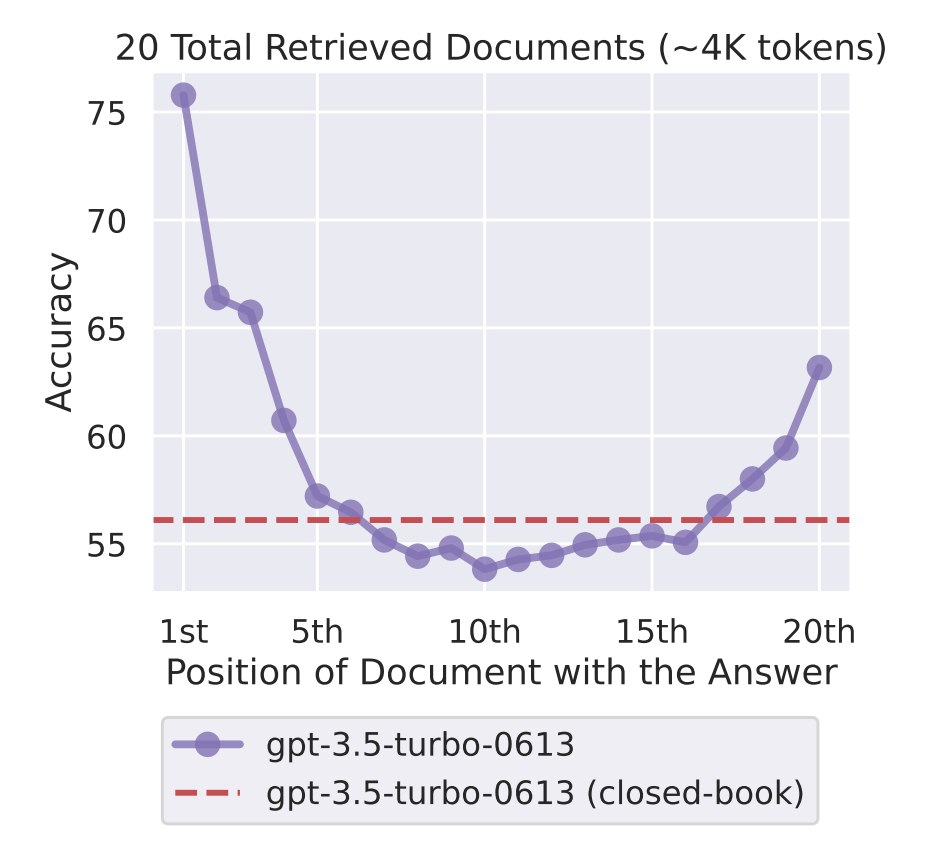
Having a 1M-token window does not mean the model uses every one of those tokens equally well. Models are known to pay more attention to the beginning and end of a long input than to the middle. [Liu et al. (2023)](https://arxiv.org/abs/2307.03172) named this the "lost in the middle" effect. If you put the most important context at the top of the prompt and again near the bottom, the quality of the model's response tends to hold up better than if you bury that information in the middle of 150K tokens of background. See [context engineering](/learn/prompt-engineering) for more details.

<img src="https://mintcdn.com/togetherai-52386018/Yt4DEYDLSbELFeod/images/lost-in-the-middle.png?fit=max&auto=format&n=Yt4DEYDLSbELFeod&q=85&s=fd2a9c9b41d65f4137dec8ddab54210f" alt="A line chart from Liu et al. 2023 showing GPT-3.5-turbo accuracy on a 20-document QA task as a function of where the answer-containing document is placed. Accuracy is ~76% when the answer is in the 1st document, drops to a low of ~54% around the 10th position, then rises back to ~63% at the 20th. A horizontal dashed line shows the closed-book baseline of ~56%, which the in-context model dips below in the middle range." style={{ maxWidth: "500px", borderRadius: "10px", border: "1px solid #e4e4e7", display: "block", margin: "16px auto" }} width="950" height="860" data-path="images/lost-in-the-middle.png" />

<p style={{ textAlign: "center", fontSize: "0.875rem", marginTop: "-8px" }}>
  Source: <a href="https://arxiv.org/abs/2307.03172" target="_blank" rel="noopener noreferrer">Liu et al., "Lost in the Middle: How Language Models Use Long Contexts" (2023)</a>. Accuracy is highest when the answer sits at the very start or very end of the context, and dips below the closed-book baseline when it's buried in the middle.
</p>

<Info>
  Newer "needle in a haystack" benchmarks measure whether a model can reliably retrieve a single fact placed at various depths in a long context. Frontier models in 2026 do well on simple needles, but they degrade significantly on multi-fact retrieval and reasoning that spans different parts of the context.
</Info>

## Long-context optimizations

Plain attention does work proportional to the square of the input length (the *N × N* cost from above). If a model claims a 1M context window and still runs efficiently (such as DeepSeek-V4), something else is going on under the hood. The main tricks that long-context models use are:

* **Sliding-window attention:** Each token only looks at the most recent *W* tokens (for example, *W* = 4K) instead of all previous tokens. This cuts the math from quadratic to linear at the cost of weaker long-range dependencies. To recover some of that range, sliding-window attention is often mixed with a few full-attention layers in the same model.
* **Grouped-query attention (GQA):** Multiple attention heads share the same keys and values, which shrinks the KV cache by a meaningful factor. GQA is cheap to implement and widely used.
* **Mixture-of-Experts (MoE):** Only a fraction of the model's parameters are run/active per token. This does not shrink the context, but it makes long-context calls dramatically cheaper to compute because the model is doing less work per token.
* **Position interpolation / RoPE scaling:** These are mathematical tricks that let a model trained on a 4K context generalize to 32K or more without retraining from scratch.

You usually do not need to think about which technique a given model is using, but it explains why two models with the same nominal window size can have very different latencies and qualities.

## Strategies for handling excess context

At some point you will have more relevant text than fits in the window. There are a few options for handling this:

* **Retrieval-augmented generation (RAG):** Index your data in a vector store. At query time, look up the chunks most relevant to the user's question, and only include those chunks in the prompt. Retrieval scales to arbitrary corpora because you are only ever putting a small relevant slice in front of the model.
* **Summarization and compaction:** As the conversation grows, you can compress old turns into a shorter summary that takes their place. You lose some fidelity to the exact wording of earlier turns, but the window stays manageable.
* **Caching:** If you keep sending the same system prompt or the same background document across many calls, prompt caching lets the model skip the prefill work for the cached portion. This does not shrink the context, but it makes long-prompt calls faster and cheaper. On Together, prompt caching is enabled by default on [dedicated endpoints](/docs/dedicated-endpoints/settings).
* **Bigger model:** When all else fails, switch to a model with a larger window. Windows keep growing, with models such as DeepSeek-V4 pushing toward 1M tokens.

## Next steps

<CardGroup cols={3}>
  <Card title="Inference metrics: TTFT & TPS" icon="dashboard" href="/learn/ttft-and-tps">
    How the prefill / decode split shows up as latency.
  </Card>

  <Card title="Tokens & tokenization" icon="scissors" href="/learn/tokens-and-tokenization">
    How to estimate token counts before you call.
  </Card>

  <Card title="Context engineering" icon="messages" href="/learn/prompt-engineering">
    What to put in (and what to cut) when the window matters.
  </Card>
</CardGroup>
