> ## Documentation Index
> Fetch the complete documentation index at: https://docs.together.ai/llms.txt
> Use this file to discover all available pages before exploring further.

# Quantization

> What quantization is, how lower precision speeds up inference, and the quality tradeoff.

export const QuantizationSnapDiagram = () => {
  const CSS = `
  .learn-diagram .qz { display: grid; gap: var(--space-sm); }
  .learn-diagram .qz__svg { width: 100%; height: auto; display: block; }
  .learn-diagram .qz__axis { stroke: var(--color-rule-strong); stroke-width: 1; }
  .learn-diagram .qz__level { stroke: var(--tg-purple-mid); stroke-width: 1.5; }
  .learn-diagram .qz__weight { fill: #fff; stroke: var(--color-ink-soft); stroke-width: 1.2; }
  .learn-diagram .qz__quantized { fill: var(--tg-orange); }
  .learn-diagram .qz__connector { stroke: var(--tg-orange); stroke-width: 1; opacity: 0.4; }
  .learn-diagram .qz__tick { font-family: var(--font-mono); font-size: 11px; fill: var(--color-ink-mute); }
  .learn-diagram .qz__rowlab {
    font-family: var(--font-mono);
    font-size: 11px;
    fill: var(--color-ink-soft);
    letter-spacing: 0.06em;
    text-transform: uppercase;
  }
  .learn-diagram .qz__label {
    font-family: var(--font-mono);
    font-size: 11px;
    fill: var(--color-ink-faint);
    letter-spacing: 0.06em;
    text-transform: uppercase;
  }
  .learn-diagram .qz__memory {
    display: flex;
    flex-wrap: wrap;
    gap: var(--space-sm) var(--space-lg);
    background: var(--color-paper-3);
    border-radius: var(--radius-md);
    padding: var(--space-xs) var(--space-sm);
  }
  .learn-diagram .qz__metric { display: grid; gap: 2px; }
  .learn-diagram .qz__metric b {
    font-family: var(--font-display);
    font-size: 26px;
    font-weight: 500;
    line-height: 1.05;
    color: var(--tg-orange);
    letter-spacing: -0.02em;
    font-variant-numeric: tabular-nums;
  }
  .learn-diagram .qz__metric span {
    font-family: var(--font-mono);
    font-size: 11px;
    letter-spacing: 0.08em;
    text-transform: uppercase;
    color: var(--color-ink-mute);
  }
  `;
  const mulberry32 = seed => {
    let a = seed;
    return () => {
      a |= 0;
      a = a + 0x6d2b79f5 | 0;
      let t = a;
      t = Math.imul(t ^ t >>> 15, t | 1);
      t ^= t + Math.imul(t ^ t >>> 7, t | 61);
      return ((t ^ t >>> 14) >>> 0) / 4294967296;
    };
  };
  const RANGE = 1.5;
  const WEIGHTS = (() => {
    const rng = mulberry32(42);
    const gauss = () => {
      let u = 0;
      let v = 0;
      while (u === 0) u = rng();
      while (v === 0) v = rng();
      return Math.sqrt(-2 * Math.log(u)) * Math.cos(2 * Math.PI * v);
    };
    const out = [];
    for (let i = 0; i < 40; i++) {
      let w = gauss() * 0.55;
      if (rng() < 0.06) w *= 2.6;
      out.push(Math.max(-RANGE, Math.min(RANGE, w)));
    }
    return out;
  })();
  const W = 700;
  const H = 250;
  const PAD_L = 84;
  const PAD_R = 36;
  const PAD_T = 42;
  const PAD_B = 52;
  const Y_AXIS = PAD_T + (H - PAD_T - PAD_B) * 0.5;
  const TICKS = [-1.5, -1, -0.5, 0, 0.5, 1, 1.5];
  const PRESETS = [{
    bits: 8,
    label: "int8"
  }, {
    bits: 4,
    label: "int4"
  }, {
    bits: 2,
    label: "int2"
  }];
  const [bits, setBits] = useState(4);
  const nLevels = Math.pow(2, bits);
  const scale = 2 * RANGE / (nLevels - 1);
  const px = v => PAD_L + (v + RANGE) / (2 * RANGE) * (W - PAD_L - PAD_R);
  const levels = [];
  for (let i = 0; i < nLevels; i++) levels.push(px(-RANGE + i * scale));
  const quantOf = w => Math.max(-RANGE, Math.min(RANGE, Math.round(w / scale) * scale));
  const rankOf = {};
  const seen = new Map();
  WEIGHTS.map((w, i) => ({
    w,
    i
  })).sort((a, b) => a.w - b.w).forEach(({w, i}) => {
    const key = quantOf(w).toFixed(4);
    const n = seen.get(key) || 0;
    rankOf[i] = n;
    seen.set(key, n + 1);
  });
  const maxRank = Math.max(0, ...Object.values(rankOf));
  const room = Y_AXIS - PAD_T - 26;
  const rowGap = maxRank > 0 ? Math.min(6, room / maxRank) : 6;
  let totalErr = 0;
  let maxErr = 0;
  const points = WEIGHTS.map((w, i) => {
    const q = quantOf(w);
    const err = Math.abs(w - q);
    totalErr += err;
    maxErr = Math.max(maxErr, err);
    const rank = rankOf[i] || 0;
    return {
      x: px(w),
      xQ: px(q),
      yW: Y_AXIS - 22 - rank * rowGap,
      yQ: Y_AXIS + 22 + rank * rowGap
    };
  });
  const gbFor8B = bits;
  const shrink = 16 / bits;
  return <DiagramFrame eyebrow="Quantization" title="Fewer bits means fewer places a weight can land" caption="Quantizing a weight matrix replaces every value with the nearest point on a fixed lattice. The lattice gets coarser as you drop bits, so each weight moves a little. That movement is the whole quality cost of quantization, and it is what buys you the memory." css={CSS} controls={<>
          <Slider label="bits per weight" value={bits} display={bits + "-bit"} min={1} max={8} onChange={setBits} />
          <div className="btn-row">
            {PRESETS.map(p => <button key={p.label} className={"btn" + (bits === p.bits ? " btn--on" : "")} onClick={() => setBits(p.bits)}>
                {p.label}
              </button>)}
          </div>
        </>} readout={<span>
          <strong>{nLevels}</strong> representable values
        </span>}>
      <div className="qz">
        <svg className="qz__svg" viewBox={"0 0 " + W + " " + H} role="img" aria-label="original weights snapping onto a quantization lattice">
          <text className="qz__label" x={PAD_L} y={PAD_T - 14}>
            weight distribution
          </text>
          <text className="qz__label" x={W - PAD_R} y={PAD_T - 14} textAnchor="end">
            {nLevels} levels · 2^{bits}
          </text>

          {levels.map((x, i) => <line key={"l" + i} className="qz__level" x1={x} y1={PAD_T - 4} x2={x} y2={H - PAD_B + 4} opacity={nLevels > 64 ? 0.35 : 0.9} />)}

          <line className="qz__axis" x1={PAD_L} y1={Y_AXIS} x2={W - PAD_R} y2={Y_AXIS} />
          {TICKS.map(v => <text key={"t" + v} className="qz__tick" x={px(v)} y={H - PAD_B + 24} textAnchor="middle">
              {v}
            </text>)}

          <text className="qz__rowlab" x={PAD_L - 12} y={Y_AXIS - 24} textAnchor="end">
            fp16
          </text>
          <text className="qz__rowlab" x={PAD_L - 12} y={Y_AXIS + 28} textAnchor="end" fill="#FC4C02">
            int{bits}
          </text>

          {points.map((pt, i) => <line key={"c" + i} className="qz__connector" x1={pt.x} y1={pt.yW} x2={pt.xQ} y2={pt.yQ} />)}
          {points.map((pt, i) => <circle key={"w" + i} className="qz__weight" cx={pt.x} cy={pt.yW} r="3.5" />)}
          {points.map((pt, i) => <circle key={"q" + i} className="qz__quantized" cx={pt.xQ} cy={pt.yQ} r="3.5" />)}
        </svg>

        <div className="qz__memory">
          <div className="qz__metric">
            <b>{gbFor8B < 1 ? gbFor8B.toFixed(1) : gbFor8B}</b>
            <span>GB for an 8B model</span>
          </div>
          <div className="qz__metric">
            <b>{shrink.toFixed(shrink % 1 ? 1 : 0)}×</b>
            <span>smaller than fp16</span>
          </div>
          <div className="qz__metric">
            <b>{(totalErr / WEIGHTS.length).toFixed(3)}</b>
            <span>average rounding error</span>
          </div>
          <div className="qz__metric">
            <b>{maxErr.toFixed(3)}</b>
            <span>worst single weight</span>
          </div>
        </div>

        <div className="stats">
          <span>
            step between levels: <strong>{scale.toFixed(3)}</strong>
          </span>
          <span>
            weight range: <strong>±{RANGE}</strong>
          </span>
          <span>
            sample: <strong>40</strong> weights
          </span>
        </div>

        <Legend items={[{
    style: {
      background: "#fff",
      border: "1.5px solid #414B58",
      borderRadius: "50%"
    },
    label: "original weight"
  }, {
    style: {
      background: "#FC4C02",
      borderRadius: "50%"
    },
    label: "snapped value"
  }, {
    style: {
      background: "#CAAEF5",
      width: "2px",
      height: "12px"
    },
    label: "representable level"
  }, {
    style: {
      background: "#FC4C02",
      height: "2px",
      width: "12px"
    },
    label: "rounding error"
  }]} />
      </div>
    </DiagramFrame>;
};

export const Legend = ({items}) => <ul className="legend">
    {items.map((it, i) => <li className="legend__item" key={i}>
        <span className="legend__sw" style={it.style || ({
  background: it.color
})} />
        {it.label}
      </li>)}
  </ul>;

export const Slider = ({label, value, display, min, max, step = 1, onChange}) => <label className="slider-group">
    <span className="slider-group__label">
      {label}
      <span className="slider-group__value">{display === undefined ? value : display}</span>
    </span>
    <input type="range" min={min} max={max} step={step} value={value} onChange={e => onChange(parseFloat(e.target.value))} />
  </label>;

export const DiagramFrame = ({eyebrow, title, caption, css, controls, readout, children}) => {
  const BASE_CSS = `
.learn-diagram {
  /* ── Together AI brand palette ── */
  --tg-orange: #FC4C02;
  --tg-orange-dark: #972E02;
  --tg-orange-soft: #FEE8DF;
  --tg-orange-tint: #FFDCCD;
  --tg-pink: #EF2CC1;
  --tg-pink-soft: #FDE3F6;
  --tg-purple: #A373ED;
  --tg-purple-mid: #CAAEF5;
  --tg-purple-soft: #EDE4FC;
  --tg-blue: #3D99F5;
  --tg-blue-mid: #A3D1FF;
  --tg-blue-soft: #E5F3FF;
  --tg-slate: #5E86AE;
  --tg-slate-soft: #EEF3F6;
  --tg-navy: #010120;

  /* ── Surfaces ── */
  --color-paper:   #FFFFFF;
  --color-paper-2: #F7F8FA;
  --color-paper-3: #F0F1F4;
  --color-paper-4: #E2E4E9;
  /* ── Ink ── */
  --color-ink:       #090909;
  --color-ink-soft:  #414B58;
  --color-ink-mute:  #626B84;
  --color-ink-faint: #98A0B3;
  /* ── Lines ── */
  --color-rule:        #C4C9D4;
  --color-rule-soft:   #E2E4E9;
  --color-rule-strong: #98A0B3;
  /* ── Accent ── */
  --color-accent:      var(--tg-orange);
  --color-accent-soft: var(--tg-orange-soft);
  --color-empty:       #F0F1F4;

  /* ── Type ── */
  --font-display: 'Jost', 'Helvetica Neue', Arial, sans-serif;
  --font-body:    'The Future', 'Jost', 'Helvetica Neue', Arial, sans-serif;
  --font-mono:    'The Future Mono', ui-monospace, 'SFMono-Regular', 'Courier New', monospace;

  /* ── Spacing (4px base) ── */
  --space-3xs: 4px;
  --space-2xs: 8px;
  --space-xs:  12px;
  --space-sm:  16px;
  --space-md:  24px;
  --space-lg:  32px;

  /* ── Radius ── */
  --radius-sm: 4px;
  --radius-md: 8px;
  --radius-lg: 12px;

  /* ── Motion ── */
  --ease-out: cubic-bezier(0.22, 1, 0.36, 1);
  --dur-fast: 120ms;
  --dur-base: 200ms;
  --dur-slow: 360ms;
  --focus-ring: 0 0 0 3px rgba(252, 76, 2, 0.35);

  font-family: var(--font-body);
  font-size: 15px;
  line-height: 1.65;
  font-weight: 400;
  color: var(--color-ink);
  -webkit-font-smoothing: antialiased;
  text-wrap: pretty;
  margin: 24px 0;
}
.learn-diagram, .learn-diagram * { box-sizing: border-box; }

/* ============ SHELL ============ */
.learn-diagram .diagram {
  margin: 0;
  background: var(--color-paper);
  border: 1px solid var(--color-rule);
  border-radius: var(--radius-lg);
  padding: var(--space-md);
  box-shadow: 0 1px 2px rgba(9, 9, 9, 0.04), 0 2px 10px rgba(9, 9, 9, 0.03);
}
.learn-diagram .diagram__head { margin-bottom: var(--space-md); }
.learn-diagram .diagram__eyebrow {
  font-family: var(--font-mono);
  font-size: 11px;
  font-weight: 500;
  letter-spacing: 0.1em;
  text-transform: uppercase;
  color: var(--tg-orange);
  margin-bottom: 6px;
}
.learn-diagram .diagram__title {
  font-family: var(--font-display);
  font-size: 20px;
  font-weight: 600;
  line-height: 1.3;
  letter-spacing: -0.02em;
  color: var(--color-ink);
  margin: 0;
}
.learn-diagram .diagram__caption {
  font-size: 13px;
  line-height: 1.55;
  color: var(--color-ink-mute);
  margin: 6px 0 0;
  max-width: 68ch;
}
.learn-diagram .diagram__controls {
  display: flex;
  flex-wrap: wrap;
  gap: var(--space-2xs) var(--space-md);
  align-items: center;
  margin-top: var(--space-md);
  padding-top: var(--space-sm);
  border-top: 1px solid var(--color-rule-soft);
}
.learn-diagram .diagram__readout {
  font-family: var(--font-mono);
  font-size: 11px;
  letter-spacing: 0.08em;
  text-transform: uppercase;
  color: var(--color-ink-mute);
  margin-left: auto;
}
.learn-diagram .diagram__readout strong {
  color: var(--tg-orange);
  font-weight: 500;
  font-variant-numeric: tabular-nums;
}

/* ============ BUTTONS ============ */
.learn-diagram .btn {
  font-family: var(--font-body);
  font-size: 13px;
  font-weight: 500;
  padding: 9px 14px;
  border: 1px solid var(--color-rule);
  border-radius: var(--radius-md);
  background: var(--color-paper);
  color: var(--color-ink);
  cursor: pointer;
  white-space: nowrap;
  transition: background var(--dur-fast) ease, border-color var(--dur-fast) ease,
              color var(--dur-fast) ease;
}
.learn-diagram .btn:hover:not([disabled]) { background: var(--color-paper-3); }
.learn-diagram .btn:focus-visible { outline: none; box-shadow: var(--focus-ring); }
.learn-diagram .btn[disabled] { opacity: 0.4; cursor: not-allowed; }
.learn-diagram .btn--accent {
  background: var(--tg-orange);
  border-color: var(--tg-orange);
  color: #fff;
}
.learn-diagram .btn--accent:hover:not([disabled]) {
  background: var(--tg-orange-dark);
  border-color: var(--tg-orange-dark);
}
.learn-diagram .btn--on {
  background: var(--tg-orange-soft);
  border-color: var(--tg-orange);
  color: var(--tg-orange-dark);
}
.learn-diagram .btn-row { display: flex; flex-wrap: wrap; gap: var(--space-2xs); flex: 0 0 auto; }

/* ============ SLIDERS ============ */
.learn-diagram .slider-group {
  display: flex;
  flex-direction: column;
  gap: 2px;
  min-width: 190px;
  flex: 1 1 190px;
}
.learn-diagram .slider-group__label {
  font-family: var(--font-mono);
  font-size: 11px;
  letter-spacing: 0.08em;
  text-transform: uppercase;
  color: var(--color-ink-mute);
  display: flex;
  justify-content: space-between;
  gap: var(--space-2xs);
}
.learn-diagram .slider-group__value {
  color: var(--tg-orange);
  font-weight: 500;
  font-variant-numeric: tabular-nums;
  text-transform: none;
}
.learn-diagram input[type="range"] {
  -webkit-appearance: none;
  appearance: none;
  width: 100%;
  height: 2px;
  background: var(--color-rule);
  border-radius: 2px;
  outline: none;
  cursor: pointer;
  margin: 8px 0 2px;
}
.learn-diagram input[type="range"]::-webkit-slider-thumb {
  -webkit-appearance: none;
  appearance: none;
  width: 14px;
  height: 14px;
  background: var(--tg-orange);
  border-radius: 50%;
  border: 2px solid var(--color-paper);
  box-shadow: 0 1px 3px rgba(9, 9, 9, 0.18);
}
.learn-diagram input[type="range"]::-moz-range-thumb {
  width: 14px;
  height: 14px;
  background: var(--tg-orange);
  border-radius: 50%;
  border: 2px solid var(--color-paper);
}
.learn-diagram input[type="range"]:focus-visible { box-shadow: var(--focus-ring); }

/* ============ PANELS · STATS · LEGEND ============ */
.learn-diagram .panel {
  background: var(--color-paper-2);
  border: 1px solid var(--color-rule-soft);
  border-radius: var(--radius-md);
  padding: var(--space-sm);
}
.learn-diagram .panel__head {
  font-family: var(--font-mono);
  font-size: 11px;
  font-weight: 500;
  letter-spacing: 0.1em;
  text-transform: uppercase;
  color: var(--color-ink-mute);
  margin-bottom: var(--space-2xs);
}
.learn-diagram .stats {
  display: flex;
  flex-wrap: wrap;
  gap: var(--space-3xs) var(--space-md);
  font-family: var(--font-mono);
  font-size: 12px;
  color: var(--color-ink-mute);
}
.learn-diagram .stats strong {
  color: var(--tg-orange);
  font-weight: 500;
  font-variant-numeric: tabular-nums;
}
.learn-diagram .legend {
  display: flex;
  flex-wrap: wrap;
  gap: var(--space-3xs) var(--space-md);
  list-style: none;
  margin: var(--space-sm) 0 0;
  padding: 0;
  font-family: var(--font-mono);
  font-size: 11px;
  letter-spacing: 0.04em;
  color: var(--color-ink-soft);
}
.learn-diagram .legend__item { display: flex; align-items: center; gap: 6px; }
.learn-diagram .legend__sw {
  width: 12px;
  height: 12px;
  border-radius: 2px;
  flex: none;
  display: inline-block;
}
.learn-diagram .tag {
  font-family: var(--font-mono);
  font-size: 11px;
  letter-spacing: 0.06em;
  text-transform: uppercase;
  padding: 3px 8px;
  border-radius: var(--radius-sm);
  background: var(--color-paper-3);
  color: var(--color-ink-soft);
  white-space: nowrap;
}
.learn-diagram .tag--accent { background: var(--tg-orange-soft); color: var(--tg-orange-dark); }
.learn-diagram .tag--muted { background: transparent; border: 1px dashed var(--color-rule); color: var(--color-ink-faint); }
.learn-diagram .note {
  font-size: 13px;
  line-height: 1.55;
  color: var(--color-ink-mute);
}
.learn-diagram code, .learn-diagram .mono { font-family: var(--font-mono); font-size: 13px; }

@media (prefers-reduced-motion: reduce) {
  .learn-diagram *, .learn-diagram *::before, .learn-diagram *::after {
    transition-duration: 1ms !important;
    animation-duration: 1ms !important;
    animation-iteration-count: 1 !important;
  }
}
`;
  return <div className="learn-diagram">
    <style>{BASE_CSS}</style>
    {css ? <style>{css}</style> : null}
    <figure className="diagram">
      {(eyebrow || title || caption) && <div className="diagram__head">
          {eyebrow && <div className="diagram__eyebrow">{eyebrow}</div>}
          {title && <h3 className="diagram__title">{title}</h3>}
          {caption && <p className="diagram__caption">{caption}</p>}
        </div>}
      <div className="diagram__inner">{children}</div>
      {(controls || readout) && <div className="diagram__controls">
          {controls}
          {readout && <span className="diagram__readout">{readout}</span>}
        </div>}
    </figure>
  </div>;
};

**TL;DR:** Quantization is the process of storing and using a model's weights such that it uses fewer bits per number. Going from fp16 (16 bits) down to fp8 (8 bits) down to int4/fp4 (4 bits) makes inference faster and reduces model's memory requirements, at the cost of a small hit to quality. For most chat workloads, fp8 is nearly free, i.e. the quality drop is so small that it's unmeasurable. Going down to int4/fp4 can save a lot of money, and if done right, the quality drop is barely noticeable (depending on the task). Frontier open-weight models like DeepSeek-V4 are now trained natively in fp8/fp4 rather than being quantized after the fact, which closes the quality gap even further.

## A JPEG quality slider for models

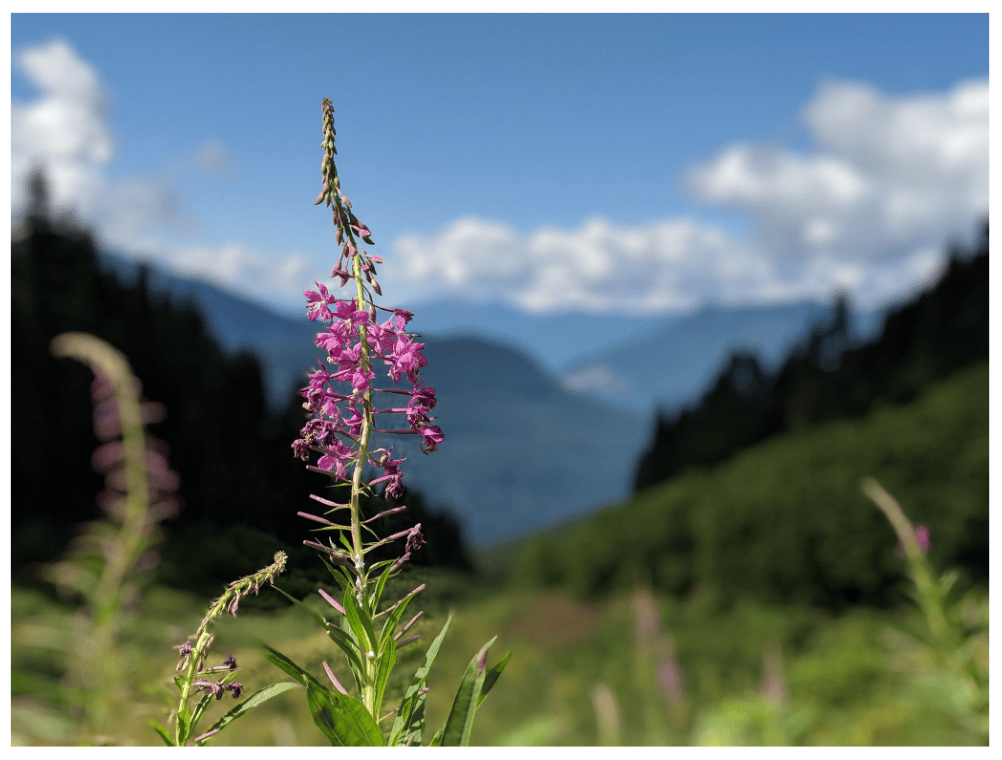
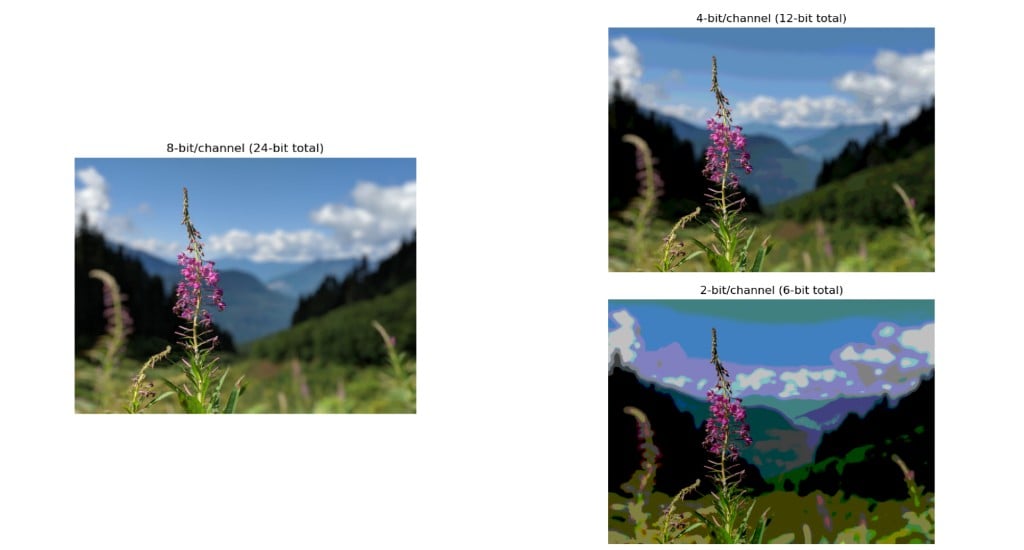
The mental model for quantization is something you already know from photos. A digital camera stores every pixel as three numbers, one each for red, green, and blue. The standard is 8 bits per channel (24 bits per pixel), which gives you \~16.7 million possible colors and smooth gradients without any visible banding. Drop the encoding to 4 bits per channel and most photos still look essentially fine at first glance. Drop again to 2 bits per channel and the image visibly posterizes: smooth skies break into discrete bands, subtle gradients collapse into chunks of solid color. The scene is the same, but the encoding has gotten coarser.

<Frame caption="The original photo. Smooth gradients in the sky, fine detail in the petals and grass, every shade of green in the foliage rendered distinctly.">
  <img src="https://mintcdn.com/togetherai-52386018/Yt4DEYDLSbELFeod/images/quantization-original.png?fit=max&auto=format&n=Yt4DEYDLSbELFeod&q=85&s=b5371ba652b5c2d986579dd9a24fde60" alt="A high-resolution landscape photograph of a fireweed flower spike in sharp focus against a softly blurred background of forested mountains and a partly cloudy sky." width="1002" height="760" data-path="images/quantization-original.png" />
</Frame>

<Frame caption="The same photo at 8, 4, and 2 bits per channel. 8-bit looks identical to the original, 4-bit holds up at a glance, 2-bit visibly posterizes. Models behave the same way as you drop bits per weight.">
  <img src="https://mintcdn.com/togetherai-52386018/Yt4DEYDLSbELFeod/images/quantization-bit-depth.png?fit=max&auto=format&n=Yt4DEYDLSbELFeod&q=85&s=01b97abf152c19c2c444ffdd37f29d9c" alt="The same landscape photo of fireweed against a mountain backdrop, rendered at 8-bit/channel (24-bit total), 4-bit/channel (12-bit total), and 2-bit/channel (6-bit total). The 8-bit and 4-bit versions look nearly identical; the 2-bit version is heavily posterized with visible color banding." width="1024" height="550" data-path="images/quantization-bit-depth.png" />
</Frame>

Quantization is the same trick applied to a model. The model's weights are real numbers, and quantization stores each one using fewer bits. 16 bits per weight is the pristine, uncompressed version. 8 bits per weight is the analogue of dropping the photo to 4 bits per channel: a meaningful reduction in storage that, for most workloads, you can't tell apart from the original. 4 bits per weight is closer to the 2-bits-per-channel photo—aggressive enough that artifacts start showing up in subtle places, and you have to actually evaluate the quantized model to know whether they matter for your specific task.

The bigger the model is to start with, the more headroom you have to compress and quantize. A 70B model at 4 bits per weight will generally outperform a 13B model at 16 bits per weight, the same way a 12-megapixel photo at 4 bits per channel still beats a 4-megapixel photo at 8 bits per channel.

## Why precision matters

A model's weights are real numbers, and at inference time the GPU spends most of its work reading those weights from memory and multiplying them with inputs. The more bits per weight, the more memory bandwidth you burn per token of output you generate. The total memory budget for a model and its activations also scales directly with bits per weight, which determines what hardware you can fit it on in the first place.

Quantization is the family of techniques for storing the same weights using fewer bits each. You end up with the same number of weights, but each one is smaller. Less memory used overall, more weights read per second, faster inference, lower hosting cost. The cost you pay is precision: the weights become slightly approximate, and that approximation translates into a small drop in model quality if done naively.

## Quantization formats

These are the formats you'll likely encounter, in approximate order of decreasing precision:

* **fp32:** 32-bit float. The full-precision format from textbook training. Almost never used for inference because it uses too much memory for not enough quality gain.
* **fp16 / bf16:** 16-bit floats. The standard format that models are trained and shipped in. bf16 has more range while fp16 has more precision. Modern GPUs prefer bf16.
* **fp8 (E4M3 / E5M2):** 8-bit float. Supported natively on H100 and later GPUs. Usually near-indistinguishable from bf16 in quality, while requiring half the memory and bandwidth.
* **int8:** 8-bit integer. An older approach to 8-bit quantization, slightly more involved than fp8 because it requires per-channel scaling. Still common on GPUs that do not have native fp8 support.
* **fp4 (MXFP4 / NVFP4):** 4-bit float. The newer 4-bit format supported natively on Blackwell (B100/B200) GPUs. Closer in quality to fp8 than int4, because it preserves the exponent range.
* **int4:** 4-bit integer. Aggressive enough that quality starts to be impacted. Most modern int4 implementations (AWQ, GPTQ, GGUF) include calibration on a sample dataset to choose quantization parameters that minimize the performance hit.

On Together, many models are served in fp8 or fp4 variants (visible in the [model list](/docs/serverless/models)), and quantization is one of the decoding options you can choose from when configuring a [dedicated endpoint](/docs/dedicated-endpoints/settings).

## How quantization actually works

Take the weights in a single layer. They have some distribution: most are small, a few are large. Suppose the range of values is roughly -1.5 to +1.5. To store these weights in int4 (only 16 possible distinct values), you:

1. Pick a scale factor. For example, 0.2.
2. For each weight, round it to the nearest multiple of the scale factor.
3. Store the integer that corresponds to the rounded value. For scale 0.2 and range -1.5 to +1.5, this gives you the integers -7 through +7, plus 0.
4. At inference time, multiply each stored integer by the scale factor to recover the (approximate) original weight.

That's essentially all there is to it conceptually. The integer takes 4 bits instead of 16, which is a 4× memory reduction. The scale factor is one float per group of weights (usually one per channel or per block), which is negligible for the overall storage cost.

<QuantizationSnapDiagram />

The art is in deciding *which* weights to round, and how. Different layers, different channels, and different blocks within a layer can use different scale factors. Calibrated approaches like AWQ and GPTQ run a small sample of real data through the model to find scales that minimize the effect of rounding on the activations that matter most. The naming conventions you'll see:

* **AWQ (Activation-aware Weight Quantization):** Common for int4.
* **GPTQ (Generalized Post-Training Quantization):** Another int4 family.
* **GGUF:** A file format used by llama.cpp that supports multiple quantization schemes.
* **SmoothQuant:** Targets int8 by smoothing activation outliers before quantizing.
* **MXFP4 / NVFP4:** The microscaling 4-bit floating-point formats used on Blackwell GPUs.

## Native quantization

Most quantization is **post-training quantization (PTQ)**, where you take a model trained in bf16 and compress it after the fact. PTQ works well down to fp8, gets noisier at int4.

The newer pattern is **native quantization**, where the model is *trained* in the low-precision format from the start. DeepSeek-V3 was the first major frontier model to train natively in fp8. DeepSeek-V4 trains natively in fp4. The advantage is that the model never has to be approximated. It was trained at the same precision it will be served in, so there's no quality gap to close. Native quantization is rapidly becoming the default for new open-weight models.

## Weights vs. activations

There are two different things that can be quantized in a model. The weights are fixed once training is done, while the intermediate activations are computed at inference time. Most public discussion of quantization focuses on weights because they account for the bulk of the memory footprint.

Quantizing activations is harder. Activations have wider dynamic ranges than weights, with occasional huge outliers, and they cannot be calibrated as easily because they depend on the current input to the model. When you see formats labeled `W8A8` or `W4A16`, that's Weight-bits / Activation-bits. The right combination depends on hardware support: GPUs that natively support fp8 in both weights and activations can run W8A8 fast, while older hardware often runs W4A16 (quantized weights and fp16 activations).

## Next steps

<CardGroup cols={3}>
  <Card title="Inference metrics: TTFT & TPS" icon="dashboard" href="/learn/ttft-and-tps">
    Quantization mostly buys you TPS.
  </Card>

  <Card title="Choosing a deployment option" icon="server" href="/learn/choosing-a-deployment-option">
    Your choice of deployment determines which quantization options are available to you.
  </Card>

  <Card title="How LLMs work" icon="cpu" href="/learn/how-llms-work">
    Which weights are getting quantized, and why model size matters.
  </Card>
</CardGroup>
