> ## Documentation Index
> Fetch the complete documentation index at: https://docs.together.ai/llms.txt
> Use this file to discover all available pages before exploring further.

# Tokens & tokenization

> How tokenization works, what the model reads, and why tokens drive cost and context usage.

export const TokenBudgetDiagram = () => {
  const CSS = `
  .learn-diagram .budget { display: grid; gap: var(--space-sm); }
  .learn-diagram .budget__msg {
    background: var(--color-paper-2);
    border: 1px solid var(--color-rule-soft);
    border-left: 3px solid var(--color-rule);
    border-radius: var(--radius-md);
    padding: var(--space-xs) var(--space-sm);
  }
  .learn-diagram .budget__msg--sys { border-left-color: var(--tg-purple-mid); }
  .learn-diagram .budget__msg--user { border-left-color: var(--tg-blue-mid); }
  .learn-diagram .budget__msg--out { border-left-color: var(--tg-orange); }
  .learn-diagram .budget__role {
    font-family: var(--font-mono);
    font-size: 11px;
    letter-spacing: 0.1em;
    text-transform: uppercase;
    color: var(--color-ink-mute);
    margin-bottom: 4px;
    display: flex;
    justify-content: space-between;
    gap: var(--space-2xs);
  }
  .learn-diagram .budget__role strong { color: var(--tg-orange); font-weight: 500; font-variant-numeric: tabular-nums; }
  .learn-diagram .budget__body { font-size: 14px; line-height: 1.55; color: var(--color-ink-soft); }
  .learn-diagram .budget__body em { color: var(--color-ink-mute); }
  .learn-diagram .budget__bar {
    height: 26px;
    background: var(--color-empty);
    border-radius: var(--radius-sm);
    overflow: hidden;
    display: flex;
  }
  .learn-diagram .budget__seg {
    height: 100%;
    font-family: var(--font-mono);
    font-size: 10px;
    letter-spacing: 0.06em;
    line-height: 26px;
    text-align: center;
    white-space: nowrap;
    overflow: hidden;
    transition: width var(--dur-base) var(--ease-out);
  }
  .learn-diagram .budget__seg--sys { background: var(--tg-purple-mid); color: var(--tg-navy); }
  .learn-diagram .budget__seg--user { background: var(--tg-blue-mid); color: var(--tg-navy); }
  .learn-diagram .budget__seg--out { background: var(--tg-orange); color: #fff; }
  .learn-diagram .budget__seg--free {
    background: repeating-linear-gradient(45deg, #F7F8FA, #F7F8FA 5px, #EDEEF2 5px, #EDEEF2 10px);
    color: var(--color-ink-faint);
  }
  .learn-diagram .budget__scale {
    display: flex;
    justify-content: space-between;
    font-family: var(--font-mono);
    font-size: 10px;
    color: var(--color-ink-faint);
    margin-top: 4px;
  }
  .learn-diagram .budget__meta {
    display: flex;
    flex-wrap: wrap;
    gap: var(--space-2xs) var(--space-md);
    font-family: var(--font-mono);
    font-size: 12px;
    color: var(--color-ink-mute);
    margin-top: var(--space-xs);
  }
  .learn-diagram .budget__meta strong { color: var(--tg-orange); font-weight: 500; font-variant-numeric: tabular-nums; }
  .learn-diagram .budget__warn {
    margin-top: var(--space-2xs);
    font-family: var(--font-mono);
    font-size: 11px;
    letter-spacing: 0.06em;
    color: var(--tg-orange-dark);
    background: var(--tg-orange-soft);
    border-radius: var(--radius-sm);
    padding: 6px 10px;
  }
  `;
  const SYS_TEXT = "You are a helpful assistant for an e-commerce platform. Answer in plain English, cite SKUs when relevant, and never invent stock numbers. If the user asks about price, look it up.";
  const USER_TEXT = "Can you check whether the blue Aerolite running shoe is in stock in size 10, and what the return policy is for shoes specifically? Thanks.";
  const estTokens = text => Math.round(text.trim().split(/\s+/).length * 1.35);
  const SYS_TOKENS = estTokens(SYS_TEXT);
  const USER_TOKENS = estTokens(USER_TEXT);
  const PRICE_IN = 0.5;
  const PRICE_OUT = 1.5;
  const WINDOWS = [4, 8, 32, 128];
  const [maxOut, setMaxOut] = useState(512);
  const [ctxK, setCtxK] = useState(8);
  const total = ctxK * 1024;
  const input = SYS_TOKENS + USER_TOKENS;
  const outRoom = Math.max(0, total - input);
  const outShown = Math.min(maxOut, outRoom);
  const used = input + maxOut;
  const remaining = Math.max(0, total - used);
  const overflow = Math.max(0, used - total);
  const costIn = input / 1e6 * PRICE_IN;
  const costOut = maxOut / 1e6 * PRICE_OUT;
  const segs = [{
    key: "sys",
    cls: "budget__seg--sys",
    n: SYS_TOKENS,
    label: "system"
  }, {
    key: "user",
    cls: "budget__seg--user",
    n: USER_TOKENS,
    label: "user"
  }, {
    key: "out",
    cls: "budget__seg--out",
    n: outShown,
    label: "reserved for output"
  }, {
    key: "free",
    cls: "budget__seg--free",
    n: remaining,
    label: "unused"
  }].filter(s => s.n > 0);
  return <DiagramFrame eyebrow="Context window" title="The window holds the prompt and the answer" caption="Everything you send plus everything the model writes has to fit in one window. Reserving room for the reply is part of the budget, and the two halves are priced differently: output tokens usually cost several times what input tokens cost." css={CSS} controls={<>
          <Slider label="max output" value={maxOut} display={maxOut + " tok"} min={64} max={4096} step={64} onChange={setMaxOut} />
          <div className="btn-row">
            {WINDOWS.map(k => <button key={k} className={"btn" + (ctxK === k ? " btn--on" : "")} onClick={() => setCtxK(k)}>
                {k}K window
              </button>)}
          </div>
        </>} readout={<span>
          <strong>{Math.round(used / total * 100)}%</strong> of {ctxK}K used
        </span>}>
      <div className="budget">
        <div className="budget__msg budget__msg--sys">
          <div className="budget__role">
            <span>system</span>
            <strong>≈{SYS_TOKENS} tok</strong>
          </div>
          <div className="budget__body">{SYS_TEXT}</div>
        </div>
        <div className="budget__msg budget__msg--user">
          <div className="budget__role">
            <span>user</span>
            <strong>≈{USER_TOKENS} tok</strong>
          </div>
          <div className="budget__body">{USER_TEXT}</div>
        </div>
        <div className="budget__msg budget__msg--out">
          <div className="budget__role">
            <span>assistant · reserved</span>
            <strong>{maxOut} tok</strong>
          </div>
          <div className="budget__body">
            <em>streamed at decode time; you pay for what it actually writes</em>
          </div>
        </div>

        <div className="panel">
          <div className="panel__head">{ctxK}K context window</div>
          <div className="budget__bar">
            {segs.map(s => {
    const pct = s.n / total * 100;
    return <div className={"budget__seg " + s.cls} key={s.key} style={{
      width: pct + "%",
      minWidth: s.n > 0 ? "3px" : 0
    }} title={s.label + ": " + s.n + " tokens"}>
                  {pct >= 12 ? s.label : ""}
                </div>;
  })}
          </div>
          <div className="budget__scale">
            <span>0</span>
            <span>{total.toLocaleString()} tokens</span>
          </div>
          <div className="budget__meta">
            <span>
              prompt: <strong>{input}</strong> tok
            </span>
            <span>
              reserved output: <strong>{maxOut}</strong> tok
            </span>
            <span>
              left over: <strong>{remaining.toLocaleString()}</strong> tok
            </span>
            <span>
              cost of this turn: <strong>${(costIn + costOut).toFixed(5)}</strong>
            </span>
          </div>
          {overflow > 0 && <div className="budget__warn">
              over budget by {overflow.toLocaleString()} tokens, so the request would be rejected or
              the prompt truncated
            </div>}
        </div>

        <div className="stats">
          <span>
            example rates: <strong>${PRICE_IN.toFixed(2)}</strong> / M in ·{" "}
            <strong>${PRICE_OUT.toFixed(2)}</strong> / M out
          </span>
          <span>
            output share of cost:{" "}
            <strong>{Math.round(costOut / (costIn + costOut) * 100)}%</strong>
          </span>
        </div>

        <Legend items={[{
    color: "#CAAEF5",
    label: "system prompt"
  }, {
    color: "#A3D1FF",
    label: "user message"
  }, {
    color: "#FC4C02",
    label: "reserved for the reply"
  }, {
    style: {
      background: "repeating-linear-gradient(45deg,#F7F8FA,#F7F8FA 4px,#EDEEF2 4px,#EDEEF2 8px)",
      border: "1px solid #E2E4E9"
    },
    label: "unused window"
  }]} />
      </div>
    </DiagramFrame>;
};

export const VariantsDiagram = () => {
  const CSS = `
  .learn-diagram .var { display: grid; gap: 2px; }
  .learn-diagram .var__row {
    display: grid;
    grid-template-columns: 130px minmax(0, 1fr) 58px;
    gap: var(--space-sm);
    align-items: center;
    padding: 8px var(--space-2xs);
    border-radius: var(--radius-sm);
    border: 1px solid transparent;
    cursor: pointer;
    transition: background var(--dur-fast) ease, border-color var(--dur-fast) ease;
  }
  .learn-diagram .var__row:hover { background: var(--color-paper-2); }
  .learn-diagram .var__row.is-sel { background: var(--tg-orange-soft); border-color: var(--tg-orange); }
  .learn-diagram .var__row:focus-visible { outline: none; box-shadow: var(--focus-ring); }
  .learn-diagram .var__in {
    font-family: var(--font-mono);
    font-size: 14px;
    color: var(--color-ink);
    background: var(--color-paper);
    border: 1px solid var(--color-rule);
    border-radius: var(--radius-sm);
    padding: 5px 9px;
    white-space: pre;
    text-align: center;
  }
  .learn-diagram .var__row.is-sel .var__in { border-color: var(--tg-orange); }
  .learn-diagram .var__out { display: flex; flex-wrap: wrap; gap: 4px; align-items: center; }
  .learn-diagram .var__tok {
    display: inline-flex;
    align-items: baseline;
    gap: 6px;
    font-family: var(--font-mono);
    font-size: 13px;
    padding: 4px 8px;
    border-radius: var(--radius-sm);
    background: var(--tg-purple-soft);
    color: var(--color-ink);
    white-space: pre;
  }
  .learn-diagram .var__tok--split { background: var(--tg-blue-soft); }
  .learn-diagram .var__tok-id { font-size: 10px; color: var(--color-ink-mute); letter-spacing: 0.04em; }
  .learn-diagram .var__n {
    font-family: var(--font-mono);
    font-size: 12px;
    color: var(--color-ink-mute);
    text-align: right;
    font-variant-numeric: tabular-nums;
  }
  .learn-diagram .var__n.is-split { color: var(--tg-orange); font-weight: 500; }
  .learn-diagram .var__head {
    display: grid;
    grid-template-columns: 130px minmax(0, 1fr) 58px;
    gap: var(--space-sm);
    padding: 0 var(--space-2xs) 6px;
    font-family: var(--font-mono);
    font-size: 11px;
    letter-spacing: 0.1em;
    text-transform: uppercase;
    color: var(--color-ink-faint);
    border-bottom: 1px solid var(--color-rule-soft);
    margin-bottom: 6px;
  }
  .learn-diagram .var__n-head { text-align: right; }
  .learn-diagram .var__detail {
    margin-top: var(--space-sm);
    display: grid;
    gap: var(--space-2xs);
  }
  `;
  const VARIANTS = [{
    label: "apple",
    toks: [{
      tok: "apple",
      id: 28202
    }]
  }, {
    label: " apple",
    toks: [{
      tok: " apple",
      id: 24149
    }]
  }, {
    label: "Apple",
    toks: [{
      tok: "Apple",
      id: 27665
    }]
  }, {
    label: " Apple",
    toks: [{
      tok: " Apple",
      id: 8325
    }]
  }, {
    label: "APPLE",
    toks: [{
      tok: "APP",
      id: 8193
    }, {
      tok: "LE",
      id: 877
    }]
  }, {
    label: " apples",
    toks: [{
      tok: " apple",
      id: 24149
    }, {
      tok: "s",
      id: 82
    }]
  }, {
    label: "apples.",
    toks: [{
      tok: "app",
      id: 680
    }, {
      tok: "les",
      id: 645
    }, {
      tok: ".",
      id: 13
    }]
  }];
  const showSpace = s => s.replace(/ /g, "·");
  const quoted = s => '"' + s.replace(/ /g, "␣") + '"';
  const [sel, setSel] = useState(1);
  const v = VARIANTS[sel];
  const multi = VARIANTS.filter(x => x.toks.length > 1).length;
  return <DiagramFrame eyebrow="Tokenization" title="The same word, seven different token ids" caption="A tokenizer works on exact bytes, not on words. A leading space, a capital letter or a trailing period each produce a different id, which is why prompts that look identical to you can behave differently, and why trailing whitespace in a prompt is rarely harmless." css={CSS} readout={<span>
          <strong>{multi}</strong> of {VARIANTS.length} variants need more than one token
        </span>}>
      <div className="var">
        <div className="var__head">
          <span>input text</span>
          <span>tokens · ids</span>
          <span className="var__n-head">count</span>
        </div>
        {VARIANTS.map((item, i) => {
    const split = item.toks.length > 1;
    return <div key={item.label} className={"var__row" + (i === sel ? " is-sel" : "")} onClick={() => setSel(i)} onKeyDown={e => {
      if (e.key === "Enter" || e.key === " ") {
        e.preventDefault();
        setSel(i);
      }
    }} role="button" tabIndex={0} aria-pressed={i === sel}>
              <div className="var__in">{quoted(item.label)}</div>
              <div className="var__out">
                {item.toks.map((t, k) => <span className={"var__tok" + (split ? " var__tok--split" : "")} key={k}>
                    {showSpace(t.tok)}
                    <span className="var__tok-id">{t.id}</span>
                  </span>)}
              </div>
              <div className={"var__n" + (split ? " is-split" : "")}>{item.toks.length} tok</div>
            </div>;
  })}

        <div className="var__detail">
          <div className="panel">
            <div className="panel__head">Selected</div>
            <div className="stats">
              <span>
                text: <strong>{quoted(v.label)}</strong>
              </span>
              <span>
                ids: <strong>[{v.toks.map(t => t.id).join(", ")}]</strong>
              </span>
              <span>
                characters: <strong>{v.label.length}</strong>
              </span>
              <span>
                tokens: <strong>{v.toks.length}</strong>
              </span>
            </div>
            <div className="note" style={{
    marginTop: 8
  }}>
              {v.toks.length === 1 ? "Common, lowercase, space-prefixed forms are usually one token; the tokenizer was trained on text where words follow a space." : "Uppercase, plurals and attached punctuation fall off the common path and get split into pieces, costing more tokens for the same word."}
            </div>
          </div>
        </div>
      </div>
    </DiagramFrame>;
};

export const BpeDiagram = () => {
  const CSS = `
  .learn-diagram .bpe { display: grid; grid-template-columns: minmax(0, 1fr) 260px; gap: var(--space-md); align-items: start; }
  @media (max-width: 760px) { .learn-diagram .bpe { grid-template-columns: minmax(0, 1fr); } }
  .learn-diagram .bpe__word {
    display: flex;
    align-items: center;
    gap: var(--space-2xs);
    padding: 6px 0;
    border-bottom: 1px solid var(--color-rule-soft);
  }
  .learn-diagram .bpe__word:last-child { border-bottom: none; }
  .learn-diagram .bpe__wcount {
    font-family: var(--font-mono);
    font-size: 11px;
    color: var(--color-ink-faint);
    width: 34px;
    text-align: right;
    flex: none;
    font-variant-numeric: tabular-nums;
  }
  .learn-diagram .bpe__wpieces { display: flex; flex-wrap: wrap; gap: 3px; }
  .learn-diagram .bpe__piece {
    font-family: var(--font-mono);
    font-size: 13px;
    padding: 3px 7px;
    background: var(--color-paper);
    border: 1px solid var(--color-rule);
    border-radius: var(--radius-sm);
    color: var(--color-ink);
    white-space: pre;
    transition: background var(--dur-base) var(--ease-out), border-color var(--dur-base) var(--ease-out);
  }
  .learn-diagram .bpe__piece.is-multi { background: var(--tg-purple-soft); border-color: var(--tg-purple-mid); }
  .learn-diagram .bpe__piece.is-merged {
    background: var(--tg-orange-soft);
    border-color: var(--tg-orange);
    color: var(--tg-orange-dark);
    animation: learn-bpe-pop var(--dur-base) var(--ease-out);
  }
  @keyframes learn-bpe-pop { from { transform: scale(0.72); opacity: 0; } to { transform: scale(1); opacity: 1; } }
  .learn-diagram .bpe__pair {
    display: flex;
    justify-content: space-between;
    align-items: center;
    gap: var(--space-2xs);
    padding: 5px 0;
    border-bottom: 1px solid var(--color-rule-soft);
    font-family: var(--font-mono);
    font-size: 12px;
    color: var(--color-ink-soft);
  }
  .learn-diagram .bpe__pair:last-child { border-bottom: none; }
  .learn-diagram .bpe__pair-piece {
    background: var(--color-paper-3);
    padding: 2px 6px;
    border-radius: var(--radius-sm);
    margin-right: 3px;
    white-space: pre;
  }
  .learn-diagram .bpe__pair.is-top { color: var(--tg-orange-dark); }
  .learn-diagram .bpe__pair.is-top .bpe__pair-piece { background: var(--tg-orange); color: #fff; }
  .learn-diagram .bpe__pair-count { font-variant-numeric: tabular-nums; color: var(--color-ink-mute); flex: none; }
  .learn-diagram .bpe__pair.is-top .bpe__pair-count { color: var(--tg-orange); font-weight: 500; }
  .learn-diagram .bpe__learned { display: flex; flex-wrap: wrap; gap: 4px; margin-top: 6px; }
  .learn-diagram .bpe__block { margin-top: var(--space-sm); padding-top: var(--space-sm); border-top: 1px solid var(--color-rule-soft); }
  .learn-diagram .bpe__count-line {
    display: flex;
    justify-content: space-between;
    font-family: var(--font-mono);
    font-size: 12px;
    color: var(--color-ink-mute);
    padding: 2px 0;
  }
  .learn-diagram .bpe__count-line strong { color: var(--tg-orange); font-weight: 500; font-variant-numeric: tabular-nums; }
  `;
  const EOW = "_";
  const CORPUS = [{
    word: "low" + EOW,
    count: 5
  }, {
    word: "lower" + EOW,
    count: 2
  }, {
    word: "newer" + EOW,
    count: 6
  }, {
    word: "newest" + EOW,
    count: 3
  }, {
    word: "widest" + EOW,
    count: 3
  }];
  const makeInitial = () => {
    const words = CORPUS.map(w => ({
      pieces: w.word.split(""),
      count: w.count
    }));
    const vocab = new Set();
    words.forEach(w => w.pieces.forEach(p => vocab.add(p)));
    return {
      words,
      vocab,
      merges: 0,
      learned: [],
      justMerged: null
    };
  };
  const topPairsOf = (words, n) => {
    const counts = new Map();
    words.forEach(w => {
      for (let i = 0; i < w.pieces.length - 1; i++) {
        const k = w.pieces[i] + "\u241F" + w.pieces[i + 1];
        counts.set(k, (counts.get(k) || 0) + w.count);
      }
    });
    return Array.from(counts.entries()).map(([k, v]) => {
      const [a, b] = k.split("\u241F");
      return {
        a,
        b,
        count: v
      };
    }).sort((x, y) => y.count - x.count || (x.a + x.b < y.a + y.b ? -1 : 1)).slice(0, n);
  };
  const mergeState = s => {
    const top = topPairsOf(s.words, 1)[0];
    if (!top || top.count < 2) return null;
    const merged = top.a + top.b;
    const vocab = new Set(s.vocab);
    vocab.add(merged);
    const words = s.words.map(w => {
      const out = [];
      let i = 0;
      while (i < w.pieces.length) {
        if (i < w.pieces.length - 1 && w.pieces[i] === top.a && w.pieces[i + 1] === top.b) {
          out.push(merged);
          i += 2;
        } else {
          out.push(w.pieces[i]);
          i++;
        }
      }
      return {
        pieces: out,
        count: w.count
      };
    });
    return {
      words,
      vocab,
      merges: s.merges + 1,
      learned: s.learned.concat([merged]),
      justMerged: merged
    };
  };
  const tokenCount = words => words.reduce((sum, w) => sum + w.pieces.length * w.count, 0);
  const show = p => p.split(EOW).join("·");
  const BASELINE = tokenCount(makeInitial().words);
  const [sim, setSim] = useState(makeInitial);
  const timer = useRef(null);
  useEffect(() => () => clearInterval(timer.current), []);
  const stop = () => clearInterval(timer.current);
  const step = () => {
    stop();
    setSim(s => mergeState(s) || s);
  };
  const runFive = () => {
    stop();
    let k = 0;
    timer.current = setInterval(() => {
      setSim(s => {
        const nextState = mergeState(s);
        if (!nextState) stop();
        return nextState || s;
      });
      if (++k >= 5) stop();
    }, 420);
  };
  const reset = () => {
    stop();
    setSim(makeInitial());
  };
  const top = topPairsOf(sim.words, 5);
  const done = top.length === 0 || top[0].count < 2;
  const tokens = tokenCount(sim.words);
  return <DiagramFrame eyebrow="Tokenization" title="Byte-pair encoding learns its vocabulary by merging" caption="Start from single characters, then repeatedly merge the most frequent adjacent pair into one new token. Frequent word pieces earn a token of their own; rare words stay split." css={CSS} controls={<div className="btn-row">
          <button className="btn btn--accent" onClick={step} disabled={done}>
            Merge top pair
          </button>
          <button className="btn" onClick={runFive} disabled={done}>
            Run 5 merges
          </button>
          <button className="btn" onClick={reset} disabled={sim.merges === 0}>
            Reset
          </button>
        </div>} readout={<span>
          merges <strong>{sim.merges}</strong> · vocab <strong>{sim.vocab.size}</strong>
        </span>}>
      <div className="bpe">
        <div className="panel">
          <div className="panel__head">Corpus · 19 words, 5 types</div>
          {sim.words.map((w, wi) => <div className="bpe__word" key={wi}>
              <div className="bpe__wcount">{w.count}×</div>
              <div className="bpe__wpieces">
                {w.pieces.map((p, pi) => <span key={pi} className={"bpe__piece" + (p === sim.justMerged ? " is-merged" : p.length > 1 ? " is-multi" : "")}>
                    {show(p)}
                  </span>)}
              </div>
            </div>)}
          <div className="bpe__block">
            <div className="bpe__count-line">
              <span>tokens to encode the corpus</span>
              <span>
                <strong>{tokens}</strong> / {BASELINE}
              </span>
            </div>
            <div className="bpe__count-line">
              <span>characters saved</span>
              <span>
                <strong>{Math.round((1 - tokens / BASELINE) * 100)}%</strong>
              </span>
            </div>
          </div>
        </div>

        <div className="panel">
          <div className="panel__head">Most frequent adjacent pairs</div>
          {done ? <div className="note">No pair occurs more than once, so training stops here.</div> : top.map((p, i) => <div className={"bpe__pair" + (i === 0 ? " is-top" : "")} key={p.a + "|" + p.b}>
                <span>
                  <span className="bpe__pair-piece">{show(p.a)}</span>
                  <span className="bpe__pair-piece">{show(p.b)}</span>
                </span>
                <span className="bpe__pair-count">{p.count}×</span>
              </div>)}
          <div className="bpe__block">
            <div className="panel__head">Merges learned, in order</div>
            {sim.learned.length === 0 ? <div className="note">None yet.</div> : <div className="bpe__learned">
                {sim.learned.map((m, i) => <span className="tag tag--accent" key={i}>
                    {show(m)}
                  </span>)}
              </div>}
          </div>
          <div className="bpe__block">
            <div className="note" style={{
    fontFamily: "var(--font-mono)",
    fontSize: 11
  }}>
              · marks the end of a word
            </div>
          </div>
        </div>
      </div>
    </DiagramFrame>;
};

export const Legend = ({items}) => <ul className="legend">
    {items.map((it, i) => <li className="legend__item" key={i}>
        <span className="legend__sw" style={it.style || ({
  background: it.color
})} />
        {it.label}
      </li>)}
  </ul>;

export const Slider = ({label, value, display, min, max, step = 1, onChange}) => <label className="slider-group">
    <span className="slider-group__label">
      {label}
      <span className="slider-group__value">{display === undefined ? value : display}</span>
    </span>
    <input type="range" min={min} max={max} step={step} value={value} onChange={e => onChange(parseFloat(e.target.value))} />
  </label>;

export const DiagramFrame = ({eyebrow, title, caption, css, controls, readout, children}) => {
  const BASE_CSS = `
.learn-diagram {
  /* ── Together AI brand palette ── */
  --tg-orange: #FC4C02;
  --tg-orange-dark: #972E02;
  --tg-orange-soft: #FEE8DF;
  --tg-orange-tint: #FFDCCD;
  --tg-pink: #EF2CC1;
  --tg-pink-soft: #FDE3F6;
  --tg-purple: #A373ED;
  --tg-purple-mid: #CAAEF5;
  --tg-purple-soft: #EDE4FC;
  --tg-blue: #3D99F5;
  --tg-blue-mid: #A3D1FF;
  --tg-blue-soft: #E5F3FF;
  --tg-slate: #5E86AE;
  --tg-slate-soft: #EEF3F6;
  --tg-navy: #010120;

  /* ── Surfaces ── */
  --color-paper:   #FFFFFF;
  --color-paper-2: #F7F8FA;
  --color-paper-3: #F0F1F4;
  --color-paper-4: #E2E4E9;
  /* ── Ink ── */
  --color-ink:       #090909;
  --color-ink-soft:  #414B58;
  --color-ink-mute:  #626B84;
  --color-ink-faint: #98A0B3;
  /* ── Lines ── */
  --color-rule:        #C4C9D4;
  --color-rule-soft:   #E2E4E9;
  --color-rule-strong: #98A0B3;
  /* ── Accent ── */
  --color-accent:      var(--tg-orange);
  --color-accent-soft: var(--tg-orange-soft);
  --color-empty:       #F0F1F4;

  /* ── Type ── */
  --font-display: 'Jost', 'Helvetica Neue', Arial, sans-serif;
  --font-body:    'The Future', 'Jost', 'Helvetica Neue', Arial, sans-serif;
  --font-mono:    'The Future Mono', ui-monospace, 'SFMono-Regular', 'Courier New', monospace;

  /* ── Spacing (4px base) ── */
  --space-3xs: 4px;
  --space-2xs: 8px;
  --space-xs:  12px;
  --space-sm:  16px;
  --space-md:  24px;
  --space-lg:  32px;

  /* ── Radius ── */
  --radius-sm: 4px;
  --radius-md: 8px;
  --radius-lg: 12px;

  /* ── Motion ── */
  --ease-out: cubic-bezier(0.22, 1, 0.36, 1);
  --dur-fast: 120ms;
  --dur-base: 200ms;
  --dur-slow: 360ms;
  --focus-ring: 0 0 0 3px rgba(252, 76, 2, 0.35);

  font-family: var(--font-body);
  font-size: 15px;
  line-height: 1.65;
  font-weight: 400;
  color: var(--color-ink);
  -webkit-font-smoothing: antialiased;
  text-wrap: pretty;
  margin: 24px 0;
}
.learn-diagram, .learn-diagram * { box-sizing: border-box; }

/* ============ SHELL ============ */
.learn-diagram .diagram {
  margin: 0;
  background: var(--color-paper);
  border: 1px solid var(--color-rule);
  border-radius: var(--radius-lg);
  padding: var(--space-md);
  box-shadow: 0 1px 2px rgba(9, 9, 9, 0.04), 0 2px 10px rgba(9, 9, 9, 0.03);
}
.learn-diagram .diagram__head { margin-bottom: var(--space-md); }
.learn-diagram .diagram__eyebrow {
  font-family: var(--font-mono);
  font-size: 11px;
  font-weight: 500;
  letter-spacing: 0.1em;
  text-transform: uppercase;
  color: var(--tg-orange);
  margin-bottom: 6px;
}
.learn-diagram .diagram__title {
  font-family: var(--font-display);
  font-size: 20px;
  font-weight: 600;
  line-height: 1.3;
  letter-spacing: -0.02em;
  color: var(--color-ink);
  margin: 0;
}
.learn-diagram .diagram__caption {
  font-size: 13px;
  line-height: 1.55;
  color: var(--color-ink-mute);
  margin: 6px 0 0;
  max-width: 68ch;
}
.learn-diagram .diagram__controls {
  display: flex;
  flex-wrap: wrap;
  gap: var(--space-2xs) var(--space-md);
  align-items: center;
  margin-top: var(--space-md);
  padding-top: var(--space-sm);
  border-top: 1px solid var(--color-rule-soft);
}
.learn-diagram .diagram__readout {
  font-family: var(--font-mono);
  font-size: 11px;
  letter-spacing: 0.08em;
  text-transform: uppercase;
  color: var(--color-ink-mute);
  margin-left: auto;
}
.learn-diagram .diagram__readout strong {
  color: var(--tg-orange);
  font-weight: 500;
  font-variant-numeric: tabular-nums;
}

/* ============ BUTTONS ============ */
.learn-diagram .btn {
  font-family: var(--font-body);
  font-size: 13px;
  font-weight: 500;
  padding: 9px 14px;
  border: 1px solid var(--color-rule);
  border-radius: var(--radius-md);
  background: var(--color-paper);
  color: var(--color-ink);
  cursor: pointer;
  white-space: nowrap;
  transition: background var(--dur-fast) ease, border-color var(--dur-fast) ease,
              color var(--dur-fast) ease;
}
.learn-diagram .btn:hover:not([disabled]) { background: var(--color-paper-3); }
.learn-diagram .btn:focus-visible { outline: none; box-shadow: var(--focus-ring); }
.learn-diagram .btn[disabled] { opacity: 0.4; cursor: not-allowed; }
.learn-diagram .btn--accent {
  background: var(--tg-orange);
  border-color: var(--tg-orange);
  color: #fff;
}
.learn-diagram .btn--accent:hover:not([disabled]) {
  background: var(--tg-orange-dark);
  border-color: var(--tg-orange-dark);
}
.learn-diagram .btn--on {
  background: var(--tg-orange-soft);
  border-color: var(--tg-orange);
  color: var(--tg-orange-dark);
}
.learn-diagram .btn-row { display: flex; flex-wrap: wrap; gap: var(--space-2xs); flex: 0 0 auto; }

/* ============ SLIDERS ============ */
.learn-diagram .slider-group {
  display: flex;
  flex-direction: column;
  gap: 2px;
  min-width: 190px;
  flex: 1 1 190px;
}
.learn-diagram .slider-group__label {
  font-family: var(--font-mono);
  font-size: 11px;
  letter-spacing: 0.08em;
  text-transform: uppercase;
  color: var(--color-ink-mute);
  display: flex;
  justify-content: space-between;
  gap: var(--space-2xs);
}
.learn-diagram .slider-group__value {
  color: var(--tg-orange);
  font-weight: 500;
  font-variant-numeric: tabular-nums;
  text-transform: none;
}
.learn-diagram input[type="range"] {
  -webkit-appearance: none;
  appearance: none;
  width: 100%;
  height: 2px;
  background: var(--color-rule);
  border-radius: 2px;
  outline: none;
  cursor: pointer;
  margin: 8px 0 2px;
}
.learn-diagram input[type="range"]::-webkit-slider-thumb {
  -webkit-appearance: none;
  appearance: none;
  width: 14px;
  height: 14px;
  background: var(--tg-orange);
  border-radius: 50%;
  border: 2px solid var(--color-paper);
  box-shadow: 0 1px 3px rgba(9, 9, 9, 0.18);
}
.learn-diagram input[type="range"]::-moz-range-thumb {
  width: 14px;
  height: 14px;
  background: var(--tg-orange);
  border-radius: 50%;
  border: 2px solid var(--color-paper);
}
.learn-diagram input[type="range"]:focus-visible { box-shadow: var(--focus-ring); }

/* ============ PANELS · STATS · LEGEND ============ */
.learn-diagram .panel {
  background: var(--color-paper-2);
  border: 1px solid var(--color-rule-soft);
  border-radius: var(--radius-md);
  padding: var(--space-sm);
}
.learn-diagram .panel__head {
  font-family: var(--font-mono);
  font-size: 11px;
  font-weight: 500;
  letter-spacing: 0.1em;
  text-transform: uppercase;
  color: var(--color-ink-mute);
  margin-bottom: var(--space-2xs);
}
.learn-diagram .stats {
  display: flex;
  flex-wrap: wrap;
  gap: var(--space-3xs) var(--space-md);
  font-family: var(--font-mono);
  font-size: 12px;
  color: var(--color-ink-mute);
}
.learn-diagram .stats strong {
  color: var(--tg-orange);
  font-weight: 500;
  font-variant-numeric: tabular-nums;
}
.learn-diagram .legend {
  display: flex;
  flex-wrap: wrap;
  gap: var(--space-3xs) var(--space-md);
  list-style: none;
  margin: var(--space-sm) 0 0;
  padding: 0;
  font-family: var(--font-mono);
  font-size: 11px;
  letter-spacing: 0.04em;
  color: var(--color-ink-soft);
}
.learn-diagram .legend__item { display: flex; align-items: center; gap: 6px; }
.learn-diagram .legend__sw {
  width: 12px;
  height: 12px;
  border-radius: 2px;
  flex: none;
  display: inline-block;
}
.learn-diagram .tag {
  font-family: var(--font-mono);
  font-size: 11px;
  letter-spacing: 0.06em;
  text-transform: uppercase;
  padding: 3px 8px;
  border-radius: var(--radius-sm);
  background: var(--color-paper-3);
  color: var(--color-ink-soft);
  white-space: nowrap;
}
.learn-diagram .tag--accent { background: var(--tg-orange-soft); color: var(--tg-orange-dark); }
.learn-diagram .tag--muted { background: transparent; border: 1px dashed var(--color-rule); color: var(--color-ink-faint); }
.learn-diagram .note {
  font-size: 13px;
  line-height: 1.55;
  color: var(--color-ink-mute);
}
.learn-diagram code, .learn-diagram .mono { font-family: var(--font-mono); font-size: 13px; }

@media (prefers-reduced-motion: reduce) {
  .learn-diagram *, .learn-diagram *::before, .learn-diagram *::after {
    transition-duration: 1ms !important;
    animation-duration: 1ms !important;
    animation-iteration-count: 1 !important;
  }
}
`;
  return <div className="learn-diagram">
    <style>{BASE_CSS}</style>
    {css ? <style>{css}</style> : null}
    <figure className="diagram">
      {(eyebrow || title || caption) && <div className="diagram__head">
          {eyebrow && <div className="diagram__eyebrow">{eyebrow}</div>}
          {title && <h3 className="diagram__title">{title}</h3>}
          {caption && <p className="diagram__caption">{caption}</p>}
        </div>}
      <div className="diagram__inner">{children}</div>
      {(controls || readout) && <div className="diagram__controls">
          {controls}
          {readout && <span className="diagram__readout">{readout}</span>}
        </div>}
    </figure>
  </div>;
};

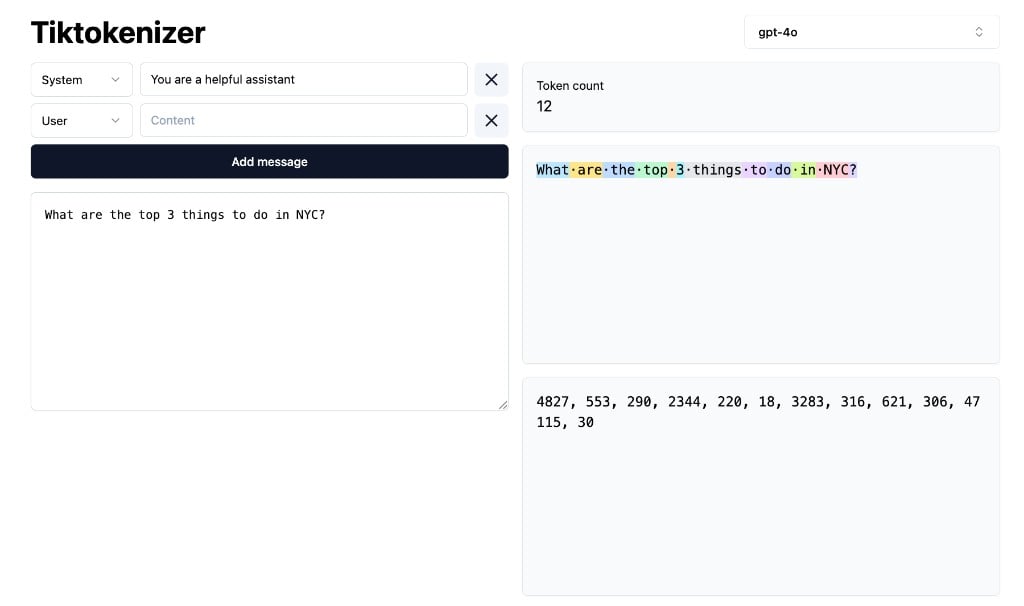
**TL;DR:** A model never reads actual words or characters. It reads tokens, subword chunks of about four characters each, where every chunk has a fixed integer ID. Tokenization is the deterministic step that turns your text into those IDs before the model ever sees it. Understanding this step matters because you pay per token, and filling your LLM's context window with the right tokens makes all the difference for generating useful outputs.

<a href="https://tiktokenizer.vercel.app/" target="_blank" rel="noopener noreferrer">
  <img src="https://mintcdn.com/togetherai-52386018/Yt4DEYDLSbELFeod/images/tiktokenizer-example.png?fit=max&auto=format&n=Yt4DEYDLSbELFeod&q=85&s=4296acfd3e9bc27412df6667ea8a2f1c" alt="Tokenized example: &#x22;What are the top 3 things to do in NYC?&#x22; split into 12 tokens with integer IDs shown. Click to open tiktokenizer.vercel.app." style={{ maxWidth: "700px", borderRadius: "10px", border: "1px solid #e4e4e7", display: "block", margin: "16px auto" }} width="1024" height="606" data-path="images/tiktokenizer-example.png" />
</a>

<p style={{ textAlign: "center", fontSize: "0.875rem", marginTop: "-8px" }}>
  Try it yourself at <a href="https://tiktokenizer.vercel.app/" target="_blank" rel="noopener noreferrer">tiktokenizer.vercel.app</a>.
</p>

## How a model "reads"

When you read English fluently, you don't sound out every letter. You see "the" and "have" and "tokenization" as single shapes, and your brain pulls up the meaning in one go. The rare and unfamiliar parts, like "antidisestablishmentarianism" or "solidgoldmagickarp", you slow down and parse in chunks: *anti-dis-establish-ment-arian-ism* or *solid-gold-magic-karp*.

A tokenizer does roughly the same thing for an LLM. Common strings get a single ID, rare ones get broken into a handful of subword pieces, and anything weirder than that falls back to individual bytes. Every model's vocabulary is fixed and determined by the tokenizer—once the tokenizer is trained, nothing more about it is learned at inference time.

The trade-off between token length and vocabulary size is straightforward: Using characters as tokens give you a tiny vocabulary but absurdly long sequences, and the model has to re-derive "h-e-l-l-o means hello" every single time. Using whole words as tokens gives you short sequences but a vocabulary of millions, including separate tokens for typos, novel words, URLs, and rare names. Subwords strike a sweet spot between these two extremes: models typically have \~50,000 to 200,000 tokens in their vocabulary, so every possible input is representable, but common text stays short.

A rough rule of thumb for English is that one token ≈ 4 characters ≈ ¾ of a word. So 1,000 tokens is roughly 750 words, or one short page.

## What tokenization actually does

Tokenization is a two-step process: first, splitting the text into chunks, then looking each chunk up in a table to get an integer ID.

```text theme={null}
"Hello, world!"  →  ["Hello", ",", " world", "!"]  →  [9906, 11, 1917, 0]
```

Notice three things about this example:

* `Hello` and ` world` (with a leading space) are each one token. The space matters and travels with the word.
* `,` and `!` are their own tokens. Punctuation almost always is, because it's common enough to warrant its own token ID.
* The IDs are lookup indices into a fixed vocabulary. There's no math here, no learning. The same text always produces the same IDs, every time.

Different models use different tokenizers, so the same string can produce different IDs across model families like GPT-5.5, Claude Opus 4.8, and DeepSeek-V4. Within one model family, the tokenizer is typically fixed and baked in at pretraining time.

## Byte pair encoding (BPE)

Almost every modern tokenizer is built using an algorithm called **byte pair encoding (BPE)**. The training procedure is as follows:

1. Start with a vocabulary of every distinct byte (or character).
2. Across the training corpus, count every pair of adjacent tokens.
3. Take the most common pair, merge it into a new token, and add it to the vocabulary.
4. Re-tokenize the corpus using the new vocabulary.
5. Repeat until the vocabulary reaches the target size (typically anywhere between 50,000 and 200,000 unique tokens).

The list of merges is saved in order. At inference time, encoding a new piece of text means applying the same merges in the same order. Fast, deterministic, no model required.

<BpeDiagram />

## Special tokens

Beside the BPE-trained vocabulary, every model reserves a few IDs for special tokens. These tokens never come from user text. The model has been trained to treat them as boundaries:

* `<|bos|>`, `<|eos|>`: start and end of the stream.
* `<|user_start|>` & `<|user_end|>`: plus the assistant pair, turn boundaries.
* `<|tool_call|>`, `<|tool_response|>`: tool boundaries (different models name them differently).

A multi-turn chat ends up laid out for the model like this:

```text theme={null}
<|bos|>
<|user_start|>What are the top 3 things to do in NYC?<|user_end|>
<|assistant_start|>Visit the Met, walk the High Line, and...<|assistant_end|>
<|user_start|>What about Brooklyn?<|user_end|>
<|assistant_start|>
```

Notice the last line. It opens an assistant turn and doesn't close it. That trailing special token is the cue that tells the model "it's your turn to generate tokens until you emit `<|assistant_end|>`." Almost the entire chat UX is two special tokens and a streaming loop.

<Warning>
  Special tokens are why you should never paste raw user input directly between role markers. If a user message literally contains the bytes `<|user_end|>`, a careless tokenizer might honor them and the user has impersonated the system role. Production tokenizers treat these as ordinary text unless you explicitly ask them to parse.
</Warning>

## The same word is not always the same token(s)

When converting text to tokens, details like casing, whitespace, and punctuation all matter. The tokenizer doesn't make semantic judgments. It does a greedy lookup against a fixed table, and that table was trained on whatever happened to appear in the corpus. So the strings below, which a human reads as variants of one word, become different sequences of token IDs:

```text theme={null}
"apple"   → [28202]
" apple"  → [24149]
"Apple"   → [27665]
" Apple"  → [8325]
"APPLE"   → [8193, 877]
" apples" → [24149, 82]
"apples." → [680, 645, 13]
```

The model usually handles this gracefully because these variants co-occur in training, but it's also why the model can respond slightly differently to different prompt phrasing. If you move a single space, the model is conditioning on a different token sequence, which can lead to different outputs.

<VariantsDiagram />

## Cost and context

Two of the most important numbers in any model specification are quoted in token counts, not words:

* **Context window:** The maximum number of tokens the model can see in one request (input + output combined). To give you an idea, \~8K tokens is a long email, 200K tokens is a small book, and 10M tokens is a small library. See [context windows](/learn/context-windows) to learn more.
* **Price:** This is usually quoted per million tokens, with separate rates for input, output, and cached tokens. Output is typically 3-4× more expensive than input because generating tokens one at a time is the slow phase of inference. See [TTFT & TPS](/learn/ttft-and-tps) and our [serverless model pricing](/docs/serverless/models) page to learn more.

Here's a rough guide for token counts:

```text theme={null}
1 token    ≈  ¾ of a word     ≈  4 characters
100 tokens ≈  75 words        ≈  half a paragraph
1K tokens  ≈  750 words       ≈  one page
8K tokens  ≈  6,000 words     ≈  a long article
128K       ≈  96,000 words    ≈  a short novel
1M         ≈  750,000 words   ≈  Lord of the Rings + appendices
```

<TokenBudgetDiagram />

## Where tokenization gets weird

Once you start counting tokens, you'll notice some quirks:

* **Numbers:** "1234" may be one token, "12345" two, and "9999999999" several. The model can't reliably see digit positions because they aren't single tokens. This is one of the reasons large arithmetic is unreliable without chain-of-thought or a tool call to a calculator function.
* **Code:** Common keywords (`def`, `return`) are single tokens, but unusual identifiers fragment. Indentation, brackets, and newlines each cost a token, which is why code prompts are surprisingly token-heavy.
* **Non-English text:** Most tokenizers were trained on corpora that are 70-90% English. A Korean or Hindi sentence can take 2-4× more tokens than its English translation, which means higher cost and smaller effective context. Newer tokenizers have improved this meaningfully, but the gap still exists.
* **Repeated whitespace:** JSON pretty-printed with indentation can be meaningfully more expensive than the same JSON minified.
* **Emoji and rare Unicode:** Most emoji are multi-byte. Less common ones can take 4-6 tokens for a single emoji.

<Tip>
  When a prompt feels too long or a reply stops mid-thought, paste the input into a [tokenizer playground](https://tiktokenizer.vercel.app/) and look at the actual count. It's almost always 1.3-2× what you expected, especially with system prompts, JSON, or non-English content.
</Tip>

## Next steps

<CardGroup cols={3}>
  <Card title="How LLMs work" icon="cpu" href="/learn/how-llms-work">
    What the model does with these IDs once it has them.
  </Card>

  <Card title="Context windows" icon="layout-board" href="/learn/context-windows">
    The consequences of a finite token budget.
  </Card>

  <Card title="Inference metrics: TTFT & TPS" icon="dashboard" href="/learn/ttft-and-tps">
    Why long inputs are slow to start, and long outputs are slow overall.
  </Card>
</CardGroup>
