

setup() and predict(), and Sprocket handles the HTTP server, queue integration, file transfers, health checks, and graceful shutdown.
Install Sprocket from Together’s package index:
How Sprocket works
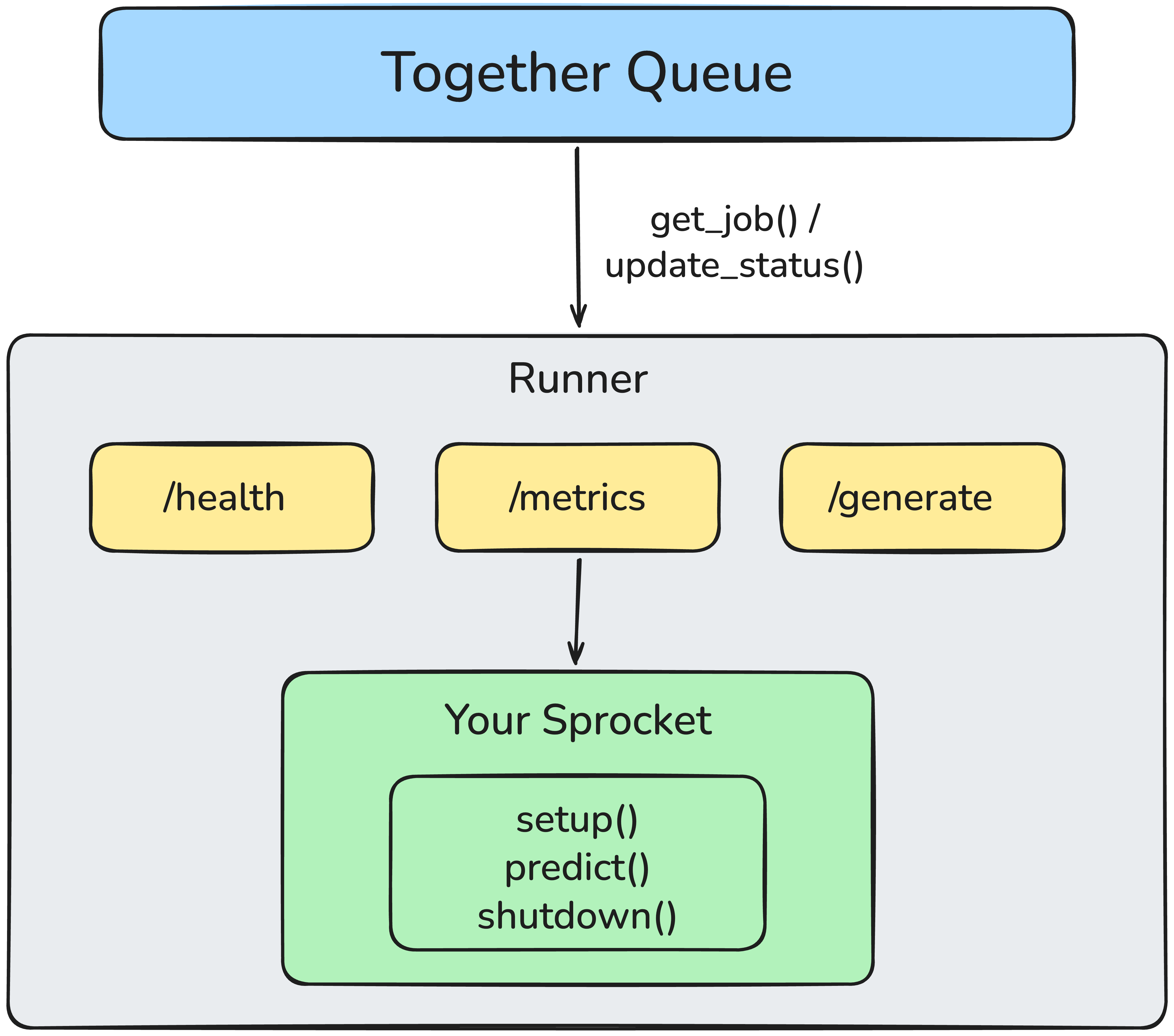
- Model definition: Subclass
Sprocket, implementsetup()to load your model andpredict(args) -> dictto handle each request. - Startup: Calls
setup()once, optionally runs warmup inputs for cache generation, then starts accepting traffic. - HTTP endpoints:
/healthfor readiness checks,/metricsfor autoscaler,/generatefor direct HTTP inference (route configurable viapredict_path). - Job processing: In queue mode, pulls jobs from Together’s managed queue, downloads input URLs, calls
predict(), uploads output files, and reports job status. - Graceful shutdown: On SIGTERM, finishes the current job, calls
shutdown()for cleanup, and exits. - Distributed inference: With
use_torchrun=True, launches one process per GPU and coordinates inputs/outputs across ranks.
Architecture
File handling
Sprocket automatically handles file transfers in both directions. Input files: Any HTTPS URL in the job payload is downloaded to a localinputs/ directory before predict() is called. The URL in the payload is replaced with the local file path, so your code opens a local file. This works with Together’s files API or any public URL.
Output files: Return a FileOutput("path") in your output dict and Sprocket uploads it to Together storage after predict() returns. The FileOutput is replaced with the public URL in the final job result.
The full pipeline for each job is:
- Download input URLs → local files
- Call
predict(args)with local paths - Call
finalize()on yourInputOutputProcessor(if you’ve overridden it) - Upload any
FileOutputvalues to Together storage - Report job result
predict() (e.g., decompressing), or upload outputs to your own storage instead of Together’s, you can subclass InputOutputProcessor and attach it to your Sprocket via the processor class attribute. See the reference for the full API.
When using
use_torchrun=True for multi-GPU inference, all file I/O (downloading inputs, uploading outputs, finalize()) runs in the parent process, not in the GPU worker processes. This keeps networking separate from GPU compute.Multi-GPU / distributed inference
For models that need multiple GPUs (tensor parallelism, context parallelism), passuse_torchrun=True to sprocket.run() and set gpu_count in your Jig config.
The architecture is:
- A parent process manages the HTTP server, queue polling, and file I/O
torchrunlaunches N child processes (one per GPU), connected to the parent via a Unix socket- For each job, the parent broadcasts inputs to all children, each child runs
predict(), and the parent collects the output from whichever rank returns a non-None value (by convention, rank 0)
torch.distributed in setup(), and return None from non-rank-0 processes:
Error handling
Sprocket distinguishes between per-job errors and fatal errors. Per-job errors: Ifpredict() raises an exception, the job is marked as failed with the error message, downloaded input files are cleaned up, and the worker moves on to the next job. The worker stays healthy: one bad input doesn’t take down the whole deployment.
Fatal errors trigger a full worker restart (SIGTERM). These occur when:
- A prediction times out (torchrun mode only, when it exceeds
TERMINATION_GRACE_PERIOD_SECONDS). - A torchrun child process crashes or disconnects.
- The connection to Together’s API is lost.
Graceful shutdown
When a container receives SIGTERM (during scale-down or redeployment):- Sprocket stops accepting new jobs
- The current job runs to completion
- Your
shutdown()method is called for cleanup - The container exits
TERMINATION_GRACE_PERIOD_SECONDS (default: 300s, configurable in pyproject.toml). Set this higher if your jobs are long-running (for example, video generation that takes several minutes per job).
Running modes
Sprocket supports two modes: Queue mode and HTTP server mode.- Queue mode is for workloads that need job durability and tracking: model generations, video rendering, or anything that takes more than a few hundred milliseconds. Jobs are persisted in the queue, survive worker restarts, and support priority ordering and progress reporting.
- HTTP server mode (direct HTTP) is for synchronous workloads that don’t need queueing: embedding inference, streaming voice models, or OpenAI-compatible endpoints where the result must be returned immediately.
Queue mode
- Continuously pulls jobs from Together’s managed queue
- Automatic job status reporting
- Graceful shutdown support
- Integrated with autoscaling
HTTP server mode
- Serves inference requests directly over HTTP at
predict_path(default/generate). - Returns results synchronously. Jobs are not persisted in a queue.
- Receives the raw JSON request body in
predict(), so your worker controls the request and response shapes.
predict_path in sprocket.run() to serve a custom route. This is how you serve an OpenAI-compatible API from a container:
Progress reporting
For long-running jobs like video generation, you can report progress updates that clients can poll for. Callemit_info() from inside predict() with a dict of progress data:
emit_info() don’t create excessive API traffic, and later values overwrite earlier ones for the same keys. The info dict must serialize to less than 4096 bytes of JSON. The runner also sends periodic heartbeats to maintain the job claim even if you don’t call emit_info().
Clients poll the job status endpoint and see emitted data in the info field:
For the full API reference (class signatures, parameters, environment variables, and complete examples), see the Sprocket SDK Reference.