

A JPEG quality slider for models
The mental model for quantization is something you already know from photos. A digital camera stores every pixel as three numbers, one each for red, green, and blue. The standard is 8 bits per channel (24 bits per pixel), which gives you ~16.7 million possible colors and smooth gradients without any visible banding. Drop the encoding to 4 bits per channel and most photos still look essentially fine at first glance. Drop again to 2 bits per channel and the image visibly posterizes: smooth skies break into discrete bands, subtle gradients collapse into chunks of solid color. The scene is the same, but the encoding has gotten coarser.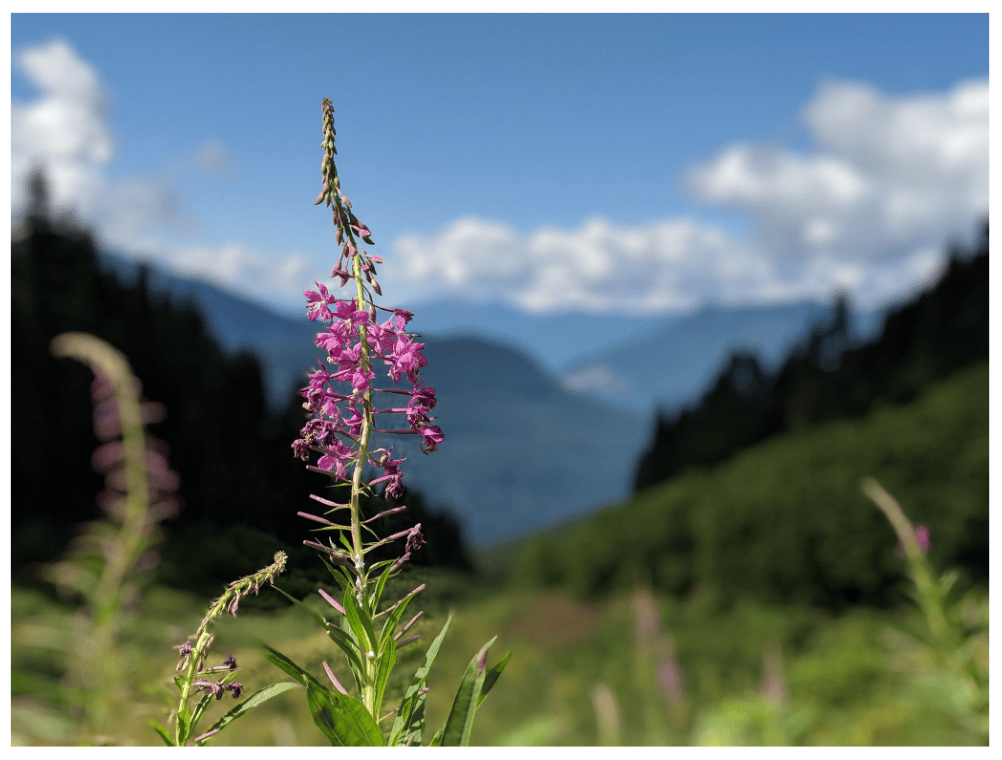
The original photo. Smooth gradients in the sky, fine detail in the petals and grass, every shade of green in the foliage rendered distinctly.
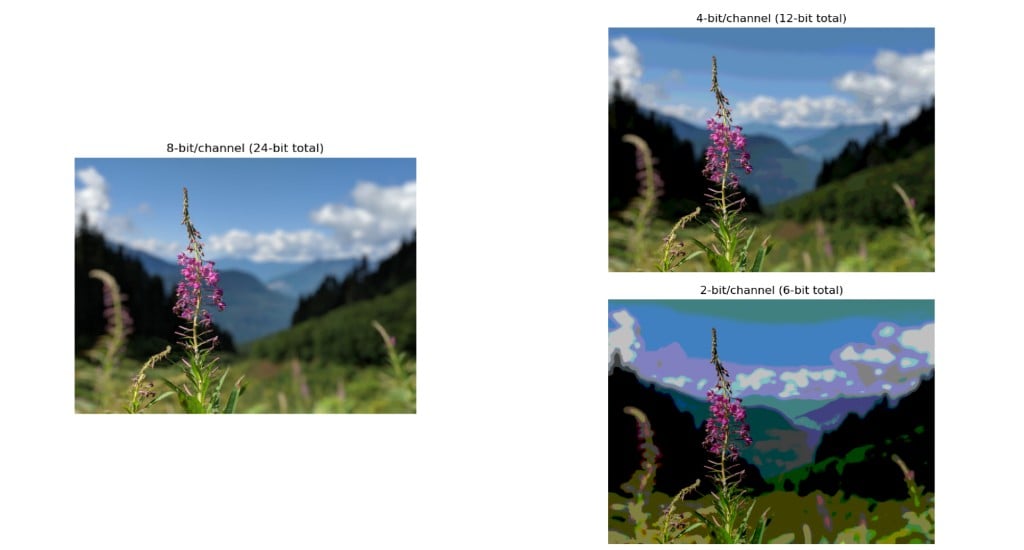
The same photo at 8, 4, and 2 bits per channel. 8-bit looks identical to the original, 4-bit holds up at a glance, 2-bit visibly posterizes. Models behave the same way as you drop bits per weight.
Why precision matters
A model’s weights are real numbers, and at inference time the GPU spends most of its work reading those weights from memory and multiplying them with inputs. The more bits per weight, the more memory bandwidth you burn per token of output you generate. The total memory budget for a model and its activations also scales directly with bits per weight, which determines what hardware you can fit it on in the first place. Quantization is the family of techniques for storing the same weights using fewer bits each. You end up with the same number of weights, but each one is smaller. Less memory used overall, more weights read per second, faster inference, lower hosting cost. The cost you pay is precision: the weights become slightly approximate, and that approximation translates into a small drop in model quality if done naively.Quantization formats
These are the formats you’ll likely encounter, in approximate order of decreasing precision:- fp32: 32-bit float. The full-precision format from textbook training. Almost never used for inference because it uses too much memory for not enough quality gain.
- fp16 / bf16: 16-bit floats. The standard format that models are trained and shipped in. bf16 has more range while fp16 has more precision. Modern GPUs prefer bf16.
- fp8 (E4M3 / E5M2): 8-bit float. Supported natively on H100 and later GPUs. Usually near-indistinguishable from bf16 in quality, while requiring half the memory and bandwidth.
- int8: 8-bit integer. An older approach to 8-bit quantization, slightly more involved than fp8 because it requires per-channel scaling. Still common on GPUs that do not have native fp8 support.
- fp4 (MXFP4 / NVFP4): 4-bit float. The newer 4-bit format supported natively on Blackwell (B100/B200) GPUs. Closer in quality to fp8 than int4, because it preserves the exponent range.
- int4: 4-bit integer. Aggressive enough that quality starts to be impacted. Most modern int4 implementations (AWQ, GPTQ, GGUF) include calibration on a sample dataset to choose quantization parameters that minimize the performance hit.
How quantization actually works
Take the weights in a single layer. They have some distribution: most are small, a few are large. Suppose the range of values is roughly -1.5 to +1.5. To store these weights in int4 (only 16 possible distinct values), you:- Pick a scale factor. For example, 0.2.
- For each weight, round it to the nearest multiple of the scale factor.
- Store the integer that corresponds to the rounded value. For scale 0.2 and range -1.5 to +1.5, this gives you the integers -7 through +7, plus 0.
- At inference time, multiply each stored integer by the scale factor to recover the (approximate) original weight.
- AWQ (Activation-aware Weight Quantization): Common for int4.
- GPTQ (Generalized Post-Training Quantization): Another int4 family.
- GGUF: A file format used by llama.cpp that supports multiple quantization schemes.
- SmoothQuant: Targets int8 by smoothing activation outliers before quantizing.
- MXFP4 / NVFP4: The microscaling 4-bit floating-point formats used on Blackwell GPUs.
Native quantization
Most quantization is post-training quantization (PTQ), where you take a model trained in bf16 and compress it after the fact. PTQ works well down to fp8, gets noisier at int4. The newer pattern is native quantization, where the model is trained in the low-precision format from the start. DeepSeek-V3 was the first major frontier model to train natively in fp8. DeepSeek-V4 trains natively in fp4. The advantage is that the model never has to be approximated. It was trained at the same precision it will be served in, so there’s no quality gap to close. Native quantization is rapidly becoming the default for new open-weight models.Weights vs. activations
There are two different things that can be quantized in a model. The weights are fixed once training is done, while the intermediate activations are computed at inference time. Most public discussion of quantization focuses on weights because they account for the bulk of the memory footprint. Quantizing activations is harder. Activations have wider dynamic ranges than weights, with occasional huge outliers, and they cannot be calibrated as easily because they depend on the current input to the model. When you see formats labeledW8A8 or W4A16, that’s Weight-bits / Activation-bits. The right combination depends on hardware support: GPUs that natively support fp8 in both weights and activations can run W8A8 fast, while older hardware often runs W4A16 (quantized weights and fp16 activations).
Next steps
Inference metrics: TTFT & TPS
Quantization mostly buys you TPS.
Choosing a deployment option
Your choice of deployment determines which quantization options are available to you.
How LLMs work
Which weights are getting quantized, and why model size matters.