

Adapters created with post-training don’t need to be uploaded, because each inference checkpoint is already registered on the platform. On supported base models, you can also attach several of them to one running deployment of their base model and choose one per request. See Multi-LoRA deployment for details.
Requirements
An adapter is eligible for upload if it meets these requirements:- Source: Hugging Face Hub or an S3 presigned URL.
- Files: The adapter directory must contain
adapter_config.jsonandadapter_model.safetensors. - Base model: The adapter must target a base model that Together AI supports for dedicated inference.
.zip or .tar.gz) with the files at the root of the archive, not nested inside an extra top-level directory. The presigned URL must point to the archive and have an expiration of at least 100 minutes.
Create the adapter
Register the adapter in your project before you upload weights. Every adapter must reference a supported base model viabaseModelId.
Give the adapter a readable name (for example my-stsb-lora), rather than a Hugging Face repo ID.
If you pass an org-prefixed name like predibase/glue_stsb, the prefix will be stored on top of your project slug, and the catalog will render a doubled slug (for example your-project/predibase/glue_stsb).
List supported models and copy the id of the architecture the adapter targets (for example ml_CbJNwQC2ZqCU2iFT3mrCh).
id (for example ml_abc123). You pass this value to the upload command in the next step. The --type adapter you set on create marks the record as a LoRA adapter, so the upload commands derive the type from the record and take no type flag.
Create request fields
Upload the adapter
After creating the adapter record, upload its weights. Use a local upload when the files are on your machine, or a remote upload to stream them from Hugging Face or a presigned S3 URL. The adapter’s type and base model come from the record you created, so you don’t pass them again here.Upload from your machine
Point the CLI at your local adapter directory:CLI
Upload from Hugging Face or S3
A remote upload streams the weights server-side. Pass the source URL as--from (use --token for gated or private Hugging Face repos). For S3, pass the presigned archive URL as --from (no token needed):
id, modelId, and status at the top level. Save the job id. You use it to poll for status.
Upload from the console
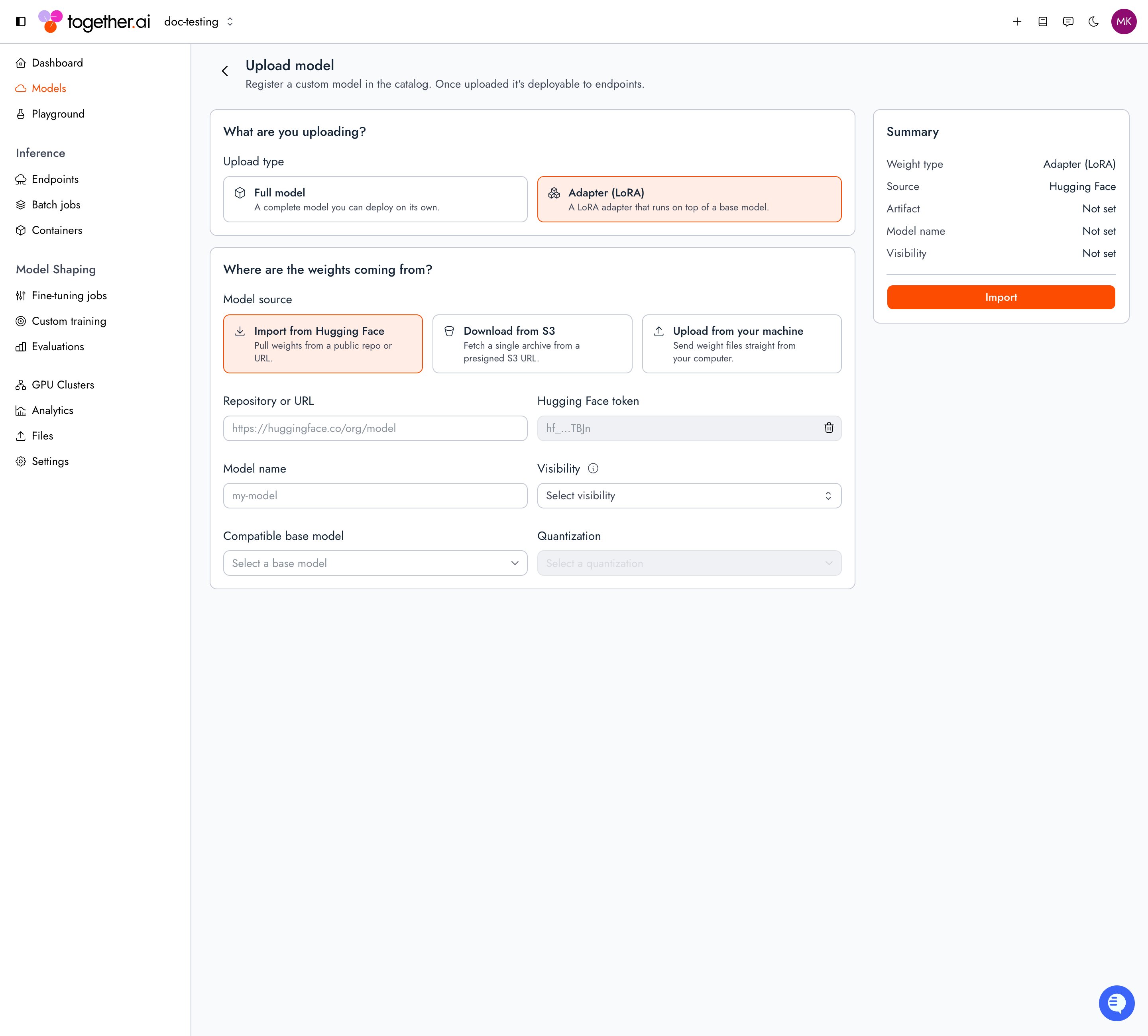
The console combines creating the adapter record and uploading its weights into a single form.1
Set the upload type
Set Upload type to Adapter (LoRA).
2
Choose the source
Under Model source, select Import from Hugging Face and enter the repo path or URL (add a Hugging Face token for gated or private repos), or select Download from S3 and paste a presigned archive URL. Upload from your machine shows a CLI command instead, so use
tg beta models upload for files on your machine.3
Name and configure the adapter
Enter a Model name, choose a Visibility, and select the Compatible base model the adapter runs on top of.
4
Import
Select Import. The upload runs server-side, with progress shown below the form. You can leave the form: the adapter appears under My models with an Uploading badge while the job is pending or running.
Check upload status
Poll the remote-upload job untilstatus is REMOTE_UPLOAD_STATUS_SUCCEEDED. The adapter is ready to deploy at that point.
REMOTE_UPLOAD_STATUS_SUCCEEDED, confirm the files landed:
CLI
Check revision validation
After files land, Together validates the revision’s weights automatically. Validation checks that the weights are in safetensors format and that the adapter is compatible with its base model. A revision must reachREVISION_VALIDATION_STATUS_SUCCESS before you can deploy it when you pin that revision explicitly.
List revisions for an adapter:
CLI
$PROJECT_ID with your project ID (proj_...):
Shell
Revision validation fields
validationStatus values
When validation fails, each entry in
validationErrors includes rule, severity, and message describing what went wrong.
Deploy the adapter
Once the upload completes, your adapter has a model ID (ml_...) in your project, linked to its base model. Deploy it the same way as a base model, using a config for its base model. The CLI’s deploy command creates the endpoint, attaches a deployment, and routes all traffic to it in one step. For an adapter, pass --merge, which deploys the adapter merged into its base model. The SDK has no single equivalent, so the Python and TypeScript samples run the same steps individually:
Run inference
Once the deployment isREADY and routable, call the endpoint by its endpoint string (<project_slug>/<endpoint_name>), the same as any other dedicated endpoint. Dedicated model inference is served at https://api-inference.together.ai:
Troubleshooting
“Model not found” during upload: Create the adapter record first withtg beta models create --type adapter, and pass the returned id to the upload command.
“Model name already exists”: Each uploaded adapter needs a unique name. Adapter versioning isn’t supported, so re-upload under a new name.
Missing required files: The adapter source must contain both adapter_config.json and adapter_model.safetensors. Confirm both are present at the root of the archive (S3) or in the Files and versions tab on Hugging Face.
Base model incompatibility: The adapter must target a base model that Together AI supports for dedicated inference. Verify the base model you trained against is available for dedicated model inference.
Upload job stuck in Processing: Most often this means the source can’t be reached. For S3, confirm the presigned URL hasn’t expired. For Hugging Face, confirm your token has access to the repo.
401 or 403 during upload: Check that TOGETHER_API_KEY is set, your Hugging Face token has permission for private repos, and your S3 presigned URL is valid and not expired.
Adapter delete fails with the model is referenced by a live deployment (HTTP 400): A deployment still references this adapter. Stop the deployment, wait for DEPLOYMENT_STATE_STOPPED, delete the deployment, then delete the adapter with tg beta models delete <adapter_id>.