

Architecture
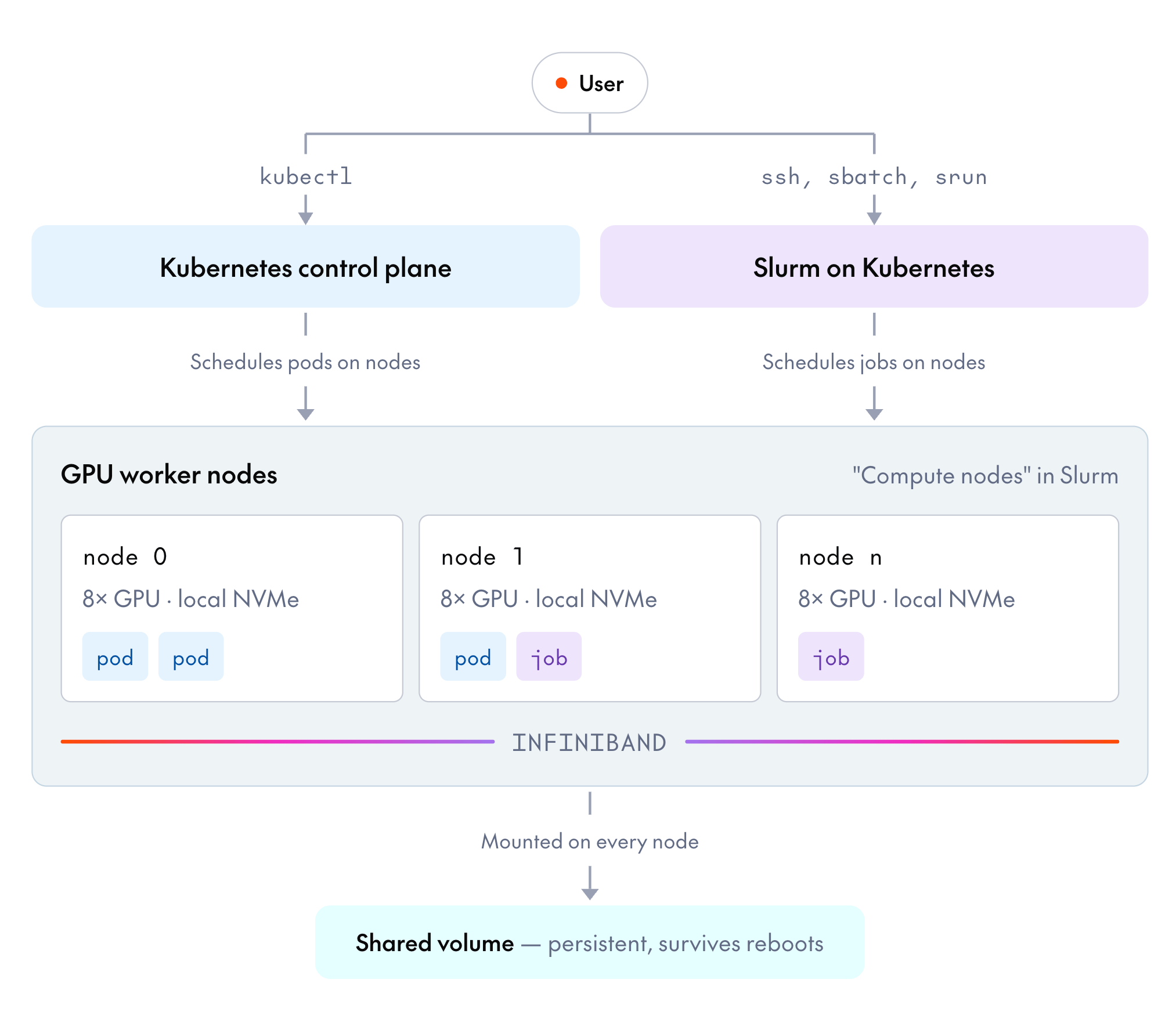
- Hardware: GPU worker nodes connected by InfiniBand, each with a local NVMe disk, plus a persistent shared volume mounted on all of them. This is the layer you rent.
- Kubernetes: Every cluster runs Kubernetes, including Slurm clusters. A control plane managed by Together tracks cluster state and schedules pods onto the worker nodes. You reach it with
kubectlafter downloading credentials. - Slurm (optional): On Slurm clusters, the Slurm stack runs on top of Kubernetes. You SSH into a login node and submit jobs, and the Slurm scheduler places them on the same GPU nodes.
kubectl and the Kubernetes ecosystem, Slurm’s batch commands, and orchestration tools like SkyPilot, Volcano, and Kueue.
Together monitors every node with passive health checks and repairs unhealthy nodes through automated repair recommendations. You can also run active health checks on demand.
Kubernetes
Kubernetes is a container orchestration system that schedules containerized workloads across a cluster of machines. Together manages the control plane, and you get fullkubectl access to schedule work onto the GPU worker nodes. For general Kubernetes usage, see the Kubernetes documentation.
Kubernetes is declarative. You describe what you want to run, and Kubernetes finds nodes with the resources to run it, starts it, and restarts it if it fails.
These Kubernetes terms come up throughout the clusters docs:
- Container: Your workload packaged with its dependencies into an image, so it runs the same way on any node.
- Pod: The smallest unit of work Kubernetes schedules onto a node, made up of one or more containers.
- Manifest: A YAML file describing what you want to run. You apply it with
kubectl apply, and Kubernetes makes the cluster match it. - Jobs and deployments: The two most common workload types. A job runs pods to completion, for example to train a model. A deployment keeps pods running, for example to serve inference.
Slurm
Slurm is a cluster management system that schedules jobs across a cluster of computers. On a Slurm cluster, Slurm comes preconfigured for distributed training. You submit jobs from the login node, and the scheduler assigns them to GPU nodes based on resource availability. For general Slurm usage, see the Slurm quick start user guide. Choose a Slurm cluster when your team works with high-performance computing (HPC) batch workflows, such assbatch scripts, job arrays, and partitions. Choose a Kubernetes cluster when your workloads are containerized and you want to work with kubectl and the Kubernetes ecosystem directly. You select the cluster type when you create the cluster. Both types run on the same hardware, storage, and networking.
Together runs Slurm on top of Kubernetes through Slinky. A Slurm cluster has the same layers underneath as a Kubernetes cluster, and Slurm adds its own vocabulary:
- Login node: The machine you SSH into to write, submit, and monitor jobs. You submit work from it rather than running work on it directly. The console labels it the head node, and the two terms are interchangeable.
- Compute node: Slurm’s name for a GPU worker node. Each one is registered with both Kubernetes and Slurm.
- Job: Slurm’s unit of work, submitted with
sbatch(batch) orsrun(interactive). A job plays the same role on a Slurm cluster that a pod plays on a Kubernetes cluster. - Partition: A named group of compute nodes that jobs are submitted to. To change partitions, see Slurm configuration.
Storage
Every cluster has these storage locations:- Shared volume: A persistent, remote-attached filesystem mounted on every node. It survives reboots, node repairs, and, by default, cluster deletion. Store datasets, checkpoints, model weights, and anything else you can’t lose on it.
- Local NVMe: A fast ephemeral disk on each node. Data on it can be lost during reboots, repairs, or rescheduling. Use it only for scratch files you can regenerate.
/home: Persistence depends on the cluster type. On Slurm clusters,/homelives on the shared volume and persists. On Kubernetes clusters, it’s local to each node and ephemeral.
Preemptible compute
You can request two kinds of compute on a cluster:- Standard: The default. Standard nodes are provisioned up front when you create or scale a cluster, and they stay in the cluster until you scale down or delete it. Together never preempts them.
- Preemptible: Discounted nodes built from Together’s spare GPU capacity. Because that capacity is spare, Together can reclaim, or preempt, a preemptible node whenever the capacity is needed elsewhere.
Glossary
Next steps
Quickstart
Create a cluster, connect to it, and run your first job.
Run workloads on Kubernetes
Deploy pods with persistent storage and run GPU workloads.
Submit Slurm jobs
Submit and manage batch jobs with the preconfigured Slurm scheduler.
Cluster storage
Choose the right storage tier for datasets and checkpoints.