

How it works
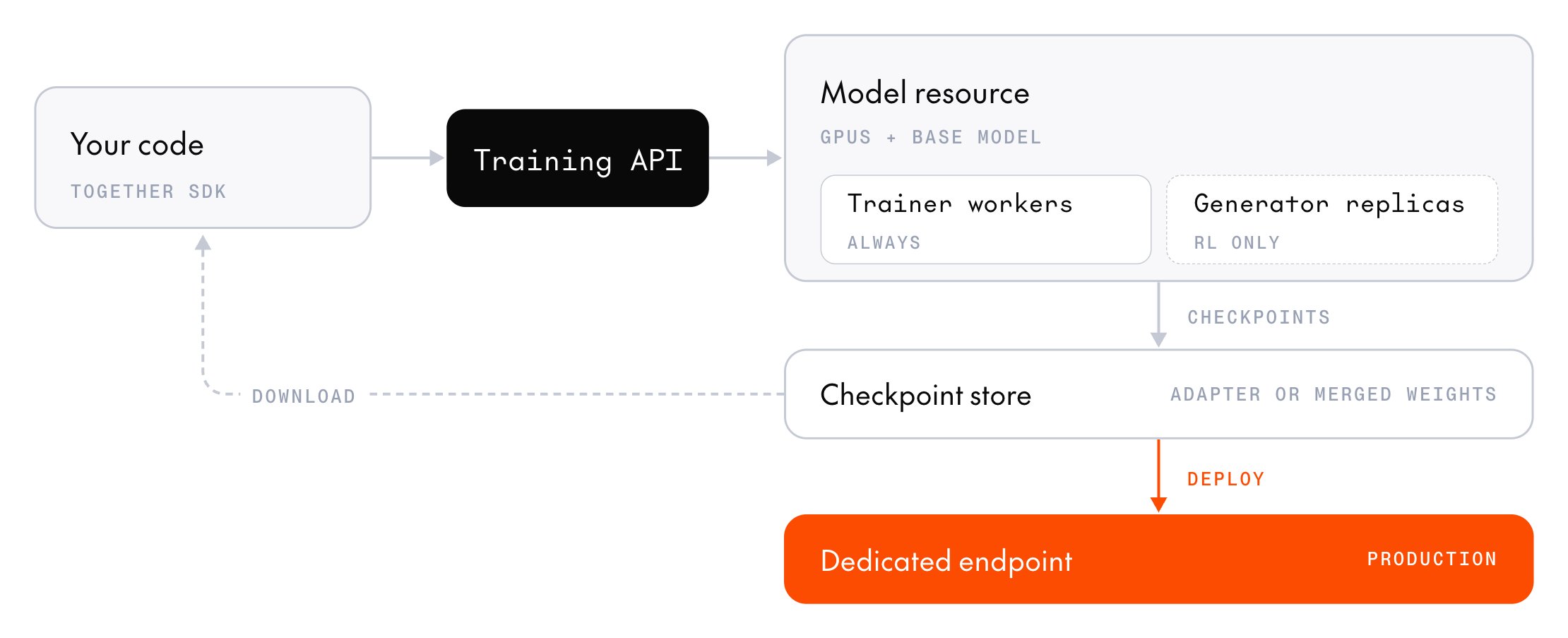
Post-training splits a training run between your code and a model resource running on Together AI GPUs. The model resource holds the model and does all the heavy computation: generating completions, computing gradients, and updating the weights. Your code runs the training loop around that work and controls everything else: loading the data, choosing which prompts to train on, building each batch and setting its size, scoring the model’s outputs, and deciding when to stop. It runs on any machine with the Together SDK installed, including a laptop with no GPU. For example, one step of a reinforcement learning (RL) run might look like this:- Your code sends a batch of prompts, and the model resource generates several completions for each one.
- Your code checks each completion against the known solution and scores it.
- Your code sends the scored completions back, and the model resource computes gradients that push the model toward the higher-scoring completions.
- The model resource updates the model’s weights, and the next step generates completions from the updated model.
Architecture
Trainer and generators
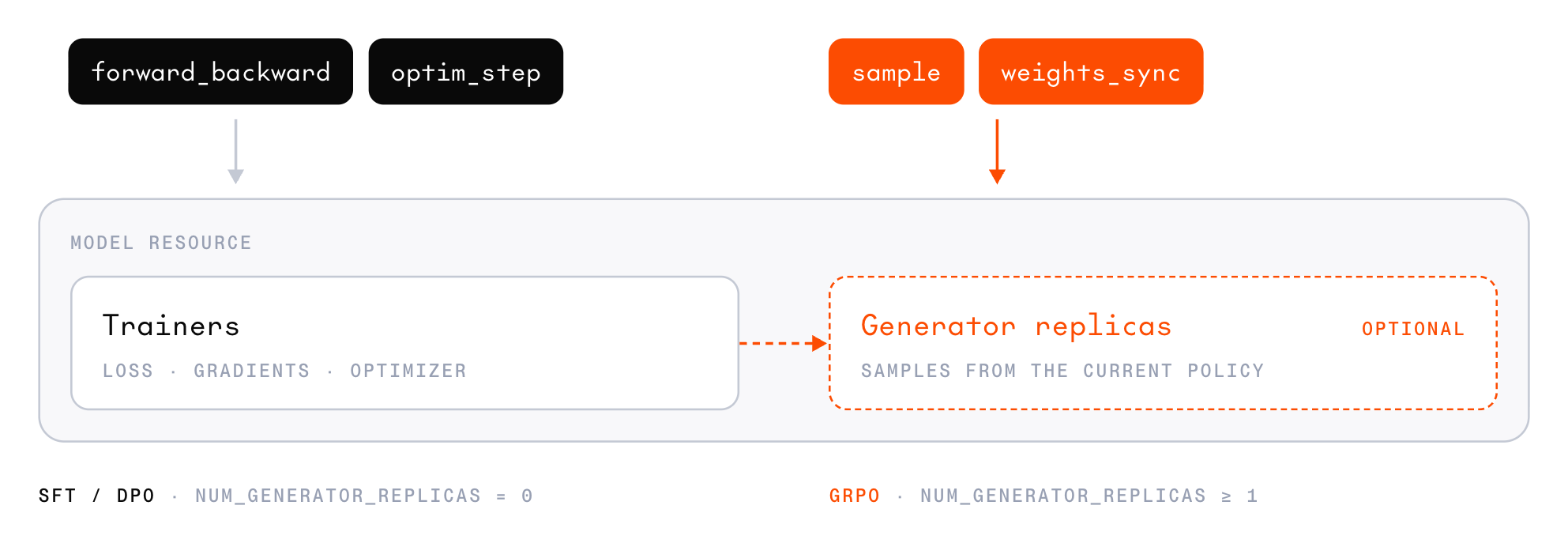
forward_backward, optim_step, and checkpoint save for every session on the resource. Each resource has one trainer: a single group of GPUs with the model sharded across them. It holds one copy of the frozen base weights and, on a low-rank adapter (LoRA) resource, every session’s adapter and optimizer state alongside them.
A generator replica is a unit of sampling capacity that serves sample calls. It runs one or more inference engines, each with its own copy of the base model and each session’s adapter loaded, so one replica serves every session on the resource. Replicas are independent, so sampling throughput scales with the replica count. The catalog sets a replica’s size per model and GPU type, and each replica adds to the resource’s hourly rate. To compare, see Estimate the cost of a resource.
The two roles hold separate copies of the weights. The trainer’s copy changes on every optim_step. The generators’ copy stays the same until you call weights_sync, which publishes the trainer’s current weights to every replica so the next sample comes from the updated policy.
Only RL samples completions, so SFT and DPO run on trainer-only resources with no generators and never call weights_sync.
Model resources and sessions
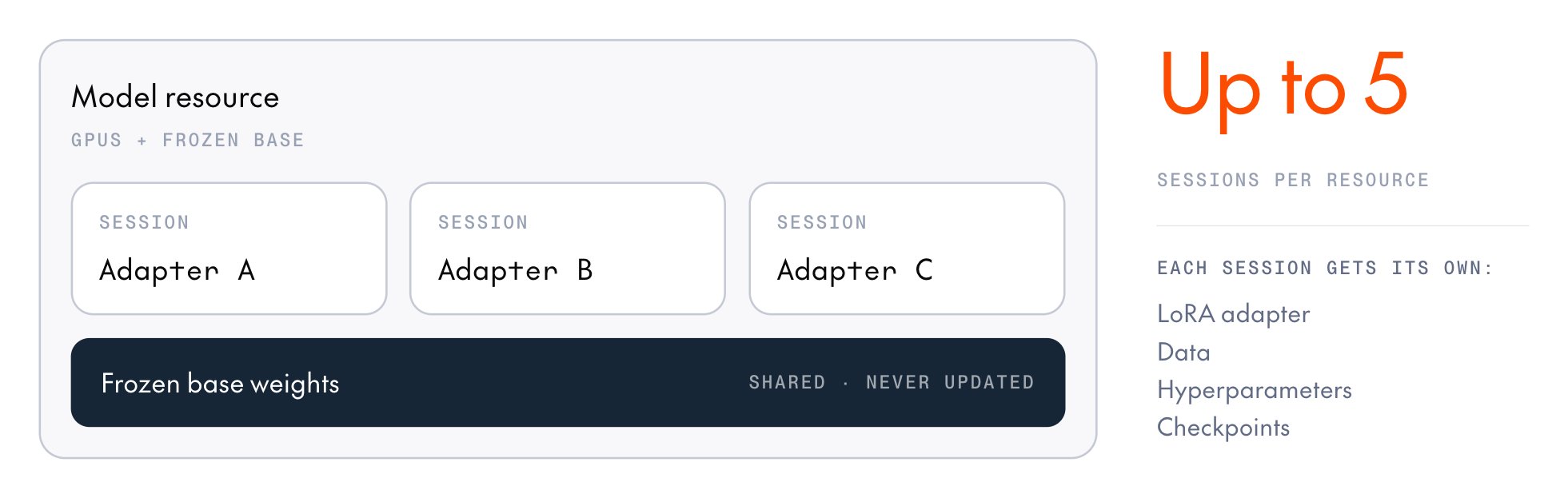
A model resource represents the set of GPUs allocated for training, plus the frozen base model loaded onto them. You choose its base model, training mode (LoRA or full-weight), GPU type, and number of generator replicas, and you pay for it by the minute while it’s ready. Manage model resources covers choosing those settings and creating, attaching to, and stopping a resource. A session is one set of trainable weights attached to a resource: a LoRA adapter or, on a full-weight resource, the full model weights. It holds those weights, the optimizer state, and a step counter. Every operation you call (sample, forward_backward, optim_step, weights_sync) targets a session.
LoRA is the default training mode. A full-weight resource hosts a single session, which updates every parameter. To choose between the two modes, see LoRA vs. full-weight training.
Stopping a session only detaches it from the resource, which keeps running and billing until you stop it. After an hour without an operation, the resource stops and its sessions expire. See Model lifecycle for more details.
Sharing a resource
Data and samples
A sample is one training example. It pairs a token sequence with the per-token values that the loss function reads, such as which tokens to train on. The cookbook builds samples for you.get_codec(model) renders each conversation with the model family’s chat template, and sample builders such as build_cross_entropy_sample and build_policy_sample turn the rendered tokens into samples. Build samples by hand only when you need full control.
In the SDK, a Sample holds its input tokens in model_input and its other arrays in a loss_fn_inputs mapping. Each position in a sample is scored on predicting the next token:
- Input tokens:
model_inputholds the prompt and response, minus the final token. - Target tokens:
target_tokensholds the same sequence minus the first token, so positioniis scored on predictingtarget_tokens[i], the token that followsmodel_input[i]. - Weights:
weightsis the loss mask. A position with1.0trains and a position with0.0doesn’t, so0.0on the prompt and1.0on the response trains the model on the response only.
t0 through t5, gives five positions. model_input holds t0 through t4, and target_tokens holds t1 through t5. The last position predicts t5, so it trains like any other response position.
GRPO samples add two more arrays to loss_fn_inputs:
- Advantages:
advantagesholds the completion’s advantage at every trained position and0.0elsewhere. - Log-probabilities:
logprobsholds the log-probability the generator assigned to each response token when it sampled it, and0.0on the prompt.
Build samples by hand
Every array inloss_fn_inputs has one value per position, lined up with target_tokens. To build each array, start with one value per token in the sequence, then drop the first value, the same way target_tokens drops the first token. Use 0.0 for positions you don’t train on rather than leaving them out.
The service doesn’t shift arrays or check that they line up. An array trimmed from the wrong end still has the right length, so the run trains on the wrong tokens without an error. To avoid this, use the cookbook’s builders. They take one value per token, trim every array for you, and reject arrays that don’t match the token count.
Reasoning in conversation history
Some reasoning models’ chat templates strip the<think> blocks from earlier assistant turns when they render conversation history. In the current catalog, the Qwen3.5 and Qwen3.6 templates strip them, while the Qwen3.8, GLM-5.3, Kimi-K3, MiniMax-M3, and MiniMax-M3.1-Flash templates keep them by default, so those conversations train as a single sequence. Once an earlier turn loses its reasoning, the rendered history no longer matches the tokens the model produced for that turn, so the conversation can’t train as a single sequence. Instead, the cookbook splits it into one sequence per turn, and each turn trains against the history the model sees at inference. Thinking settings covers the enable_thinking and preserve_thinking settings that control this behavior.
Checkpoints
A session saves two kinds of checkpoint:- Inference checkpoint: Snapshots the model weights for inference, which you can download or deploy. It registers the deployable part in your project’s model registry: the adapter for a LoRA session, or the full model for a full-weight session.
- Training checkpoint: Saves the full training state (adapter or full weights, optimizer moments, and step counter), so a later session can resume the run or start a new one from the same weights.