

- Supervised fine-tuning (SFT).
- Direct preference optimization (DPO).
- Reinforcement learning with group relative policy optimization (GRPO).
Key features
- Train on outcomes: With reinforcement learning, your code scores the model’s outputs, so you can train on any task where you can check the answer, even if you can’t provide training examples.
- Train agents: Fine-tune models in multi-turn environments, where the model acts over several turns and can call tools.
- Control every step: Your code chooses each batch, learning rate, and loss function. For any training method, you can write your own loss function that computes the loss in PyTorch from the model’s log-probabilities.
- No infrastructure management: Your loop runs on any machine, even a laptop, while Together AI runs the sharded trainer, the sampling engines, and the weight sync between them. See Concepts for more details.
- Iterate cheaply, then deploy: Train several adapters on one base model for the GPU cost of one, then deploy the best to dedicated inference.
Get started
SFT quickstart
Run your first supervised fine-tuning session from a cookbook recipe.
RL quickstart
Train a model on grade-school math with GRPO and an exact-match reward.
Supported models
Pick a base model by training mode, context length, and GPU type.
How it works
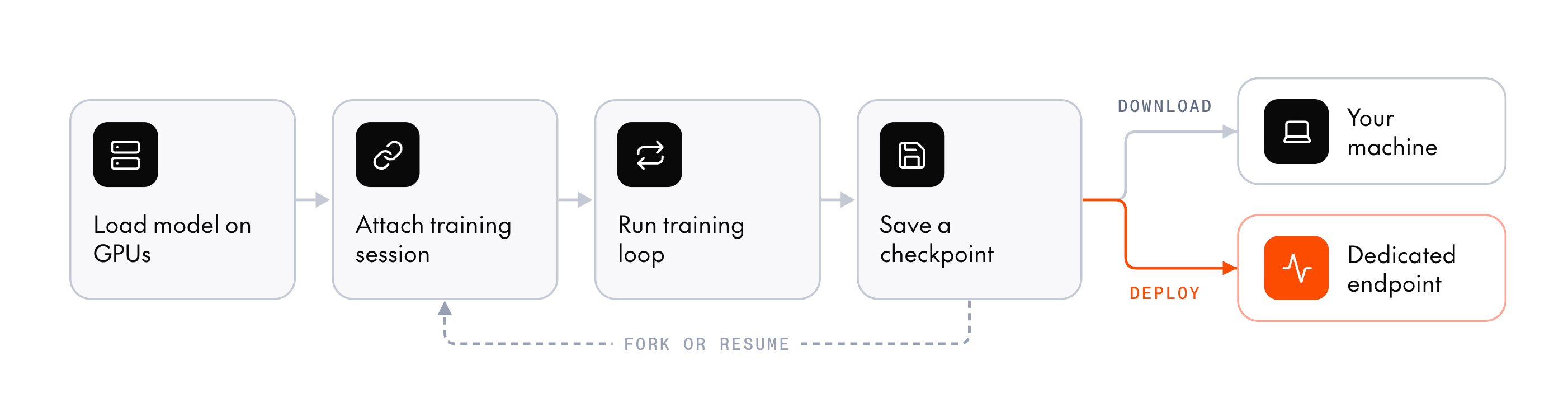
The main functionality for post-training is contained in a few SDK methods. First, you create a model resource and attach a training session to it:create: Provision a model resource, which represents a set of GPUs with the base model loaded on them. This is what you’re billed for.create_session: Attach a training session to the model resource.
sample_batch: Generate completions for your code to score.forward_backward: Compute the loss and backpropagate the gradients.optim_step: Update the model weights.weights_sync: Publish the new weights to the generator replicas, so the next step samples from them.
sample_batch and weights_sync.
Example
Here’s a minimal example of supervised fine-tuning with the Python SDK:- Together AI provisions GPUs and loads the base model onto them.
- Your code runs the training loop on your machine. At each step, it sends a batch to the GPUs, which compute the loss, update the model’s weights, and return the loss to your code.
- When the program exits, Together AI releases the GPUs and billing stops.
Cookbook
Instead of writing a training loop from scratch, you can use a recipe from the post-training cookbook, a Python library of ready-made loops built on the Together SDK. Each recipe handles dataset loading, tokenization, reward scoring, and the training loop itself, so you only need to work with the SDK directly when no recipe fits your task. The cookbook also includes notebooks. Thenotebooks/ directory walks step by step through GRPO, SFT, and training several low-rank adapters (LoRAs) on one model resource, using the SDK’s async calls. To add a notebook kernel, run uv sync --locked --group notebooks in your checkout.
Post-training vs. standard fine-tuning
Together AI also offers a job-based fine-tuning service for standard workloads. If you only need SFT or DPO and have well-formed data, it’s much simpler to use: upload a dataset, submit a job, and wait for the model to train. Post-training is more powerful but more complex. It uses a session-based workflow in which your own code runs the training loop against remote GPUs. The table summarizes the main differences:Train, evaluate, and productionize adapters
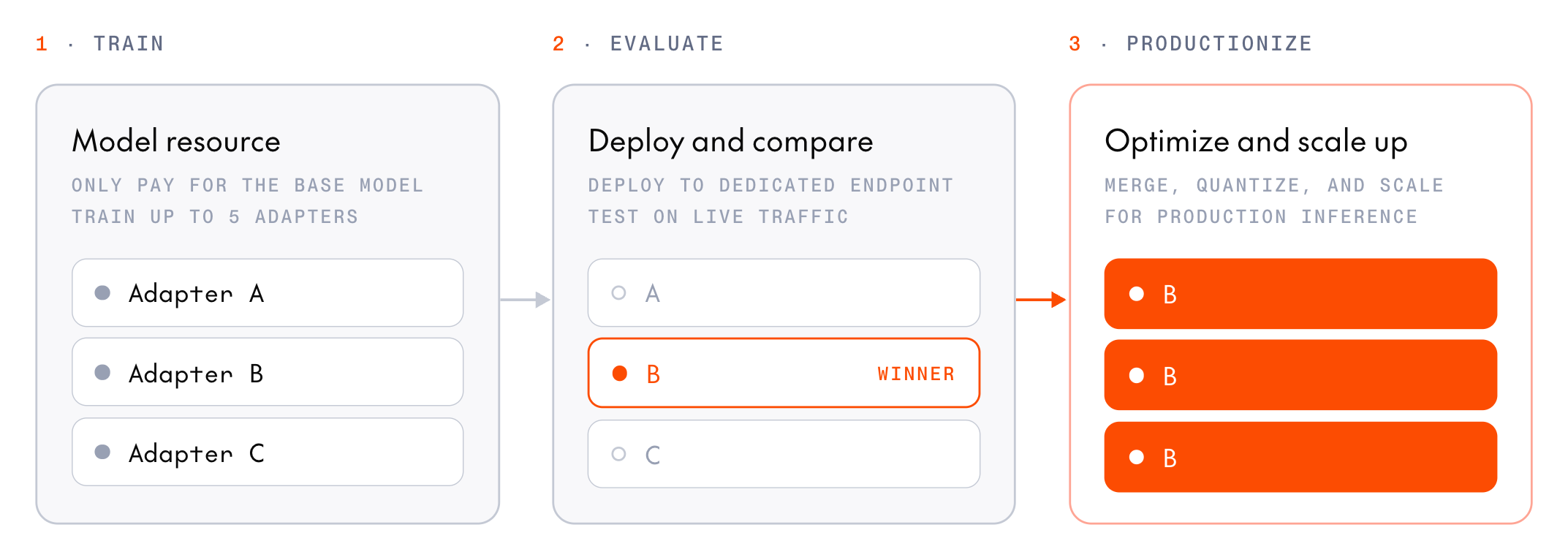
- Train: Attach several training sessions to one model resource. Each session trains an independent adapter against the same frozen base model, so a hyperparameter sweep costs one base model’s worth of GPU time, not one per adapter.
- Evaluate: Each adapter is registered as a model when its session saves an inference checkpoint. Attach the candidates to one deployment of the base model on dedicated GPUs, then compare them by naming a different adapter in each request. Multi-LoRA deployments support only some base models.
- Productionize: Deploy the winner on its own deployment, which merges it into its base model when it starts. For GLM-5.3 and Kimi-K3, first prepare the adapter for FP4 inference.
Learn more
Concepts
How work splits between your code and Together AI GPUs, and the model resources, sessions, and checkpoints you work with.
Training methods
Choose a method and a training mode, compare built-in and custom loss functions, and combine methods.
Model resources
Size, create, attach to, and stop the GPUs your sessions train on.
Pricing
Per GPU-minute billing, cost estimates, and refunds on failure.
Manage checkpoints
Save, download, and resume from what you trained.
Deploy a checkpoint
Serve a trained model on dedicated model inference.