

When to use TSA
TSA helps most when many nodes read the same objects, or when the same objects are read repeatedly across jobs:- Model weights at startup: A checkpoint that every replica loads is fetched from the origin once per cluster, not once per node.
- Training data shared across nodes: Dataset shards that every worker reads are served from the cache after the first epoch.
- Hugging Face Hub downloads: Model and dataset repositories are mirrored inside the cluster, with your token applied for gated repositories and rate limits.
- Cross-region or cross-cloud buckets: Objects in a distant region or another cloud are pulled over the WAN once, which cuts egress and removes the WAN from every later read.
- Many pods starting at once: Concurrent requests for the same uncached object collapse into a single origin fetch, so a fleet-wide cold start doesn’t become an origin fetch storm.
PUT or DELETE sent to the endpoint passes through to the origin with the backend’s credentials.
How it works
TSA runs one cache instance on every GPU node in your cluster, in thetsa namespace. A single in-cluster service, tsa.tsa.svc.cluster.local, routes each pod to the instance on its own node, so the client-side hop never leaves the host. Instances share a cluster-wide cache: an object is split into fixed-size blocks, each block is cached on one node, and other nodes fetch it from that peer rather than from the origin. Nodes added to the cluster join the cache automatically.
Each instance uses a fixed portion of its node’s local NVMe for cached blocks. When the cache fills, the least valuable blocks are evicted and fetched again from the origin on the next read.
Enable the add-on
Before you start, you need:- TSA enabled for your organization. If the TSA section doesn’t appear in your cluster’s create form or details page, contact your account team.
- Credentials for at least one S3-compatible backend, a Hugging Face token, or both.
- Console
- API
1
Open the TSA section
In the console, turn on the TSA toggle in the cluster create form, or open an existing cluster’s details page and turn on the TSA toggle there.
2
Add backends
Select Add backend and fill in the fields described in Configure backends. Add a Hugging Face token to enable the Hugging Face Hub mirror.
3
Save
Create the cluster, or select Update on the details page. Together installs TSA on the cluster’s GPU nodes within a few minutes.
Configure backends
A backend is one S3-compatible origin that TSA caches. You can configure up to three backends per cluster, plus one Hugging Face token.
The Hugging Face token is optional. Add one to enable the Hugging Face Hub mirror, to download gated repositories, and to avoid the rate limits Hugging Face applies to anonymous downloads. In preview testing, anonymous downloads started returning 429 responses after roughly 49 GB.
Together stores backend credentials and the Hugging Face token encrypted in a secrets vault and delivers them to your cluster as Kubernetes secrets in the
tsa namespace. The console shows them masked after you save. To rotate credentials, enter the new values and select Update. Leave a credential field blank to keep its stored value.
Use TSA in workloads
The TSA endpoint ishttp://tsa.tsa.svc.cluster.local:18080. It isn’t exposed outside the cluster. It’s reachable from pods and from anything else on the cluster’s node network, because the TSA pods run on the host network.
Read from an S3-compatible backend
Point your S3 client at the TSA endpoint and prefix every object path with the backend name:<BACKEND_NAME>/<BUCKET>/<KEY>. Your S3 client treats the backend name as the bucket and the rest of the path as the key. Client credentials aren’t used, so any value works. TSA signs the origin request with the backend’s credentials.
Set the endpoint for every S3 client in a pod with AWS_ENDPOINT_URL:
training-data, read datasets/tokens.bin from the bucket my-bucket:
GET and HEAD requests, including range requests, so parallel downloaders that fetch byte ranges work as expected. Listings pass through to the origin and are always current. Addressing is path-style only. Virtual-hosted-style requests, where the bucket is part of the hostname, aren’t supported.
Download from Hugging Face Hub
SetHF_ENDPOINT in the pod. huggingface_hub, and every library built on it such as transformers, then downloads through the mirror:
/api/* and */resolve/* paths. TSA resolves a branch or tag such as main to its commit hash before caching, so a repository whose main has moved never serves stale files. The mirror is active only when a Hugging Face token is configured for the add-on.
Warm the cache before a job
Prefetch an object so a job’s first read is already warm. Prefetching populates the cache across the cluster, with each node fetching the blocks it owns, without writing files anywhere:/prefetch/<BACKEND_NAME>/<BUCKET>/<KEY>. Run it from any pod in the cluster before the job starts, for example in an init container or a pre-job step. The response reports per-node results.
Monitor TSA
Check the add-on from inside the cluster:/health returns OK when the local instance is running. It doesn’t check the cache disk or the origins.
TSA exposes Prometheus metrics on port 9091 of every GPU node, not on the tsa service. The pods run on the node network, so scrape http://<NODE_IP>:9091/metrics for each GPU node, or discover the pods in the tsa namespace and scrape their metrics port. The metrics cover cache hit rate by tier, bytes served from cache and from the origin, origin request latency and errors by backend type, evictions, disk health, and peer request latency.
Performance
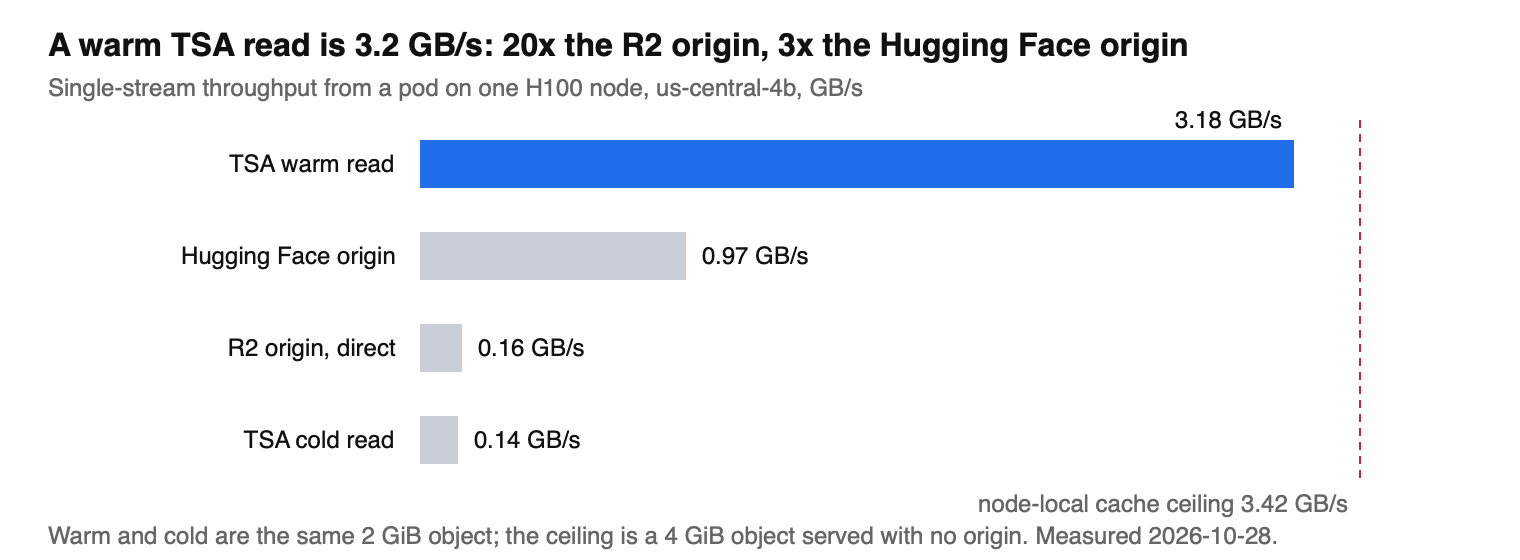
These numbers were measured on 2026-10-28 from a pod on a single H100 GPU node in a Together GPU Cluster in us-central, with Cloudflare R2 as the S3-compatible backend and Hugging Face Hub as the origin for the model download. Each read was a single stream unless noted. Clients wrote to/dev/null or the node’s local NVMe, so the numbers reflect the cache, not the client’s disk.
What to expect from these numbers:
- A cold read costs about the same as reading the origin directly. The proxy hop added about 5 percent to the wall time of a 2 GiB download.
- Warm reads run within 10 percent of the node’s local cache ceiling. The proxy isn’t the bottleneck; a single-stream client is. Four parallel readers on one node share the same ceiling.
- Origin throughput varies by region. The same Hugging Face download ran at 0.20 GB/s from a cluster in ca-west and 0.97 GB/s from us-central, so the warm-read speedup is largest where the origin is slowest.
- Reads served from a peer node weren’t measured. Every number above is from the node that holds the cached blocks. A read whose blocks live on another GPU node also crosses the cluster network.
Caching behavior and consistency
TSA is built for immutable content: model weights, datasets, and checkpoints written once under a new key. Keep these behaviors in mind:- Overwritten objects: An object overwritten at the same key in the origin can keep serving the previously cached bytes until they’re evicted, and a read that spans the change can return a mix of old and new data. Don’t overwrite objects in place. Write changed data under a new key or version suffix, or read it with
Cache-Control: no-storeto bypass the cache. - Listings:
Listrequests always go to the origin, so listings reflect the origin’s current state. - Hugging Face revisions: Cache keys are pinned to the resolved commit, so moved branches and tags never serve stale files.
- Cache capacity: Each node contributes a fixed share of its local NVMe. When a node leaves the cluster, the blocks it held are fetched again from the origin on the next read.
- Origin outages: Cached blocks can keep serving while the origin is unavailable, as long as the object’s cached metadata hasn’t expired. Uncached objects fail with the origin’s error.
Security
- Network access: The TSA endpoint isn’t exposed outside the cluster. Because the TSA pods run on the host network, the proxy listens on each GPU node’s IP, so it’s reachable from pods and from anything else on the cluster’s node network. Any pod in the cluster can send requests through any configured backend, so treat the cluster’s workloads as trusted, give backends read-only credentials, and add a Kubernetes NetworkPolicy to restrict which namespaces can reach the
tsanamespace when more than one team shares the cluster. - Client credentials: TSA doesn’t authenticate S3 clients. It signs origin requests with the backend credentials you configured, for writes and deletes as well as reads. Give each backend read-only credentials unless workloads need to write through it.
- Credential storage: Together stores backend credentials and the Hugging Face token encrypted in a secrets vault, delivers them to your cluster as Kubernetes secrets in the
tsanamespace, and masks them in the console. Anyone with cluster-admin access to your cluster can read those secrets.
Troubleshooting
- The TSA section doesn’t appear in the console: TSA isn’t enabled for your organization yet. Contact your account team.
- The console won’t save the add-on: Enabling TSA requires at least one backend with a name, access key ID, and secret access key, or a Hugging Face token. A backend with a name but no credentials, or credentials but no name, fails validation.
- Pods in the
tsanamespace are inCrashLoopBackOff: Runkubectl -n tsa logs daemonset/tsa-s3-cache-proxy-chart --tail=5. AFailed to create S3 source clienterror that ends incredentials files ... are emptymeans the backend’s credentials didn’t reach the cluster. Re-enter the access key ID and secret access key in the console and select Update. If the pods keep crashing, contact support. - No pods in the
tsanamespace: TSA runs only on GPU nodes. If the cluster is still provisioning, the pods appear when the first GPU node joins. If the cluster has GPU nodes and the add-on is enabled, contact support. - Every read returns
500withInternalErrorand a message aboutEC2 IMDSorget credentials: The request reached TSA’s default origin instead of one of your backends. That happens when the add-on has no backends configured, or when the request path doesn’t start with a backend name. Add a backend, then prefix the path with its name. 403orNoSuchBucketon a read: Check that the request path starts with the backend name. A path that starts with a bucket name is sent to the default origin, not to your backend. Then check the backend’s region and credentials against the origin.404on a read that works against the origin directly: Confirm the backend URL is the origin’s endpoint only, with no bucket name or path appended.502on a read: TSA couldn’t reach the origin. Check the backend URL and the origin’s availability from inside the cluster.- Hugging Face downloads bypass the cache: The mirror is active only when a Hugging Face token is configured. Add a token to the add-on, then confirm
HF_ENDPOINTis set in the pod. - Hugging Face returns
401,403, or429: The repository is gated or the download hit Hugging Face’s anonymous rate limit. Add a token with access to the repository. - Rotated credentials don’t take effect: TSA picks up updated credentials a few minutes after you save them, without a restart. If reads still fail after that, check the new credentials against the origin directly.
Limits
- Up to three S3-compatible backends and one Hugging Face token per cluster.
- Path-style addressing only.
- Reads only. Uploads, multipart uploads, and listings go to the origin.
- Container image caching and bulk data ingest into cluster storage aren’t part of the add-on.