

model in a recipe’s config to provision a resource that the recipe stops on exit, or, in GRPO and SFT recipes, set model_resources_id to attach to one that’s already running.
Choose a configuration
Six settings define a model resource: its base model, optional custom base weights, training mode (low-rank adapter or full-weight), GPU type, number of generator replicas, and optimizer. All of these are fixed once the resource is created, and every session on the resource shares them, so to change one, provision a new resource.
For more details, see the API reference.
Generator replicas
A model resource runs a trainer and, optionally, generator replicas. The trainer computes losses and gradients and applies optimizer steps. Generators sample completions from the current policy, so only reinforcement learning needs them.- SFT and DPO: Set
num_generator_replicas=0. The resource is trainer-only, which provisions less hardware and costs less per minute. The cookbook’s SFT and DPO loops do this for you. - GRPO: Set
num_generator_replicasto 1 or more. More replicas raise sampling throughput when rollouts, rather than the optimizer step, are the bottleneck. Each replica adds GPUs and cost.
num_generator_replicas, including when you pass a compute_config that sets only gpu_type, so pass num_generator_replicas=0 explicitly for trainer-only work. Models whose Supported models row says No generator can’t be provisioned with replicas at all, so creating one without num_generator_replicas=0 fails.
Sessions inherit the resource’s layout. On a trainer-only resource, session.generator raises RuntimeError, so guard shared code paths with session.has_generator.
Create a resource
Your project needs a credit balance of at least $100, the minimum credit balance, to create a resource.ModelResourcesClient.create submits the request and waits until the resource is READY. The wait covers queueing for GPUs, starting them, and loading the base model, and it runs longer when capacity for the model’s GPU type is scarce. Billing starts the moment the resource becomes READY.
create waits up to an hour by default. The service has no time limit for a resource waiting in the queue, so when capacity is scarce, the SDK’s timeout can run out while the resource is still queued. Pass timeout=None to keep waiting until the resource gets GPUs, or a smaller timeout to give up sooner. If creation fails (the wait times out, the resource enters ERROR, or you interrupt the process), the SDK stops the resource it created before raising, so a failed create doesn’t leave GPUs billing.
If the process is killed instead, for example with kill -9 or by a machine crash, no cleanup runs. A resource still in the queue stays there until it gets GPUs, then becomes READY and bills until you stop it or it stops after an hour without an operation, so stop it yourself.
Every SDK operation has an
_async variant, such as ModelResourcesClient.create_async. The synchronous calls block the calling thread, so they raise RuntimeError when called from code that’s already running an event loop, such as an async application. Jupyter notebooks are the exception: a synchronous call works in a notebook cell but blocks the cell until it returns. Use the _async variants in async code. They also work in notebooks, as the cookbook’s notebooks show.Attach to an existing resource
To train on a resource that already exists, attach to it by ID. Use this for a resource you created in the console, one a teammate provisioned, or one you keep running across experiments.attach provisions nothing and doesn’t wait. It only confirms that the resource exists.
stop(), the same as an owned handle’s, and stops the resource for everyone else using it. Call detach() instead.
To attach a GRPO or SFT cookbook recipe instead, set model_resources_id on its config, as Attach to a running resource shows.
Inspect and list resources
To check a resource’s state, callretrieve on its client handle. It returns the resource’s current record, including its status and, when the status is ERROR, an error with the error code:
resource.status_details.queue_position estimates its place: the number of older resources of the same GPU type still waiting for GPUs, plus one. It’s unset once the resource is placed on a cluster.
To find resources without a handle, list them from the base client. Filter by status to see what’s billing right now:
status takes a list, the SDK sends several values in a form the API rejects with HTTP 400. To find resources in several states, call list once for each status.
The Model resources tab in the console shows the same resources. The tg CLI can list and inspect them with tg training ls-resources, tg training ls-sessions, tg training ls-checkpoints, and tg training get <ID>, but it can’t create or stop them, so use the SDK or the console for that.
Stop a resource
AREADY resource bills until it stops, even when nothing is training on it. Stop it as soon as you’re done:
stop returns once the resource has left READY, which is when billing ends. The API refuses to stop a resource while any session on it is still active. Stop your sessions first, or pass force=True to stop the resource along with every session attached to it, including sessions that other processes own:
Lifecycle
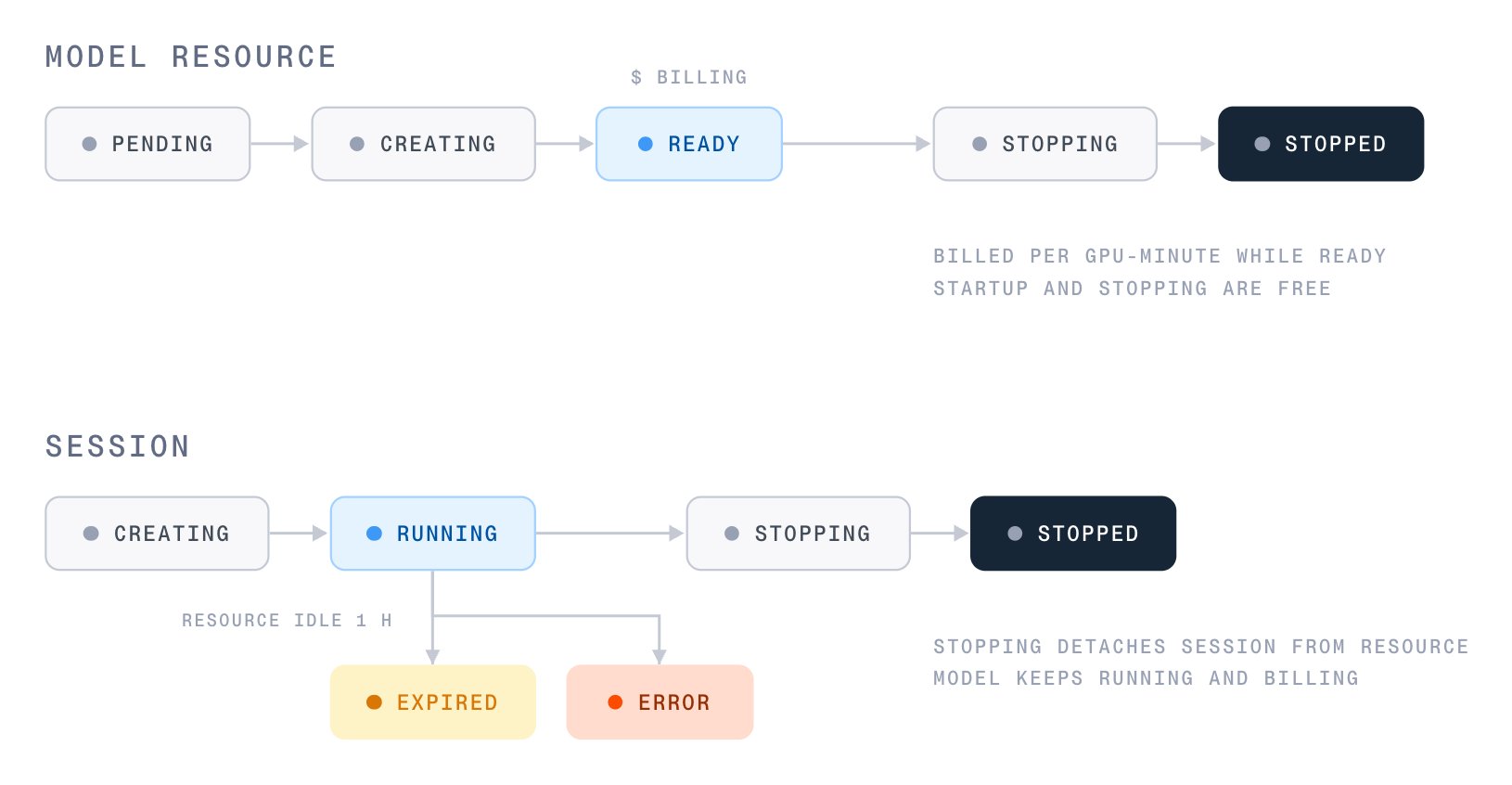
MODEL_RESOURCES_STATUS_READY and TRAINING_SESSION_STATUS_RUNNING.
Model resource: PENDING → CREATING → READY → STOPPING → STOPPED, or ERROR.
PENDINGmeans the resource is waiting for GPUs. It first waits in a queue, with no time limit, for a cluster with free capacity for its GPU type. Then it waits for its pods to be scheduled on that cluster. While it’s queued,status_details.queue_positionshows its place in line.CREATINGmeans the pods are scheduled and the base model is loading.READYmeans sessions can attach. Billing runs only in this state.ERRORis reachable from any active state, with the cause inerror.code:MODEL_RESOURCES_ERROR_CODE_CAPACITY_WAIT_TIMEOUT: The resource left the queue for a cluster, but its pods weren’t scheduled within an hour. It was never billed.MODEL_RESOURCES_ERROR_CODE_PROVISIONING_FAILED: The resource’s pods were scheduled, but it didn’t finish starting, either because startup failed or because it wasn’tREADYwithin an hour. It was never billed.MODEL_RESOURCES_ERROR_CODE_RESOURCE_UNAVAILABLE: AREADYresource failed. A trailing window of its runtime is refunded. See Refunds on failure.
CREATING → RUNNING → STOPPING → STOPPED, or EXPIRED or ERROR.
- Stopping a session only detaches it. The resource keeps running for its other sessions, and billing continues until the resource itself stops.
- When a resource goes one hour without an operation from any of its sessions, every session on it is marked
EXPIREDand detached. An idle session doesn’t expire while another session on the same resource is still training. The check runs every minute, so sessions expire within about a minute of the one-hour mark. ERRORmeans the session failed to start, to keep running, or to stop. Read the cause fromsession.retrieve().error, which holds acode, amessage, and anoccurred_attimestamp:TRAINING_SESSION_ERROR_CODE_RESOURCE_UNAVAILABLE: The session’s model resource is no longer available, so the session can’t continue.TRAINING_SESSION_ERROR_CODE_RESOURCE_AT_CAPACITY: The session couldn’t start, because the resource already hosts as many sessions as it accepts. Stop another session on the resource, or use a different resource.TRAINING_SESSION_ERROR_CODE_TIMED_OUT: The session didn’t become ready in time.TRAINING_SESSION_ERROR_CODE_SESSION_FAILED: The session failed for any other reason.
STOPPING, STOPPED, EXPIRED, or ERROR instead of RUNNING, create_session raises RuntimeError with the session ID and that status. You don’t get a session handle in that case, so read the error by ID with client.post_training.sessions.retrieve("your_session_id").error. To continue training after a session error, create a new session, resuming from a training checkpoint if you saved one.
Timers
On long runs, save training checkpoints so that an expiry or unexpected stop loses only the work since your last checkpoint, not the whole run. See Training checkpoints.
Operation errors
When an operation such asforward_backward, optim_step, or sample fails on the model resource, the SDK raises OperationFailedError, a subclass of RuntimeError. Its message holds the operation ID and the operation’s error, which has a code and a message that says what went wrong:
together.post_training doesn’t export OperationFailedError, so catch RuntimeError. Over the REST API, the failed operation has the status TRAINING_OPERATION_STATUS_FAILED and the same error.
If the session had already left
RUNNING when you submitted the operation, the API doesn’t create the operation. It rejects the request with HTTP 400 and training session is not running (current status: ...), which the SDK raises as BadRequestError. Handle it the same way as SESSION_NOT_ACTIVE.
Limits
For the credit needed to create a resource, see Minimum credit balance.
Rate limits
The service limits request rates per project for creating resources, starting sessions, and downloading checkpoints, and per session for training operations. A burst is how many calls can go through at once before the rate applies. When you exceed a limit, the API returns HTTP429, and the SDK retries the call before it raises RateLimitError.
The SDK retries any request that fails with a connection error or an HTTP
408, 409, 429, or 5xx response, up to seven times for session calls, which include every operation. Each operation carries an idempotency key, so a retried submission doesn’t create a second operation. Don’t wrap operation calls in your own retry loop.
Troubleshooting
- The resource stays
PENDINGfor a long time: No B200 GPU capacity is free yet. The resource stays in the queue until GPUs free up or you stop it, and you aren’t billed while it waits. Checkstatus_details.queue_positionto see how many resources are ahead of it. createraisesTimeoutErrorwhile the resource is stillPENDING: The SDK’s one-hour default ran out before the resource left the queue, so the SDK stopped it. To wait longer, create the resource again with a largertimeout, ortimeout=None. The new resource joins the back of the queue, so when capacity is scarce, passtimeout=Nonefrom the start.- Create is rejected with
rate limit exceeded, retry after ...: Your project has reached its create rate limit. The API returns HTTP429, which the SDK raises asRateLimitErrorafter retrying. Wait for the time in the message, then retry. To stay under the limit, reuse a running resource by attaching sessions to it instead of creating one for each run. - Create is rejected with
organization GPU quota exceeded: Your organization has a quota on the total GPUs held by itsPENDING,CREATING, andREADYresources, and the new resource would exceed it. The API returns HTTP429, which the SDK raises asRateLimitError, with a message such asorganization GPU quota exceeded: 112 of 120 GPUs in use, requested 16. Stop resources you no longer need, or contact support to request a higher quota. - Create fails for the GPU type or training mode: The model doesn’t support that combination. Check the model’s row on Supported models. Generator replicas also aren’t available for every model.
- Create is rejected for insufficient credit: Your project’s balance is below the $100 minimum for creating a resource. See Minimum credit balance.
stopis refused because a session is still active: Stop the sessions first, or passforce=True. The context-manager exit on an owned resource doesn’t force, so it fails the same way if a session you don’t own is still attached.- An operation call raises
TimeoutError: The SDK submits each operation, such asforward_backwardorsample, and polls until it finishes or itstimeoutruns out, 300 seconds by default or 7200 seconds for checkpoint saves. The operation keeps running on the service after the call raises, and there’s no call to cancel it. Don’t resubmit it. A secondforward_backwardis a new operation, so its gradients add to the first one’s. For slow steps on large models or large batches, pass a largertimeout, ortimeout=Noneto wait indefinitely. - An operation raises
OperationFailedError: Operation (...) failed: The operation failed on the model resource. Look up thecodefrom the message in Operation errors. - An operation fails with
SESSION_NOT_ACTIVEortraining session is not running: The session was stopped, expired after an hour without an operation on its resource, or hit an error. Readsession.retrieve().statusandsession.retrieve().error, then create a new session, resuming from a training checkpoint if you saved one. - A running resource stopped on its own: Either your balance ran out, or the resource went an hour without an operation from any session. Check your balance, then check the session statuses for
EXPIRED. If neither explains the stop, contact support with the resource ID and the time it stopped, and resume from your last training checkpoint.
Next steps
Train multiple adapters
Share one resource across several sessions to run a sweep for one base model’s worth of GPUs.
Pricing
How a resource bills, how to estimate a run, and what’s refunded on failure.
Post-training API reference
Every field for resources, sessions, and operations, with types and defaults.
Supported models
GPU types, training modes, and session caps per model.