

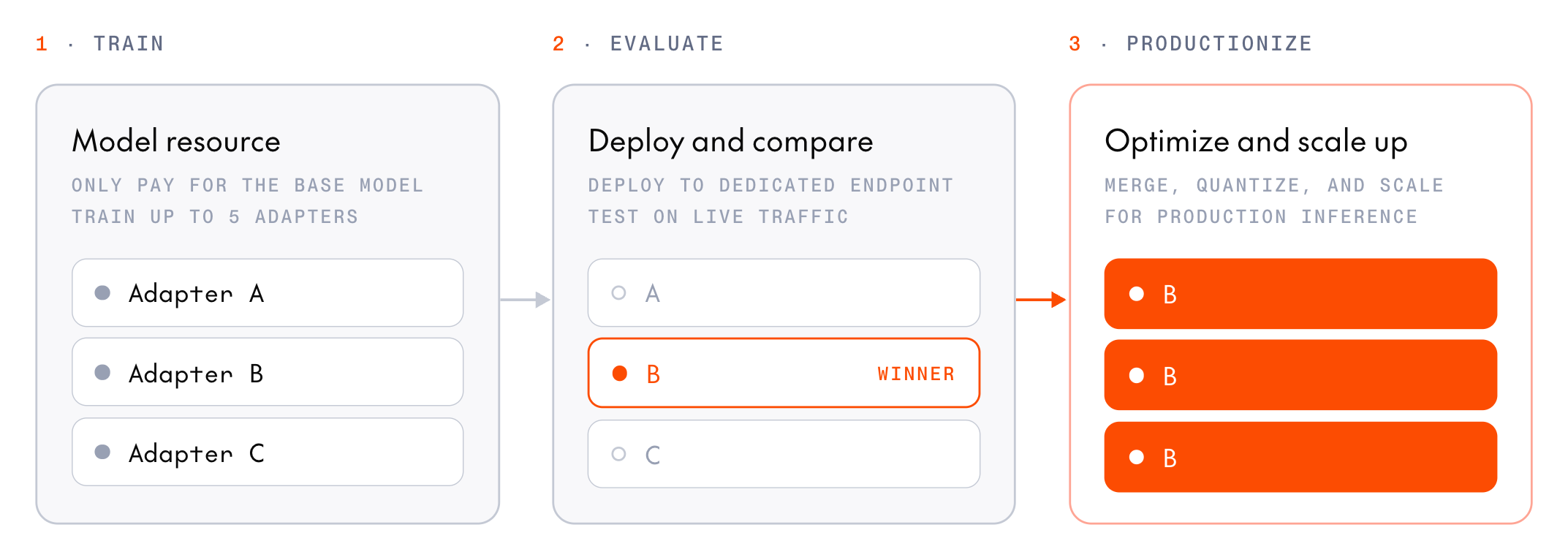
model field, or leaves the adapter out to call the base model.
A multi-LoRA deployment serves only adapters from post-training inference checkpoints. You can’t attach a training checkpoint, or adapters from the fine-tuning service.
Why serve multiple adapters from one deployment?
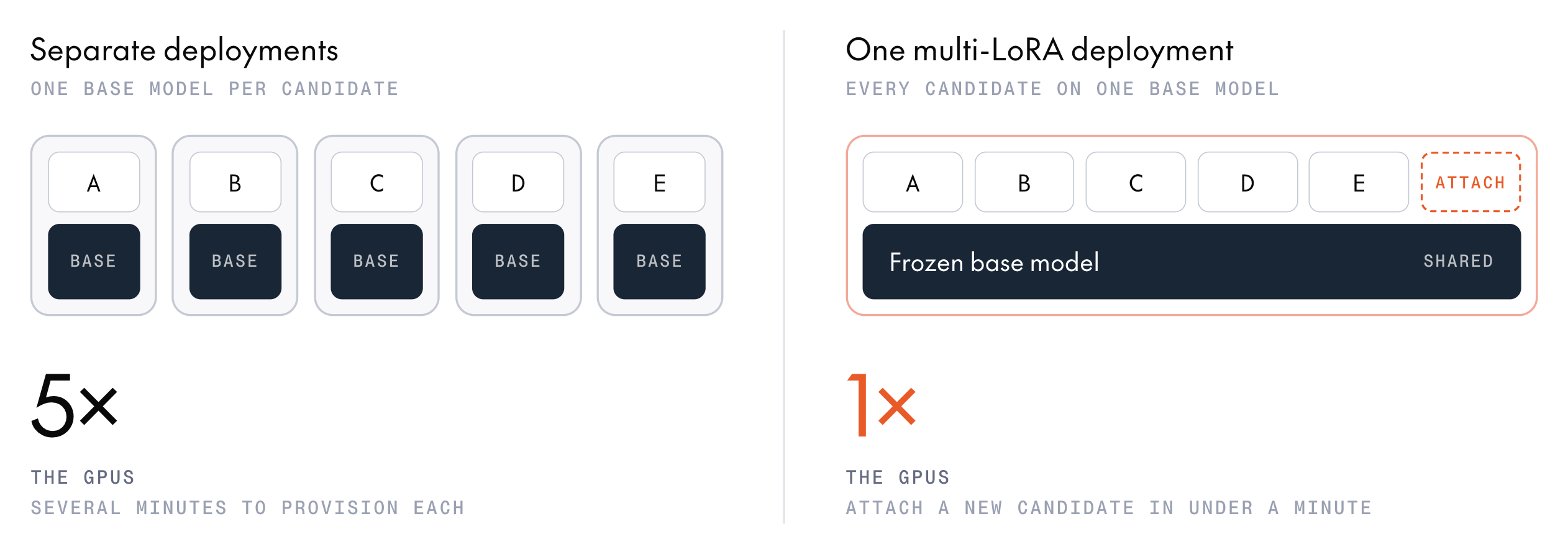
- Pay for one deployment, not one per adapter: An adapter is a small set of weights on top of a frozen base model, so every candidate trained on the same base model can share one copy of that model. Five candidates on Qwen3.8 27B cost one deployment’s GPUs, not five. Attaching an adapter adds nothing to the deployment’s cost.
- Add candidates without provisioning: A new deployment can take 20 minutes or more to provision. Attaching an adapter to a running deployment usually takes under a minute, so you can test inference checkpoints as training produces them.
- Hold the serving environment constant: Every candidate runs on the same base model and hardware, so differences in output come from the adapters, not the serving setup. To switch candidates, change the
modelstring.
How adapters load
Supported models
You can attach an adapter only to a deployment of the base model it was trained on. These base models support multi-LoRA deployments:
B200 serving requires a profile whose
accelerator_type is nvidia-b200-180gb and adapter_mode is dynamic. List the base model’s configs to check availability. For GLM-5.3, cr_Cfoa4Ez74aGkvCetiTuyi uses eight B200 GPUs. If a model has no B200 multi-LoRA profile, contact your account team for B200 serving support.
Adapters from a model’s single-session variant, such as Qwen/Qwen3.8-27B-single-session, register against the same serving base model as the default model, so they attach to the same deployments.
GLM-5.3 adapters saved before October 9, 2026 record zai-org/GLM-5.3-NVFP4 as their base, so they can’t be attached. Prepare them for FP4 inference instead.
The adapter must come from an inference checkpoint that registers an adapter (registration.adapter). A checkpoint that registers a merged model instead deploys directly.
Find the adapter ID
You attach an adapter by its model registry ID (ml_...). Every LoRA inference checkpoint registers its adapter as a model, so there’s no upload step. Read the ID from the inference checkpoint.
- SDK
- Console
Read the ID from each of the session’s inference checkpoints:After the session ends, list its inference checkpoints with the checkpoints API. There, the IDs are in
inference_registration:Attach an adapter
Adapters attach to a running deployment of their base model whose deployment profile serves adapters, called a multi-LoRA deployment. The CLI creates that deployment for you when you deploy the first adapter. In the console, you create the deployment first, then attach adapters to it.- CLI
- Console
Run The CLI looks up the adapter’s base model, then looks for a deployment of that model on the The example uses the eight-B200 GLM-5.3 profile, which holds 12 adapters, as Attach more adapters explains. Use an adapter trained on GLM-5.3 with this config.
tg endpoints deploy with the adapter ID, an endpoint name, and --attach-adapter:CLI
my-sweep endpoint whose profile serves adapters. If there isn’t one, the CLI creates the endpoint and a one-replica deployment of the base model, then attaches the adapter. On success, it confirms the attachment and prints the endpoint, with the adapter listed under its deployment.To list a base model’s profiles for
--config, run tg models configs with the base model ID from Supported models:CLI
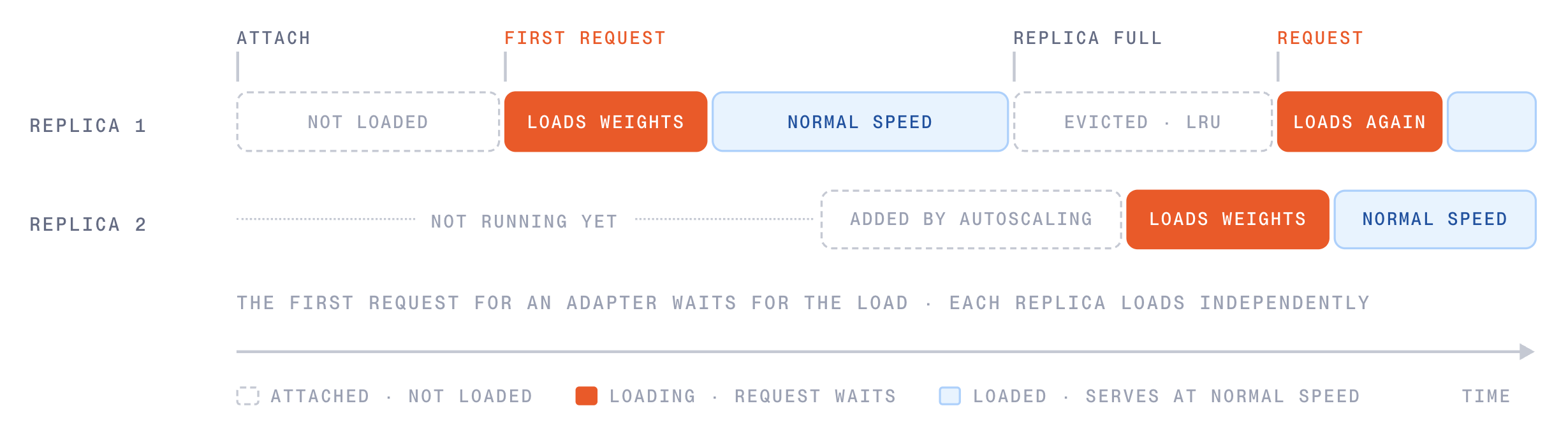
ADAPTER_LOAD_STATE_PENDING and ADAPTER_LOAD_STATE_LOADING to ADAPTER_LOAD_STATE_READY, at which point it can serve requests. On a running deployment, it’s usually ready within a minute. If the adapter reaches ADAPTER_LOAD_STATE_FAILED instead, its reason and message say why. To check an adapter’s state, see List attached adapters.
Send requests to an adapter
To call an adapter, setmodel to the endpoint string followed by a colon and the adapter ID. Send the request to https://api-inference.together.ai:
your-project-slug/my-sweep).
To call an adapter from any OpenAI-compatible client, set the client’s base URL to https://api-inference.together.ai/v1 and pass the adapter’s model string as model. Serverless inference can’t serve post-training adapters, so a deployment is the only way to call one.
If the adapter isn’t attached to the deployment, or the ID after the colon doesn’t exist, the request fails with HTTP 400 and the code adapter_not_registered. A request that leaves out the adapter suffix (:ml_abc123) succeeds, but the base model answers it. Before you score an adapter’s outputs, check the model field in each response to confirm that the adapter answered. A response from the adapter echoes the full your-project-slug/my-sweep:ml_abc123 string, and a response from the base model has no adapter suffix.
If you trained with thinking turned off, as the SFT examples do for Qwen models, pass "chat_template_kwargs": {"enable_thinking": false} in the request (chat_template_kwargs={"enable_thinking": False} in Python) so the chat template matches training.
Attach more adapters
To compare more candidates, attach each one to the same deployment. With the CLI, run the samedeploy --attach-adapter command with each adapter ID. The CLI finds the deployment it created, so you can leave out --config. If the endpoint has more than one deployment that serves adapters, pass --deployment-name to choose one. In the console, select Deploy LoRA on each checkpoint. Each request then chooses its adapter with the model string.
Each deployment can hold a limited number of attached adapters, set by its deployment profile. The eight-B200 GLM-5.3 profile in the example holds 12 adapters. Check the selected profile’s capacity for other models. Once a deployment is full, attaching another adapter fails until you detach one. To make room and attach in one step, select Deploy anyway when the console reports that the deployment is at its adapter limit, or pass force=True to client.endpoints.adapters.create. Either way, the deployment detaches its oldest attached adapter first.
Compare the candidates
Once the candidates are attached, compare them on the metric that matters for your task:- Rerun your baseline script: If you scored the base model with a cookbook
serverless_evalscript before training, as in Check a baseline before training, run the same script against each candidate so the scores compare directly with the baseline. SetTOGETHER_BASE_URLtohttps://api-inference.together.ai/v1, and pass each adapter’s model string, such asyour-project-slug/my-sweep:ml_abc123, asmodel. - Run an evaluation: Evaluations can score a dedicated endpoint, or judge two models head to head with a
compareevaluation. They reference a dedicated model by its endpoint ID, so use them for candidates deployed to their own endpoints.
List attached adapters
- CLI
- Console
tg endpoints get my-sweep lists each deployment’s attached adapters. The CLI doesn’t report their state yet, so check it with the SDK, using the endpoint and deployment IDs from get:adapter_model_id) and its attachment ID (id, which starts with dad_). You need the attachment ID to detach the adapter. If a cluster’s state is ADAPTER_LOAD_STATE_FAILED, its reason and message say why.Detach an adapter
To detach an adapter, pass its attachment ID and currentetag to delete. Both come from the deployment’s list of attached adapters:
retrieve, update, and delete take the attachment ID, not the adapter’s model ID. Passing ml_abc123 fails with HTTP 400 and “is not a canonical adapter id”. If you detach an adapter and attach it again, it gets a new attachment ID.
Stop the deployment
A running deployment bills per replica-minute whether or not requests name an adapter. When you’ve finished comparing candidates, stop it:- CLI
- Console
CLI
Troubleshooting
deployfails with ”… is a LoRA adapter. Choose how to deploy it”: Add--attach-adapterto attach the adapter to a multi-LoRA deployment.deployfails with “—attach-adapter only applies to LoRA adapter models”: The model ID isn’t a LoRA adapter in the project you’re deploying to. Pass the checkpoint’sregistration.adapter.id. Aregistration.model.idis a merged model, which deploys without--attach-adapter.deployfails with “No fixed or dynamic LoRA config found”: The adapter’s base model doesn’t support multi-LoRA deployments. Check Supported models.deployfails with “Multiple configs found for model”: The base model has more than one profile that serves adapters, and the CLI can’t prompt, for example with--non-interactive. Pass--configwith adynamicconfig.deployfails with “Config … is not valid for model”: The config isn’t one of the model’s current deployment profiles. Runtg models configswith the base model ID and pass adynamicconfig from its output.deployfails with “Config … has adapter_mode disabled”: The config you passed to--configdoesn’t serve adapters. Pass a config whoseadapter_modeisdynamic.deployreportsFailed Preconditionor “Error attaching adapter” right after it creates a deployment: The new deployment isn’t ready to take adapters yet. It keeps running and billing, and so does the endpoint ifdeploycreated it. To attach the adapter, wait untiltg endpoints get my-sweepshows the deployment ready, then run the samedeploycommand again. To delete them instead, runtg endpoints rm <endpoint_id> --force, which deletes every deployment on the endpoint. Ifrmreports that the deployment must be stopped first, wait for the deployment to stop, then runrmagain.- Attaching fails right after the checkpoint is saved: Together validates each adapter before you can attach it. Wait a few minutes and retry.
- Attaching fails because the deployment is full: Detach an adapter, select Deploy anyway in the console, or attach with
force=Truein the SDK. - Re-attaching fails with
409right after a detach: The detach is still finishing. Wait a few seconds and retry. - Adapter state is
ADAPTER_LOAD_STATE_FAILED: Readreasonandmessage.ENGINE_SHAPE_MISMATCHandENGINE_INCOMPATIBLE_TARGET_MODULESmean the adapter’s rank or target modules don’t fit the deployment profile. - Requests fail with
400andadapter_not_registered: The ID after the colon is wrong, or the adapter isn’t attached to this deployment. List the attached adapters to check, and attach the adapter if it’s missing. - Requests fail with
500andlora_load_failed: The deployment couldn’t load the adapter, and the error message says why. For example, the adapter’s LoRA rank can be incompatible with the deployment’s LoRA memory pool, even when it’s below the profile’s maximum rank. Detach the adapter. - Responses don’t change with the adapter: If the response’s
modelfield has no adapter suffix, the request didn’t name an adapter, so the base model answered. Check that themodelstring in the request ends with a colon and the adapter ID. - Requests fail with “Adapter lookup failed”: Send adapter requests to
https://api-inference.together.ai, nothttps://api.together.ai. - The adapter’s answer appears in
reasoning_content: The base model is a thinking model. Pass"chat_template_kwargs": {"enable_thinking": false}if you trained with thinking off.
Next steps
Deploy a checkpoint
Deploy the winning adapter as a merged model for production.
Train multiple adapters on one base model
Produce the candidates this page serves.
Prepare for FP4 inference
Serve a GLM or Kimi-K3 adapter as one merged FP4 model.
Manage deployments
Scale, stop, and delete endpoints and deployments.