deepseek-ai/DeepSeek-V4-Pro-0813. Pricing is $1.32 per 1M input tokens, $3.96 per 1M output tokens, and $0.13 per 1M cached input tokens.
Quickstart
Reasoning is on by default, so most calls work with no extra configuration. Stream the response, since reasoning output can be long.reasoning field on each delta, and the answer arrives in content.
Reasoning effort
DeepSeek V4 Pro accepts two effort levels through thereasoning_effort parameter:
"high": The default thinking depth. Use for most complex problems."max": Maximum reasoning effort. Use for the hardest math, planning, and multi-step coding agents. Set the context window to at least 384K tokens for Think Max mode, and setmax_tokensgenerously, since"max"mode can produce very long chains of thought.
"low" and "medium" map to "high", and "xhigh" maps to "max".
Long-context use
DeepSeek V4 Pro accepts up to 1M input tokens on Together. The model’s hybrid attention combines Compressed Sparse Attention (CSA) with Heavily Compressed Attention (HCA), which keeps the key-value (KV) cache and per-token FLOPs roughly an order of magnitude smaller than DeepSeek V3.2 at long contexts. Use the full context window with care. The model’s ability to retrieve information is not uniform across the window, so refer to the needle-in-a-haystack results from DeepSeek’s paper below. For critical tasks, treat the first 256K of context as more reliable than the next 256K, and so on.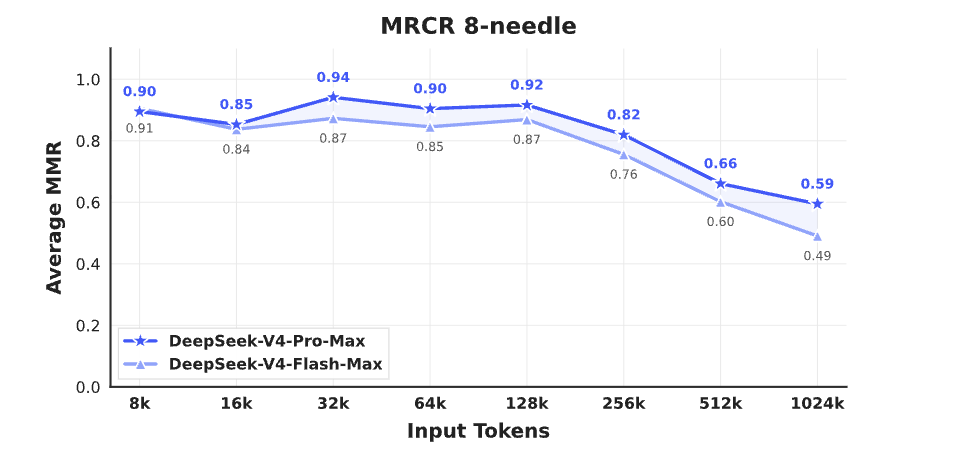
- Put your instructions at the top of the prompt and your question at the bottom.
- Set
max_tokensexplicitly. Long contexts plusreasoning_effort="max"can produce very long completions.
Recommended sampling parameters
DeepSeek recommendstemperature=1.0 and top_p=1.0 for V4 Pro. Lower temperatures can collapse the reasoning trace and degrade answer quality, so prefer to control output length with max_tokens rather than turning down temperature.
Reducing reasoning overhead
V4 Pro is a thinking-by-default hybrid model on Together. For turns where reasoning overhead is not needed, disable reasoning withreasoning={"enabled": False}:
reasoning_effort="high" (the default) and add a short instruction asking the model to keep its thinking concise.
Multi-turn conversations
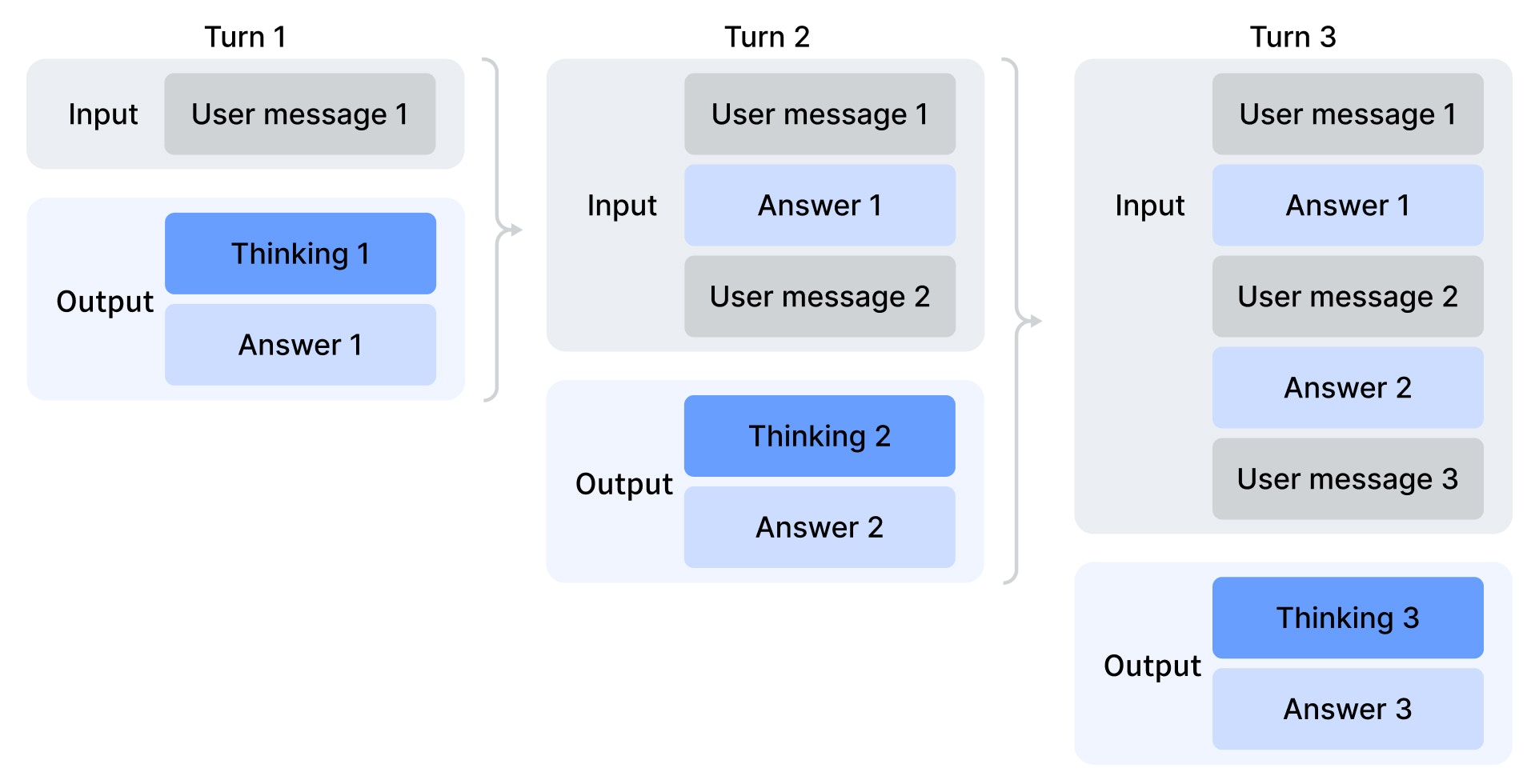
In each turn of the conversation, the model outputs both a chain-of-thought (reasoning_content) and a final answer (content). The API itself is stateless, so to continue a conversation, you must resend the prior messages for every request.
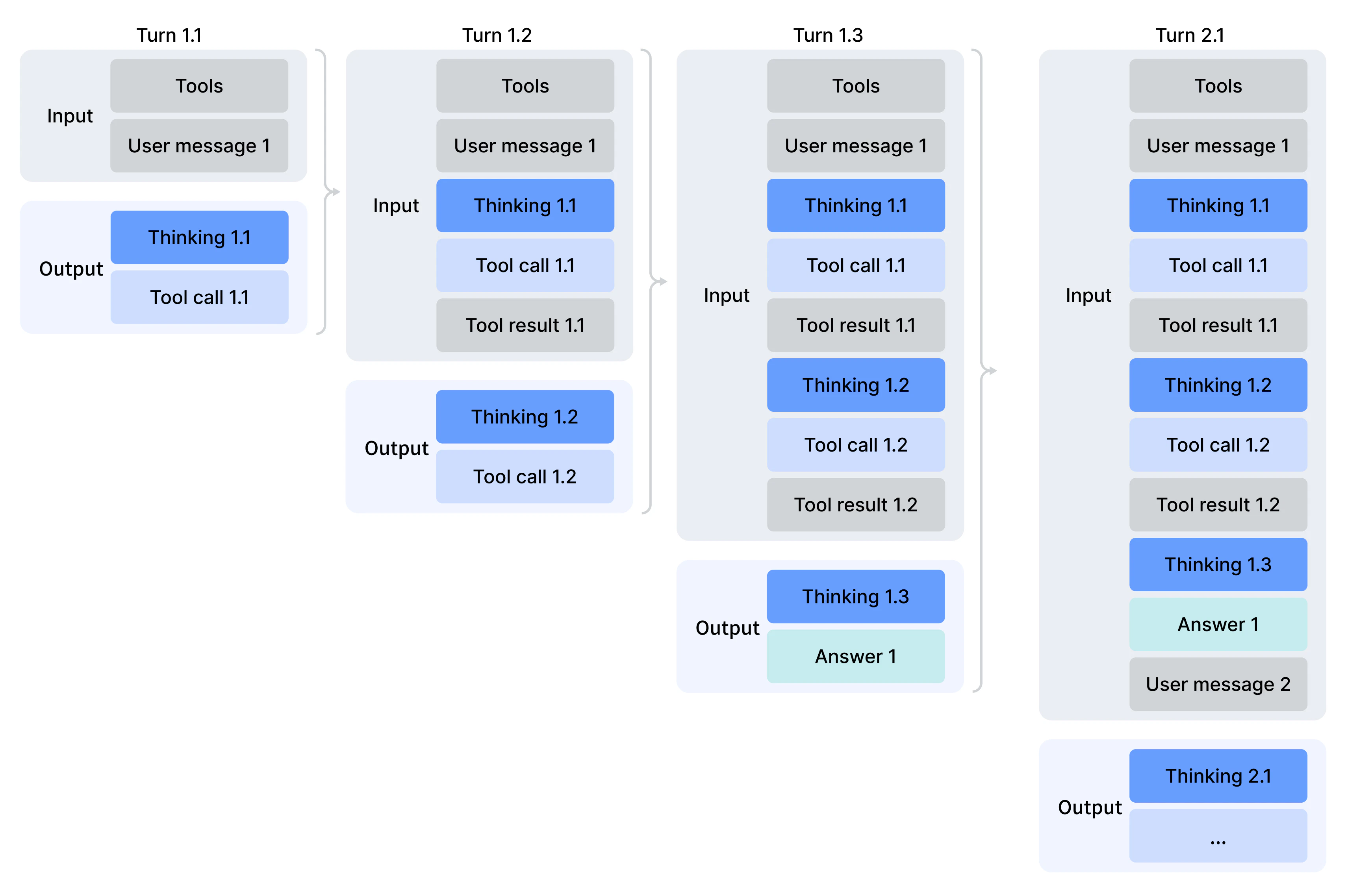
If the assistant’s response included tool calls, pass both the previous answer and the CoT (reasoning_content) back in your next request to maintain the model’s reasoning context. However, if there was no tool call, the prior CoT (reasoning_content) from previous turns is not included in the next turn’s context. Only the usual conversation history carries forward. The diagram for multi-turn reasoning context illustrates this behavior:
Function calling and interleaved reasoning
DeepSeek V4 Pro supports tool calling. Define tools in the standard OpenAI-compatible schema and pass them viatools.
content, reasoning_content, and tool_calls, then append each tool result with the matching tool_call_id, as illustrated in the multi-turn function-calling diagram.